
10 Best Car Code Reader for Home Mechanics: Top Picks, Features, and Buying Guide

Car code readers help home mechanics find why a car’s dashboard lights come on and guide basic repairs without a trip to the shop. These devices range from simple code scanners that read and clear engine codes to advanced tools that show live data, run system tests, and give repair tips. For someone who works on their own car, a code reader can save time and money by pointing to the likely problem and confirming fixes.
The key things to watch for are vehicle coverage, ease of use, and the depth of diagnostics. Compatibility with OBD-II protocols and specific car makes matters most; a reader that only handles basic engine codes may not help with ABS, airbag, or transmission issues. A good home mechanic’s code reader should read the codes your car uses, show clear results, and include features—like live data or guided fixes—that match how deep they want to diagnose and repair. The next section looks at the best models tested for different needs and budgets.
Best Car Code Readers for Home Mechanics
This list shows the top car code readers made for people who work on cars at home. It focuses on tools that are easy to use, give clear trouble codes, and help with basic repairs and maintenance.
ANCEL AD310

It’s a solid buy for home mechanics who want a simple, reliable code reader to find and clear emission-related engine codes quickly.
Pros
- Very easy to use with clear on-screen results.
- Rugged cable and compact body feel built for garage work.
- No batteries needed; it powers from the car’s OBDII port.
Cons
- Only reads emission-related OBDII codes, not deep system diagnostics.
- Lacks advanced features for pros, like bi-directional tests.
- Not compatible with OBDI vehicles even with adapters.
I plugged this unit into a 2006 sedan and it found the check-engine code in under a minute. The screen showed the code and a plain-text description, which made it simple to decide the next step.
The build felt solid in hand. The cable is thick and flexible, so it didn’t tug or feel fragile while crawling around the engine bay. Buttons responded well and the backlit display stayed readable under the hood.
Using the AD310 to clear a code after a quick spark plug swap worked exactly as expected. It won’t replace a professional scanner for ABS, SRS, or module programming, but for routine home checks and emissions codes it saved time and a trip to the shop.
If someone needs a straightforward, no-frills OBDII reader for 1996-or-newer cars, this tool does the job without fuss.
Foxwell NT301

This is a good buy for home mechanics who want a simple, reliable OBD2 reader to find and clear check engine codes and watch live data.
Pros
- Fast code reads and clear results.
- Easy to use—plug and play with a clear color screen.
- Useful I/M readiness and live data graphing.
Cons
- Doesn’t scan ABS, SRS, or other advanced systems.
- Not compatible with some off-road and specialty vehicles.
- Updates require Windows and are not Mac/iOS friendly.
They plugged the NT301 into several daily drivers and it gave codes quickly without fumbling through menus. The I/M readiness lights saved time before emissions checks by showing status at a glance.
Live data felt accurate for basics like RPM, coolant temp, and O2 sensors. It helped spot a lean condition when watching fuel trims, and the graphing made trends obvious while the engine ran.
Clearing the check engine light worked as expected after repairs, but codes returned on one car until the underlying fault was fixed. The unit’s limits showed when they tried to check ABS and airbags—those systems aren’t supported.
The build is compact and felt solid in hand. It boots from the car port instantly and the screen stays readable in daylight, which made roadside checks easier.
Buy it if someone wants a straightforward, no-frills scanner for engine diagnostics and emissions readiness; skip it if they need full-system coverage or Mac-based updates.
ANCEL AD410

It’s a solid buy for home mechanics who want a simple, no-frills scanner that reads and clears engine codes quickly.
Pros
- Easy to use right out of the OBD-II port.
- Built-in code definitions save time looking things up.
- Works on most OBD-II and CAN cars from 1996 onward.
Cons
- Only reads engine/OBD-II systems, not ABS, SRS, or transmission.
- USB update process and manual are clunky.
- Screen and menu feel basic compared with pricier units.
They plugged the AD410 into several household cars and it started instantly from the dash. Reading codes took seconds and the on-device descriptions often pointed to the likely problem without needing a phone search.
When they cleared the check engine light after fixing an issue, the tool reset the MIL and showed readiness status for smog tests. Running the O2 and EVAP tests gave useful live data that helped narrow down fuel and emissions faults.
Firmware updates required a Windows PC and the included USB felt awkward, but the core scanning and clearing worked reliably. For a budget tool, it felt durable and practical for DIY repairs and pre-repair checks.
FOXWELL NT604 Elite

It’s a solid buy for a home mechanic who wants clear diagnostics for engine, ABS, SRS, and transmission without paying dealer prices.
Pros
- Easy setup and works right out of the box.
- Reads multiple systems and shows live data.
- Comes with a sturdy case and lifetime updates.
Cons
- No service/reset functions like oil or battery registration.
- AUTOVIN can fail on older or odd vehicles.
- Not a repair tool—must fix the issue before clearing codes.
They plugged it into several cars and it started diagnosing fast. The screen and menus felt straightforward, and the AUTOVIN grabbed most VINs without typing.
Live data streaming impressed on a test drive. It showed real-time sensor values that helped pinpoint an ABS pump fault on an older sedan. Logging and playback made it easy to show findings to others.
Clearing SRS and ABS codes worked for common faults, but collision data could not be cleared and the unit won’t perform relearns or resets. Updates were simple over the internet, which kept compatibility improving over time.
For a DIYer, it hits the sweet spot between price and capability. It won’t replace a full shop tool, but it handles most home diagnostic needs cleanly and reliably.
BlueDriver Pro Next-Gen

It’s a smart buy for a home mechanic who wants pro-level diagnostics without learning a complex scan tool.
Pros
- Covers advanced systems like ABS, SRS, TPMS, and transmission on many cars.
- Easy wireless setup — plugs in and pairs with phone fast.
- Technician-verified repair reports tied to the vehicle VIN.
Cons
- Some newer models may have limited support.
- App pairing can hiccup on rare phones.
- It won’t fix parts — only tells what’s wrong.
The first time they used BlueDriver it felt like having a shop-grade scanner in a pocket. It connected to the truck in seconds and stream live data made troubleshooting much faster. Reading enhanced codes for ABS and airbags saved time over a basic reader.
They liked the verified fix reports built into the app. The reports gave clear causes and possible fixes that matched what a mechanic told them later. Freeze-frame data and readiness monitors were handy before emissions testing.
On the downside, a few modern vehicles required checking the compatibility chart or waiting for app updates. Pairing worked usually, but they once needed support to get an iPhone linked. Despite that, the no-subscription model and solid support made this drop-in tool feel reliable for regular DIY use.
MOTOPOWER MP69033 (Yellow)

It’s a solid budget choice for a home mechanic who wants quick, reliable check-engine codes without extra frills.
Pros
- Simple plug-and-play use that gets codes fast.
- Clear backlit screen and easy menu navigation.
- Wide car compatibility for most 1996+ OBDII vehicles.
Cons
- Can’t read ABS, airbag, or other non-OBDII systems.
- Basic monochrome screen and limited advanced features.
- Cable feels thick but limits reach in tight spaces.
The tool felt straightforward in hand and hooked up instantly to the OBDII port. It powered right from the car and the menu responded without delays, so reading codes took only a minute.
It pulled standard freeze-frame and live-data readings that matched what a local shop later confirmed. The DTC lookup library helped point to likely causes, which saved time when deciding whether to DIY or call a mechanic.
Clearing codes worked cleanly after repairs, and the VIN quick-query was handy when checking multiple cars. On the downside, it won’t access ABS or airbag faults, so professionals will need a fuller scanner for those jobs.
For someone who wants a no-nonsense reader to diagnose check-engine lights and view basic live data, it does the job well for the price.
FOXWELL NT301 Plus
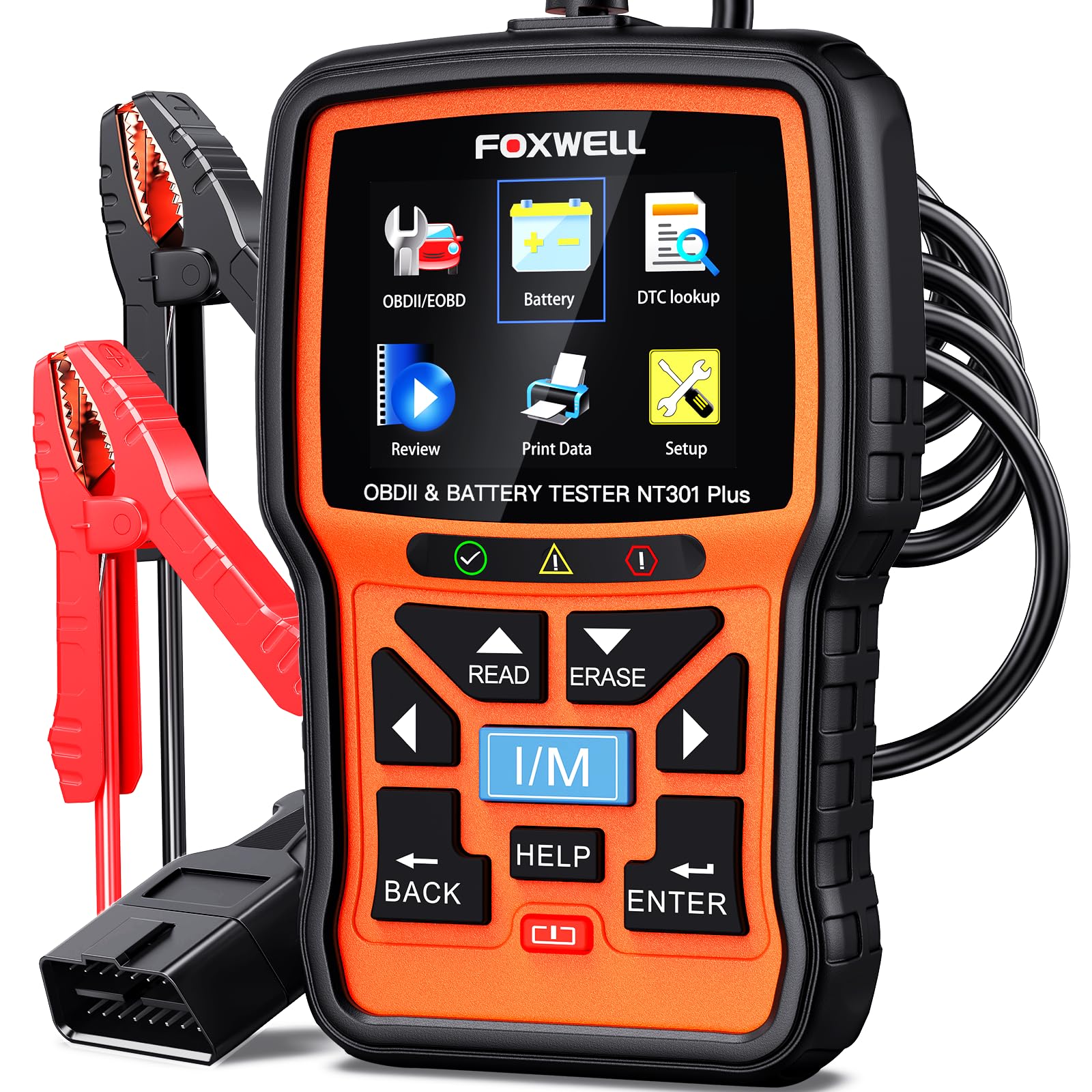
It’s a solid buy for home mechanics who want simple engine codes and battery checks without subscriptions.
Pros
- Combines OBD2 scan and 12V battery test in one compact tool.
- Clear color screen makes codes and live data easy to read.
- Built-in code explanations help decide if a DIY fix is possible.
Cons
- Limited to engine and battery tests—no ABS, SRS, or advanced resets.
- Updates only on Windows, so Mac users face a hurdle.
- Not compatible with some older or rare car protocols.
They used it to check a check-engine light and a weak battery. Plugging it in gave a readable code and battery health readout in under a minute. The 2.8″ color display made live data easy to scan while the engine idled.
The battery test saved time on a no-start scare. The clamp hookup felt sturdy and the tester differentiated between recharge vs. replace clearly. It did not do a load test, so they still recommended a shop if results looked borderline.
Running I/M readiness and EVAP checks proved useful for pre-inspection checks and used-car inspections. The DTC lookup helped them decide whether to tackle the repair or call a mechanic. Updates require a Windows PC, which slowed them when they tried to update at home.
FOXWELL NT201

It’s a solid buy for a home mechanic who wants an easy, reliable way to read and clear engine codes and check emissions readiness.
Pros
- Very simple plug-and-play use for beginners.
- Quick I/M readiness check with clear color indicators.
- Shows live data for basic troubleshooting.
Cons
- Limited to engine and emissions—no ABS, airbag, or transmission coverage.
- Screen and menu feel basic compared with phone apps.
- Some car-specific codes may not be fully explained.
They plugged the NT201 into a handful of older and newer cars and it read codes right away. The display made fault codes and I/M status obvious, so they knew whether a repair was needed or if the car was ready for emissions testing.
Using the live data helped track a rough idle issue by watching RPM and temperature while the engine ran. It didn’t replace a shop scan for advanced diagnostics, but it found the common problems quickly and saved them a diagnostic trip.
The unit felt sturdy and stayed powered from the OBD2 port with no batteries. Menu navigation was straightforward, though the small screen made long data lists a bit slow to scroll through.
Overall, it worked best as a first-line tool in a home garage—fast, clear, and dependable for engine codes and emissions checks without the complexity of pro-level scanners.
Innova 5210 Scanner

It’s a solid buy for home mechanics who want clear codes, live data, and a simple battery check without subscriptions.
Pros
- Easy to use and reads/clears common engine codes quickly.
- Live data and oil reset help with real troubleshooting.
- RepairSolutions2 app gives real-world fixes with no extra fees.
Cons
- ABS coverage can be hit-or-miss depending on the car.
- App updates and initial setup sometimes need help.
- Not as deep as pro-level scanners for advanced features.
They connected the Innova to the OBD2 port and it gave codes fast. The display is straightforward, so he didn’t need to guess what the code meant before checking the phone app.
Real-time data felt useful during diagnosis. Watching RPM, temperature, and fuel trims while revving the engine made it easier to spot issues that a single code wouldn’t show.
The battery/alternator test proved handy for a weekend job. It saved time by confirming the charging system before replacing parts he didn’t need.
Occasionally the app needed a nudge to update or show suggested repairs. When that happened, customer support helped, but it added a little downtime.
For the price and ease of use, it handled routine DIY fixes and emissions readiness checks well. It won’t replace a shop-level tool, but it will keep a home mechanic informed and confident.
ANCEL AD530
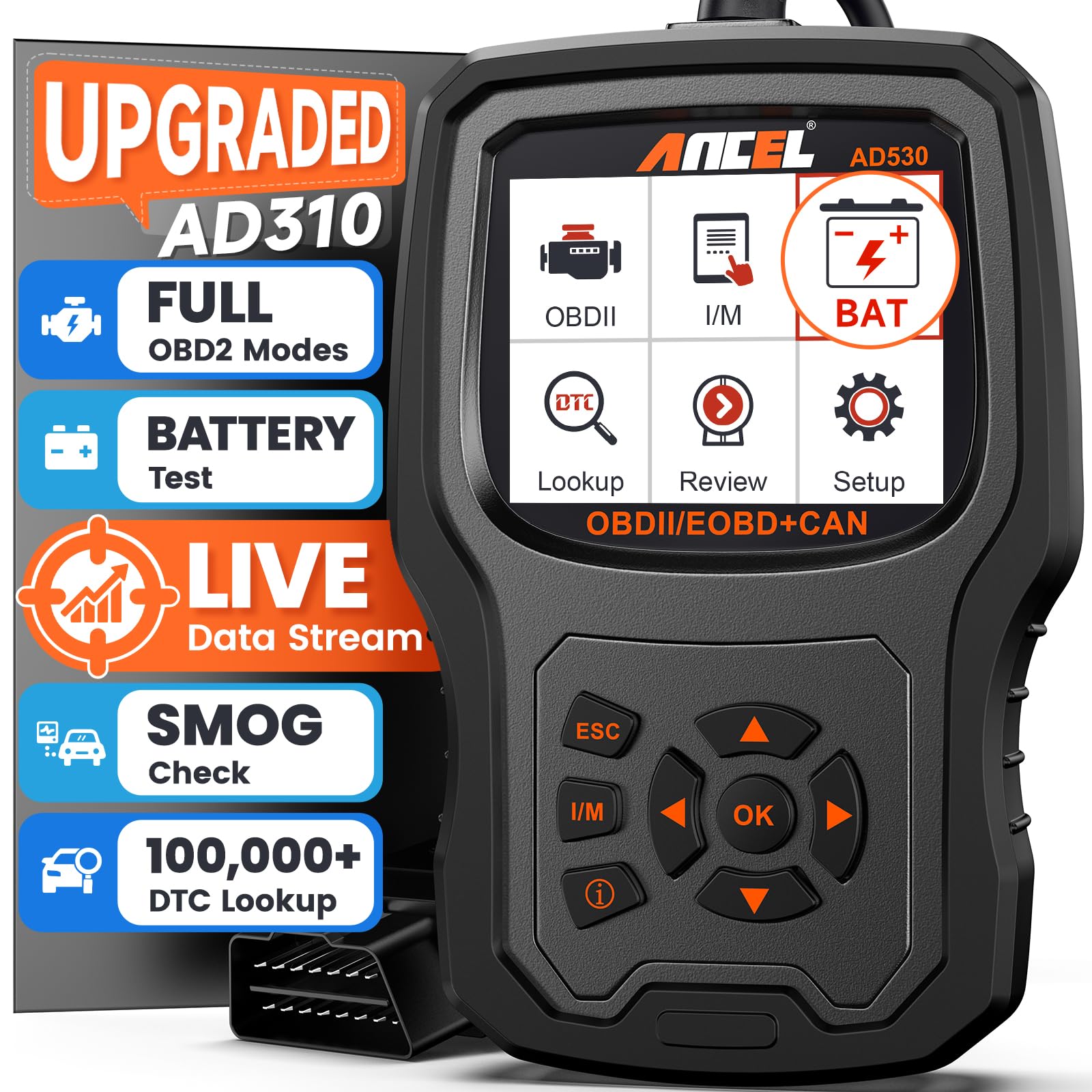
It’s a solid buy for home mechanics who want fast engine codes, live data, and battery checks without paying shop fees.
Pros
- Clear code explanations with the dedicated “i” button.
- Live voltage and sensor data to catch problems early.
- Plug-and-play use—no setup needed.
Cons
- Does not diagnose ABS, SRS, transmission, or diesel engines.
- Limited screen size can feel cramped when viewing live graphs.
- Windows-only update tool; no macOS support.
I used the AD530 on a few family cars and found it quick to start. Plugging into the OBD2 port woke it instantly, and the menu was easy to follow. The “i” hotkey translated codes into plain language, which saved time hunting down definitions.
Watching the live data while cranking the engine felt useful. The real-time voltage graph showed a small drop on one older car that suggested a weak charging circuit. That hint helped avoid a stranded morning.
Clearing codes worked as expected and the I/M Readiness check gave confidence before an emissions test. The small manual in the box was light, but the downloadable manual filled the gaps when needed.
It won’t replace a full dealer scanner for ABS or airbags, but for engine codes and battery health it covers almost everything a DIYer needs. The build felt sturdy and the results matched dealer reads on a few checks.
Buying Guide
Choose a scanner that matches the user’s skill level and vehicle needs. A basic reader works for simple code checks. A more advanced tool helps with live data and diagnosis.
Look for these key features:
- OBD-II coverage: Ensure it reads generic and manufacturer codes where needed.
- Live data and graphing: Shows sensor readings in real time for better troubleshooting.
- Bi-directional control: Lets the user activate systems to test components, if they are comfortable.
- Freeze frame and readiness monitors: Helpful for emissions-related checks and intermittent faults.
Consider ease of use and durability. A clear screen and simple menus speed up work. Rugged housing and good battery life matter if it will be used in a garage.
Check connectivity and updates. Wireless models offer convenience, but cables can be more reliable. Regular software updates keep compatibility with new car models.
Think about extra tools and accessories. Built-in code libraries, printable reports, and adapter cables add value. A carrying case keeps the tool and leads organized.
Compare warranty and support. Good technical support helps when interpreting results. A solid warranty protects the investment over time.
Editor’s Choice
They pick the Autel MaxiLink ML629 as the Editor’s Choice for home mechanics. It reads and clears codes from most systems quickly. The screen is bright and easy to read in a garage setting.
The tool offers live data and smog check readiness, useful for basic diagnostics and repairs. It gives clear code definitions and suggests common causes. The interface stays simple so users learn it fast.
Key features include:
- Wide vehicle coverage for most makes and models.
- Live data streaming to watch sensors in real time.
- One-button I/M readiness tests for emissions checks.
The device balances price and capability. It sits mid-range cost but saves time over trial-and-error repairs. Home mechanics who want reliable results with little fuss find it practical.
The build feels durable and handles drops better than cheaper models. It includes helpful cables and a long battery life. They can use it in cold or warm garages without frequent recharges.
Conclusion
A good code reader gives home mechanics fast answers and saves time. It helps them find what failed, decide if a repair is simple, and avoid unnecessary shop visits.
They should pick a reader that fits their car, skill level, and budget. Basic OBD-II scanners work for most cars and quick fixes. Advanced tools add features like live data, bi-directional tests, and repair guidance for deeper troubleshooting.
Durability and updates matter. A sturdy device with regular software updates stays useful as vehicles change. Mobile app integration can make reading and clearing codes easier and share results with a shop when needed.
Buy with future needs in mind. A slightly pricier model often pays off by covering more systems and newer cars. Warranties and customer support reduce risk and help when problems arise.
Quick checklist:
- Compatible with the vehicle
- Offers needed features (codes, live data, freezes)
- Has good updates and support
- Fits the mechanic’s skill and budget
They will find the right tool by balancing features, ease of use, and long-term value.
FAQS
What is a car code reader?
A code reader is a tool that reads error codes from a car’s computer. It helps home mechanics find problems quickly.
Do all cars use the same codes?
Most modern cars use standard OBD-II codes. Some manufacturers add extra codes. A good reader shows generic and maker-specific codes.
Can a beginner use a code reader?
Yes. Many models use simple menus and clear code descriptions. Basic readers can guide a beginner through tests and resets.
Will a code reader fix the problem?
No. It only shows codes and basic data. The mechanic must diagnose and repair the issue.
Should they buy a Bluetooth or wired reader?
Bluetooth readers work with phones and apps for charts and updates. Wired readers are plug-and-play and often more reliable. Choice depends on comfort with apps and budget.
How much should they expect to spend?
Entry-level readers start low and cover basic needs. Advanced scan tools cost more but add live data, graphing, and advanced tests. Match features to the jobs they plan to do.
How to choose the best reader?
Look for OBD-II support, live data, update options, and clear instructions. Read user reviews and check warranty. Reliability and ease of use matter most.
