
10 Best Professional OBD2 Scanner for Check Engine Light: Top-Rated Tools, Features, and Buying Guide

Modern cars use an OBD2 port to report engine faults, emissions data, and sensor readings. Professional OBD2 scanners read those codes, show live data, run advanced tests, and often clear the check engine light so technicians and DIYers can find and fix problems faster. These tools range from handheld code readers to full diagnostic tablets that link to repair databases and vehicle-specific functions.
When choosing a professional OBD2 scanner, pay attention to vehicle coverage, supported protocols, live-data speed and graphing, bi-directional control (active tests), and software updates. The most important feature is reliable, up-to-date vehicle coverage and the ability to read live data and manufacturer-specific codes, because without that you can miss the true cause of a check engine light. We tested many models and focused on scanners that balance depth of diagnostics, ease of use, and value so readers can find the right tool for their needs.
Best Professional OBD2 Scanners for Check Engine Light
Below is our full list of the best professional OBD2 scanners for diagnosing check engine lights. We chose tools that give clear trouble codes, detailed live data, and reliable build quality to help both pros and serious DIYers. Our picks focus on accuracy, ease of use, and features that matter when you need fast, correct fixes.
Foxwell NT301

We recommend this if you want a simple, reliable code reader to find and clear check engine lights without extra bells and whistles.
Pros
- Easy to use right out of the box.
- Clear live data graphs for basic sensors.
- Compact, rugged feel that holds up to garage use.
Cons
- Doesn’t scan ABS, SRS, or other non-OBDII systems.
- Lacks advanced reset or bi-directional controls.
- Not guaranteed to work on non-OBDII vehicles like some UTVs.
We plugged the NT301 into several cars and it read CEL codes fast. The screen showed live PID graphs that helped us spot odd coolant temp and fuel trim behavior quickly. It cleared codes after repairs and showed readiness status with the handy red-yellow-green LED.
Using it felt straightforward. The menu walks you to OBDII, then Read Codes, and the unit speaks results with a small speaker. We liked the compact size; it fit easily in a toolbox and powered up from the car with no setup.
This reader won’t replace a full professional scanner. We tried it on newer models with advanced systems and it could not access ABS or airbag faults. For basic engine diagnostics and pre-emissions checks, though, it saved us time and trips to the shop.
Buy link: Foxwell NT301
ANCEL AD310

We recommend this if you want a simple, reliable code reader to diagnose and clear emission-related check engine lights.
Pros
- Fast reads and clears most emission codes.
- Sturdy cable and compact, easy to carry.
- No batteries needed — powers from the car.
Cons
- Only reads emission-related OBD-II codes.
- No advanced systems or bi-directional tests.
- Some users report clearing failures on certain cars.
We plugged the AD310 into several cars and it found codes quickly. The screen is clear and buttons are easy to use, so we diagnosed issues without hunting through menus.
The build felt solid while working under the hood. The thick cable held up when we moved around the vehicle and the unit stayed easy to handle.
We liked that it draws power from the OBD-II port. That made testing quick; no charging or batteries to worry about.
If you drive a 1996-or-newer vehicle and only need emission code checks, this is a good budget pick. For deeper diagnostics on ABS, airbag, or transmission, look for a more advanced scanner.
ANCEL AD410

We recommend this if you want a simple, reliable code reader to find and clear check engine lights on most OBD2 cars.
Pros
- Fast, straightforward read and clear for check engine codes
- Built-in code definitions so we spend less time searching online
- No battery needed — it powers from the car, so it’s always ready
Cons
- Only covers engine/OBDII systems, not ABS, SRS, or transmission
- USB updates on PC can be clunky and instructions are thin
- Screen and UI feel basic compared to high-end tools
We plugged the ANCEL AD410 into several family cars and it gave results quickly. The unit booted from the car’s OBD port and showed codes in plain text. We liked that the code lookup is built in, so we could act fast without pulling our phones.
Using the O2 sensor and EVAP test felt useful during troubleshooting. The EVAP leak check guided us through pressure testing and helped confirm a small hose issue. For routine pre-smog checks, the I/M readiness readout saved us an extra trip to the shop.
We noticed limits when we needed deeper systems coverage. For airbag or ABS faults we still went to a dealer-level scan. The USB update on a Windows laptop worked but the manual left gaps, so plan for a bit of fiddling if you choose to upgrade firmware.
FOXWELL NT604 Elite

We recommend this if you want a capable, no-nonsense scanner that reads engine, ABS, SRS, and transmission codes without fuss.
Pros
- Clear live data and DTC info help us find faults fast.
- Solid build with a protective case makes it feel durable.
- AUTOVIN and preloaded software save setup time.
Cons
- No advanced service or relearn functions for maintenance tasks.
- AUTOVIN can fail on older or obscure models.
- Not a bidirectional tool — limited for advanced diagnostics.
We plugged this into several cars and liked how quickly it pulled VIN and basic module info. Reading codes and streaming live data felt smooth, and the on-screen graphs helped us watch values change in real time.
Using it on ABS and SRS systems gave useful fault codes that pointed us to likely parts or wiring issues. We had to remember that clearing codes didn’t fix the underlying problem; repairs came first, then we used the scanner to verify the fix.
On a few older cars AUTOVIN did not auto-detect, so we picked vehicle models manually. The unit lacks service resets and advanced bi-directional tests, so professionals who need those functions should look higher up the range.
Overall, this scanner gives strong basic and mid-level diagnostics for DIYers and shops that don’t need full service functions. Try it if you want reliable code reading, live data, and a rugged handheld unit.
BlueDriver Pro OBD2 Scanner

We recommend this if you want a reliable, easy Bluetooth scanner that gives dealer-level codes without a subscription.
Pros
- Reads advanced codes (ABS, SRS, TPMS) beyond basic check engine alerts.
- Clean, well-designed app with repair reports and live data.
- No subscription fees and strong customer support.
Cons
- Works best on gas vehicles 1996+ and some makes have deeper coverage than others.
- Must use a phone or tablet—no built-in screen.
- Occasional extra troubleshooting needed when codes list multiple possible causes.
We plugged BlueDriver into our car and it found a pending engine code in under a minute. The phone app walked us through likely causes and suggested fixes, which saved time compared with guessing. Live data viewing made it easier to watch sensors while we drove.
We liked how small and wireless the dongle is. Leaving it plugged in felt safe and convenient during test drives. The app’s repair reports and videos gave clear next steps, so we could decide whether to DIY or visit a shop.
We did notice it lists several possible causes sometimes, which means you may still need some hands-on checks. Coverage varies by vehicle brand for advanced systems, so it shines most on common US, Japanese, and European models but can be less detailed on some makes.
Overall, we found BlueDriver fast, simple, and professional-grade for the price—especially if you want more than a basic code reader and prefer no subscription fees.
Innova 5210

We recommend this for DIYers who want a reliable scanner that reads/clears CELs and also tests batteries without subscriptions.
Pros
- Easy to use and quick to read codes.
- Built-in battery tester and live data help diagnose issues.
- Free RepairSolutions2 app gives repair tips from mechanics.
Cons
- Can miss some ABS or advanced module data on newer cars.
- App suggestions don’t always show exact part numbers.
- Updates and coverage checks can be a little clunky.
We plugged the Innova 5210 into a few cars and found it gave clear codes fast. The screen is simple and the first read took less than a minute.
We used the battery tester after noticing dim lights and it pointed to a weak alternator. That saved us a tow and let us plan a repair.
We ran the live data while driving and watched RPM and temp in real time. The RepairSolutions2 app offered repair steps that matched what we saw, though it sometimes missed exact part fits.
Overall, the 5210 feels solid for home mechanics and small shops who need accurate CEL reads, basic ABS checks, and battery testing without paying for subscriptions.
BLCKTEC 460T

We recommend this if you want a pro-level scanner that handles check engine light work and many service resets without a dealer visit.
Pros
- Fast AutoScan and AutoVIN so we start diagnosing quickly.
- Real-time live data and graphing make pinpointing CEL causes easier.
- Many dealer-style reset functions let us do common workshop tasks ourselves.
Cons
- Some advanced functions depend on the vehicle and may not be available.
- App and features only supported in the USA and Canada.
- Learning curve for first-time users when digging into OEM live data.
We plugged the 460T into several cars and found it boots and reads codes fast. The AutoVIN and AutoScan saved us time compared with older handheld scanners.
When the check engine light came on, the live-data graphs helped us watch sensor behavior while revving the engine. That made it simple to find a misfire versus a bad sensor.
We used the reset tools after maintenance and the ABS bleed and battery reset worked as expected on recent models. On a few older or less-common vehicles, some service options did not show up, so we double-checked compatibility first.
Overall, the 460T feels solid and quicker than similar tools we’ve used. It won’t replace dealer-level software for every car, but for most home mechanics it cuts diagnostics and service time a lot.
ANCEL AD410 PRO
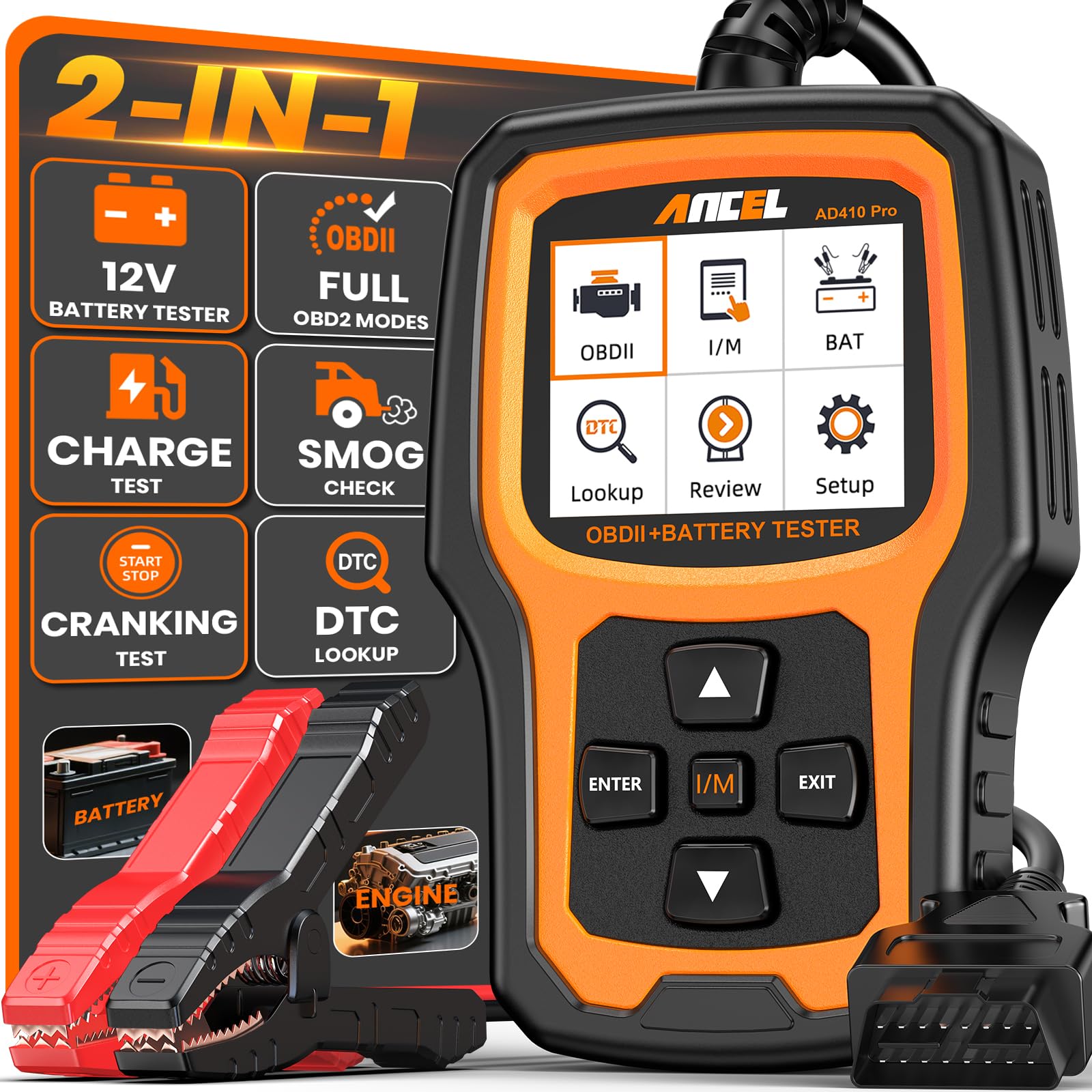
We recommend this if you want a reliable, easy-to-use scan tool that also tests your battery so you can diagnose check engine lights and starting problems without extra gear.
Pros
- Clear code readouts and quick I/M readiness checks.
- Built-in battery/cranking/charging tests save time and money.
- Simple plug-and-play use with a readable 2.4″ screen.
Cons
- Doesn’t scan ABS, SRS, or transmission systems.
- Screen and interface feel basic compared to tablet apps.
- Limited to 12V vehicles with a standard OBDII port.
We used the AD410 PRO on several cars and it handled check engine codes fast. The unit reads and explains the code, then lets us clear the light after repairs. That saved us a trip to the shop on minor issues.
Battery tests proved useful when a car struggled to start. We ran cranking and charging checks and saw whether the battery or alternator caused the problem. Having both functions in one handheld tool cut down the gear we carry.
Live data and freeze-frame helped track intermittent faults. Watching engine RPM, temp, and sensor values in real time made it easier to pinpoint causes. The menus are straightforward, though power users may miss advanced features.
Overall, we found the AD410 PRO a solid choice for DIYers and small shops that need engine diagnostics plus reliable battery testing without complex setup. Buy it if you want practical, no-nonsense checks and fewer trips to a mechanic.
MOTOPOWER MP69033

We recommend this if you want a simple, affordable OBD2 reader that quickly finds and clears basic check engine codes.
Pros
- Cheap and easy to use
- Clear screen for code reading and live data
- Plugs into most OBD-II cars with no battery needed
Cons
- Won’t read ABS or airbag systems
- Limited advanced features for pros
- Cable feels a bit stiff in tight spaces
We plugged this into several cars and liked how fast it showed the check engine code and live data. The 2.8″ screen was bright enough to read in daylight and the menu felt straightforward when we scrolled through live parameters.
We used it to verify a thermostat fault and to clear a few emissions-related codes. It didn’t solve complex problems, but it saved time by telling us where to start and by letting us clear codes after fixes.
We noticed limits when we tried ABS and airbag diagnostics — the unit simply won’t access those systems. Still, for routine check engine work and quick troubleshooting, this tool gave useful, reliable results without a big cost.
GearWrench 5″ Handheld Bidirectional Diagnostic Tool
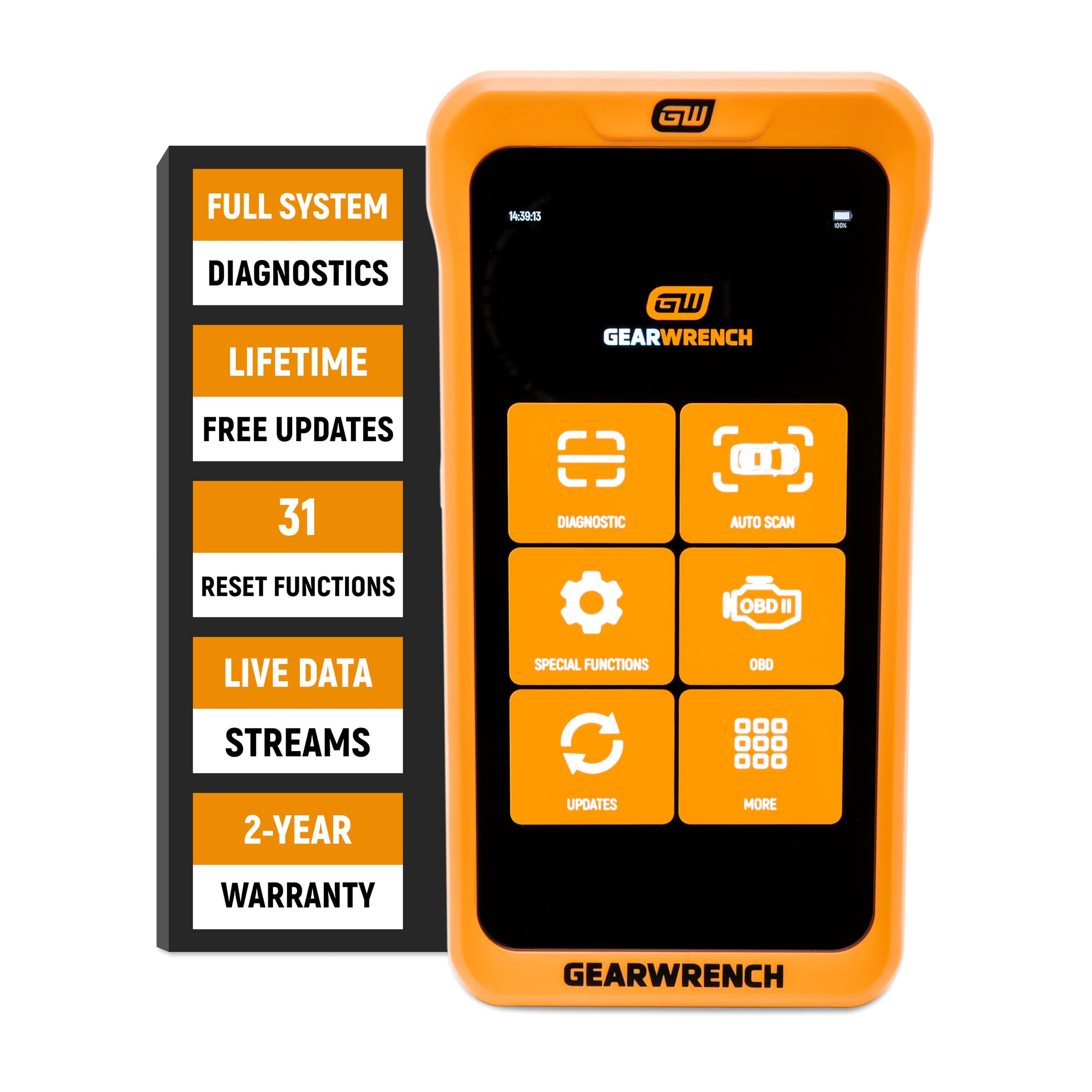
We recommend this tool for professionals who want fast, full-system diagnostics in a compact handheld unit.
Pros
- True bidirectional control for testing parts directly.
- Wide set of service functions like ABS, TPMS, and battery resets.
- Free lifetime software updates — no subscription fees.
Cons
- Shorter accessory cables and no protective case included.
- Screen is useful but can be small for long data sessions.
- Requires AutoAuth for some secure systems, which adds steps.
We used this scanner on a few shop vehicles and it handled live data and actuator tests smoothly. The menu responds fast and the graphing helped us spot sensor drift quickly.
Connecting to different makes felt simple. We ran relearns and resets without jumping between devices, which saved time on routine service jobs.
Carrying it around is easy thanks to the compact build. Still, we missed a hard case and longer leads when working in tight engine bays.
Buying Guide
We focus on features that matter when choosing a professional OBD2 scanner for a check engine light. Prioritize tools that read and clear codes, show live data, and support emission readiness. These basics solve most diagnostics.
We look for wide protocol coverage. Support for multiple vehicle makes and newer models keeps the tool useful as cars change. Faster connection types like wired USB or reliable Bluetooth matter for smooth operation.
We value live-data graphs and freeze-frame capture. Visual data helps spot intermittent issues. Recording and playback let us review faults after a test drive.
We check software updates and support. Regular updates add new vehicle coverage and fix bugs. Good tech support and clear manuals reduce setup time.
We consider advanced functions like ABS, SRS, and transmission codes. Bi-directional control and service resets are useful for deeper repairs. These features matter if we plan to do more than basic scanning.
We balance cost with durability and ease of use. Metal housings, clear displays, and intuitive menus save time. Battery life or vehicle-powered options affect field use.
We compare compatibility, update policy, and warranty. Confirming these points before buying prevents surprises. A short checklist helps:
| Feature | Why it matters |
|---|---|
| Code reading & clearing | Fix basic faults quickly |
| Live data & graphs | Diagnose intermittent issues |
| Protocol & vehicle coverage | Works on many cars |
| Updates & support | Keeps tool current |
| Advanced functions | For deeper repairs |
| Build quality & power | Reliability in the garage or roadside |
Editor’s Choice
We chose the Autel MaxiCOM MK808 as our Editor’s Choice. It balances deep diagnostic power with an easy interface, making it a solid pick for professionals and experienced DIYers.
We liked its wide vehicle coverage and fast, clear live data. It reads and clears codes, runs active tests, and supports full OBD2 functions plus many manufacturer-specific systems.
Key features we value:
- Full OBD2: Read/erase codes, freeze frame, I/M readiness.
- Advanced tests: Active tests, bi-directional control.
- Live data: Graphing and multi-parameter views.
- Wide support: Many makes and models, regular updates.
The screen is bright and responsive, so reading live data in bright conditions is simple. Battery life and build quality handle shop use without much worry.
Price sits in the mid-to-high professional range. We find the cost justified by the breadth of functions and regular software updates.
We recommend this when you need strong diagnostics and reliable updates. It fits technicians who want depth without jumping to a very expensive flagship tool.
Conclusion
We chose scanners that balance features, ease of use, and reliability for diagnosing check engine lights. Each model gives clear trouble codes, useful live data, and varying levels of repair guidance.
For basic needs, we recommend a simple OBD2 reader that reads/clears codes and shows freeze frame data. For professional work, we favor units with advanced live-data graphs, bi-directional controls, and broad OEM coverage.
Consider your skill level and vehicle types before buying. If you work on many makes, prioritize wide protocol support and frequent software updates. If you only own one car, a simpler, cheaper scanner often does the job.
We value accuracy, durability, and software support most. Prioritize scanners from makers that provide regular updates and good customer service. That reduces downtime and keeps diagnostics current.
Quick buying checklist:
- Read/clear codes and view live data
- Regular software updates
- Adequate vehicle coverage
- Intuitive interface and solid build
We expect any recommended scanner to save time and reduce repair guesswork. Pick the one that fits your budget and needs, and you’ll diagnose check engine lights with more confidence.
FAQS
What is an OBD2 scanner and why do we need one?
An OBD2 scanner reads codes from a vehicle’s computer when the check engine light turns on. We use it to find the likely cause and decide if we can fix it ourselves or need a mechanic.
Can any OBD2 scanner read all car makes?
Most scanners work on cars made after 1996 in the US. Some advanced models cover more systems and brands. We should check compatibility before we buy.
Do professional scanners require training?
Basic functions are easy to use. Advanced features like bi-directional controls and module coding need more knowledge. We recommend a model with clear menus and good documentation.
How accurate are scan tool diagnoses?
Scanners report fault codes, not exact fixes. Codes point to a problem area. We still need testing and inspection to confirm the root cause.
How often should we scan the car?
Scan when the check engine light comes on and after repairs. We also scan during maintenance or if the car shows poor performance. Regular checks can catch issues early.
Can a scanner clear codes and turn off the light?
Yes, most scanners clear codes and reset the light. Clearing without fixing the issue can make problems worse. We only clear codes after repairs.
What features should we prioritize?
Look for wide vehicle coverage, live data, freeze-frame, and update support. Durable build and a straightforward interface matter too. We balance features with budget.
