
10 Best OBD2 Splitter Cables for 2026

Every OBD-II port on a modern vehicle sends and receives diagnostic data through a single 16-pin connector under the dash. That works fine when only one tool needs access, but plenty of setups call for more: a scan tool alongside a GPS tracker, a tuner running next to an insurance dongle, or a dash cam sharing power with a code reader. An OBD2 splitter cable solves that physical bottleneck by turning one port into two or three, letting multiple devices stay connected without swapping plugs every time.
The right splitter depends on more than pin count. Cable length determines whether you can tuck a tracker up under the dash or route a cable to a center console mount. Straight versus right-angle connectors affects clearance around pedals and steering columns in tight cabins. A splitter with all 16 pins fully passed through, rather than a partial pinout missing CAN bus lines, is the difference between a device that works and one that silently fails to communicate. Mounting brackets, connector gender, and build quality around the housing all factor into how well a splitter holds up to daily use.
We looked at ten splitter cables built for exactly these scenarios, comparing connector layout, length, angle, and mounting design to figure out which ones handle simultaneous diagnostic and tracking duty without drama.
Best overall for dual-device setups: bbfly-B6 OBD2 Splitter
Best for hiding a tracker further from the port: bbfly-A9 OBD II Splitter (2FT)
Best right-angle design for tight footwells: HNeekyr Right Angle Splitter
Best ultra-low-profile fit: YPP Low Profile Splitter
Best for power-only accessories: Vgate 16 Pin Splitter
Best premium build quality: Autel Original OBD2 Splitter
Best right-angle option for left-hand-drive vehicles: iKKEGOL Right Angle Y Splitter
Best for connecting three devices at once: OLLGEN 1-to-3 Splitter
Best for permanent GPS tracker installs: OLLGEN Underdash Mount Splitter
Best for replacing a factory port with a bracket: JUTA Splitter with Mounting Bracket
bbfly-B6 OBD2 Splitter OBDII Extension Cable Adapter

This is our top pick for most dual-device setups thanks to a full 16-pin pass-through and a compact 1-foot length that keeps cable clutter to a minimum.
Pros
- Full 16-pin pass-through with no shared ground wires
- Flat, low-profile housing fits behind most dash panels
- Flexible cable resists kinking in tight spaces
Cons
- Short 1-foot length limits how far a device can be tucked away
- Straight connector may not clear low dash overhangs
- Male end can wear if repeatedly unplugged
Owners running scan tools alongside insurance dongles or GPS units report all 16 pins working correctly, including CAN bus lines that cheaper splitters sometimes omit. The flat cable profile helps it sit close to the dash without adding bulk near the driver’s knees. At 30cm, it’s long enough to reach a mounting spot just behind the OBD port but not much farther, so drivers wanting to hide a tracker deep under the dash may prefer a longer cable.
bbfly-A9 OBD II Splitter (2FT)

Choose this version when the standard 1-foot splitter doesn’t give enough reach to hide a tracker or telematics device out of sight.
Pros
- Doubled length (60cm) for routing to hidden mounting spots
- Male-to-female design keeps the original OBD port accessible
- Full 16-pin connection with no shared grounds
Cons
- Longer cable adds more slack to manage and secure
- Connector can loosen slightly if bumped repeatedly
- Flat design still needs a bit of clearance to fold
Fleet operators and rideshare drivers who need to conceal an insurance tracker or telematics unit favor this length because it reaches well behind the dash panel. The extra foot of cable makes a real difference when routing around steering columns or fuse boxes. Some owners note the connection can feel less snug than shorter splitters, so a zip tie or adhesive mount helps keep it seated.
HNeekyr Right Angle Splitter

This right-angle splitter earns its spot for vehicles where a straight connector would jam against the steering column or knee panel.
Pros
- Right-angle male connector reduces clearance issues
- Full 16-pin layout supports CAN protocol devices
- Compact, well-built housing
Cons
- Some reports of insufficient current for power-hungry accessories
- Right angle orientation isn’t ideal in every vehicle
- OBD2 still limits true simultaneous data communication
Jeep JL owners and ForScan users report solid results running a laptop and a Bluetooth OBD2 module at the same time. The 90-degree connector angle is worth considering for compact cars where a straight plug sits too close to the pedals. One reviewer found it couldn’t power a Banks gauge and a Progressive Snapshot dongle simultaneously, a reminder that current draw varies by accessory.
YPP Low Profile Splitter
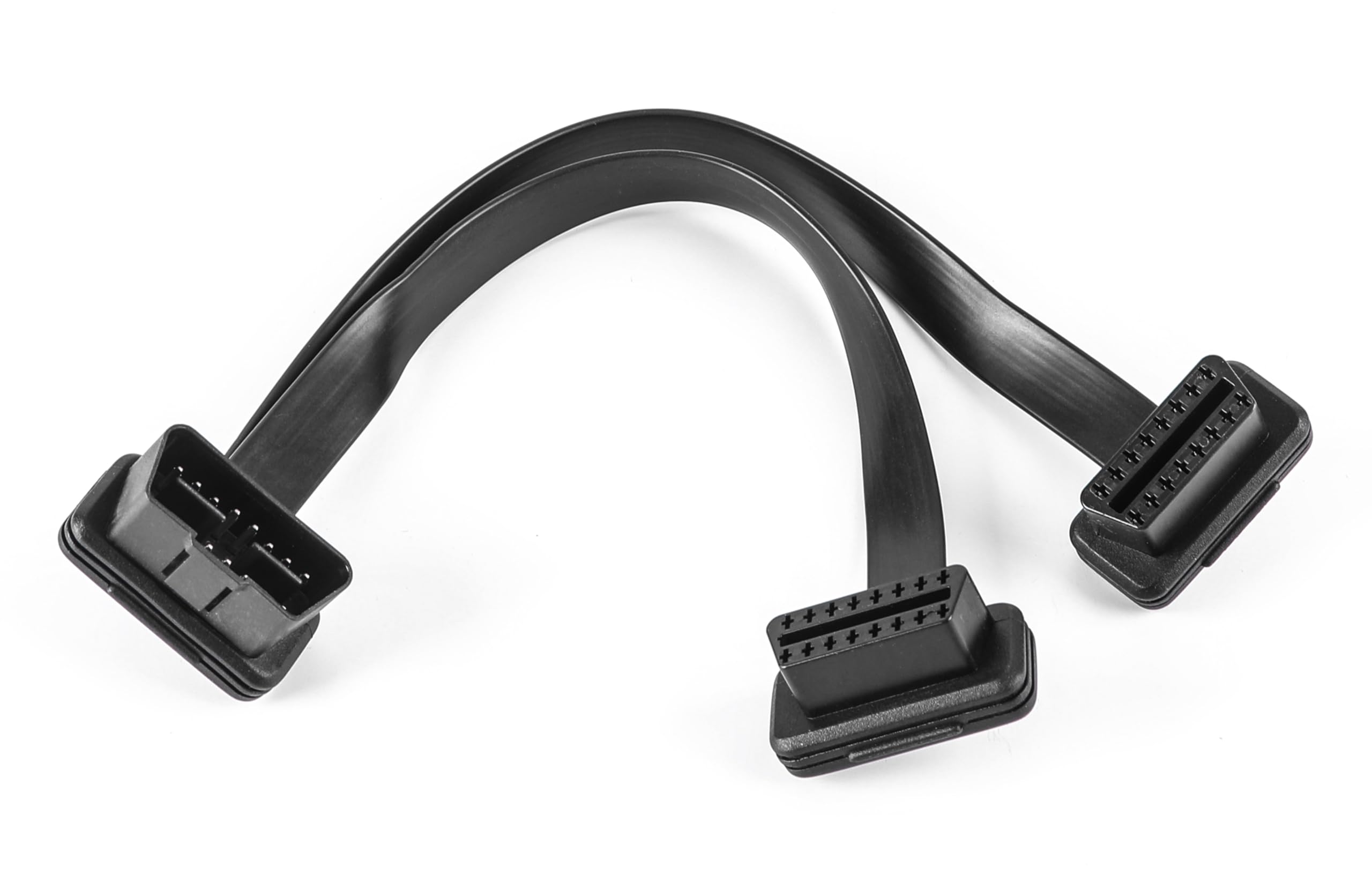
This splitter suits drivers who need the shortest, flattest connector possible to squeeze behind a crowded dash.
Pros
- Thicker 26AWG wire gauge for durability
- Short, low-profile connector housing saves space
- Flexible ribbon cable design
Cons
- Only available in a short 1-foot length
- Straight connector, no right-angle option
- Lower review volume than more established brands
Truck owners running an ELD alongside a tuner report both devices operating independently without interference. The thicker gauge wire gives some peace of mind for accessories drawing steady power, like a tuner monitoring EGTs while towing. The low-profile housing is the main selling point here, useful in trucks with limited space around the diagnostic port.
Vgate 16 Pin Splitter

This splitter works best for powering accessories like dash cams or running boards rather than running two data-hungry scan tools at once.
Pros
- Reliable at supplying power to both ports
- Lightweight, round cable design
- Straightforward plug-and-play install
Cons
- Data communication between two active devices isn’t guaranteed
- Round cable is bulkier than flat alternatives
- No right-angle version offered
Multiple owners report success powering amp steps, dash cams, and CarPlay screens through one port while keeping a scanner plugged into the other. Reviewers who tried running two data-based tools, like a tuning chip and an insurance tracker, had mixed results. This one is best reserved for setups where at least one device only needs power, not active data exchange.
Autel Original OBD2 Splitter

Autel’s splitter is the choice for owners who want a name-brand cable with reinforced construction and a backed warranty.
Pros
- Oxygen-free copper core for consistent signal transfer
- Reinforced double fishnet cable jacket resists wear
- Backed by a 1-year warranty and support line
Cons
- Higher price point than generic alternatives
- Coaxial-style cable is less flat than ribbon designs
- 1-foot length limits reach for hidden installs
Owners running a Banks iDash gauge alongside a code reader or scan tool report a clean fit into factory OBD brackets. The reinforced jacket and thicker core make this a good pick for permanent installs where the cable will flex repeatedly over years of use. It costs more than most splitters here, which fits its positioning as the sturdier, warrantied option.
iKKEGOL Right Angle Y Splitter

This right-angle splitter is built specifically for left-hand-drive vehicles, directing its branches toward the center console instead of the driver’s knees.
Pros
- Right-angle design routes cable away from pedals in LHD vehicles
- Full 16-pin pass-through supports CAN protocol
- Flat cable folds easily behind dash trim
Cons
- Not every device combination runs simultaneously without conflict
- Right angle geometry may not suit every dash layout
- Housing feels less rigid than premium alternatives
One owner switched to this cable after a competitor’s splitter stuck out too far and interfered with the pedals, calling this design a noticeable improvement. Reviewers using it to run an AFM delete alongside a heads-up display found the two devices sometimes conflicted, a reminder that OBD2 treats simultaneous data requests as coming from a single connected device. For power-plus-diagnostic combinations, it performs reliably.
OLLGEN 1-to-3 Splitter
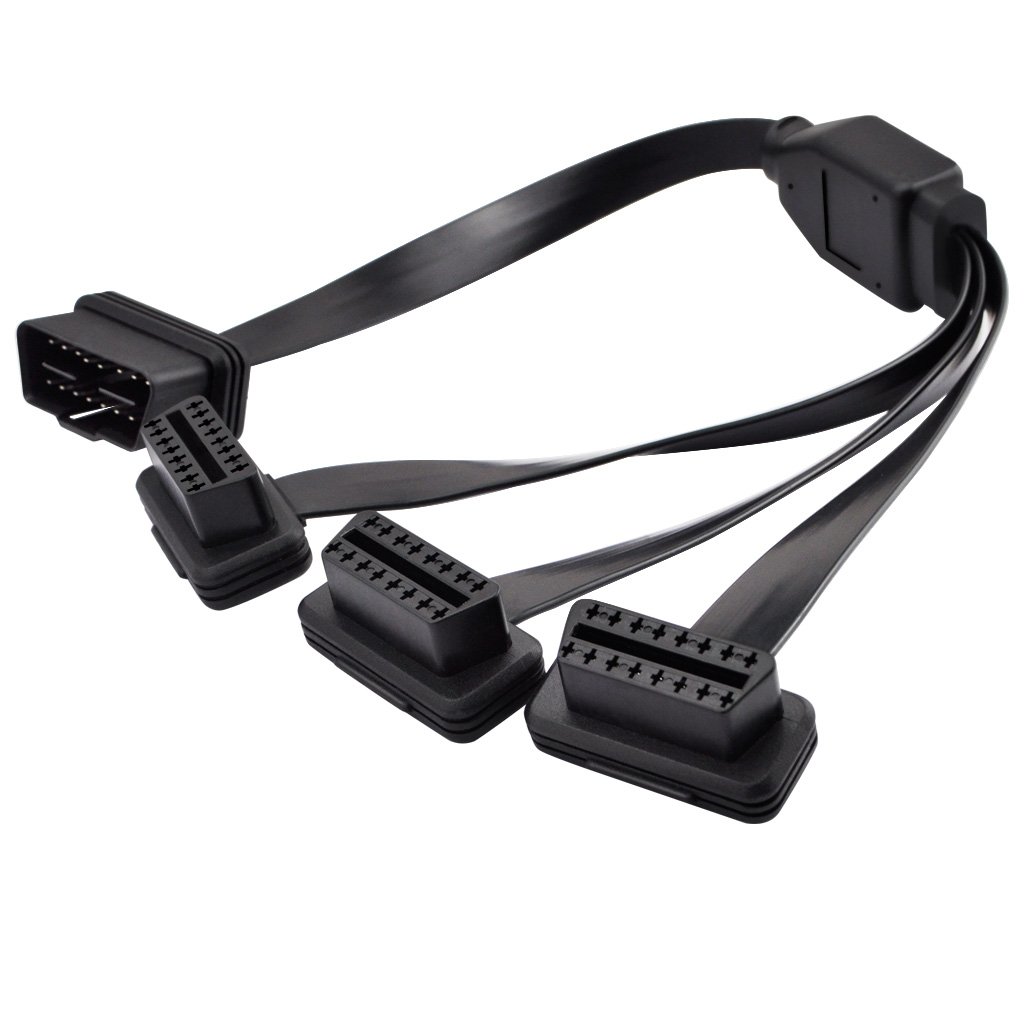
This is the only three-port splitter in the lineup, built for drivers juggling more than two accessories off a single OBD port.
Pros
- Splits one port into three female connectors
- Ultra low-profile housing for tight installs
- Longer 50cm cable for flexible routing
Cons
- Only direct pass-through on select pins, not the full 16
- Three simultaneous data connections aren’t realistic on OBD2
- Lower review volume than other picks
Owners running an Alpine OBD2 monitor, a Banks pedal monster, and keeping a spare port open for troubleshooting report good results with this layout. The catch is that this splitter passes through only nine of the sixteen pins, so accessories requiring pins outside that set won’t function. It suits power-focused accessories more than data-heavy diagnostic tools running at the same time.
OLLGEN Underdash Mount Splitter

This splitter is designed around permanent GPS tracker installs, with a right-angle connector and mounting option built for staying hidden long-term.
Pros
- Right-angle connector routes cleanly under the dash
- 60cm length gives ample reach for concealment
- Designed to keep the diagnostic port accessible to mechanics
Cons
- Only 6 pins confirmed connected, not the full 16
- Not suited for devices needing full OBD2 data access
- Limited review history compared to bigger brands
Fleet and telematics installers use this cable to tuck GPS trackers out of sight while keeping the main port free for diagnostic work. One owner reports a tight, secure fit running an Auto Agent 3.0 tracker alongside amp steps with no power interruptions. Because it doesn’t pass all 16 pins, it’s better suited to GPS and telematics hardware than full-featured scan tools.
JUTA Splitter with Mounting Bracket
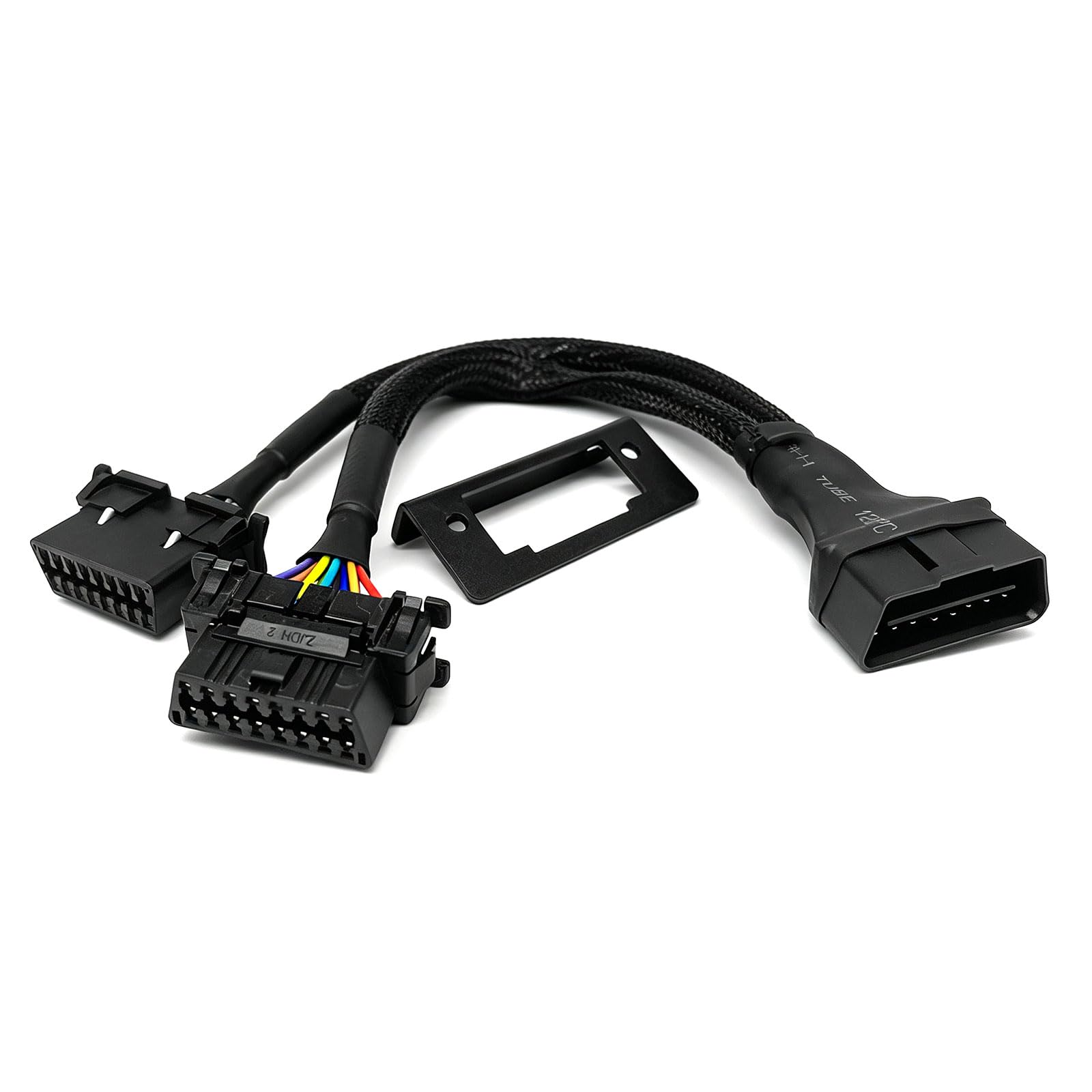
This splitter stands out for including a mounting bracket, letting one female port replace the factory OBD position while the other stays hidden.
Pros
- Includes a bracket for a factory-look installation
- Heavier-gauge wire with chafe protection
- Zinc-plated copper connectors resist corrosion
Cons
- Short cable limits routing options
- Some owners find real-world performance underwhelming for the price
- Doesn’t guarantee simultaneous data logging on demanding setups
A driver datalogging with HPTuners while injecting wideband oxygen sensor data through the same port reports success with this setup. The bracket is a genuine advantage for anyone wanting the dash to look stock after installation. One reviewer notes it’s still just a wiring splitter at heart, so expectations about advanced simultaneous data logging should stay realistic.
Buying Guide
Confirm Full 16-Pin Pass-Through
Not every splitter connects all sixteen pins from the vehicle’s OBD-II port. Some budget cables only wire through the pins needed for power and basic communication, skipping CAN bus lines that many modern scan tools and telematics devices require. Check the pinout details before buying if the connected devices need full diagnostic access rather than just power.
Match Cable Length to the Install Location
| Length | Best Use |
|---|---|
| 1ft / 30cm | Devices mounted close to the OBD port, minimal cable clutter |
| 2ft / 60cm | Hiding a tracker or dongle farther under the dash or console |
| 20in+ / 50cm+ | Routing to a distant mounting point or three-way splits |
Shorter cables keep installs tidy but limit how far a device can be hidden. Longer cables add flexibility at the cost of more slack to secure.
Straight vs. Right-Angle Connectors
Straight connectors work fine in vehicles with open space around the dash, but right-angle connectors reduce strain and clearance issues in tight footwells. A 90-degree bend can route cable branches toward the center console instead of jutting toward the driver’s knees or pedals, which matters most in compact cars and trucks with low dash overhangs.
Understand the Limits of OBD2 Splitting
A splitter creates physical access for multiple devices, but the OBD2 protocol itself doesn’t guarantee simultaneous communication. Some vehicles and device combinations work fine together; others compete for the same data stream and one device drops out. Power-only accessories, like dash cams or running boards, avoid this conflict entirely since they don’t request diagnostic data.
Check Connector Gender and Mounting Options
Most splitters use a male connector on the vehicle side and two female ports for devices. A few models include mounting brackets that let one port sit in the factory location, keeping the dash looking stock while the second port stays hidden. This matters for anyone who wants mechanics or future owners to find the OBD port in its expected spot.
Editor’s Choice
The bbfly-B6 OBD2 Splitter earns our top recommendation for its full 16-pin pass-through, low-profile fit, and consistent reports of working alongside CAN bus-dependent devices. It handles the most common use case, a scan tool paired with a GPS tracker or insurance dongle, without the partial pinout issues that trip up cheaper splitters.
For anyone needing more reach to hide a device further under the dash, the bbfly-A9’s 2-foot length is the natural upgrade. Drivers dealing with tight footwells should look at the HNeekyr or iKKEGOL right-angle models instead, since the connector geometry solves clearance problems a straight cable can’t.
Conclusion
Picking the right OBD2 splitter comes down to matching connector geometry, cable length, and pinout coverage to the specific devices being run. A full 16-pin cable handles most scan tool and tracker combinations, while shorter, low-profile designs suit tight dash spaces and longer cables suit hidden installs. Three-way splitters and partial-pinout cables serve narrower use cases, mainly power delivery rather than full diagnostic access.
Testing a splitter with the actual devices intended for daily use, rather than assuming compatibility from the pin count alone, remains the most reliable way to confirm a setup works before committing to a permanent install.
FAQS
Can I run a scan tool and a GPS tracker at the same time through a splitter? Many owners do this successfully, particularly when the scan tool is used occasionally and the tracker runs continuously. Simultaneous active data requests from two tools at once aren’t guaranteed to work on every vehicle.
Does a splitter drain my car battery faster? A splitter itself draws no power. Any battery drain comes from the connected devices staying powered when the ignition is off, which is a factor of the devices, not the splitter.
What’s the difference between a 1-to-2 and 1-to-3 splitter? A 1-to-2 splitter adds one extra port, suited to most dual-device setups like a scanner plus a tracker. A 1-to-3 splitter adds two extra ports but often sacrifices full 16-pin coverage, limiting it to power-focused accessories.
Will a right-angle connector fit better in my vehicle? Right-angle connectors help in vehicles with limited space near the pedals or steering column. Straight connectors work fine when there’s open clearance under the dash.
Do all these splitters support CAN bus communication? Not all of them. Cables passing through all 16 pins, like the bbfly and Autel models, support CAN bus devices. Splitters that only wire a handful of pins, like some low-profile or three-way designs, may not.
