
Autel MaxiCOM MK900 Review: Is It Worth It in 2026?

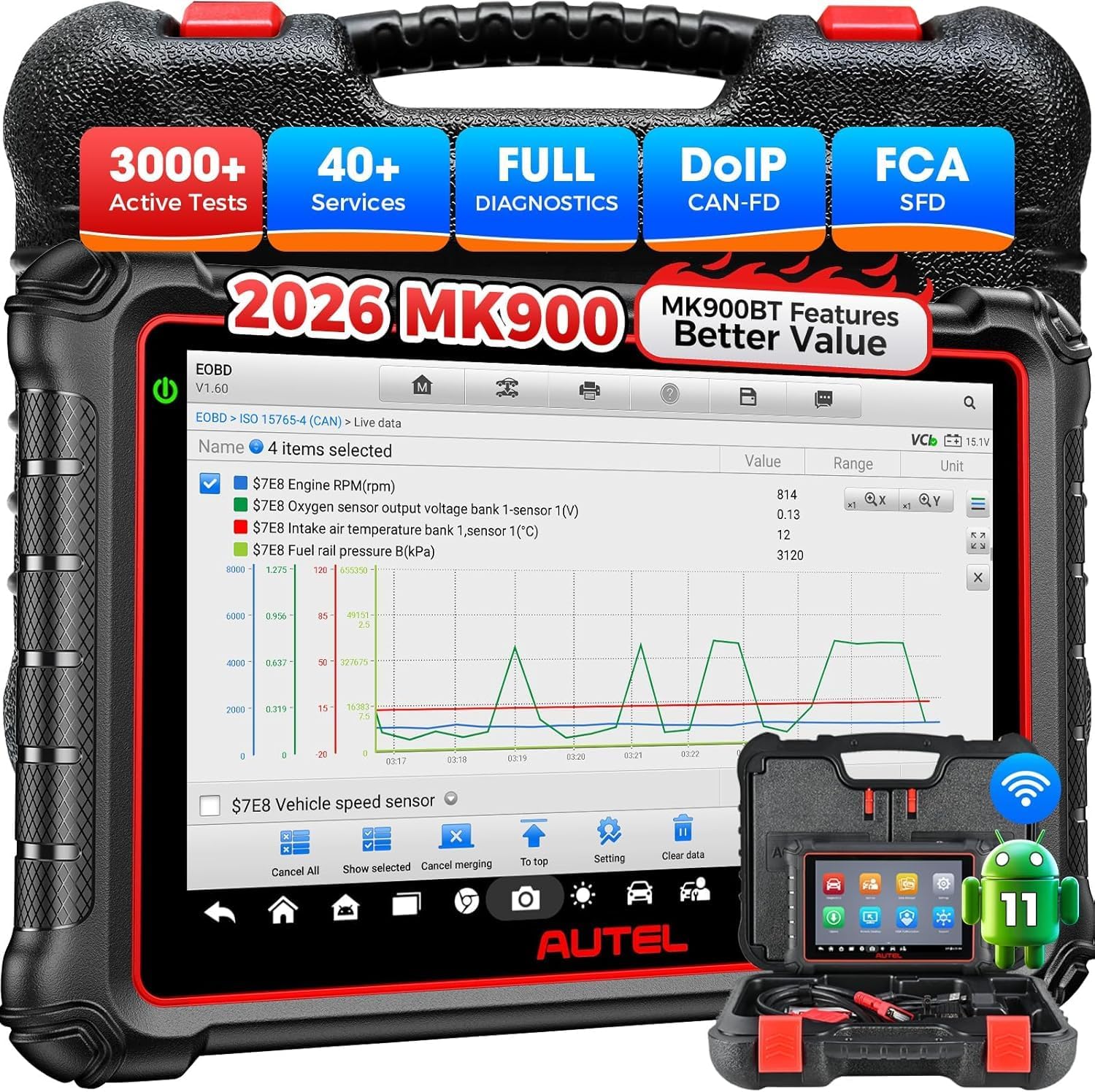
The Autel MaxiCOM MK900 is an Android-based bidirectional OBD2 diagnostic tablet built for full-system vehicle diagnostics, active testing, maintenance functions, and advanced fault finding. Its primary use is helping professional technicians and serious DIY mechanics diagnose electronic systems, command supported components, view live data, and complete common service procedures from one scanner.
This Autel MaxiCOM MK900 review focuses on its verified capabilities rather than marketing promises. With an 8-inch touchscreen, Android 11, 4GB RAM, 64GB storage, CAN FD and DoIP support, it sits well above basic code readers and targets buyers who regularly perform deeper diagnostic work.
🏆 My Quick Verdict
💡 Best For: Independent technicians, advanced DIY mechanics, and small workshops needing bidirectional tests and broad all-system diagnostics.
⚡ Key Specs:
Android 11, 8-inch 1280×800 display, 4GB RAM, 64GB storage, 7700mAh battery, CAN FD, DoIP, active tests, AutoVIN.
✅ Bottom Line: The MK900 combines modern protocol support, full-system scanning, active tests, and strong tablet hardware in a compact professional platform. Its biggest limitation is that individual service functions and active tests still depend on the exact vehicle.
At a Glance
- Performs full-system code reading, clearing, live-data viewing, ECU information access, and supported active tests.
- Supports newer vehicle communication standards including CAN FD and DoIP.
- Uses an 8-inch 1280×800 touchscreen with Android 11 and a 1.8GHz quad-core processor.
- Includes 4GB RAM, 64GB internal storage, Wi-Fi connectivity, and expandable microSD storage.
- Smart AutoVIN can simplify compatible vehicle identification before a diagnostic scan.
- Pre-scan and post-scan reporting are useful for documenting vehicle condition before and after repairs.
Premium Specifications
| Specification | Verified Detail |
|---|---|
| Operating System | Android 11 |
| Processor | Quad-core 1.8GHz |
| Memory | 4GB RAM / 64GB storage |
| Display | 8-inch LCD capacitive touchscreen, 1280×800 |
| Rear Camera | 8MP |
| Battery | 3.7V / 7700mAh lithium-polymer |
| Connectivity | Wi-Fi, USB Type-C, USB 2.0, microSD up to 64GB |
| Newer Protocols | CAN FD and DoIP |
| Operating Temperature | 32°F to 122°F / 0°C to 50°C |
Design & Build Quality
The MK900 is built around an 8-inch tablet format that provides considerably more viewing space than a traditional handheld code reader. The 1280×800 display is especially helpful when reading longer diagnostic menus, fault descriptions, and graphed live-data streams.
The 7700mAh rechargeable battery lets the tablet operate independently instead of relying entirely on vehicle power. Its USB-C connection, Wi-Fi support, rear camera, and expandable storage give it the hardware expected from a modern workshop diagnostic tablet.
Setup, Installation & Ease of Use
- Charge the diagnostic tablet before extended workshop use.
- Connect the supplied vehicle communication cable securely to the diagnostic port.
- Turn the vehicle ignition on as required by the selected diagnostic procedure.
- Use AutoVIN where supported or identify the vehicle manually when automatic detection is unavailable.
- Connect the tablet to Wi-Fi before downloading software and vehicle database updates.
- Store the tablet, cable, and adapters together to protect connectors from dirt and workshop damage.
Core Performance & Feature Breakdown
The MK900’s strongest capability is combining OE-level full-system access with bidirectional testing. It can read and erase supported trouble codes, display ECU information and live data, and command compatible actuators during diagnosis.
Bidirectional control can shorten troubleshooting because technicians can command a supported component instead of waiting for normal vehicle operation to activate it. Actual active-test availability remains make-, model-, year-, system-, and software-dependent.
Expert Insight
Buy a bidirectional scanner based on confirmed support for the specific vehicles and functions you service, not simply the advertised total number of available tests across the entire database.
CAN FD and DoIP support also matter for buyers servicing newer vehicles. These communication standards give the MK900 access to platforms that may be beyond the capabilities of older diagnostic tablets.
Key Features Explained
Bidirectional Active Tests
Bidirectional control allows the scanner to send commands to supported vehicle modules and actuators. This can help distinguish an electrical control problem from a failed component, although available commands vary considerably between vehicles.
Full-System Diagnostics
The scanner is designed to communicate with supported electronic systems rather than limiting diagnosis to generic engine codes. This makes it more appropriate for troubleshooting ABS, airbag, transmission, body, steering, climate-control, and other electronically managed systems.
CAN FD and DoIP
Built-in CAN FD and DoIP compatibility expands support for newer diagnostic architectures. That matters increasingly as late-model vehicles move beyond the protocols handled by older OBD diagnostic equipment.
AutoVIN and Scan Reporting
Smart AutoVIN can identify supported vehicles automatically, while pre-scan and post-scan reports help document faults before and after work. Automatic identification is convenient, but manual vehicle selection may still be necessary on unsupported applications.
Real-World Usability & Maintenance
The large screen is one of the MK900’s practical advantages when several data parameters need to be viewed together. Wi-Fi updating also makes database maintenance easier than scanners that require frequent computer-based updates.
Keep the diagnostic connector and USB ports clean, avoid exposing the tablet to workshop fluids, and recharge it before storage. Software should also be kept current because vehicle coverage and supported diagnostic functions depend heavily on the installed database.
Pros & Cons
Pros
- Full-system diagnostics go substantially beyond generic check-engine code reading.
- Bidirectional testing provides more useful component-level troubleshooting capability.
- CAN FD and DoIP support improve compatibility with newer vehicle platforms.
- Modern Android 11 hardware provides 4GB RAM, 64GB storage, and an 8-inch display.
Cons
- Function coverage varies by vehicle, so every required feature should be checked before purchase.
- The MK900 uses a wired vehicle communication connection rather than the Bluetooth VCI found on MK900-BT.
- Its advanced capabilities create a steeper learning curve than a basic code reader.
Common Issues & Fixes
AutoVIN Does Not Identify the Vehicle
Automatic VIN detection is not universal across every supported vehicle. Select the manufacturer, model, year, and relevant configuration manually when AutoVIN cannot identify it.
A Needed Active Test Is Missing
Bidirectional functions differ between vehicle platforms and control modules. Verify coverage for the exact VIN and update the diagnostic software before assuming the function is unsupported.
The Scanner Cannot Communicate With a Module
Communication problems can result from vehicle voltage, connection issues, protocol support, or module faults. Confirm adequate battery voltage, reconnect the diagnostic cable, and verify the selected vehicle information first.
What to Know Before You Buy
The most important pre-purchase check is exact vehicle-function compatibility. “Full-system” and “bidirectional” describe the scanner’s capabilities across its supported database, but they do not guarantee every special function on every individual vehicle.
Also distinguish the MK900 from the MK900-BT before ordering. The standard MK900 uses wired vehicle communication, while the MK900-BT version uses a wireless Bluetooth VCI and adds supported battery-analysis capability with compatible hardware.
Who Should Buy It / Who Should Skip It
✅ Who Should Buy It
- Independent technicians diagnosing multiple systems across different makes.
- Advanced DIY mechanics who genuinely need component activation and live-data testing.
- Small workshops requiring CAN FD and DoIP support for newer vehicles.
- Buyers moving beyond basic engine-only OBD2 scanners.
✗ Who Should Skip It
- Drivers who only need to read and clear occasional check-engine codes.
- Buyers who require wireless vehicle communication as a non-negotiable feature.
- Users unwilling to verify vehicle-specific coverage before purchasing.
Alternatives to Consider
LAUNCH X431 CRP919X BT
Best For: Buyers who prioritize Bluetooth vehicle communication and ECU coding capability.
Main Advantage: Wireless DBScar VII connectivity keeps the technician untethered from the diagnostic port.
Trade-off: Vehicle-specific coding and reset availability must still be confirmed before purchase.
Key Spec: 7-inch display, Android 10, 4GB RAM, 64GB storage, CAN FD and DoIP support.
TOPDON Phoenix Lite 2
Best For: Workshops wanting wireless diagnostics and strong battery capacity.
Main Advantage: It combines bidirectional control with an 8-inch display and wireless VCI.
Trade-off: Current manufacturer guidance states that Phoenix Lite 2 does not include CAN FD support.
Key Spec: 8-inch 1280×800 display with a 12600mAh battery.
Is It Worth It?
The MK900 is worth considering when full-system diagnostics and bidirectional testing are tools you will actually use. Its value comes from combining those capabilities with modern protocols and capable tablet hardware rather than simply reading more trouble codes.
For occasional check-engine diagnostics, it is more scanner than most owners require. For frequent troubleshooting across several vehicle systems, however, the additional diagnostic depth can make the higher class of tool much easier to justify.
Final Verdict
The Autel MaxiCOM MK900 is a strong fit for technicians and experienced DIY users who want professional-style diagnostics without moving to Autel’s larger premium platforms. Its full-system access, active tests, CAN FD, DoIP, AutoVIN, reporting, and modern hardware create a capable diagnostic package, provided the functions you need are verified for your vehicles.
Frequently Asked Questions
Is the Autel MaxiCOM MK900 bidirectional?
Yes, the MK900 supports bidirectional active tests on compatible vehicles and systems. Available commands depend on the vehicle make, model, year, control module, and installed diagnostic software.
Does the MK900 support CAN FD and DoIP?
Yes, Autel lists both CAN FD and DoIP among the MK900’s supported communication protocols. These protocols improve its suitability for many newer vehicle architectures.
Is the Autel MK900 wireless?
The standard MK900 uses a wired vehicle communication connection. Buyers wanting wireless Bluetooth communication should compare it with the separate MK900-BT model.
What size screen does the MK900 have?
The MK900 has an 8-inch capacitive LCD touchscreen with 1280×800 resolution. It runs Android 11 using a 1.8GHz quad-core processor with 4GB RAM and 64GB internal storage.
What warranty does the Autel MK900 include?
Autel’s MK900 manual specifies a limited one-year warranty for the original retail purchaser. Warranty terms can be affected by local laws and exclusions, so purchasers should retain proof of purchase and review the applicable regional policy.
Does the MK900 support every service function on every car?
No, individual service functions and active tests vary by vehicle. Verify support for the exact year, make, model, engine, and required procedure before buying the scanner for one specific job.
Affiliate disclosure: replacekeyfob.com earns a small commission when you purchase through links on this page — at no extra cost to you. Our editorial process is independent: affiliate relationships never influence which products we recommend or how we rank them.