
ANCEL BM500 OBD2 Scanner Review: Is It Worth It in 2026?

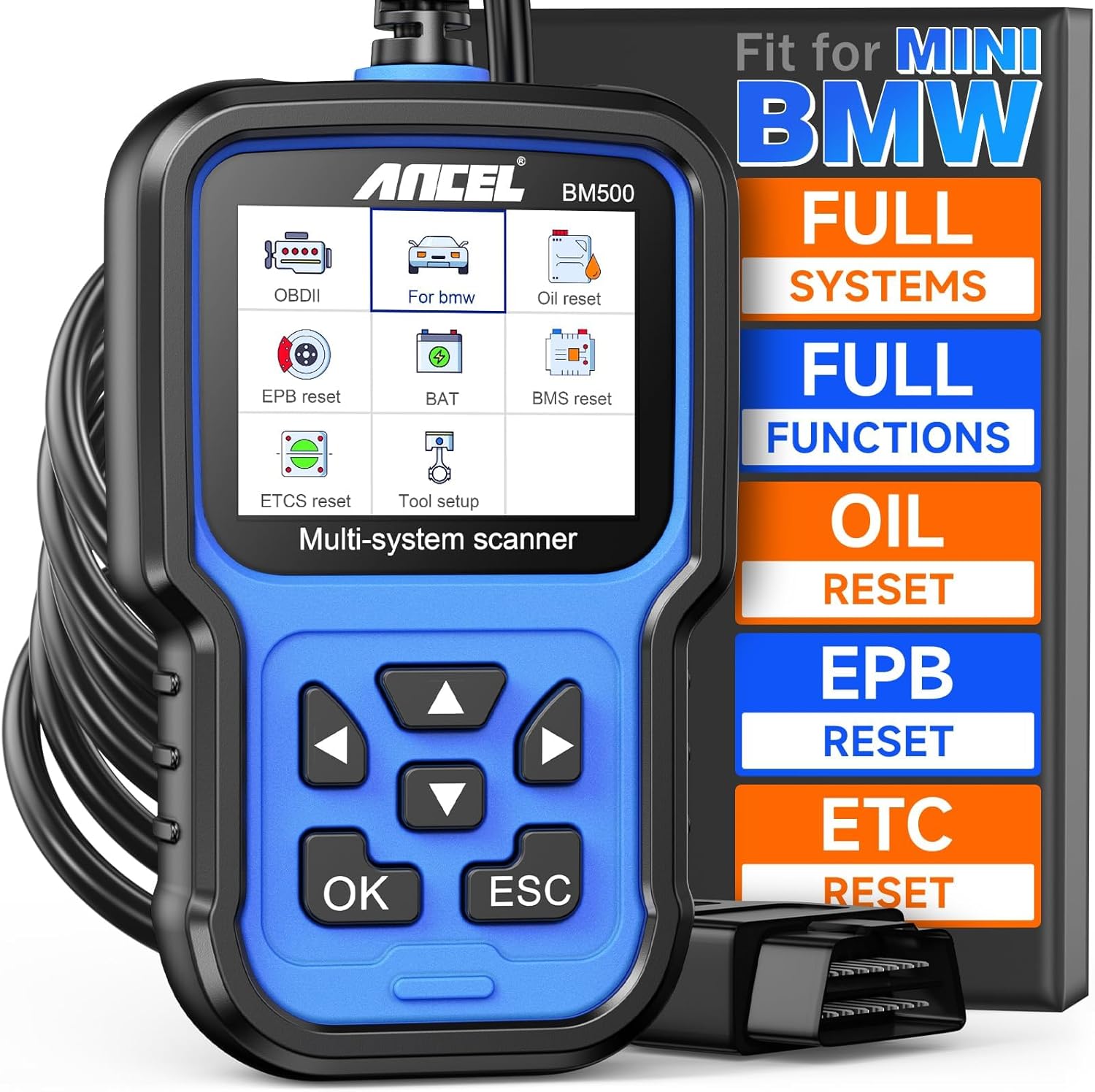
The ANCEL BM500 is a handheld multi-system OBD2 diagnostic scanner designed primarily for BMW, MINI, and Rolls-Royce vehicles. Its main use is reading vehicle faults, accessing BMW-specific systems, performing common maintenance resets, and registering replacement batteries.
This ANCEL BM500 review focuses on what matters to BMW and MINI owners who want more capability than a basic check-engine code reader. It sits in the affordable dedicated-BMW scanner category, with physical controls and a wired connection rather than a phone-dependent interface.
🏆 My Quick Verdict
💡 Best For: BMW and MINI DIY owners who need full-system fault scanning, battery registration, and common service functions without relying on a smartphone.
⚡ Key Specs:
2.4-inch LCD, 320 × 240 display resolution, 8–18V operating range, OBDII/EOBD support, BMW/MINI/Rolls-Royce multi-system diagnostics.
✅ Bottom Line: The BM500 combines BMW-focused diagnostics with useful maintenance functions such as battery registration and EPB service. Its small screen and button-driven interface are less polished than newer tools, but the core feature set is practical for home maintenance.
At a Glance
- Designed for deeper BMW, MINI, and Rolls-Royce system diagnostics.
- Supports standard OBDII and EOBD diagnostic operations.
- Battery management includes replacement-battery registration on supported vehicles.
- Reads and clears faults while also displaying live data streams.
- Uses a 2.4-inch color LCD and physical navigation buttons.
- Runs from vehicle power through its wired diagnostic connection.
Specifications
| Specification | Verified Detail |
|---|---|
| Display | 2.4-inch LCD |
| Display Resolution | 320 × 240 pixels |
| Operating Voltage | 8V–18V |
| Operating Temperature | 0°C–60°C / 32°F–140°F |
| Storage Temperature | -20°C–70°C / -4°F–158°F |
| Primary Vehicle Coverage | BMW, MINI, Rolls-Royce |
| Standard Diagnostics | OBDII/EOBD |
Design & Build Quality
The BM500 uses a traditional handheld scanner design with an integrated display, directional controls, OK and ESC buttons, and a wired vehicle connection. This layout keeps operation self-contained, so a phone or Bluetooth pairing process is unnecessary.
The 2.4-inch screen is compact by modern standards. It is large enough for menus, codes, and numerical data, though users accustomed to touchscreen scanners may find navigation more deliberate.
Setup, Installation & Ease of Use
- Locate the vehicle’s 16-pin diagnostic connector before beginning.
- Connect the BM500 securely to the diagnostic port.
- Switch the ignition on as directed for the diagnostic procedure.
- Select the BMW-specific menu or standard OBDII mode as appropriate.
- Use system scan for broad diagnostics or manual selection for a specific module.
- Keep the cable and scanner stored dry and free from oil or moisture.
Core Performance & Feature Breakdown
The BM500’s strongest capability is access beyond generic engine diagnostics on supported BMW Group vehicles. Its documentation identifies systems such as engine, transmission, ABS, and airbag as part of its multi-system coverage.
That matters because many BMW warning lights are tied to manufacturer-specific control modules. A generic OBD2 reader may only handle emissions-related engine codes, while the BM500 is built for deeper vehicle-level troubleshooting.
Expert Insight
Battery registration and fault clearing solve different problems: registration tells supported BMW electronics that a replacement battery has been fitted, while fault clearing only removes stored diagnostic codes after the underlying issue has been addressed.
The scanner also provides live data functions, letting users inspect changing values reported by supported control modules. That can make troubleshooting more useful than simply reading a static trouble-code description.
Key Features Explained
BMW Multi-System Diagnostics
The scanner can access multiple BMW Group vehicle systems rather than limiting diagnostics to generic engine faults. This is especially useful when warning lights involve ABS, airbags, transmission electronics, or other supported modules.
Battery Registration
Battery management lets supported vehicles record a battery replacement through the DME/DDE electronics. This is important on BMW models that electronically manage charging based on battery replacement history.
CBS Service Functions
The BM500 includes condition-based service functions for supported BMW applications. These functions are useful when maintenance has been performed and the applicable service information needs to be reset or corrected.
Electronic Parking Brake Service
EPB functionality supports applicable electronic parking-brake maintenance procedures. Coverage can vary by vehicle and chassis, so compatibility should be confirmed before buying the tool for one specific service task.
Real-World Usability & Maintenance
The wired design is useful for occasional DIY work because there is no wireless pairing or separate phone app to manage. Vehicle power also means there is no scanner battery to charge before a diagnostic session.
For maintenance, keep the unit clean and dry and avoid oil, water, or grease contamination. The manufacturer documentation recommends using mild detergent on a clean cloth when exterior cleaning is necessary.
The biggest usability constraint is the small display. Long module names and data lists naturally require more scrolling than they would on a larger professional tablet.
Pros & Cons
Pros
- Provides BMW-specific multi-system diagnostics beyond ordinary engine-code reading.
- Includes battery registration for supported BMW and MINI applications.
- Works without requiring a smartphone or Bluetooth connection.
- Combines standard OBDII functions with useful BMW service functions.
Cons
- The 2.4-inch screen is small compared with newer diagnostic tools.
- Button-driven menus require more navigation than modern touchscreen interfaces.
- Special-function compatibility depends on the exact vehicle and control system.
Common Issues & Fixes
The Scanner Does Not Communicate
A connection problem can occur if ignition status or the diagnostic-port connection is incorrect. Reseat the connector, confirm the required ignition position, and retry the correct vehicle menu.
A Special Function Is Missing
Some service functions depend on model, chassis, and installed electronics. Verify exact vehicle coverage rather than assuming every listed BMW function applies to every BMW.
A Cleared Fault Returns
A diagnostic code may return when the underlying mechanical or electrical problem remains present. Diagnose and repair the cause before treating code clearing as a permanent solution.
What to Know Before You Buy
The BM500 should be viewed primarily as a BMW Group diagnostic and maintenance tool, not as a universal full-system scanner for every vehicle brand. Its standard OBDII mode can still be useful outside BMW applications, but its deeper functions are where the BMW focus matters.
Battery registration compatibility deserves particular attention. Confirm the exact year, chassis, battery-management system, and intended procedure before buying solely for a battery replacement.
Who Should Buy It / Who Should Skip It
✅ Who Should Buy It
- BMW owners who perform their own routine diagnostics.
- MINI owners needing compatible service and fault functions.
- DIY users who specifically need battery registration.
- Owners who prefer a dedicated handheld scanner.
✗ Who Should Skip It
- Users wanting a large touchscreen diagnostic tablet.
- Owners needing advanced programming or coding capabilities.
- Technicians requiring broad professional coverage across many brands.
- Buyers who have not confirmed compatibility with their specific service procedure.
Alternatives to Consider
FOXWELL NT510 Elite for BMW
Best For: BMW owners wanting a more advanced dedicated diagnostic platform.
Main Advantage: Supports full-system diagnostics and numerous service functions for its installed BMW software.
Trade-off: It is generally positioned above basic BMW handheld scanners in complexity and cost.
Key Spec: BMW software covers BMW, MINI, and Rolls-Royce applications.
AUTOPHIX 7910
Best For: BMW owners comparing another dedicated handheld diagnostic scanner.
Main Advantage: Includes BMW-focused diagnostics plus battery registration and several maintenance functions.
Trade-off: It remains a compact button-controlled handheld rather than a tablet-style platform.
Key Spec: 2.8-inch 320 × 240 TFT display.
Is It Worth It?
The BM500 makes sense when its BMW-specific functions match the jobs you actually plan to perform. Battery registration, multi-system fault access, and maintenance resets can make it substantially more useful than a generic inexpensive code reader.
Its value becomes weaker if you want advanced coding, a large display, or professional multi-brand coverage. The appeal is specialization rather than maximum capability.
Final Verdict
The ANCEL BM500 is a practical BMW and MINI diagnostic scanner for DIY owners who need deeper system access and battery-registration capability in a straightforward wired handheld tool. Confirm vehicle-specific coverage first, but its verified feature set addresses several common BMW maintenance and diagnostic tasks.
Frequently Asked Questions
Does the ANCEL BM500 register BMW batteries?
Yes, the BM500 includes a battery-management function for registering battery replacement on supported BMW applications. Vehicle compatibility should still be confirmed before relying on it for a specific model or battery configuration.
Does the BM500 work with MINI vehicles?
Yes, MINI is included in the scanner’s documented BMW Group coverage. The exact systems and special functions available can vary by vehicle.
Can the BM500 diagnose systems other than the engine?
Yes, its BMW-specific coverage includes multiple systems such as engine, transmission, ABS, and airbag. This is one of its main advantages over a basic generic code reader.
Does the BM500 require batteries or charging?
The scanner operates from vehicle power through its diagnostic connection. Its documented operating-voltage range is 8V to 18V.
How should the BM500 be maintained?
Keep the scanner dry, clean, and free from oil, water, and grease. The documentation recommends mild detergent on a clean cloth when exterior cleaning is required.
What warranty does the ANCEL BM500 include?
The reviewed documentation does not provide enough verified warranty information to state a specific warranty term here. Check the current seller or manufacturer warranty terms before purchasing.
Affiliate disclosure: replacekeyfob.com earns a small commission when you purchase through links on this page — at no extra cost to you. Our editorial process is independent: affiliate relationships never influence which products we recommend or how we rank them.
