
Car Key Not Detected After Battery Change: What to Check and How to Fix It

You swapped the battery, closed the fob, walked back to the car, and got the same frustrating message: key not detected. That usually means the battery change did not create a brand-new problem. More often, it exposed one that was already there — a weak battery contact, a bad battery, a low vehicle battery, or a fob that needs resyncing.
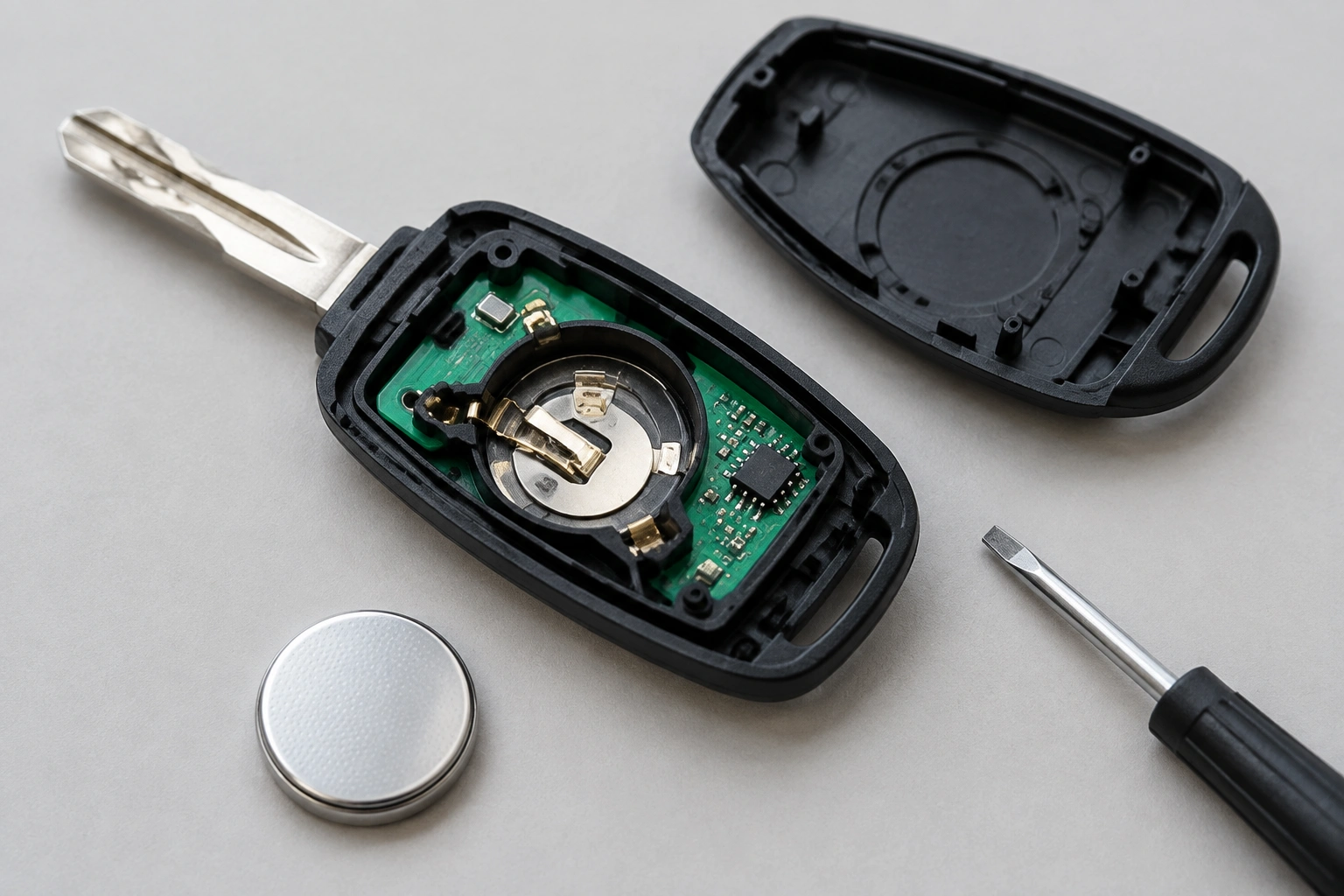
The good news is that this issue is often fixable without a dealer visit. The trick is to work in the right order so you do not waste time guessing.
What “Key Not Detected” Usually Means
A vehicle with passive keyless entry is looking for a valid signal from the fob. If the signal is too weak, interrupted, or not recognized, the car may refuse to unlock, start, or both.
That message can point to several different problems:
- the coin-cell battery is installed backward
- the replacement battery is the wrong size or weak
- the battery contacts inside the fob are bent, dirty, or loose
- the fob case is not fully snapped together
- the vehicle battery is weak enough to interfere with detection
- the fob has lost sync or needs reprogramming on that model
Before you assume the fob is “dead,” remember this: a fresh battery only helps if the fob can actually deliver power to the circuit board and the car can receive the signal.
Most Likely Causes, Ranked
Here is the order I would check them in as a former tech:
| Likely cause | What it looks like | What to do |
|---|---|---|
| Wrong battery type or polarity | Fob stopped working right after battery swap | Confirm the battery matches the original, usually a CR2032 on many vehicles, and make sure the + and – sides face the same way as before |
| Poor battery contact | Battery is new, but fob is intermittent or dead | Inspect the metal tabs inside the fob for bending, dirt, or loss of spring tension |
| Case not fully closed | Buttons feel odd or fob works only when pressed tightly | Reopen and snap the shell together evenly |
| Weak vehicle battery | Car has other electrical glitches, slow cranking, or dim accessories | Test the car battery and charge or replace it if needed |
| Sync or programming issue | Battery and contacts look fine, but car still won’t recognize the fob | Check whether your vehicle supports a DIY resync or needs dealer/locksmith programming |
| Damaged fob electronics | Water exposure, corrosion, cracked board, or repeated failures | Replace or repair the fob rather than chasing battery fixes |
A useful comparison: if one fob works and the other does not, the problem is probably in the fob, not the car. If both fobs fail, the car battery, receiver, or vehicle-side system becomes much more likely.
Quick Checks to Do First
These are the fastest checks that solve a lot of cases.
1) Confirm the battery is the right one
Many fobs use a CR2032, but not all do. Some use a different coin cell, and using the wrong thickness can keep the contacts from touching properly.
If the old battery is still nearby, compare them side by side. Look for:
- the same diameter
- the same thickness
- the same voltage
- the same orientation marking
A cheap battery that fits loosely can act like a dead battery even when it is brand new.
2) Check the battery orientation
This sounds basic, but it is one of the most common mistakes. Coin cells are easy to flip during reassembly, especially when the holder is small and spring-loaded.
If the fob worked before the battery swap and stopped immediately after, reopen it and verify the positive and negative sides are facing correctly.
3) Reseat the battery and inspect the contacts
If the battery is installed correctly but the car still does not detect the key, look closely at the battery contacts inside the fob. They should press firmly against the battery.
What I look for:
- a bent tab that no longer touches the battery
- a contact that has slipped out of its slot
- corrosion or white residue
- dirt, lint, or a film on the contact surface
A contact problem can make a fresh battery useless. Sometimes gently repositioning the tab is enough; sometimes the contact is worn and the fob needs repair.
4) Make sure the case is fully closed
If the shell is not snapped together evenly, the battery can shift just enough to lose contact. That can also prevent the buttons from aligning properly with the internal board.
Run your fingers around the seam. If one side feels raised, reopen it and close it again carefully.
Step-by-Step Fixes for the Fob
Once the basic checks are done, move through the fob itself.
Clean the battery area
If you see light corrosion or grime, clean the contact area carefully with a dry cotton swab or a small amount of electronics-safe cleaner. Avoid soaking the board.
If the battery leaked or the inside looks green, crusty, or rusted, that is a stronger sign the fob may have deeper damage.
Check whether the fob works only when held near the car
Some vehicles have a backup start method. If the car starts only when the fob is held against the start button or placed in a designated backup area, the fob may still be transmitting weakly, or the car may be relying on a near-field backup reader.
That result matters because it helps separate two problems:
- fob signal is weak but not gone
- vehicle is not detecting the fob normally
If your owner’s manual describes a backup start position, use that exact procedure rather than repeatedly trying random button presses.
Try a vehicle-specific reset or resync
This is where model differences matter. Some vehicles allow the owner to resync the fob after a battery change. Others do not.
I’m intentionally not giving a universal button sequence here, because the correct steps vary by make and model. Use the owner’s manual for your exact vehicle, or the manufacturer’s support instructions if they are available.
If the manual says a reset is possible, follow that procedure exactly. If it does not, do not assume more button pressing will fix it.
For a broader look at how key systems and battery-related issues are handled, the NHTSA is a useful place to start for vehicle safety and owner guidance, while Edmunds has practical ownership information that can help you understand what is normal versus what needs service.
How to Tell If It’s the Car Instead of the Fob
A battery change often gets blamed for a problem that actually lives in the vehicle.
Test the spare key fob
If you have a spare, try it. This is the quickest way to separate a fob problem from a car-side problem.
- Spare works: the original fob is the likely issue
- Both fail: look at the car battery, receiver, or immobilizer-related system
Watch for weak car battery symptoms
A weak vehicle battery can prevent the receiver from recognizing the key fob, and if the car struggles to start or accessories are glitching, the main battery may be to blame. That includes things like:
- slow cranking
- flickering interior lights
- random warning messages
- infotainment resets
- power accessories acting erratically
If the car battery is weak, the key detection problem may disappear after the battery is charged or replaced.
Pay attention to when the problem started
If the issue began right after the car battery was disconnected, replaced, or went dead, the fob may not be the real problem. Some vehicles can lose sync or need relearning after an electrical reset.
That does not mean every car needs reprogramming after a battery event. It means the timing is worth noticing.
When Reprogramming Is Required
Battery replacement and reprogramming are not the same thing.
A battery swap restores power to the fob. Reprogramming restores the relationship between the fob and the vehicle. If the fob has power but the car still refuses to recognize it, programming becomes more likely.
Reprogramming is more likely when:
- the fob works inconsistently after a car battery replacement
- both the lock/unlock and start functions fail
- the vehicle says no key is detected even when the fob battery is known good
- the car has had an electrical reset or module issue
- an aftermarket or replacement fob was installed
Some vehicles allow owner-level resyncing. Others require a locksmith or dealer. That difference is normal, not a sign that you did something wrong.
The Car and Driver ownership and tech coverage can also be helpful when you want to understand how modern push-button start systems behave in everyday use.
Signs the Key Fob Is Damaged and Needs Replacement
Sometimes the battery change simply reveals that the fob was already on its way out.
Look for these warning signs:
- water damage inside the shell
- green or white corrosion on the board or contacts
- a cracked circuit board
- a swollen or leaking coin cell
- buttons that feel mushy, uneven, or stuck
- intermittent operation that changes when you flex the case
If the fob only works after you squeeze it, twist it, or tap it, that usually points to a physical issue rather than a battery issue.
At that point, replacing the battery again will not solve much. If the electronics are damaged, the better move is usually a replacement fob.
When to Consult a Locksmith
Call a dealer or automotive locksmith when the simple checks are done and the car still will not detect the key.
That is the right next step if:
- the spare fob also fails
- the vehicle battery is known good
- the battery type and polarity are correct
- the contacts look fine
- the fob still is not recognized
- the vehicle requires programming that cannot be done at home
A locksmith can often save time if your vehicle supports third-party programming. A dealer is usually the safer path when the model has security-gated programming or when you need factory-level diagnostics.
If you are still deciding whether a fresh battery, a replacement fob, or a programming service makes the most sense, our key fob battery replacement guides can help you match the fix to the symptom.
How to Prevent the Same Problem Next Time
A few habits make future battery changes much smoother:
- keep the old battery nearby so you can compare size and orientation
- handle the coin cell by the edges to avoid contamination
- check the battery contacts every time you open the fob
- close the case evenly before testing it
- test the fob right away, before leaving the driveway
That last step matters. If the fob does not work after reassembly, you want to catch it while the tools and battery are still on the table.
FAQ
Why does my car say key not detected after I changed the battery?
Usually because the new battery is installed incorrectly, the contacts are not touching well, or the fob needs a resync. In some cases, the real issue is the car battery or a damaged fob.
Can a new battery still be the problem?
Yes. A battery can be new and still be the wrong type, the wrong orientation, or a low-quality cell that does not make good contact.
Do I need to reprogram the key fob after a battery change?
Not always. Many vehicles do not need reprogramming after a simple battery swap. Some do, especially if the car battery was disconnected or the vehicle uses a model-specific sync procedure.
Why does the car only start when I hold the fob near the button?
That usually means the backup start method is working, but normal detection is weak or failing. The issue may be the fob battery contacts, the fob battery itself, or the vehicle’s detection system.
What if my spare key fob works?
Then the original fob is the most likely problem. That points you toward the battery, contacts, case, or internal electronics inside that specific fob.
When should I replace the whole fob?
Replace the fob if it is water-damaged, corroded, cracked, or still unreliable after you verify the battery and contacts. At that point, the electronics are likely failing.
