
Smart Key System Malfunction Warning: What It Means and How to Fix It

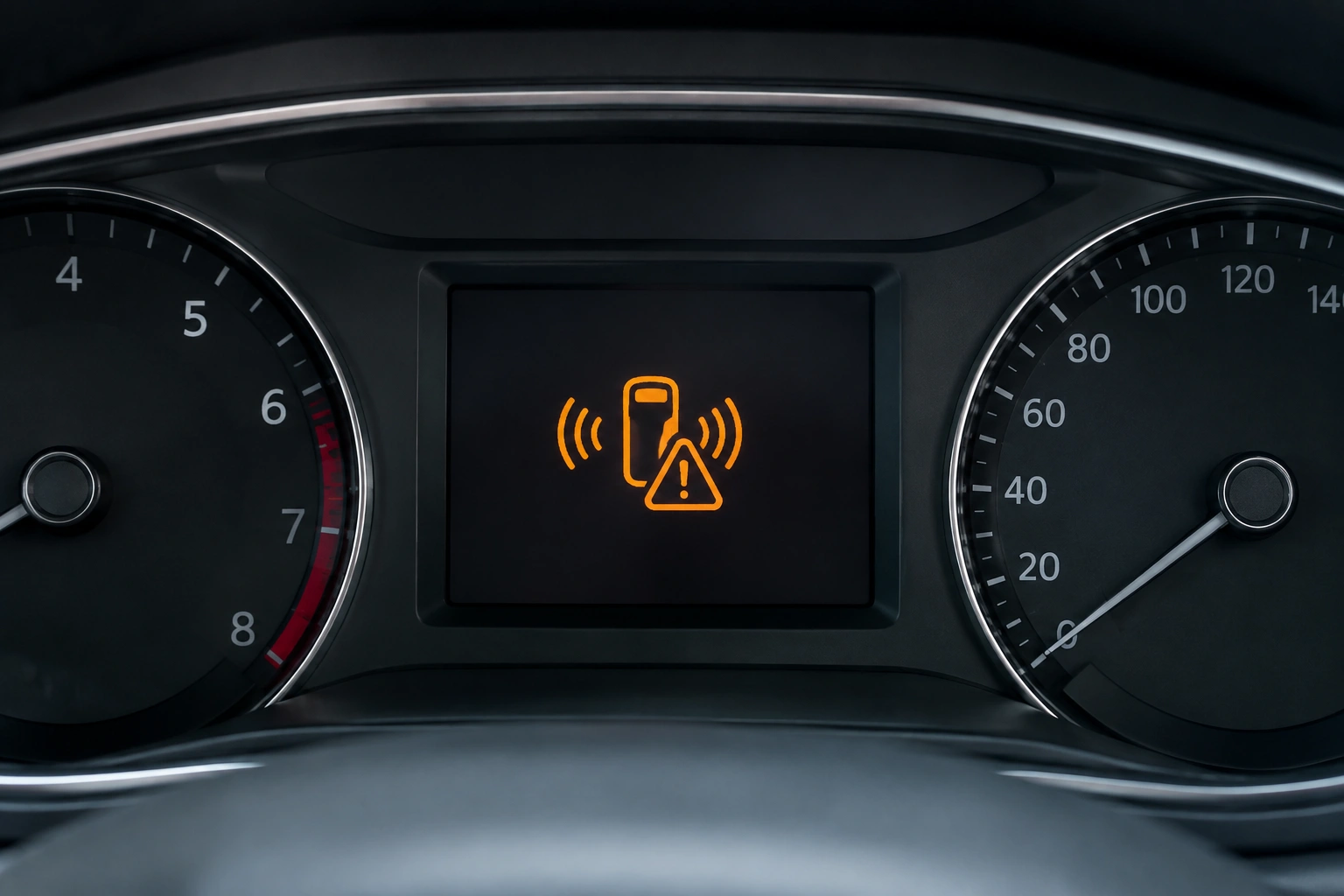
If your dashboard suddenly shows a smart key system malfunction warning, the car is telling you the smart entry and push-button start system is not communicating the way it should. In plain English: the vehicle is having trouble recognizing the key fob, or one of the smart key components on the car side is not responding correctly.
That warning can be annoying, but it is also useful. It narrows the problem down to a few likely causes: a weak key fob battery, a weak 12V vehicle battery, signal interference, a damaged fob, or a fault in the car’s receiver, antenna, wiring, or immobilizer system. The trick is to check the simplest causes first before assuming the worst.
What to do first
- Try a spare key fob.
- Replace or test the key fob battery.
- Check the vehicle’s 12V battery.
- Remove possible interference.
- Get a professional diagnosis if the warning remains.
What the Smart Key System Malfunction Warning Means
A smart key system is the part of the car that lets the vehicle “talk” to your fob without inserting a metal key. When everything works, the car detects the fob nearby, unlocks the doors, and allows push-button starting.
When the warning appears, that communication has broken down somewhere. In most cases, it means the car is not reliably detecting the fob or one of the smart key components is not responding as expected. Common causes include a dead key fob battery, signal interference from other devices, a damaged key fob, or issues with the car’s receiver or wiring.
That message does not automatically mean the car is broken beyond use. It does mean you should treat the system as unreliable until you confirm the cause.
Can You Still Start or Drive the Car?
Sometimes, yes — but only if the car is starting normally and the warning is not affecting restart.
Safe for short-term driving:
If the car starts, the warning clears after startup, and there are no other electrical symptoms, you can usually drive it short-term while you arrange a fix. This is especially true if the issue seems limited to one fob or a weak fob battery.
Do not rely on it:
If the car only starts intermittently, does not detect the key consistently, or has trouble restarting after shutdown, do not treat it as dependable. The system may fail the next time you stop and try to start again.
Check the vehicle battery first if:
The warning appears with dim lights, slow cranking, or other electrical glitches. Those signs can point to a weak 12V battery rather than a fob problem.
For broader context on push-button start and key recognition issues, Edmunds’ car tech guides are a useful reference point for owners who want plain-language explanations.
Most Likely Causes, Ranked by What to Check First
When I was turning wrenches, I learned not to chase the complicated failure before checking the easy one. The same logic applies here.
1. Weak or dead key fob battery
This is the most common place to begin. A weak fob battery can still work sometimes, especially close to the car, and fail at other times. That makes the problem look random when it really isn’t.
2. Weak 12V vehicle battery
A lot of owners focus on the fob and overlook the car battery. But the smart key system depends on stable vehicle voltage. If the 12V battery is weak, the car may struggle to power the receiver, antennas, and control modules that read the fob.
3. Signal interference
A phone, another fob, a metal object, or even parking in a location with unusual electronic noise can interfere with detection. If the warning disappears after moving the fob or the car, interference becomes more likely.
4. Damaged key fob
A cracked case, liquid damage, worn contacts, or internal board damage can cause intermittent communication problems even with a fresh battery.
5. Vehicle-side smart key fault
If the fob is known-good and the vehicle battery is healthy, the issue may be on the car side: receiver, antenna, wiring, immobilizer, or a related module.
Step-by-Step Troubleshooting in the Right Order
Use this sequence instead of guessing.
Step 1: Try the fob in a different position
Hold the fob close to the start button or the designated backup detection area. Many push-button cars have a spot where the car can read the fob even when the battery is weak.
If the car starts only when the fob is placed right next to the button, that points strongly to a weak fob battery.
Step 2: Remove possible interference
Take other key fobs, phones, and metal objects away from the smart key. Then try again. If the warning is intermittent, this simple step can reveal a borderline fob battery or a sensitivity issue.
Step 3: Try the spare key fob
This is one of the best diagnostic tests you have. If the spare works normally, the original fob is the likely problem. If neither fob works properly, the fault is more likely in the vehicle.
Step 4: Check the vehicle battery
If the car is slow to crank, the lights seem dim, or multiple warning lights are showing up, the 12V battery may be weak. Even if the fob battery is fine, low vehicle voltage can confuse the smart key system.
Step 5: Replace the fob battery if it is old or unknown
If you do not know when the battery was last changed, replacing it is a smart first repair. It is inexpensive compared with module diagnosis, and it solves a lot of “mystery” warnings.
Step 6: Watch for patterns
If the warning only happens in one location, near certain electronics, or after the car sits for a while, that pattern matters. Intermittent symptoms usually point to a weak battery, marginal connection, or early-stage component failure rather than a complete breakdown. If the warning clears on its own, that does not mean the problem is fixed — it often means the system is still on the edge of failing.
How to Start the Car When the Smart Key Is Not Detected
If your push-button vehicle says the key is not detected, the emergency start procedure is often the quickest way to get moving.
The exact method varies by make and model, and the backup detection location is not always the same. Check the owner’s manual first so you know the correct spot for your vehicle.
The usual approach is:
1. Sit in the driver’s seat with the fob.
2. Press the brake pedal.
3. Hold the fob directly against the start button or place it in the backup detection area specified in the owner’s manual.
4. Press the start button while keeping the fob in position.
If that works, the car is confirming that the fob is at least readable at close range. That usually points to a weak fob battery rather than a total system failure.
For model-specific steps, the owner’s manual is the best source. If you want a second reference, NHTSA’s vehicle safety resources are helpful for understanding when a warning affects starting or vehicle operation.
How to Tell If the Problem Is the Key Fob or the Vehicle
Here is the practical difference I look for:
| Symptom | More likely cause | First fix |
|---|---|---|
| Car starts only when fob is held near the button | Weak key fob battery | Replace fob battery |
| Spare fob works, original does not | Bad fob battery or damaged fob | Test with fresh battery, inspect fob |
| Neither fob works consistently | Vehicle-side smart key issue or weak 12V battery | Check vehicle battery, then diagnose system |
| Warning appears with dim lights or slow cranking | Weak vehicle battery | Test or replace 12V battery |
| Warning comes and goes near certain places | Signal interference or marginal fob battery | Move away from electronics, retest |
| Warning stays on after battery swaps | Receiver, antenna, wiring, or module fault | Professional diagnosis |
A key point: a fob problem often affects one fob. A vehicle-side fault often affects every fob.
How to Replace the Key Fob Battery
If your fob battery is weak, replacement is usually the simplest fix.
General approach:
1. Open the fob case carefully.
2. Note the battery type before removing it.
3. Replace it with the same type and orientation.
4. Reassemble the fob fully so the contacts sit correctly.
5. Test the fob from normal distance and again with the emergency start method.
If the warning disappears after replacement, great. If it does not, do not assume the battery change failed. Check whether the battery was installed backward, whether the contacts are bent, or whether the fob case is not closing properly.
If you already replaced the battery and the warning remains, this related guide may help: why a key fob low battery warning won’t go away.
When a Spare Key Fob Helps Diagnose the Issue
A spare fob is more than a backup — it is a diagnostic tool.
Use the spare in the same conditions where the warning appears. If the spare works normally, you have a strong clue that the original fob is the problem. That could mean the battery is weak, the contacts are dirty, or the fob itself is damaged.
If both fobs act the same way, stop focusing on the fobs and shift your attention to the vehicle battery or the smart key system hardware.
Why the Warning Comes and Goes Intermittently
Intermittent warnings are frustrating, but they are also informative.
A warning that appears and disappears often points to one of three things:
– A marginal fob battery that works at close range but not reliably
– Interference from nearby electronics or objects
– An early vehicle-side fault such as a loose connection, antenna issue, or receiver problem
That “sometimes works” behavior is a clue, not a coincidence. A completely dead fob usually fails all the time. Intermittent issues usually mean the system is on the edge of working.
When Reprogramming or Professional Diagnosis Is Needed
Reprogramming is usually not the first fix. If the battery is weak or the fob is damaged, reprogramming will not fix the root problem.
It becomes relevant mainly after battery checks fail, or when you are pairing a replacement fob and the vehicle needs it programmed to recognize the new one.
You usually need professional diagnosis when:
– both the spare and original fob fail
– the warning stays on after a fresh fob battery
– the vehicle battery tests good
– the car starts only inconsistently
– there are signs of a receiver, antenna, wiring, or immobilizer fault
At that point, a scan tool and model-specific testing can save time. Some repairs are best handled by a dealer, while others can be handled by an automotive locksmith, depending on the make and model and on whether the issue is tied to the fob itself or a replacement that needs pairing.
When to Consult a Locksmith
Call a locksmith, dealer, or mechanic when the simple checks do not solve it.
Choose the right shop based on the symptom:
– Automotive locksmith: often a good option for fob replacement, many reprogramming jobs, and key-related diagnosis, depending on the vehicle
– Dealer service: often best for vehicle-specific smart key module diagnosis and brand-specific programming
– Mechanic: useful when the issue may involve the 12V battery, charging system, wiring, or broader electrical faults
Get professional help sooner if the car will not start, the warning appears with other electrical problems, or the spare fob behaves the same as the original. That usually means the issue is no longer a battery swap job.
Quick Takeaway
If you see a smart key system malfunction warning, work in this order: test the spare fob, replace the fob battery if needed, check the vehicle’s 12V battery, and look for interference. If those steps do not change anything, the problem is probably on the vehicle side and needs diagnosis.
FAQ
Can I drive with a smart key system malfunction warning?
Usually yes for a short trip if the car starts normally and there are no other electrical symptoms. Do not rely on it if the car is hard to start or may not restart.
What is the most common cause of a smart key warning?
A weak key fob battery is one of the first things to check, followed by the vehicle’s 12V battery.
Will reprogramming fix a smart key malfunction?
Not usually by itself. Reprogramming is more relevant for replacement fobs or confirmed pairing problems after battery checks fail.
Why does the warning come and go?
Intermittent warnings often point to a marginal battery, interference, or an early hardware fault. If it clears temporarily, the issue may still be developing.
Should I check the car battery even if the fob battery seems fine?
Yes. A weak 12V battery can cause smart key problems even when the fob battery is good.
