
iCarsoft MB V4.0 Review: Is This Mercedes Scanner Worth It?

The iCarsoft MB V4.0 is a full-system bidirectional diagnostic scanner built primarily for Mercedes-Benz, Sprinter, Smart, and Maybach vehicles. Its main use is reading and clearing faults, viewing live data, running supported active tests, and accessing model-specific maintenance functions without relying on a basic code reader.
This iCarsoft MB V4.0 review focuses on what matters most to owners, DIY technicians, and independent repair shops: coverage depth, usability, service capability, update costs, and compatibility limits. It sits near the top of iCarsoft’s make-specific MB range, adding touchscreen control, Wi-Fi updates, CAN-FD support, and two additional downloadable vehicle groups.
🏆 My Quick Verdict
💡 Best For: Mercedes-family owners and independent technicians who need deeper diagnostics, active tests, and service functions without an annual update subscription.
⚡ Key Specs:
5-inch 854×480 capacitive touchscreen, Android, 1.3 GHz quad-core processor, 32GB storage, 5000mAh battery, 2.4 GHz Wi-Fi, CAN-FD, and lifetime software updates.
✅ Bottom Line: The MB V4.0 offers substantially more diagnostic depth than a generic OBD2 reader and improves convenience over older iCarsoft MB tools. Its biggest limitation is that exact functions vary by vehicle, so VIN-level compatibility should be checked before purchase.
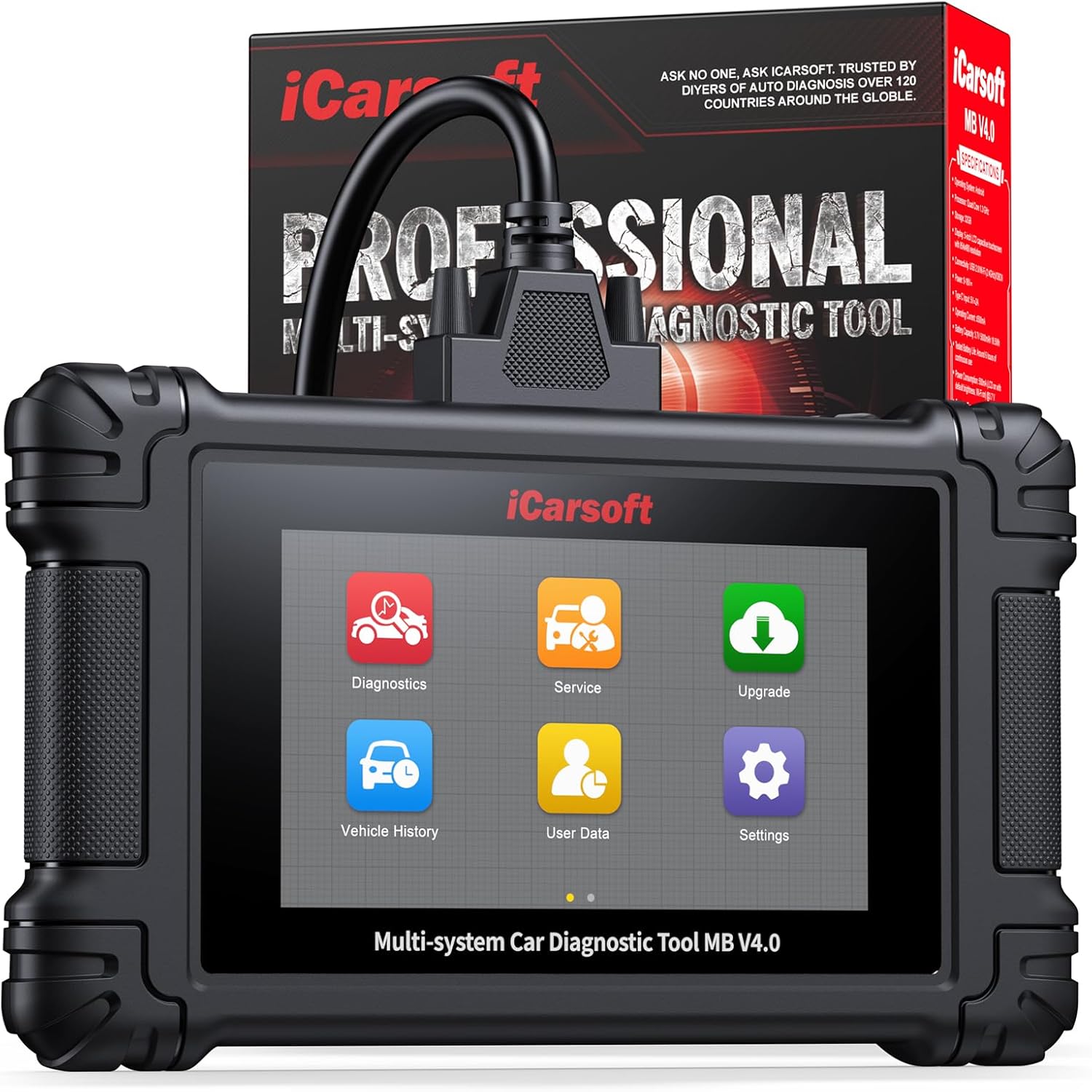
At a Glance
- Designed for full-system diagnostics on supported Mercedes-Benz, Sprinter, Smart, and Maybach vehicles.
- Runs supported bidirectional active tests to command components and confirm faults.
- Includes 41 listed service functions, with availability varying by model, year, and ECU.
- Uses a 5-inch Android touchscreen with Wi-Fi software updates and no recurring update fee.
- Supports CAN-FD for newer compatible vehicle platforms.
- Allows two additional supported vehicle groups to be downloaded free of charge.
Premium Specifications
| Specification | Verified Detail |
|---|---|
| Display | 5-inch 854×480 capacitive touchscreen |
| Operating system | Android |
| Processor | Quad-core 1.3 GHz |
| Storage | 32GB |
| Battery | 5000mAh; around six hours stated continuous use |
| Connectivity | USB 2.0, 2.4 GHz Wi-Fi, OBDII |
| Dimensions | 200 × 116 × 30.2 mm |
| Net weight | Approximately 380 g |
Design & Build Quality
The MB V4.0 uses a compact handheld form factor rather than a large workshop tablet. At about 200 mm wide and roughly 380 g, it remains portable enough for owner garages, mobile work, and routine service bays.
The 5-inch capacitive screen is the main interface improvement over older button-driven MB models. That makes menu navigation, live-data review, and Wi-Fi updating more direct, although buyers wanting a much larger display may prefer a full-size professional tablet scanner.
Setup, Installation & Ease of Use
- Unbox the scanner and confirm the diagnostic cable and included accessories are present.
- Charge the internal battery before longer diagnostic sessions.
- Connect the diagnostic cable securely to the vehicle’s supported port before starting a scan.
- Use AutoVIN where supported, or select the vehicle manually when automatic identification is unavailable.
- Connect to 2.4 GHz Wi-Fi and install available software updates before important service work.
- Store the scanner and cable clean, dry, and protected from excessive heat when not in use.
Core Performance & Feature Breakdown
The MB V4.0’s strongest advantage is full-system access beyond generic emissions diagnostics. On compatible vehicles, it can reach systems such as engine, transmission, ABS, airbag, body electronics, climate, suspension, and other installed control modules.
Bidirectional control adds real diagnostic value because the scanner can command supported components instead of only reading fault codes. Examples listed by iCarsoft include operating windows, fuel pumps, cooling fans, wipers, ABS pump functions, injectors, and other outputs where the vehicle supports the test.
Expert Insight
The most important pre-purchase check is not the headline number of service functions; it is whether your exact VIN, ECU, and model year support the specific active test or reset you need.
The scanner also supports the standard OBD2 test modes needed for common emissions-related diagnosis. CAN-FD support broadens usefulness on newer compatible Mercedes platforms, while lifetime Wi-Fi updates reduce the ownership cost compared with tools that require recurring subscriptions.
Key Features Explained
Full-System Diagnostics
Full-system access lets the scanner interrogate many vehicle modules instead of stopping at engine-related OBD2 faults. This matters when a warning involves brakes, airbags, suspension, transmission, body electronics, or other manufacturer-specific systems.
Bidirectional Active Tests
Active testing sends commands to supported components so you can check whether a device responds. It can shorten troubleshooting by separating a failed component from a wiring, control, or command problem, but available tests vary by vehicle.
41 Service Functions
iCarsoft lists 41 service functions covering common maintenance and more advanced routines. Examples include oil reset, EPB, steering angle calibration, DPF regeneration, injector coding, ABS bleeding, air suspension service, battery management, TPMS, AdBlue, and several adaptation functions.
Wi-Fi Lifetime Updates
Software updates are delivered over Wi-Fi and are stated to remain free for the life of the product. This avoids a yearly update charge, although new software cannot add a function that the target ECU itself does not support.
Real-World Usability & Maintenance
For everyday ownership, the touchscreen and Wi-Fi update process remove some friction found on older PC-updated scan tools. Diagnostic history and report functions also help when comparing faults before and after repairs.
Keep the software current, protect the cable connectors, and avoid storing the unit in temperature extremes. For older Mercedes or early Sprinter models, check the diagnostic port before purchase because a separate 38-pin or 14-pin adapter may be required.
Pros & Cons
Pros
- Full-system access reaches far beyond a basic OBD2 engine-code reader.
- Bidirectional testing can confirm whether supported components respond to commands.
- Lifetime Wi-Fi software updates avoid a recurring update subscription.
- Two additional supported vehicle groups increase usefulness beyond the Mercedes family.
Cons
- Function availability depends on the exact vehicle, year, ECU, and installed equipment.
- Some older Mercedes and Sprinter models require separately sold diagnostic adapters.
- The 5-inch screen is smaller than the displays on many professional tablet scanners.
Common Issues & Fixes
AutoVIN does not identify the vehicle. Select the vehicle manually and confirm the software package is updated.
A listed service function is unavailable. Verify VIN-specific coverage because supported routines differ across models and control modules.
An older vehicle will not connect through the standard cable. Check whether that model requires the optional 38-pin Mercedes or 14-pin Sprinter adapter.
What to Know Before You Buy
The MB V4.0 should be purchased around your required function, not only its feature count. Confirm the exact vehicle, production year, diagnostic connector, and desired service routine before ordering.
The Mercedes-Benz, Sprinter, Smart, and Maybach group is preinstalled, and two other supported vehicle groups can be added. That expansion is useful for multi-car households, but buyers should choose the extra groups carefully based on the vehicles they actually service.
Who Should Buy It / Who Should Skip It
✅ Who Should Buy It
- Mercedes-family owners who perform their own diagnostics and maintenance.
- Independent technicians needing make-specific active tests and service routines.
- Users who prefer lifetime software updates instead of annual subscriptions.
✗ Who Should Skip It
- Drivers who only need occasional generic engine-code reading.
- Shops needing broad multi-brand coverage on a large professional tablet platform.
- Owners unwilling to verify VIN-specific support before purchase.
Alternatives to Consider
iCarsoft MB V3.0
Best For: Mercedes-family users who want bidirectional control but prefer physical buttons.
Main Advantage: Full-system access and bidirectional capability in the previous-generation MB platform.
Trade-off: It uses a 4-inch button interface and USB updates rather than the V4.0 touchscreen and Wi-Fi workflow.
Key Spec: 4-inch display.
iCarsoft MB V2.0
Best For: Owners who mainly need full-system scanning and common service resets.
Main Advantage: It keeps dedicated Mercedes-family diagnostics with a simpler interface.
Trade-off: It does not add the V4.0’s bidirectional control, touchscreen, or Wi-Fi updating.
Key Spec: 4-inch display.
Is It Worth It?
The MB V4.0 is worth considering when you own compatible Mercedes-family vehicles and need more than code reading. Its value comes from deeper module access, active testing, service routines, and subscription-free updates in one dedicated handheld tool.
It is less compelling for drivers who only clear occasional check-engine lights. In that case, a simpler OBD2 scanner can cover basic needs for less money and complexity.
Final Verdict
The iCarsoft MB V4.0 is a strong make-specific diagnostic choice for serious Mercedes-family DIY work and independent service. Buy it only after confirming your exact vehicle and required functions, because supported routines vary across platforms.
Frequently Asked Questions
Does the iCarsoft MB V4.0 work with every Mercedes-Benz?
No, exact compatibility and functions vary by model, year, ECU, and diagnostic connector. iCarsoft lists broad Mercedes-family coverage, but VIN-specific confirmation is the safest check before purchase.
Can it perform bidirectional active tests?
Yes, it supports bidirectional active tests on compatible modules. Available tests can include pumps, fans, windows, injectors, wipers, and other supported outputs.
Does it need a subscription for updates?
No, iCarsoft states that software updates are free for the life of the tool. Updates are delivered over 2.4 GHz Wi-Fi.
What adapters may be needed for older vehicles?
Some older models require separately sold adapters. Certain pre-2003 Mercedes vehicles may need a 38-pin adapter, while early Sprinter models may need a 14-pin adapter.
What warranty does the MB V4.0 include?
iCarsoft states that the MB V4.0 is backed by its manufacturer warranty. Check the current seller or manufacturer warranty policy for the exact term and regional conditions before ordering.
How should the scanner be maintained?
Keep the software updated and protect the unit, battery, cable, and connectors from moisture and temperature extremes. Store it dry and inspect connections before diagnostic sessions.
Affiliate disclosure: replacekeyfob.com earns a small commission when you purchase through links on this page — at no extra cost to you. Our editorial process is independent: affiliate relationships never influence which products we recommend or how we rank them.
“`
