
Key Fob Battery Size Chart: Find Your Battery Type (CR2032, CR2025, CR2016 & More)

Most car key fobs run on a 3-volt lithium coin cell, and the most common sizes are CR2032, CR2025, CR2016 and CR1620. They look alike, but each has a different diameter and thickness, so you need the right one. This chart lists the sizes you are likely to meet, and the sections below show how to confirm which one your fob takes before you buy.
Quick answer
The code on the old battery is the answer. Read the first two digits as the diameter in millimetres and the last two as the thickness in tenths of a millimetre: CR2032 is 20 mm wide and 3.2 mm thick. Bring the old cell with you if you are buying in a shop.
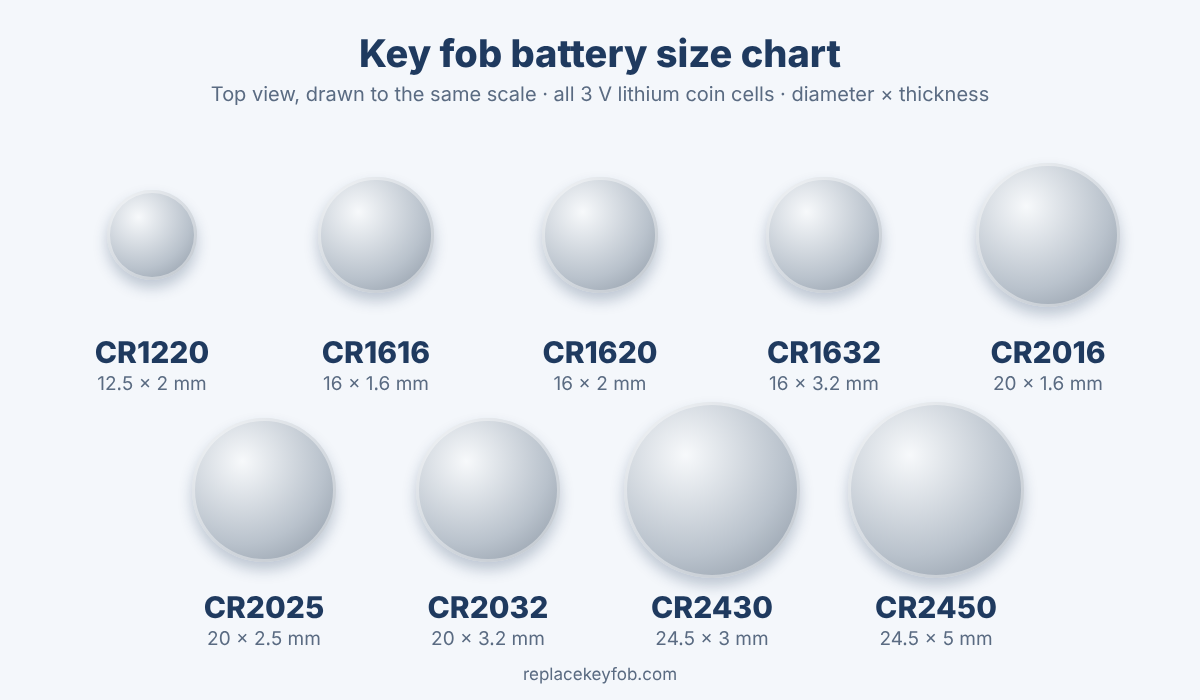
Key fob battery size chart
All of these are lithium cells with a nominal voltage of 3 V. Sizes follow the standard coin cell naming system, so the dimensions below are the same for any reputable brand.
| Battery | Diameter | Thickness | Where you may see it |
|---|---|---|---|
| CR2032 | 20 mm | 3.2 mm | The most common fob battery |
| CR2025 | 20 mm | 2.5 mm | Slimmer fob cases |
| CR2016 | 20 mm | 1.6 mm | Very slim fobs, often two cells stacked |
| CR1632 | 16 mm | 3.2 mm | Some compact remotes |
| CR1620 | 16 mm | 2.0 mm | Compact and older-style fobs |
| CR1616 | 16 mm | 1.6 mm | Small remotes and key tags |
| CR1220 | 12.5 mm | 2.0 mm | Very small remotes |
| CR2430 | 24.5 mm | 3.0 mm | Larger fobs and some remote starters |
| CR2450 | 24.5 mm | 5.0 mm | Larger fobs and smart keys |
Which size a given car uses depends on the make, model and year, and even on whether the fob is the original or an aftermarket one. Treat the “where you may see it” column as a guide, not a rule, and confirm with the old battery or the owner’s manual.
How to read a battery code
- CR: a round lithium manganese dioxide cell.
- First two digits: diameter in millimetres (20 = 20 mm, 16 = 16 mm, 24 = 24.5 mm).
- Last two digits: thickness in tenths of a millimetre (32 = 3.2 mm, 25 = 2.5 mm, 16 = 1.6 mm, 20 = 2.0 mm).
The 24.5 mm sizes are the exception to the rounding, because the code uses 24 for a diameter of 24.5 mm. Once you know the rule, a code on a battery tells you its size at a glance. For a deeper comparison of the two most popular sizes, see CR2032 vs CR2025.
How to find out which battery your key fob uses
- Open the fob and read the old battery. The code is stamped on the flat face with the + sign. Our guide to opening a key fob without damaging it shows the common case designs.
- Check the owner’s manual. It normally lists the battery type in the section on remote controls or keys.
- Look at the plastic case. Some fobs have the code moulded next to the battery holder.
- Measure it. If the code is worn off, a digital caliper gives you the diameter and thickness. Match them to the table above.
- Search by your car’s year, make and model together with “key fob battery”, then confirm against the old cell.
If you are not sure it is safe to try this yourself, read can I replace a key fob battery myself? first.
Does it matter if you use a different size?
Yes. Size is not only about fit. A cell that is too thin may not make firm contact, and one that is too thick can stop the case closing or bend the contacts. Voltage is the same across this family, but capacity changes with size, so a thinner cell tends to run out sooner. The safe approach is to use the exact code your fob was designed for.
One important exception to watch for is rechargeable cells such as LIR2032. They look like a CR2032 but run at a higher voltage (typically around 3.6 V), which is not what a key fob circuit is built for. Do not substitute them.
Some fobs use two batteries
Several slim fobs hold two thin cells, for example two CR1616 or CR2016 batteries, either stacked or side by side. If your fob has two, replace both at the same time with the same type. Mixing a fresh cell with a tired one shortens the life of the new battery and can cause the same weak-signal problems you were trying to fix.
Check polarity before you close the case
Most fobs take the battery with the + side up, but some are the other way round, and a battery inserted backwards will not power the fob. Take a photo of the old battery before you remove it and see the key fob battery polarity guide for how to recognise the right orientation.
How long a fob battery lasts
Most owners get somewhere between one and a few years from a fresh cell, depending on how often the fob is used, the fob’s features and the climate. Keyless-entry fobs that listen for the car all day tend to use their battery faster. Details and a replacement schedule are in how long key fob batteries last and how often to replace the battery.
Different fob types, different battery habits
The kind of key you have affects how hard the battery works, though not which size it takes:
- Remote head keys and flip keys have a key blade and a few buttons. They only transmit when you press a button, so the battery tends to last a long time.
- Smart keys and proximity fobs (push-button start) talk to the car more often, which can drain the cell faster. Many include a hidden emergency key blade in case the battery dies.
- Standalone remotes, such as garage-style or remote-start fobs, are usually smaller and may use one of the 16 mm or 12.5 mm cells.
Whichever you have, the rule stays the same: copy the code from the old battery. If your fob has already stopped working, most smart keys can still start the car using a backup method described in the owner’s manual, so check it before calling for help.
How to test a coin battery
If you are not sure whether the old battery is really dead, a basic multimeter can tell you. Set it to DC volts, touch the red probe to the + face and the black probe to the − side. As a rough guide, a fresh CR-type cell reads about 3 V or a little above, and a reading well below that, for example under about 2.7 V, means the cell is weak and worth replacing. A reading taken without a load can look fine even on a tired battery, so if the fob is misbehaving, replacing the cell is the quickest test.
Storing spare batteries
Keep spare coin cells in their original blister pack, in a cool dry place, away from coins, keys and other metal that can touch both faces and drain them. Do not store them in the car, where heat and cold in the cabin shorten their life. Write the purchase date on the pack if you keep several.
Buying the right battery
- Buy by code, not by “car key battery” labels. Check that the code on the pack matches the one on your old cell.
- Choose a recognised brand, since unknown cells may not deliver their stated capacity.
- Check the expiry or best-before date printed on the pack.
- A multi-pack is usually good value, and the spares can sit in a drawer at home.
See our best CR2032 batteries for key fobs comparison, or browse CR2032 batteries on Amazon, CR2016 or CR1620. As an Amazon Associate, ReplaceKeyFob earns from qualifying purchases; see our disclaimer.
Common mistakes
- Buying by guess because two batteries “look the same”.
- Prying out the old cell with a metal screwdriver, which can bend the contacts. Use a plastic tool.
- Handling the new battery by its flat faces. Hold it by the edge.
- Forcing the case shut over a cell that is too thick.
- Replacing only one of two batteries.
If the fob still does not work
When a correct, fresh battery does not bring the fob back, the problem is usually a dirty or bent contact, a wrongly seated cell, or lost pairing. Work through what to do when a new battery did not fix the problem, and see whether your fob needs reprogramming.
Safety: keep coin batteries away from children and pets
A swallowed coin cell can cause serious internal burns within hours. Store spares out of reach, and dispose of old cells promptly. If you think a child has swallowed a battery, go to the emergency room straight away and call the National Battery Ingestion Hotline at 1-800-498-8666, or Poison Help at 1-800-222-1222. More guidance: Poison Control.
Frequently asked questions
What is the most common key fob battery?
The CR2032 is the most common, followed by the CR2025. Many fobs also use a CR2016 or CR1620, so always check the old battery.
How do I know which battery my key fob needs?
Read the code on the old battery, look in the owner’s manual, or check the case. If none of those help, measure the cell’s diameter and thickness and match it to the chart.
Can I use a different battery size if it fits?
It is best not to. Cells of different thickness can leave a loose contact or strain the case. Use the code the fob was made for.
Are CR2032 and CR2025 interchangeable?
They share the same diameter and voltage, but the CR2032 is thicker and has more capacity, so they are not a true like-for-like swap. Our CR2032 vs CR2025 guide explains the trade-offs.
Why does my key fob still not work after a battery change?
Check the battery direction, clean the contacts gently, and confirm the battery size. If it still fails, the fob may need re-pairing or may have a fault.
Do I need a professional to program a key fob?
Not usually for a simple battery change, because most fobs keep their pairing. Programming is only needed if the fob loses its link to the car or is replaced.
Are aftermarket batteries as good as OEM?
Reputable brands are normally fine. Be cautious with unbranded cells, which may not hold their stated capacity.
Bottom line
Match the code on your old battery to the chart, buy the same code, and keep a spare. When in doubt, measure the diameter and thickness before you buy. Keep every coin cell out of reach of children.
