
GOOLOO DS100 OBD2 Scanner Review: Is It Worth It?

The GOOLOO DS100 OBD2 Scanner Bluetooth is a smartphone-based automotive diagnostic adapter designed to identify vehicle faults through an OBD-II connection.
It helps everyday drivers and DIY mechanics investigate warning lights, retrieve diagnostic codes, and access supported vehicle systems without a standalone scanner.
This GOOLOO DS100 OBD2 Scanner review examines its capabilities, compatibility restrictions, subscription considerations, and overall buying value.
Its biggest attraction is broader diagnostic coverage in a portable format. However, vehicle-specific support and ongoing software costs deserve careful attention.
🏆 My Quick Verdict
💡 Best For: Everyday motorists and beginner DIY mechanics who want smartphone-based fault diagnosis and access to supported vehicle control modules.
⚡ Key Specs:
Bluetooth 5.0; Android 7.0+ (64-bit); iOS 11.0+; OBD-II connection; support for up to three bound vehicle makes.
✅ Bottom Line: The DS100 offers an appealing way to investigate automotive faults through a smartphone. Its advertised multi-system coverage is useful, but buyers should confirm exact vehicle functions and potential renewal costs before purchasing.
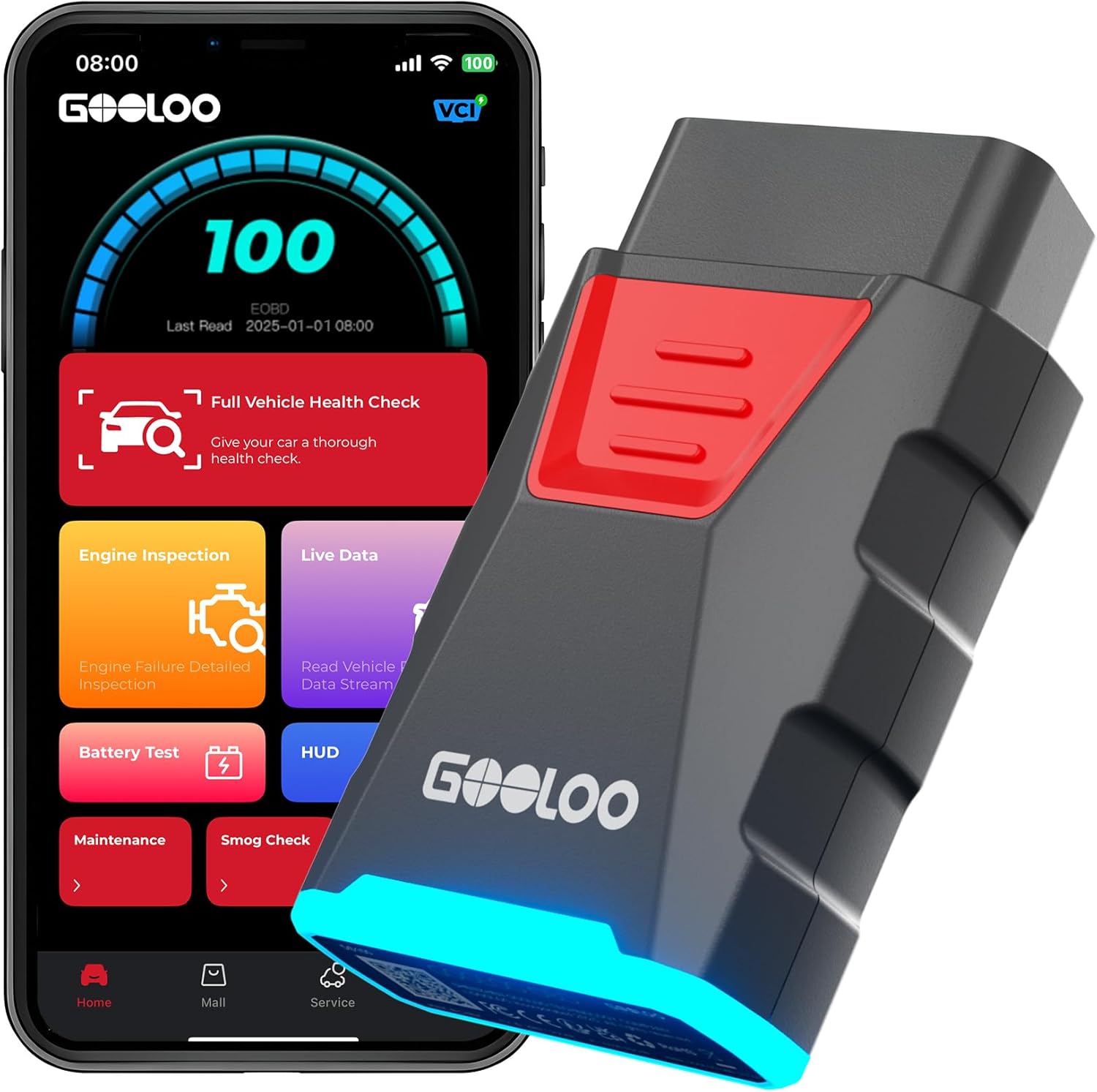
GOOLOO DS100 at a Glance
- Bluetooth 5.0 connects the diagnostic adapter to supported smartphones.
- Advertised diagnostic coverage includes engine, transmission, ABS, and airbag systems.
- Compatible smartphones require supported iOS or 64-bit Android software.
- The adapter supports binding up to three vehicle makes.
- Manufacturer information lists a first-year-free arrangement with potential annual renewal costs.
- Electric vehicles are excluded from the manufacturer’s stated compatibility.
GOOLOO DS100 Specifications
The published specifications establish the DS100’s basic hardware and software requirements. Advanced diagnostic availability remains dependent on the vehicle.
| Specification | GOOLOO DS100 |
|---|---|
| Brand | GOOLOO |
| Model | DS100 |
| Device category | Bluetooth OBD-II diagnostic adapter |
| Wireless connectivity | Bluetooth 5.0 |
| Android requirement | Android 7.0+; 64-bit |
| Apple requirement | iOS 11.0+ |
| Vehicle connection | OBD-II diagnostic port |
| Vehicle-make binding | Up to three makes |
| Subscription listing | First year free; $29.99/year shown for renewal |
| Electric vehicle support | Not supported |
Design and Build Quality
The GOOLOO DS100 uses a compact plug-in design rather than a separate handheld diagnostic computer. This arrangement eliminates the need for a dedicated display or additional diagnostic cable.
Its small form factor suits occasional troubleshooting and storage between uses. Physical clearance still depends on where the vehicle manufacturer positioned the diagnostic socket.
The product connects directly to the vehicle’s diagnostic interface and draws operating power from that connection. An internal rechargeable battery is unnecessary.
Specific housing materials, impact resistance, and environmental protection ratings could not be independently verified. Buyers should avoid assuming workshop-grade durability.
Setup, Installation and Ease of Use
- Unpack the scanner and inspect its connector for visible damage.
- Confirm your vehicle and smartphone meet the stated compatibility requirements.
- Download the diagnostic application recommended for the DS100.
- Locate the vehicle’s OBD-II diagnostic port, usually beneath the dashboard.
- Insert the adapter firmly without forcing the connector.
- Turn the ignition on according to the manufacturer’s instructions.
- Enable Bluetooth and follow the application’s connection process.
- Select the appropriate vehicle information before starting a diagnostic scan.
- Save relevant fault information before clearing diagnostic trouble codes.
- Remove and store the adapter somewhere dry when it is unnecessary.
Core Performance and Diagnostic Capabilities
Engine Fault Diagnosis
The DS100 is designed to help identify engine-related problems through diagnostic trouble codes. These codes provide starting points for troubleshooting rather than guaranteed repair instructions.
For example, a sensor-related warning may identify an affected circuit without proving that the sensor itself has failed. Wiring and related components may require further investigation.
Multi-System Diagnostics
GOOLOO advertises access to multiple vehicle systems beyond the engine controller. Its listed targets include transmission, ABS, SRS airbags, steering, and several body-related modules.
This broader coverage can be useful when dashboard warnings originate outside the engine system. Actual module access varies with manufacturer, model, year, and software support.
Bluetooth Communication
Bluetooth connectivity allows the smartphone to serve as the diagnostic interface. This makes readings easier to view without purchasing a separate screen-based scan tool.
However, connection stability depends on the phone, application, vehicle communication system, and surrounding wireless environment. A Bluetooth specification alone does not establish diagnostic speed.
Expert Insight
Multi-system diagnostic claims should never be interpreted as universal vehicle coverage. Confirm that the scanner supports your exact vehicle and intended diagnostic function before relying on it for safety-related warnings.
Practical Diagnostic Limitations
A stored trouble code describes what the vehicle’s control system detected. It does not automatically identify the failed component or confirm repair costs.
Airbag and braking warnings require particular caution because incorrect repairs can compromise safety. Professional diagnosis remains appropriate when faults involve critical systems.
Key Features Explained
1. Smartphone-Based Diagnostics
The phone-based interface replaces a traditional scanner screen and physical controls. It offers a familiar operating environment, although the experience depends heavily on the installed application.
2. Vehicle-Make Management
The DS100 supports binding three vehicle makes through its software. Users can manage assigned makes through the application’s device-management settings.
3. Broad Module Coverage
Advertised access extends to multiple electronic control systems, making the DS100 potentially useful beyond routine engine warnings. Individual functions must still be checked against the vehicle compatibility information.
4. Software-Dependent Functionality
The scanner relies on compatible software to communicate with supported vehicles. This introduces an important purchasing consideration: application availability, licensing terms, and future updates can affect long-term usefulness.
Real-World Usability and Maintenance
For occasional vehicle owners, the most useful routine is recording fault codes before discussing repairs with a mechanic. Keeping screenshots or reports can preserve information that later disappears.
Store the adapter away from moisture, excessive heat, and physical impacts. Inspect the connector periodically and avoid touching or damaging its electrical contacts.
When servicing multiple cars, confirm the correct vehicle profile before running diagnostics. Do not leave the adapter connected indefinitely without understanding its power-management behavior.
GOOLOO DS100 Pros and Cons
Advantages
- Bluetooth connectivity removes the need for a dedicated scanner display.
- Advertised multi-system coverage expands potential troubleshooting applications.
- Support for iOS and Android accommodates different smartphone users.
- Compact construction makes storage and transport straightforward.
Disadvantages
- Advanced functionality depends on exact vehicle compatibility.
- Subscription or software renewal charges can increase ownership costs.
- Electric vehicles and 32-bit Android systems are unsupported.
Common Issues and Fixes
Scanner Does Not Connect
An unsuccessful Bluetooth connection may prevent the application from detecting the adapter. Confirm ignition power, Bluetooth permissions, connector seating, and the application’s pairing procedure.
Expected Vehicle Module Is Missing
A diagnostic module may be unavailable even when basic OBD-II communication works. Check the manufacturer’s vehicle coverage information before assuming the scanner is defective.
Application Requests Payment
A subscription prompt may appear when software access or licensing requirements apply. Review the official renewal terms and avoid similarly named applications from unverified developers.
What to Know Before You Buy
The most important buying consideration is compatibility with your exact car, not simply its model year. Confirm the engine type and the specific electronic modules you need to diagnose.
GOOLOO states support for many gasoline vehicles from 1996 onward and selected light diesels. Its published information excludes electric vehicles, so broader vehicle compatibility should not be assumed.
Also verify the current renewal policy before checkout. The manufacturer’s comparison chart lists a first-year-free arrangement followed by an annual fee, while software instructions reference compatible applications.
Who Should Buy It and Who Should Skip It?
✅ Who Should Buy It
- Drivers who want to investigate dashboard warnings.
- DIY mechanics working with confirmed compatible vehicles.
- Smartphone users who prefer wireless diagnostic interfaces.
- Owners seeking access beyond basic engine fault codes.
✗ Who Should Skip It
- Electric vehicle owners.
- Users requiring a completely standalone scanner.
- Buyers unwilling to consider recurring software charges.
- Professional technicians requiring guaranteed manufacturer-level coverage.
Alternatives to Consider
Two established Bluetooth adapters deserve consideration when the DS100’s subscription structure or vehicle restrictions are unsuitable.
Veepeak OBDCheck BLE
Best For: iOS and Android users seeking flexible third-party diagnostic apps.
Main Advantage: Compatible with multiple established applications.
Trade-off: Advanced features depend on the chosen app and vehicle.
Key Spec: Bluetooth LE and Classic Bluetooth connectivity.
OBDLink LX Bluetooth
Best For: Android and Windows users prioritizing established diagnostic software.
Main Advantage: Includes OBDLink software support and secure pairing.
Trade-off: Does not support iOS devices.
Key Spec: Supports legislated OBD-II protocols.
Is the GOOLOO DS100 Worth It?
The DS100 represents reasonable value for buyers who specifically need its supported diagnostic capabilities. Its usefulness depends more on compatible vehicle coverage than an extensive advertised feature list.
The potential subscription cost makes a long-term comparison important. Occasional users should calculate whether an annually renewed software arrangement matches their expected usage.
Final Verdict
The GOOLOO DS100 is a promising Bluetooth diagnostic option for compatible gasoline vehicles and selected light diesels. It is best considered a convenient diagnostic aid rather than a guaranteed replacement for professional equipment.
Confirm module coverage and software terms before purchasing. Those checks will determine whether it meets your needs.
Frequently Asked Questions
Does the GOOLOO DS100 work with iPhone and Android?
Yes, the manufacturer lists iOS 11.0+ and Android 7.0+ compatibility. Android devices must also meet its 64-bit requirement.
Does the GOOLOO DS100 work with every car?
No, compatibility is vehicle-dependent. The manufacturer lists many gasoline vehicles and selected light diesels but excludes electric vehicles.
How many vehicles can the DS100 support?
The DS100 supports binding up to three vehicle makes. Existing makes can be managed through the application’s device-management section.
Does the GOOLOO DS100 require a subscription?
The manufacturer’s comparison chart lists a first-year-free arrangement followed by a $29.99 annual renewal. Confirm current licensing terms and included functions before purchasing.
What warranty comes with the DS100?
A specific warranty duration could not be independently verified. Check the seller’s current warranty documentation and return policy.
How should I maintain the GOOLOO DS100?
Keep the adapter dry, clean, and protected from impact. Inspect its connector before use and store it safely when disconnected.
Affiliate disclosure: replacekeyfob.com earns a small commission when you purchase through links on this page — at no extra cost to you. Our editorial process is independent: affiliate relationships never influence which products we recommend or how we rank them.
