
What Are OBD2 Readiness Monitors? A Complete Guide

Quick Answer
OBD2 readiness monitors are self-checks built into a vehicle’s onboard diagnostic system that track whether specific emissions-related systems have completed their diagnostic tests. An OBD2 scanner displays each supported monitor as Ready, Not Ready, or Not Supported. If a monitor is Not Ready, the computer has not completed that test; it does not automatically mean a component has failed or that the vehicle has failed an emissions inspection.
What the Monitor Statuses Mean
- Ready: The vehicle has completed the applicable diagnostic test.
- Not Ready: The required test has not completed since the last reset or relevant diagnostic event.
- Not Supported: The vehicle does not support that particular monitor.
- Common causes: A disconnected battery, cleared diagnostic trouble codes, recent repairs, or driving conditions that have not allowed a test to run.
- What to do: Check all monitor statuses with a compatible scanner, then follow the vehicle manufacturer’s drive-cycle guidance where needed.
Before an Emissions Test
- Check your local inspection rules because the number of incomplete monitors allowed varies by jurisdiction and vehicle.
- Don’t clear diagnostic codes just to try to pass an inspection; doing so can reset monitor readiness and hide useful diagnostic information.
If you’ve connected an OBD2 scanner to your car and seen several monitors marked Incomplete, you’re not alone in wondering what those results mean. These statuses can be confusing, especially after a battery replacement, engine repair, or check-engine light issue.
In this guide, I’ll explain what readiness monitors check, how to interpret their results, why they become incomplete, and what to do before an emissions inspection. I’ll also clarify how readiness differs from diagnostic trouble codes so you can make better decisions with your scan tool.
In This Guide
- What Are OBD2 Readiness Monitors?
- What Does Each Readiness Monitor Check?
- What Do Ready, Not Ready, and Not Supported Mean?
- Why Are OBD2 Monitors Not Ready?
- How Do You Get Readiness Monitors to Ready?
- Can You Pass Emissions With Incomplete Monitors?
- How Do You Check Readiness With an OBD2 Scanner?
- Frequently Asked Questions
What Are OBD2 Readiness Monitors?
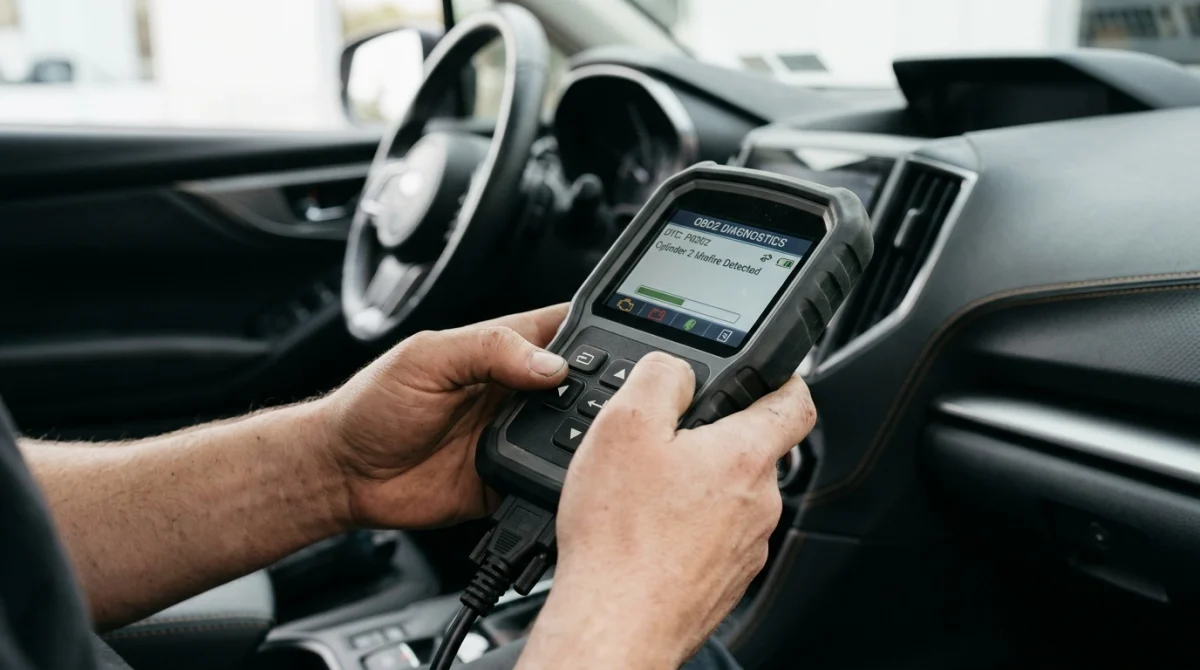
OBD2 readiness monitors are diagnostic status indicators that tell you whether a vehicle’s onboard computer has completed particular emissions-system self-tests. OBD2 stands for On-Board Diagnostics, Second Generation, a standardized diagnostic system used in vehicles covered by applicable regulations.
These monitors help the computer evaluate emissions-related components and systems under suitable operating conditions. Their status also helps inspection programs determine whether the vehicle’s onboard diagnostic system has completed the checks required for an emissions test.
How Do Readiness Monitors Work?
The engine control module or another relevant control module runs diagnostic routines when the conditions required by the vehicle’s programming are met. Depending on the monitor, those conditions can involve engine temperature, vehicle speed, fuel level, engine load, or other operating factors.
When a test finishes, the system records its readiness status. A completed test can be reported as Ready, while a test that has not completed remains Not Ready.
- Automatic testing: Many monitors run during ordinary driving when their enabling conditions are satisfied.
- Condition-dependent testing: Some monitors require specific combinations of temperature, speed, or other operating conditions.
- Diagnostic feedback: If a completed test detects a qualifying malfunction, the system may store a diagnostic trouble code (DTC) and command the check-engine light on.
One important distinction: readiness describes whether a diagnostic test has run, not necessarily what the test found. A Ready monitor does not automatically mean the related component passed every possible test or that the entire vehicle is fault-free.
Are Readiness Monitors the Same as Trouble Codes?
No. Readiness monitors and diagnostic trouble codes provide different information, even though both appear in OBD2 diagnostic data.
| Diagnostic information | What it tells you |
|---|---|
| Readiness status | Whether a supported diagnostic monitor has completed its test. |
| Diagnostic trouble code (DTC) | A code identifying a detected fault or condition requiring interpretation. |
| Malfunction indicator lamp (MIL) | The check-engine warning status commanded by the vehicle’s diagnostic system. |
For example, you might see an evaporative-system monitor marked Not Ready without a corresponding stored trouble code. The test may simply not have run yet, so the result remains undetermined.
Section takeaway: Readiness tells you whether a diagnostic test has completed; trouble codes help identify detected problems.
What Does Each Readiness Monitor Check?
Each readiness monitor covers a particular emissions-related system or group of components. The monitors available on your vehicle depend on its engine, fuel type, model year, and emissions-control design.
Continuous Monitors
Continuous monitors evaluate certain systems during engine operation rather than waiting for one specific test sequence to finish. Common examples include:
- Misfire monitor: Detects engine combustion misfires that can affect emissions and potentially damage the catalytic converter.
- Fuel system monitor: Evaluates aspects of fuel delivery and mixture control, including whether the system can maintain the intended air-fuel mixture.
- Comprehensive component monitor: Checks supported electronic components and circuits associated with engine management.
These monitors generally operate continuously when their required conditions are present. However, the exact status display and diagnostic strategy can vary with the vehicle and scanner.
Non-Continuous Monitors
Non-continuous monitors run only when their specific enabling conditions are met. They are often the monitors that remain incomplete after a battery disconnect or code clearing.
- Catalyst monitor: Evaluates catalytic converter performance using information from relevant sensors.
- Oxygen sensor monitor: Checks the operation of oxygen sensors used to measure exhaust oxygen levels.
- Oxygen sensor heater monitor: Evaluates the heater circuits that help oxygen sensors reach operating temperature.
- Evaporative system monitor: Checks parts of the fuel-vapor containment system for qualifying leaks or other faults.
- EGR system monitor: Evaluates the exhaust gas recirculation system where fitted.
- Secondary air system monitor: Checks the operation of an air-injection system where equipped.
- Heated catalyst monitor: Applies to vehicles equipped with the relevant emissions-control technology.
- Diesel particulate filter and related monitors: Certain diesel vehicles use additional tests for particulate filters, exhaust treatment, and related systems.
Not every vehicle supports every monitor. A gasoline vehicle may display a different set of available monitors from a diesel vehicle, and newer emissions systems may include additional manufacturer-specific diagnostic information.
For a broader explanation of emissions inspection programs, consult the U.S. Environmental Protection Agency’s vehicle inspection and maintenance guidance.
Section takeaway: Focus on the monitors your vehicle supports, particularly non-continuous monitors that need specific driving conditions to run.
What Do Ready, Not Ready, and Not Supported Mean?
These three statuses tell you whether a monitor has completed its test, still needs to run, or does not apply to the vehicle. Understanding the difference prevents unnecessary parts replacement and confusion before an inspection.
| Status | Meaning | Recommended response |
|---|---|---|
| Ready | The applicable diagnostic test has completed. | Review trouble codes and other results separately. |
| Not Ready / Incomplete | The monitor has not completed its required test. | Check recent repairs, reset history, and manufacturer-specific drive-cycle requirements. |
| Not Supported / N/A | The monitor is not applicable or supported in the displayed diagnostic context. | Confirm the scanner is reading the correct vehicle and diagnostic mode. |
Does Not Ready Mean Something Is Broken?
Not necessarily. It means the system has not completed the relevant check, so its diagnostic result may still be unknown.
For instance, a vehicle that recently had its battery disconnected may have several incomplete monitors even if it starts, idles, and drives normally. That status alone does not prove a faulty oxygen sensor, catalytic converter, or evaporative-system component.
However, an incomplete monitor should not automatically be dismissed. A malfunctioning component or a problem preventing the monitor’s enabling conditions from being met can stop a test from completing.
Technician’s note: If a monitor repeatedly refuses to complete, check for stored or pending DTCs and investigate any related operating-condition or component faults before replacing parts.
Why Are OBD2 Monitors Not Ready?
OBD2 monitors commonly become Not Ready when the computer loses relevant diagnostic information or has not experienced the conditions needed to complete a test. Recent maintenance is a frequent reason, but it is not the only one.
Common Causes of Incomplete Monitors
- Battery disconnection: Disconnecting the battery can reset readiness information on many vehicles.
- Cleared trouble codes: Using a scanner to erase DTCs can reset affected monitor statuses.
- Recent repairs: Engine or emissions-system repairs may require the relevant self-tests to run again.
- Limited driving: Short trips or repeated cold starts may not provide the conditions some monitors require.
- Fuel level or temperature: Certain monitors require a particular fuel level, engine temperature, or ambient condition.
- Underlying malfunction: A faulty component or another issue can prevent a monitor from running or completing successfully.
Why Does My EVAP Monitor Stay Incomplete?
The evaporative emissions monitor, commonly called the EVAP monitor, checks aspects of the system that prevents fuel vapors from escaping into the atmosphere. Its test may require a particular fuel level, temperature range, soak period, or other vehicle-specific conditions.
Filling the tank to the top, driving only short distances, or using an unsuitable driving pattern may prevent some vehicles from meeting their test conditions. The precise requirements depend on the vehicle.
Why Did My Monitors Reset After a Battery Change?
A battery replacement or power interruption can cause the onboard computer to lose readiness information. Some vehicles retain certain learned information, but readiness may still need to be re-established.
This does not mean the replacement battery damaged the emissions system. It means the computer may need to repeat its applicable self-tests before the vehicle is ready for inspection.
Technician’s note: Before attempting a drive cycle, scan for trouble codes and consult the owner’s manual or service information. A recurring incomplete monitor may need diagnosis rather than more driving.
How Do You Get Readiness Monitors to Ready?
Most incomplete monitors return to Ready after the vehicle experiences the operating conditions required by its onboard diagnostic system. There is no single universal drive cycle that works for every make, model, engine, and model year.
Follow These Practical Checks
- Read the current status. Use an OBD2 scanner to identify which monitors remain incomplete and whether any DTCs are stored or pending.
- Review recent work. Consider whether the battery was disconnected, codes were cleared, or emissions-related repairs were performed.
- Check for warning signs. If the check-engine light is on, investigate the underlying fault before assuming additional driving will solve the issue.
- Consult vehicle-specific guidance. Find the manufacturer’s recommended drive cycle or relevant service information for your exact vehicle.
- Drive under safe, appropriate conditions. Follow the specified operating requirements without exceeding speed limits or making unsafe maneuvers.
- Scan again. Recheck the readiness statuses after the vehicle has had a reasonable opportunity to complete its tests.
How Long Does It Take for Readiness Monitors to Reset?
There is no fixed timeframe. Some monitors may complete during ordinary driving, while others can require several trips or specific operating conditions.
The EVAP and catalyst monitors can be particularly dependent on temperature, fuel level, engine operation, and other enabling criteria. A vehicle that is driven only for short errands may take longer to complete certain tests.
Do not rely on a universal mileage figure or a fixed number of days. Follow the manufacturer’s guidance and confirm the results with a scanner.
Should You Clear Codes to Make Monitors Ready?
No. Clearing codes does not make incomplete monitors Ready; it can reset readiness information and remove useful diagnostic evidence.
If a warning light is illuminated, identify the cause and repair it as appropriate. After repairs, the relevant monitors may need to run again to evaluate the system.
Technician’s note: Vehicle-specific drive cycles may involve precise speed, temperature, and load conditions. If the procedure requires unfamiliar or potentially unsafe driving, have a qualified technician perform or explain it.
Section takeaway: Diagnose warning lights first, use the correct vehicle-specific drive-cycle information, and verify monitor completion with a scanner.
Can You Pass Emissions With Incomplete Monitors?
Possibly, but it depends on your jurisdiction’s inspection rules, the vehicle’s model year and fuel type, and which monitors remain incomplete. A Not Ready status is not automatically an emissions-test failure everywhere.
Some inspection programs allow a limited number of incomplete non-continuous monitors for qualifying vehicles. Others impose stricter requirements, and the rules can change over time.
What Inspectors May Check
Depending on the local program, an OBD-based emissions inspection may examine:
- The readiness status of applicable monitors.
- Whether the malfunction indicator lamp is commanded on.
- Relevant stored diagnostic trouble codes.
- Other required inspection criteria for that vehicle and jurisdiction.
A vehicle can have all required monitors Ready and still fail an inspection because of an emissions-related malfunction or another applicable requirement. Readiness is a statement about completed self-tests, not a guarantee of passing.
For example, California’s Bureau of Automotive Repair publishes its OBD test reference, which explains the readiness and malfunction-indicator requirements used in its Smog Check program. Its rules should not be assumed to apply in another state.
What Should You Do Before the Inspection?
- Check your local inspection agency’s current readiness requirements.
- Scan the vehicle shortly before the appointment.
- Resolve an illuminated check-engine warning and relevant diagnostic faults.
- Allow incomplete monitors to finish using the correct drive cycle where necessary.
- Avoid erasing codes immediately before testing because this can reset readiness status.
For general background on OBD inspections, you can also consult the Texas Department of Public Safety’s readiness monitor guidance. Always confirm the rules that apply where your vehicle is registered.
Section takeaway: Check the current local inspection rules before assuming one incomplete monitor will cause a failure or be allowed.
How Do You Check Readiness With an OBD2 Scanner?
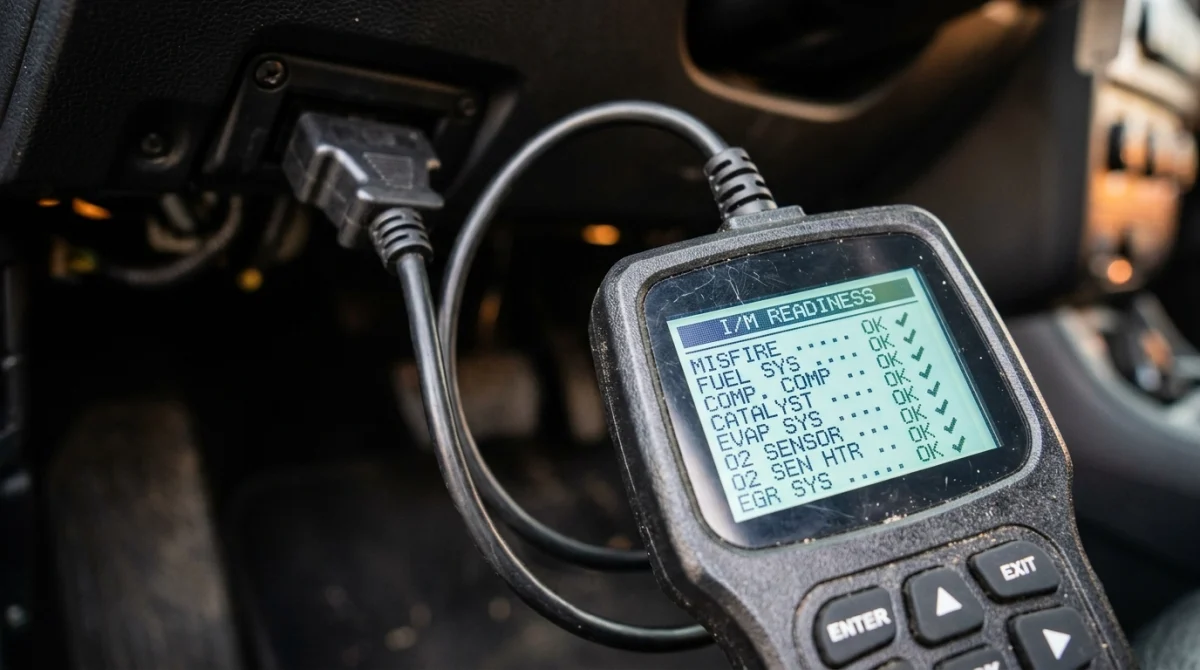
A compatible OBD2 scanner can show which readiness monitors have completed their tests and which still need attention. The menu names and display format differ between scan tools, but the information is generally available through the vehicle’s emissions-related diagnostic data.
What to Look For on the Scanner
- Connect the scanner to the vehicle’s diagnostic connector according to its instructions.
- Turn the ignition or vehicle power on as directed by the scanner and vehicle manufacturer.
- Open the OBD2 or emissions-diagnostics menu.
- Find the I/M Readiness, Monitor Status, or equivalent screen.
- Review the status of each supported monitor.
- Check stored and pending DTCs separately, and record relevant information before clearing anything.
The term I/M Readiness refers to inspection and maintenance readiness. Some scanners display individual monitor names alongside Ready, Incomplete, or Not Supported results.
Can Every OBD2 Scanner Read Readiness Monitors?
Many standard OBD2 code readers support readiness checks, but available features vary. A basic reader may provide monitor status and generic trouble codes, while a more advanced diagnostic tool may offer additional manufacturer-specific data.
If a scanner shows unexpected results, confirm that it supports the vehicle’s diagnostic protocol and is displaying the correct mode. A missing monitor entry does not automatically mean the vehicle has a fault.
For accurate diagnosis, compare the scanner’s findings with the owner’s manual, manufacturer service information, and any applicable technical service bulletins. This is especially useful when a particular monitor remains incomplete despite normal driving.
Section takeaway: Use a compatible scanner to check readiness and trouble codes separately, then verify unusual results against vehicle-specific information.
Frequently Asked Questions
How Many Readiness Monitors Does a Car Have?
The number varies by vehicle, engine, fuel type, and emissions equipment. OBD2 systems may support several continuous and non-continuous monitors, but not every vehicle has every monitor. Your scanner displays the monitors supported by the vehicle and diagnostic mode.
Can Readiness Monitors Be Ready When the Check-Engine Light Is On?
Yes. A monitor may have completed its test and still show Ready even when another system has detected a fault. Check the stored and pending diagnostic trouble codes and the malfunction indicator status rather than relying on readiness alone.
Does Disconnecting the Battery Reset OBD2 Readiness Monitors?
It can. Disconnecting the battery may reset readiness information and other learned data, depending on the vehicle. Afterward, applicable monitors may need to complete their self-tests again before an emissions inspection.
Can I Drive Normally to Complete Readiness Monitors?
Often, yes. Many monitors complete during ordinary driving, provided the required operating conditions occur. Some require a particular drive cycle, so consult vehicle-specific guidance instead of assuming everyday short trips will complete every monitor.
Does a Not Ready Monitor Mean My Car Will Fail Emissions?
Not always. The outcome depends on local inspection rules, vehicle characteristics, and the number and type of incomplete monitors. Some programs allow limited incompleteness for qualifying vehicles, while others require stricter readiness completion.
Why Is My Catalyst Monitor Still Incomplete?
The catalyst monitor may need particular engine temperatures, driving conditions, and other enabling criteria before it can run. If it remains incomplete, check for relevant trouble codes and consult the manufacturer’s diagnostic guidance rather than replacing the catalytic converter based on readiness status alone.
Will an OBD2 Scanner Tell Me Why a Monitor Is Not Ready?
A scanner can identify the incomplete monitor and may show related diagnostic codes or additional data, depending on its capabilities. However, readiness status alone usually cannot identify the root cause. Vehicle-specific diagnostics may be needed if the monitor repeatedly fails to complete.
Final Takeaway
OBD2 readiness monitors tell you whether your vehicle’s onboard computer has completed its applicable emissions-system diagnostic tests. They are useful for troubleshooting, verifying repairs, and preparing for emissions inspections, but they are not a substitute for checking diagnostic trouble codes or evaluating actual component performance.
If your scanner shows Not Ready, start by checking recent battery disconnection, code clearing, maintenance, and the driving conditions required by the affected monitor. Follow the manufacturer’s guidance, scan again, and confirm your local inspection requirements before scheduling the test.
Understanding these statuses can help you avoid unnecessary parts replacement and make better use of your OBD2 scanner. When a monitor repeatedly remains incomplete or the check-engine light stays on, seek a qualified diagnostic assessment.
Research note: This guide explains general OBD2 readiness principles. Exact monitor availability, drive-cycle requirements, and inspection rules vary by vehicle and location.
Editorial disclosure: This article is for general informational purposes and does not replace vehicle-specific service information or professional diagnosis.
