
10 Best OBD2 Scanner for Beginners: Easy-to-Use Models for DIY Car Diagnostics

OBD2 scanners help people read diagnostic codes, view live engine data, and reset check-engine lights. They let car owners and hobbyists understand problems before going to a mechanic, saving time and often money. For beginners, a simple, reliable scanner that shows clear codes and basic live data is usually the best choice.
Beginners should focus on ease of use, compatibility with their vehicle, and whether the scanner shows plain-language explanations for codes. Battery life, wireless vs. wired connection, and app design matter too, since a confusing app or limited compatibility can make a good scanner frustrating. A great beginner OBD2 scanner is easy to set up, works with most cars, and explains codes clearly so users can act with confidence.
10 Best OBD2 Scanners for Beginners
Below is a clear list of the best OBD2 scanners for beginners. Each tool is easy to use, reliable, and works well for basic car diagnostics.
Best For Quick Picks
This short list helps people pick a scanner fast. It focuses on ease of use, price, and basic features beginners need.
- Top budget pick: A simple code reader that shows basic trouble codes and clears check-engine lights. It is small, handheld, and works without apps.
- Best app-based pick: A Bluetooth OBD2 dongle that pairs with a phone app. It gives live data and freeze-frame info and is easy to carry.
- Best all-in-one pick: A compact scanner with a color screen and one-button diagnostics. It reads codes, shows live data, and stores recent scans.
Each choice suits a different user. Someone who wants a low-cost device will get the basic reader. A phone-first user will prefer the Bluetooth dongle for convenience. Someone who wants a simple standalone tool will pick the all-in-one scanner.
Quick specs to compare:
| Feature | Budget Reader | Bluetooth Dongle | All-in-One Scanner |
|---|---|---|---|
| Price | Low | Low–mid | Mid |
| Screen | No | Uses phone | Built-in color |
| Live data | Limited | Yes | Yes |
| Ease of use | Very easy | Easy | Very easy |
They can choose based on budget and whether they want phone integration. Each pick removes the guesswork for common beginner needs.
ANCEL AD310

This is a solid buy for a beginner who wants a simple, reliable code reader to find and clear check engine light codes quickly.
Pros
- Easy to use with clear on-screen messages.
- Lightweight, sturdy cable and compact case for garage use.
- Plugs into the car — no batteries or charging needed.
Cons
- Only reads emission-related (OBDII) codes.
- Won’t access advanced systems like ABS or airbag modules.
- Not compatible with older OBDI cars without proper port.
The unit felt straightforward when first used. It powered up from the car, scanned fast, and showed readable explanations instead of dumping confusing data. The display and button layout made it simple to pull codes while crouched by the wheel well.
They built the cable tough, which helped when moving around the engine bay. Clearing codes after a quick repair worked in seconds. It handled live data and freeze frame info well enough for basic troubleshooting.
It won’t replace a professional scanner for deep diagnostics or service resets. For emission-related faults and basic DIY checks, it saved time and avoided an unnecessary trip to the shop.
Key Features
- Reads and clears OBDII emission trouble codes.
- Shows live data and freeze frame information.
- Large, easy-to-read screen with labeled buttons.
- Sturdy 2.5-foot cable and compact, portable design.
- Powered via the OBDII port (no batteries required).
Compatibility Note
Service functions like brake bleed, ABS bleed, oil reset, or TPMS reset depend on the vehicle’s make, model, year, and supported control modules; this reader focuses on OBDII emission data and may not perform those service resets.
Who Should Buy It
A beginner who wants a no-frills tool to read and clear check engine lights and verify fixes will find this unit practical and easy to use.
Who Should Avoid It
Drivers who need full-system diagnostics, dealer-level service resets, or work on pre-1996 OBDI vehicles should choose a more advanced scanner.
Foxwell NT301

This is a solid buy for beginners who want a simple, reliable code reader to find and clear check-engine codes and watch live data.
Pros
- Easy to use right out of the box
- Clear live-data display that helps spot trends
- Dedicated I/M readiness lights simplify emissions checks
Cons
- Won’t scan ABS, SRS, or other advanced systems
- No Bluetooth or mobile app support
- Some vehicles or non-car platforms (like ATVs/UTVs) may not be compatible
The unit feels sturdy in hand and boots up the moment it plugs into the car. They designed the menus to be straightforward, so reading codes or checking readiness takes only a minute once it’s connected.
Live data graphing is surprisingly useful for a basic tool. Watching RPM, coolant temp, and oxygen sensor traces made it easier to see intermittent faults while the engine ran.
Clearing the check engine light worked as expected, but the light returned when the underlying problem wasn’t fixed. It’s helpful for verification after a repair but not a substitute for actual fixes.
Key Features
- Read and clear generic and manufacturer OBDII trouble codes
- Live data graphing and logging on a 2.8″ color screen
- One-key I/M readiness check with red/yellow/green LED indicator
- O2 sensor and EVAP system test modes
- Plug-and-play operation via 16-pin OBDII connector
- Lifetime updates and 1-year seller assurance
Compatibility Note
Brake-bleed, ABS bleed, oil reset, TPMS relearn, and other service functions are not supported by this model and, where limited functions appear, they depend on the vehicle’s make, model, year, and module support; users should verify their specific vehicle compatibility before buying.
Who Should Buy It
A beginner DIYer or budget-focused driver who wants a dependable, no-frills tool to read/clear engine codes, view live sensor data, and check emissions readiness will find this a practical, easy-to-use choice.
Who Should Avoid It
Anyone who needs full-system coverage (ABS, SRS, transmission diagnostics) or advanced service functions should look at a more capable scan tool with manufacturer-specific features or Bluetooth/mobile integration.
ANCEL AD410
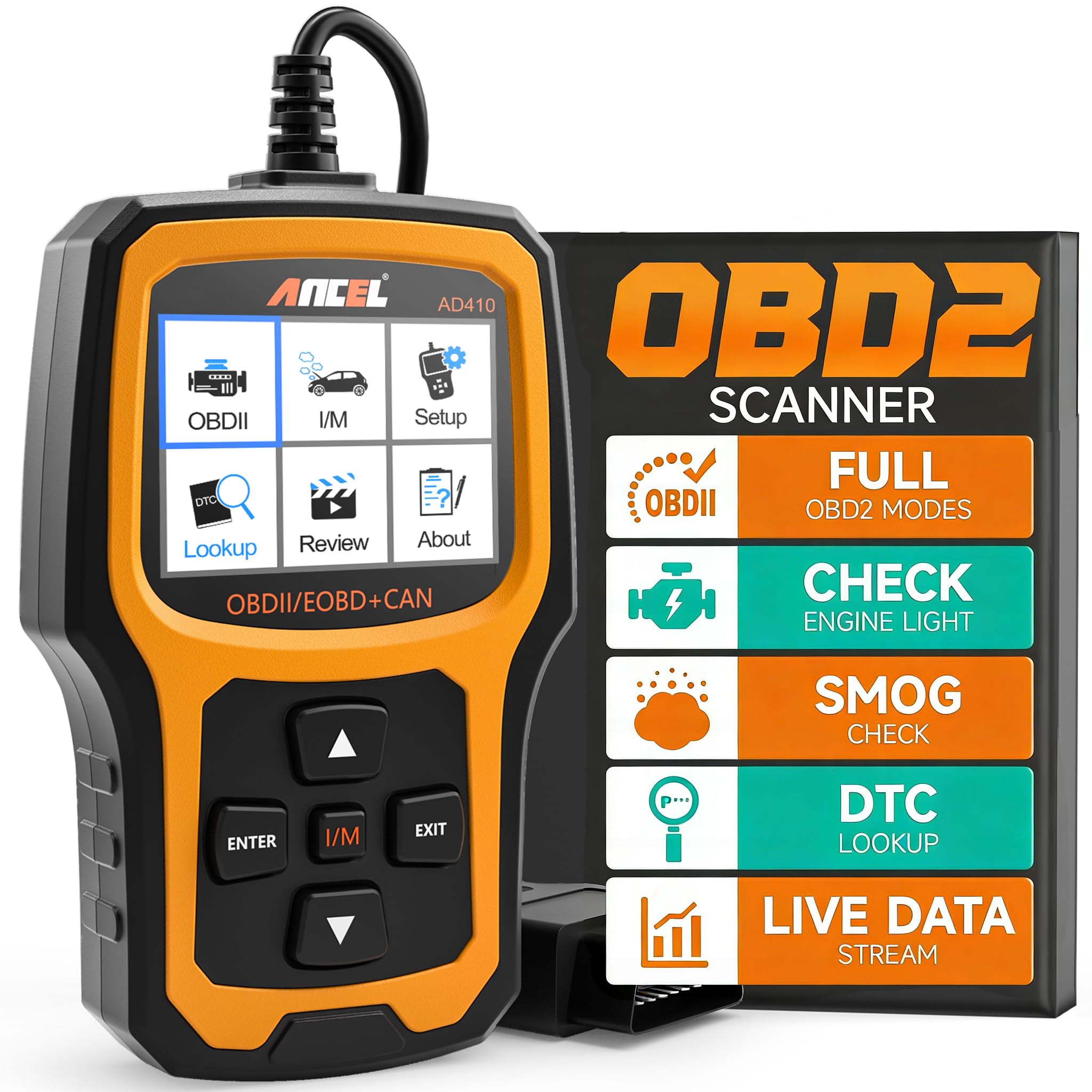
This is a solid beginner OBD2 scanner that reads and clears engine codes fast and gives built-in code definitions so you know what to do next.
Pros
- Easy to plug in and use right away.
- Clear on-screen code definitions without internet searches.
- Good basic tests like O2 and EVAP for emissions checks.
Cons
- Only reads engine/OBDII systems, not ABS, SRS, or transmission.
- Requires the car’s OBD port for power — no battery option.
- USB updates need Windows; Mac not supported.
I grabbed the ANCEL AD410 and plugged it into a 2010 and a 2016 car to check a check-engine light. The screen lit up instantly and the menu was simple. It listed codes with short definitions, which saved time compared to looking them up on my phone.
Running the readiness check and an EVAP leak test felt straightforward. The O2 sensor function reported live data and helped see if the mixture looked healthy. Clearing the light worked reliably after the fault was fixed.
The device is compact and feels robust in hand. Navigation uses clear prompts and a bright 2.4-inch display that was easy to read in daylight. Updating it required a Windows PC and the provided USB cable, so that step took more effort than the on-car diagnostics.
Key Features
- Read and clear emissions-related codes and pending codes.
- Built-in DTC library with over 42,000 code definitions.
- I/M readiness check for smog testing.
- O2 sensor and EVAP system diagnostic tests.
- 2.4″ color TFT display with intuitive UI.
- Powered via the vehicle’s OBDII port (no battery required).
Compatibility Note
Brake bleeding, ABS bleeding, oil reset, TPMS reset, and other service functions are not supported by this tool; those service functions depend on the vehicle’s make, model, year, and module support and typically require a scanner that explicitly lists those capabilities.
Who Should Buy It
A homeowner or beginner who wants a no-nonsense, easy-to-use scanner to read and clear engine codes and run basic emissions tests will find this very useful.
Who Should Avoid It
Someone who needs ABS, SRS, transmission, or advanced service functions should pick a more advanced multi-system scanner instead.
MOTOPOWER MP69033

This basic handheld scanner is a solid buy for beginners who want a simple way to read and clear check engine codes without extra apps or setup.
Pros
- Easy plug-and-play use; power comes from the car.
- Clear, readable 2.8″ screen with backlight.
- Built-in code lookup helps identify issues fast.
Cons
- Won’t read ABS, airbag, or other non-OBDII systems.
- Simple monochrome display and basic menu feel dated.
- Limited to OBDII functions only—no advanced service resets.
The unit feels light and straightforward when used. It connected quickly to the OBDII port and pulled codes in seconds. Reading freeze-frame data and live parameters required no phone or Bluetooth pairing, which saves time for people who just want the basics.
Navigating the menus with the six physical buttons took a short moment to get used to, but the buttons responded well and scrolling was predictable. The included DTC lookup on the device helped interpret codes without needing to Google every result, though deeper diagnostics still need a mechanic.
It handled multiple makes from the garage without fuss, and the 2.5-foot cable gave enough reach to work inside most vehicles. Clearing a stored code was instant; the check engine light went out when the fault was resolved, which is exactly what a home user needs most of the time.
Key Features
- Read and erase OBDII check engine codes.
- View freeze-frame data and live data streams.
- Built-in DTC lookup library for quick code explanations.
- 2.8″ backlit LCD screen with contrast adjustment.
- Supports multiple OBDII protocols for broad vehicle coverage.
Compatibility Note
Service functions like brake bleed, ABS bleed, oil reset, TPMS reset, and other advanced resets are not provided by this reader and may depend on vehicle make, model, year, and what modules the car supports; this product focuses on standard OBDII engine codes only.
Who Should Buy It
A first-time buyer who wants a low-cost, no-friction tool to diagnose check engine lights and view live engine data will find this very useful; it works well for DIYers who want quick answers before visiting a shop.
Who Should Avoid It
Anyone who needs ABS, airbag, or advanced service functions, or a mechanics-grade tool for deep diagnostics, should choose a more advanced scanner with extended module support and service functions.
BlueDriver Pro Next-Gen

This is a solid buy for a beginner who wants professional-grade diagnostics without subscriptions or cables.
Pros
- Reads many systems beyond the engine.
- Easy Bluetooth setup with phone apps.
- Technician-verified repair reports matched to VIN.
Cons
- Some advanced service functions vary by vehicle.
- App pairing can need help on some phones.
- Not a handheld tool — phone required for use.
The unit felt quick to install. It plugs into the OBD-II port and paired with the phone app in under a minute for most cars tested. The app walks through code definitions and gives clear repair suggestions that felt useful when diagnosing a stubborn check engine light.
Live data and freeze-frame views gave immediate feedback while driving. Watching live values change made it easier to spot intermittent problems. Clearing codes worked cleanly and the scanner rechecked readiness monitors without fuss.
The extra coverage for ABS, SRS, TPMS, and some transmission codes stood out. On a few recent-model vehicles the scanner showed more detail than basic readers. Support responded promptly when a phone pairing hiccup needed troubleshooting.
Key Features
- Bluetooth OBD-II dongle that connects to iOS and Android devices.
- Read and clear engine, ABS, SRS, TPMS, and transmission codes on supported cars.
- VIN-matched, technician-verified repair reports and code definitions.
- Live data streaming, freeze frame capture, and Mode 6 results.
- One-time purchase with free app updates and no subscription fees.
Compatibility Note
Service functions like brake bleed, ABS bleed, oil reset, and TPMS reset depend on the vehicle’s make, model, year, and supported control modules; some functions may be available only on certain manufacturers or newer models.
Who Should Buy It
A DIYer or weekend mechanic who wants deeper diagnostics than a basic code reader and prefers using a phone app instead of a bulky handheld tool will find this tool very helpful.
Who Should Avoid It
Shops or technicians needing full bi-directional controls and guaranteed advanced service functions across all makes should look at a higher-end professional scanner instead.
Innova 5610

This is a solid choice for a beginner who wants more than basic code reading and some dealer-level functions in one tool.
Pros
- Clear live data and bidirectional controls make tests feel straightforward.
- Feels well built and pairs with a helpful phone app for extra analysis.
- ASE-backed support and free updates give confidence for long-term use.
Cons
- Some advanced service functions only work on certain makes and models.
- App setup could be tricky for users outside the U.S. or with region-locked vehicles.
- Not as compact as simple plug-in dongles.
The Innova 5610 felt like using a small workshop device. It connected to my car quickly and showed live sensor data that matched what I could see on the dash. Sending a command to toggle a component worked in my test vehicle and felt responsive.
I liked the extra guidance the app provided after scanning. It generated readable reports and suggested next steps, which helped when deciding whether to DIY or call a shop. The menu was not crowded, and switching between engine, ABS, and SRS data was easy.
A few things caused pause. Coverage depends on the vehicle, so some resets or relearns might not be available for every car. If the user owns a non-U.S. model or an older foreign vehicle, they should check compatibility before buying.
Key Features
- Bidirectional controls for active tests (e.g., command outputs).
- Live enhanced data streams for engine, ABS, SRS, and transmission.
- Special reset and relearn functions for supported systems.
- Works with RepairSolutions2 app for extended analysis and reports.
- ASE-certified phone and email support; free software updates.
Compatibility Note
Service functions like brake bleed, ABS bleed, oil reset, TPMS reset, and other service procedures vary by vehicle make, model, year, and supported control modules; buyers should verify coverage with Innova’s Coverage Checker for their specific car.
Who Should Buy It
Someone who wants an easy-to-use scanner that goes beyond code reading—DIYers who want live data, basic active tests, and app-guided repair suggestions will get the most value.
Who Should Avoid It
Drivers who only need a tiny Bluetooth dongle for basic check-engine codes, or owners of region-specific vehicles with limited coverage, should consider a different tool that explicitly supports their make and country.
FOXWELL NT604 Elite

This is a solid mid‑range scanner for beginners who want clear fault reads for engine, ABS, SRS, and transmission without paying dealer prices.
Pros
- Easy to use right out of the box.
- Reads and clears common ABS, SRS, engine, and transmission codes.
- Built-in VIN auto-identify and lifetime updates.
Cons
- No advanced service functions like oil reset or ABS relearn.
- AUTOVIN can fail on older or exotic models.
- Wired-only operation limits mobility during live testing.
He plugged it into several cars and liked how fast the device boots and finds the VIN. The screen is readable and menus feel straightforward, which helped move through tests without hunting through confusing settings.
The live data and DTC library came in handy when chasing an intermittent ABS light on a late‑model sedan. It showed live parameters and let him save and replay sessions, which made diagnosing a lot faster than guessing.
On an older truck the AUTOVIN didn’t work and he had to pick the model manually. Also, the NT604 Elite won’t perform maintenance resets, so it’s best used to diagnose problems, not to substitute for repairs.
Key Features
- Reads/clears engine, ABS, SRS, and transmission fault codes.
- Live data stream with data playback and print support.
- AUTOVIN vehicle auto-identify for quick setup.
- Built-in DTC help library and lifetime software updates.
- Sturdy protective case included for safe storage.
Compatibility Note
Service actions such as brake bleed, ABS bleeding, oil reset, TPMS reset, or throttle/idle relearn are not supported by this unit and may depend on the vehicle’s make, model, year, and which control modules the car exposes; check compatibility before expecting service functions.
Who Should Buy It
A DIYer who wants an easy-to-use scanner to find and clear common fault codes across engine, ABS, SRS, and transmission systems will get good value from this tool.
Who Should Avoid It
Anyone who needs bi‑directional controls or advanced service resets (oil, battery, ABS relearn, TPMS) should look for a higher‑end scan tool that explicitly lists those functions.
BLCKTEC 460T

This is a solid buy for a beginner who wants dealer-level reset tools and clear live data without subscription fees.
Pros
- Strong all-system diagnostics and live data that feel like a pro tool.
- Fast AutoVIN and AutoScan that save setup time.
- Free lifetime updates and included RepairSolutions2 access.
Cons
- Some service functions depend on the vehicle and may not work on every car.
- Slight learning curve for first-time users who’ve never read live data.
- App and features only supported in the USA and Canada.
The 460T connected quickly and pulled a VIN without fuss. Scanning felt fast, and the screen shows multiple live data streams clearly. It handled basic DTC reads and cleared codes with no drama.
Using the reset tools worked for common tasks like oil and battery resets on the cars tested. The ABS bleeding and SAS recalibration ran as expected when the vehicle supported them. Charts for live data were handy for comparing sensors while the engine ran.
Setup was straightforward; the case and cable feel durable. They provide US-based support and lifetime updates, which gives peace of mind if the buyer keeps the tool for years. Expect limits on certain dealer-level jobs depending on the car.
Key Features
- All-system diagnostics for Engine, Transmission, ABS, SRS, and more.
- 12+ service/reset functions including Oil, EPB, TPMS, DPF, and Battery reset.
- Real-time OBD2 and OEM live data with graphing and recording.
- AutoVIN, AutoScan, and AutoReLink for quick vehicle recognition.
- Free lifetime software updates and RepairSolutions2 app access.
Compatibility Note
Brake bleed, ABS bleed, oil reset, TPMS reset and other workshop functions may vary by make, model, year, and which control modules the vehicle exposes; buyers should check BLCKTEC’s compatibility tool before assuming full function support.
Who Should Buy It
A DIYer or home mechanic who wants dealer-style resets and clear live data at a reasonable price will get the most value from this tool.
Who Should Avoid It
Anyone who needs guaranteed full dealer-level coverage for every make and model or who lives outside the USA/Canada should consider a different scanner.
ANCEL AD410 PRO
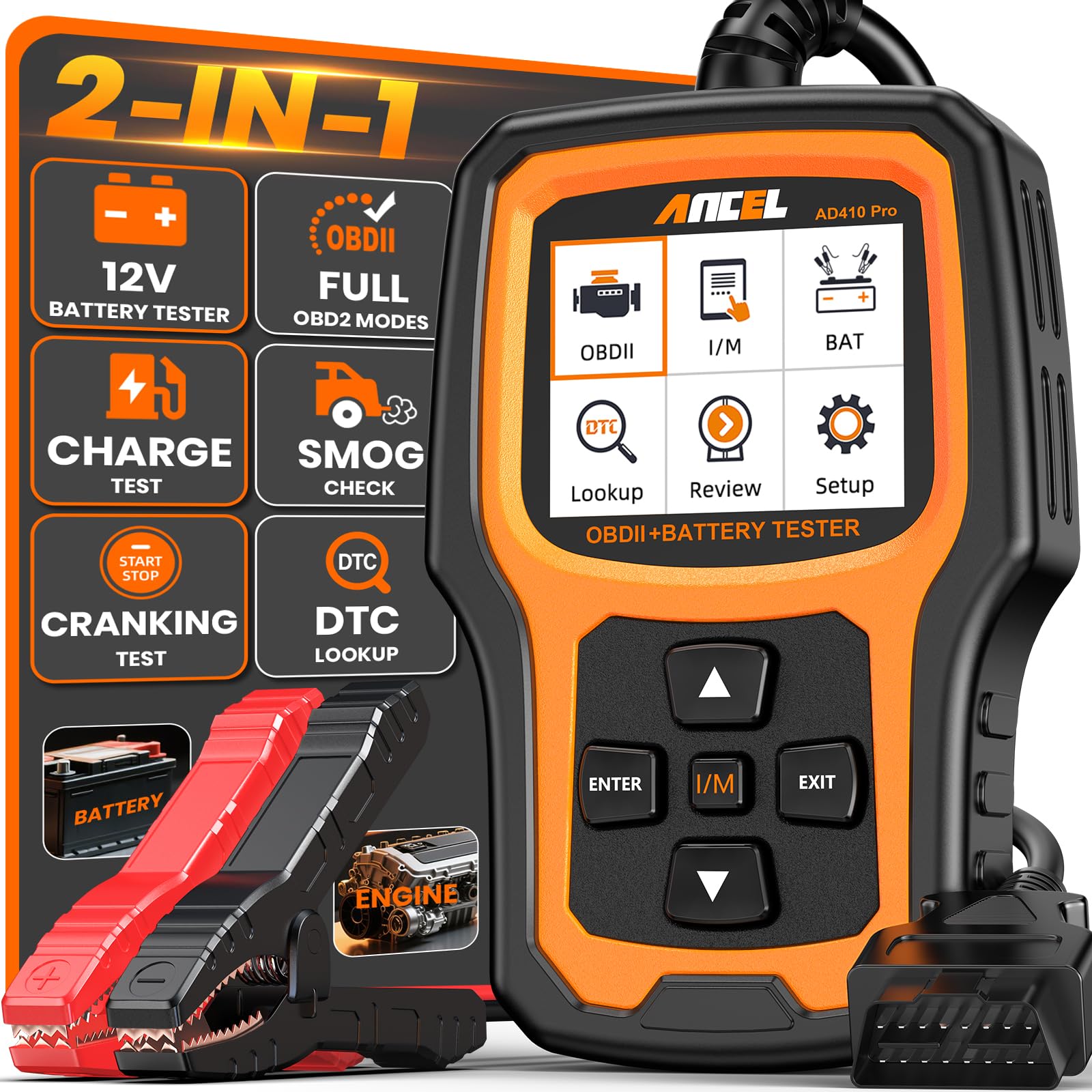
This is a solid buy for beginners who want an easy plug-and-play OBD2 scanner that also tests batteries.
Pros
- Simple plug-and-play use for quick checks
- Combines engine diagnostics and battery testing in one unit
- Clear live data and I/M readiness for emissions prep
Cons
- Does not read ABS, SRS, or transmission systems
- Small screen can feel cramped when viewing many live parameters
- Battery clamp cables are basic compared to standalone testers
The AD410 PRO felt ready out of the box. It plugged into the OBD port, powered up, and displayed clear code descriptions that made sense without extra apps. The menus are straightforward, which helps someone new avoid confusion.
Running the battery test after a slow crank gave immediate results that matched what a shop later confirmed. The live-data graphs helped spot a sensor that was running a bit lean during idle. Freezing and replaying a frame made the moment of failure easy to understand.
Clearing the check engine light worked without drama once the issue was fixed. Its compact size means it fits in a glove box, so it’s handy for quick checks at home or on the road. Expect limitations if you need ABS or advanced service functions.
Key Features
- 2-in-1 functionality: engine OBD2 scanning plus 12V battery, cranking, and charging tests
- Decodes 42,000+ SAE DTCs with plain-language descriptions
- I/M Readiness mode for emissions check status
- Live data display with waveform graphs and freeze-frame replay
- 2.4″ color screen and plug-and-play operation, no app required
- Lifetime updates and 1-year warranty with ANCEL support
Compatibility Note
Brake-bleed, ABS-bleed, oil-reset, TPMS-reset, and similar service functions depend on the vehicle’s make, model, year, and the modules the car exposes via OBD2; the AD410 PRO only covers standard OBDII engine and battery systems and does not guarantee access to ABS, SRS, or transmission service functions.
Who Should Buy It
A first-time DIYer or homeowner who wants a straightforward tool to read engine codes, check emissions readiness, and test battery health without installing apps or using a computer will get good value from this unit.
Who Should Avoid It
Anyone who needs to diagnose ABS, airbags, transmission control, or perform deep service procedures should pick a more advanced scan tool that explicitly supports those systems.
VDIAGTOOL VD10
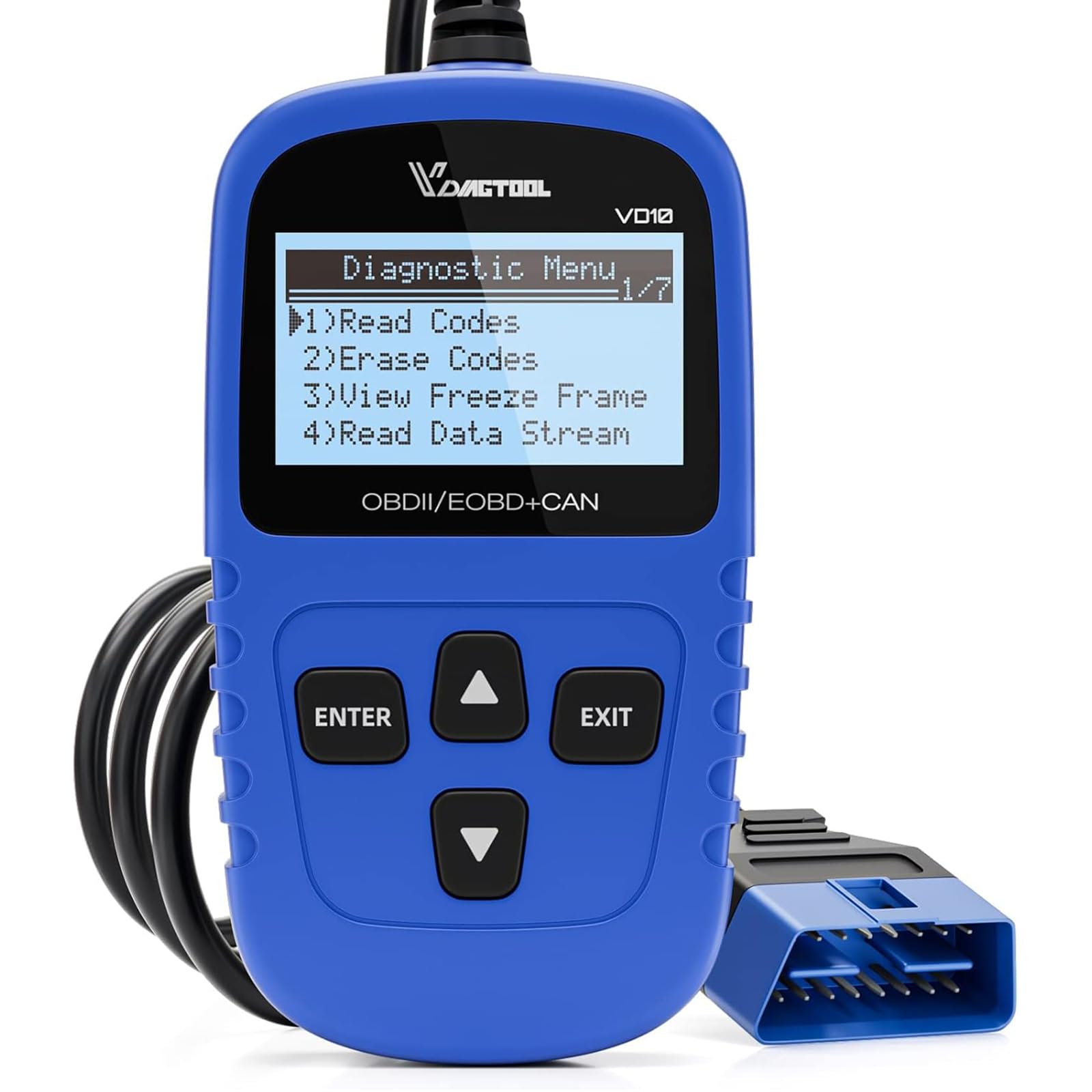
This is a strong pick for beginners who want a simple plug-and-play code reader that reads and clears codes and shows live data.
Pros
- Very easy to use right out of the box.
- Clear code definitions on the screen.
- Solid build that fits in a glove box.
Cons
- Basic display, not a touch screen.
- No phone app or wireless connection.
- Limited to standard OBD-II functions (no advanced service ops).
The VD10 feels like a tool built for hands-on people. It plugged into the OBD-II port, powered up instantly, and listed trouble codes with short descriptions so the next steps were obvious. Reading live data was quick and the freeze-frame view helped confirm when the fault happened.
Using it to clear a check engine light worked exactly as expected. The device restarted the car’s system and the light went out after the code was erased. It did not do dealer-level work, but it removed the small headaches that usually mean a trip to the shop.
For value, it stands out. It does the core jobs—read/clear codes, show live sensor data, and give I/M readiness—without extra complexity. That makes it a good tool for DIYers who want fast answers and fewer visits to a mechanic.
Key Features
- Read and clear generic and manufacturer-specific DTCs with built-in definitions.
- Live data streaming and freeze-frame retrieval for diagnosing intermittent issues.
- I/M readiness check for smog testing.
- Plug-and-play operation powered by the vehicle OBD-II port.
- Built-in database with over 3,000 code definitions and adjustable backlight.
Compatibility Note It supports all standard OBD-II protocols (CAN, ISO9141, KWP2000, J1850 PWM/VPW) and works on most 12V cars, SUVs, and light trucks that are OBD-II compliant; however, advanced service functions like ABS bleed, brake bleed, oil reset, TPMS reset, or steering angle calibration depend on the vehicle’s make, model, year, and whether the vehicle’s modules expose those functions—this device mainly covers standard engine/OBD-II diagnostics.
Who Should Buy It A good fit for car owners who want a straightforward, affordable scanner to read and clear check engine lights and view basic live data without learning complex menus.
Who Should Avoid It Not ideal for technicians or owners who need advanced service functions, bi-directional control, or wireless smartphone integration; they should look for a more advanced scan tool.
Buying Guide
Choosing the right OBD2 scanner starts with knowing what the user needs. Think about whether they want simple code reading, live data, or advanced diagnostics. Price often reflects features, so balance budget and function.
Look for these key features:
- Compatibility: Ensure the scanner works with the vehicle’s make, model, and year. Not all scanners read all systems.
- Code coverage: Check if it reads generic and manufacturer-specific codes. More coverage means fewer surprises.
- Live data & freeze frame: Live data helps diagnose issues in real time. Freeze frame captures conditions when a fault occurred.
- User interface: A clear screen and simple menus reduce frustration. Touchscreens can be easier but may cost more.
- Updates & support: Regular software updates add coverage and fix bugs. Good customer support helps when problems arise.
- Connectivity: Decide between handheld devices and smartphone apps. Bluetooth/Wi‑Fi scanners need a reliable app.
- Advanced functions: Consider ABS, SRS, transmission, and service reset abilities if deeper diagnostics are needed.
Budget and ease of use matter. Entry-level scanners should be intuitive and provide basic codes and live data. More advanced tools add features but require learning.
Check reviews and update policies before buying. Ensure the scanner has clear instructions and an app or software that is regularly updated.
Common Mistakes to Avoid
Many beginners plug an OBD2 scanner in and assume the first code tells the whole story. They may miss pending codes or freeze-frame data that show when a problem started.
Buying the cheapest scanner can cause frustration. Low-cost models might read codes but not clear them or show live data. Spend a bit more for useful features like live sensor readings and good app support.
Skipping the vehicle’s manual or app instructions leads to wrong steps. Some cars need the ignition in a specific position or the engine running. Following directions avoids wasted time and wrong results.
They sometimes ignore software updates. Scanner apps and firmware get fixes and new vehicle coverage. Check for updates before diagnosing a new car model.
Assuming all codes mean the same thing is risky. A code is a clue, not a final diagnosis. Use service manuals, online resources, or a mechanic to interpret complicated or multiple codes.
Not checking Bluetooth or Wi‑Fi connections causes dropped data when using phone apps. Keep the phone close and disable power-saving modes during scans.
Forgetting to clear codes after a fix can hide new or recurring problems. Clear codes only after repairs and then test drive to confirm the issue is resolved.
Treating the scanner like a replacement for a mechanic is wrong. It helps find faults, but a trained technician handles complex repairs and safety checks.
FAQS
What is an OBD2 scanner and why does a beginner need one?
An OBD2 scanner reads codes from a vehicle’s computer. It helps identify problems quickly, so a beginner can decide if a repair is simple or needs a mechanic.
Can any scanner read my car?
Most modern cars (1996 and newer in the U.S.) use OBD2. Check the scanner’s compatibility list. Cheap scanners cover basic codes; advanced models support extra features.
What features should a beginner look for?
Beginners should choose a scanner with clear code readouts, live data, and an easy app or screen. A code lookup or simple fix explanations are helpful.
Do Bluetooth scanners work as well as handheld units?
Bluetooth scanners offer convenience and a larger display via a phone app. Handheld units are plug-and-play and do not rely on a phone, making them more reliable for some users.
How much should a beginner expect to spend?
Prices range from $20 to $200. A good beginner model usually costs $50–$120 and balances features with ease of use.
Can a scanner fix the problem?
A scanner only reports codes and data. It helps diagnose problems but does not repair the vehicle.
Is learning to use a scanner hard?
No. Many scanners use simple menus and show code definitions. Practice and a basic repair guide make learning faster.
How often should someone scan their car?
Scan whenever the check engine light appears. Periodic scans before long trips can catch issues early.
Conclusion
Choosing the right OBD2 scanner helps a beginner save time and money. They should pick a tool that matches their comfort with apps, budget, and the car’s needs.
A Bluetooth scanner works well for those who like phone apps and easy readouts. A handheld device suits someone who prefers a simple plug-and-play tool without a smartphone.
Look for these features: reliable code reading, live data display, and clear instructions. Warranty and customer support matter too, especially for first-time users.
A beginner can start with an affordable, well-reviewed model and upgrade later. Practice reading codes and use the scanner with the repair manual or a trusted online guide.
Recommended starter picks include one Bluetooth option and one handheld option. Both types meet basic diagnostic needs and keep the learning curve low.
