
How to Register a Car Battery With a Scan Tool

Quick Answer
To register a car battery with a scan tool, connect a compatible diagnostic scanner to the vehicle’s OBD2 port, select the correct vehicle, open its battery service functions, and follow the on-screen instructions to register the replacement. The exact procedure depends on your make, model, year, battery type, and diagnostic system; some vehicles don’t require manual registration. Consult the manufacturer’s service information or this guide to battery coding and registration before starting.
Basic battery registration steps
- Check compatibility: Confirm that your scanner supports battery registration for your exact vehicle.
- Verify the battery: Check its technology, capacity, and specifications against the vehicle’s requirements.
- Connect the scanner: Follow the tool manufacturer’s instructions for connecting to the OBD2 port.
- Open battery services: Look for Battery Registration, Battery Replacement, BMS Reset, or Battery Adaptation.
- Enter the details: Supply the requested battery information, such as type, capacity, manufacturer, or serial number.
- Confirm the result: Wait for the tool’s completion message and check for relevant warning lights or fault codes.
Before you begin
- Don’t assume a basic code reader can register a battery; many only read and clear diagnostic trouble codes.
- If you change battery technology or capacity, check whether your vehicle also requires battery coding rather than registration alone.
Replacing a car battery doesn’t always finish the job on a modern vehicle. Some cars need the battery management system to recognize the replacement before their charging strategy can adapt correctly.
In this guide, I’ll explain how battery registration works, which scan tool features to look for, and how to verify the procedure without guessing at vehicle-specific settings.
In This Guide
What Is Car Battery Registration?
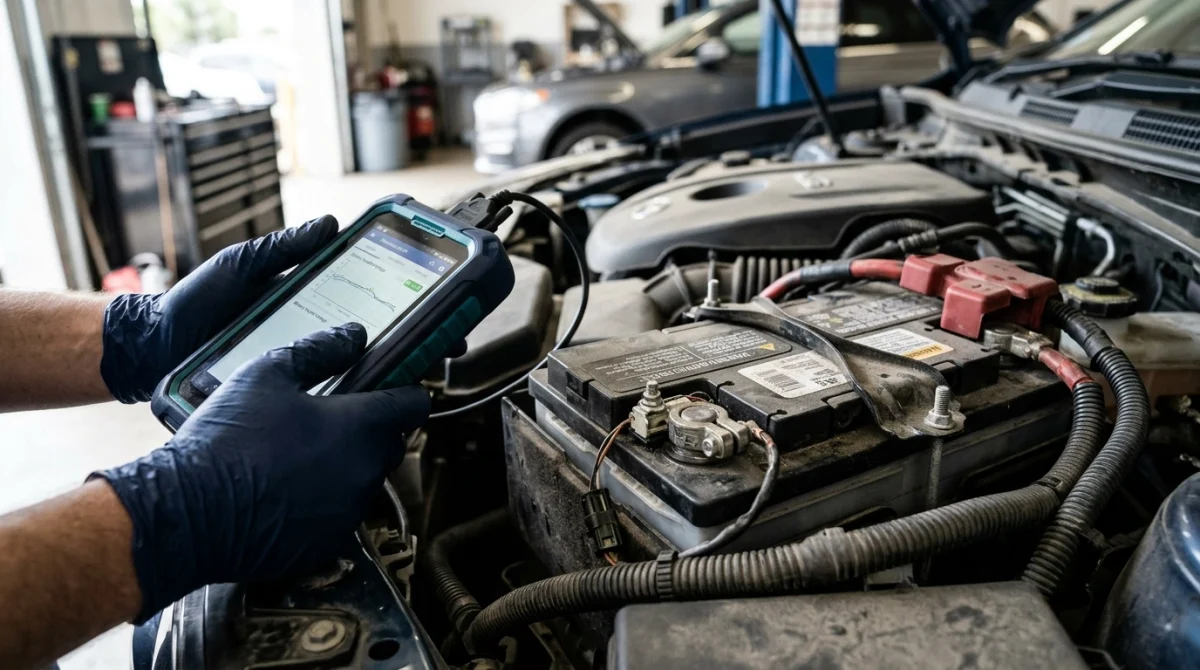
Car battery registration is a diagnostic procedure that tells a vehicle’s electronic battery management system that a replacement battery has been installed. Depending on the vehicle, the process may reset battery history or update information used to manage charging.
What does the battery management system do?
The battery management system (BMS) monitors information about the battery and helps the vehicle manage its charging behavior. Some vehicles use an intelligent battery sensor to track battery condition, current flow, temperature, or state of charge.
On supported vehicles, the system may use battery age and stored battery information when deciding how to charge the battery. Registration helps the system account for a replacement instead of continuing to rely on information associated with the previous battery.
A scan tool communicates with the vehicle’s electronic control modules through the diagnostic connector. When the scanner supports the required service function, it can send the appropriate battery registration or adaptation command.
Is battery registration the same as clearing a fault code?
No. Clearing a diagnostic trouble code removes a stored fault entry when the control module allows it, while battery registration updates the vehicle’s battery-related information.
A generic OBD2 code reader may communicate with the engine control module but lack access to battery service functions. You’ll need to check the scanner’s vehicle-specific service coverage rather than relying on its advertised code-reading capabilities.
When Does a Car Need Battery Registration?
Battery registration is necessary on vehicles whose manufacturer specifies an electronic battery replacement procedure. Other vehicles automatically adapt to a new battery or don’t use a registration process at all.
Which vehicles commonly require registration?
Registration or battery adaptation is common on certain vehicles with intelligent charging and battery monitoring systems, including many BMW, MINI, Audi, Volkswagen, Škoda, SEAT, Jaguar, Land Rover, and Mazda applications. Requirements still depend on the exact model, year, engine, and installed battery system.
Don’t use the vehicle’s brand alone to decide whether registration is required. Check the owner’s manual, manufacturer service information, or a trusted vehicle-specific diagnostic coverage list.
Does the battery type matter?
Yes. A replacement battery must meet the vehicle manufacturer’s requirements for battery technology and capacity, especially when the vehicle uses start-stop or intelligent charging systems.
- Flooded lead-acid: A conventional lead-acid battery used in many vehicles.
- AGM: An Absorbent Glass Mat battery designed for applications that require particular cycling and electrical performance.
- EFB: An Enhanced Flooded Battery designed for certain start-stop applications.
These types aren’t automatically interchangeable. The vehicle’s specifications determine which battery technology and capacity are appropriate.
Technician’s note: Before registering the battery, verify its specifications against the manufacturer’s requirements. If its type or capacity differs from the original, confirm whether the vehicle also needs battery coding.
What Scan Tool Do You Need?
You need a diagnostic scanner that explicitly supports battery registration, battery adaptation, or the appropriate BMS service function for your particular vehicle. A connector that fits the OBD2 port doesn’t guarantee that the scanner can perform this operation.
Which scan tool features should you check?
- Vehicle coverage: Confirm the exact make, model, year, and relevant powertrain configuration.
- Battery service functions: Look for battery replacement registration, BMS reset, or battery adaptation in the supported service menu.
- Battery coding: Check whether the vehicle requires battery type, capacity, manufacturer, or serial-number information to be entered.
- Software support: Verify that the tool’s current software includes the required function and protocol.
- Power stability: Follow the scanner and vehicle service instructions about maintaining adequate voltage during diagnostic operations.
A professional bidirectional scan tool or a capable manufacturer-specific diagnostic device may offer these functions, but coverage varies by model. Some consumer scanners provide only selected battery services for selected vehicles.
Can a basic OBD2 scanner register a battery?
Usually, a basic code reader cannot perform battery registration unless its manufacturer specifically lists that service function for your vehicle. Reading engine codes and writing battery adaptation data are different capabilities.
Before buying a scanner, check its official vehicle coverage list and search for the exact battery function. This is more reliable than choosing a tool based only on its screen size, price, or general claim of compatibility.
Technician’s note: Confirm service-function coverage before purchasing a tool or beginning the job. If the scanner lists only battery voltage or diagnostic code reading, don’t assume it can register a replacement battery.
How to Register a Car Battery With a Scan Tool
The general process involves identifying the vehicle, opening its battery service menu, entering the required replacement information, and confirming that the operation completed. Menu names and data fields differ, so follow the instructions displayed for your exact vehicle.
Step 1: Confirm the replacement battery is correct
Check the battery label and vehicle specifications before connecting the scanner. Confirm the battery technology, rated capacity, and any other specifications required by the manufacturer.
If the vehicle requires a particular battery type, registration won’t make an incorrect replacement suitable. Resolve any compatibility question before proceeding.
Step 2: Connect the scan tool
Park the vehicle safely, switch off the ignition as instructed, and locate the OBD2 diagnostic connector. Connect the scanner according to its manual, then select the appropriate vehicle identification method.
Some scanners identify the vehicle through its VIN, while others ask you to select the make, model, year, and system manually. Confirm the identification before opening a service function.
Step 3: Find the battery service function
Open the scanner’s service or special-functions menu and look for the battery-related operation. Depending on the tool and vehicle, it may appear under one of these names:
- Battery Registration
- Register Battery Replacement
- Battery Adaptation
- Battery Replacement
- BMS Reset
- Battery Management System
These labels can describe related but different operations. Choose the function specified for your vehicle, rather than selecting an unfamiliar option simply because its name mentions the battery.
Step 4: Enter the requested battery information
Some vehicles require only confirmation that a new battery has been installed. Others require additional details to update the battery management system correctly.
- Battery capacity: The rated capacity, commonly expressed in amp-hours (Ah).
- Battery technology: The applicable type, such as AGM or EFB, if the vehicle requests it.
- Manufacturer information: A manufacturer code or identifier when required by the system.
- Serial or battery identification: A battery-specific value on systems that require it.
Not every vehicle requests every field. Use the actual battery label and manufacturer guidance; don’t invent a serial number, code, or battery specification.
Step 5: Confirm and complete the registration
Review the selected operation and entered information before confirming. Follow the scanner’s prompts, and don’t disconnect the tool or interrupt the process while the vehicle is writing data.
Wait for an explicit completion message or the scanner’s documented success indication. If the tool reports an error, record the message and investigate it rather than repeating commands at random.
Step 6: Verify the result
Once the operation finishes, follow any required ignition-cycle or waiting instructions. Check for battery or charging warnings and review relevant fault codes if the scanner supports them.
Remember that a successful registration doesn’t prove the battery or charging system is healthy. If the car still has starting problems, warning lights, or charging faults, test the battery and charging system separately.
Technician’s note: The menu path and required fields can change between model years and diagnostic protocols. Use model-specific service information whenever the scanner’s prompts don’t clearly match the installed battery.
Battery Registration vs. Coding vs. Reset
Battery registration, coding, and resetting are related terms, but they don’t always describe the same operation. Knowing the difference helps you select the right scan tool and avoid changing settings the vehicle doesn’t need.
| Operation | What it does | When it’s used |
|---|---|---|
| Battery registration | Records a battery replacement in a supported control system. | When the manufacturer requires the system to recognize a new battery. |
| Battery coding | Updates configuration information, such as battery technology or capacity, when supported. | When the vehicle requires configuration changes, including certain battery-type or capacity changes. |
| BMS reset | Resets or initializes battery-monitoring data as specified by the vehicle. | When the manufacturer specifies a reset or initialization procedure. |
| Battery test | Assesses battery condition or electrical performance using a suitable tester. | When checking battery health or investigating a starting or charging problem. |
These distinctions matter because one function doesn’t necessarily replace another. For example, a vehicle may require registration after a like-for-like battery replacement but also require coding if the battery technology or capacity changes.
How do the procedures differ by manufacturer?
The same scanner may display different options for different vehicle brands. Even two vehicles from the same manufacturer may use different control modules or adaptation procedures.
- BMW and MINI: Many supported models use a battery registration procedure, with additional coding potentially required when battery specifications change.
- Audi and Volkswagen: Certain models use battery adaptation or coding through a battery management or gateway control module.
- Jaguar and Land Rover: Some vehicles require a compatible diagnostic service operation to update battery-related information.
- Other makes: Some vehicles adapt automatically, while others provide a reset or relearn procedure that varies by model.
These are general examples, not universal instructions. Consult the vehicle’s service information before applying any brand-specific procedure.
Section takeaway: Choose the exact battery function required by your vehicle, and distinguish registration from coding or resetting. A generic scanner menu or a familiar brand name isn’t enough to confirm compatibility.
What If Battery Registration Fails?

If your scan tool cannot complete battery registration, the cause may be incorrect vehicle selection, limited tool coverage, missing information, or a vehicle-system issue. Start by checking the displayed error and the scanner’s official instructions.
Why doesn’t the scanner show a battery registration option?
The vehicle may not require manual registration, or the scanner may not support that function for the selected model. Some service options appear only after selecting the correct control module or updating the scanner’s software.
- Confirm the make, model, year, and vehicle configuration.
- Check the manufacturer’s diagnostic coverage list for the exact battery service.
- Verify that the scanner software is current and any required subscription is active.
- Consult the vehicle service information to determine whether a manual reset or automatic adaptation applies.
What if the tool rejects the battery information?
Check that the entered battery capacity, technology, and identification details match the installed battery and the vehicle’s accepted format. Don’t substitute guessed values to force the operation to complete.
Some systems require manufacturer-specific identifiers or a particular combination of data fields. If the replacement battery differs from the original, confirm whether the vehicle supports that configuration before trying again.
What if registration succeeds but warning lights remain?
Registration doesn’t fix a weak battery, a poor terminal connection, a defective charging system, or an unrelated electrical fault. A warning may also remain until the vehicle completes a required operating or monitoring cycle.
Use the scanner to check relevant fault codes, then test the battery and charging system with appropriate equipment. Follow manufacturer instructions before clearing codes or attempting additional adaptations.
Stop and seek qualified diagnostic help if the procedure repeatedly fails, the vehicle reports a critical electrical fault, or you’re unsure which module or adaptation value to change.
Technician’s note: Avoid disconnecting the battery again or experimenting with unrelated control-module settings just to clear a warning. Diagnose the fault first, especially on vehicles with complex charging and electrical systems.
Frequently Asked Questions
Can I register a car battery with any OBD2 scanner?
No. Many basic OBD2 scanners read engine codes but don’t support battery registration. Choose a scanner that explicitly lists the required battery service for your exact vehicle, model year, and configuration.
Do I need to register a new battery every time?
No. Some vehicles require registration or adaptation, while others learn the replacement automatically or don’t use a registration process. Check the manufacturer’s instructions for your particular vehicle before deciding whether a scan tool is necessary.
Can I drive without registering the new battery?
That depends on the vehicle. On models requiring registration, skipping the procedure may prevent the battery management system from updating its stored information correctly and may affect charging behavior. Follow the manufacturer’s guidance and arrange the required service promptly.
Does changing from a standard battery to AGM require coding?
It can. The vehicle must support the replacement battery technology, and some models require battery-type coding in addition to registration. Confirm the approved battery specification and coding requirements before installing a different type.
How long does battery registration take?
The diagnostic operation itself may take only a few minutes once the correct scanner is connected and the vehicle is identified. Setup, entering battery details, troubleshooting communication problems, and completing required waiting procedures can take longer.
Will battery registration fix a battery warning light?
Not necessarily. Registration updates battery-related information, but it won’t repair a weak battery, faulty alternator, damaged wiring, or defective battery sensor. Read the relevant fault codes and test the charging system if a warning remains.
Can a Bluetooth OBD2 adapter register a battery?
Some Bluetooth adapters support battery registration through a compatible app, while others offer only basic diagnostics. Verify support for your vehicle and the specific service function, along with any required app subscription, before purchasing an adapter.
Final Takeaway: Verify Before You Register
Registering a car battery with a scan tool is straightforward when your vehicle requires the procedure and your scanner supports it. The essential steps are to verify the battery specifications, select the correct vehicle, use the proper battery service function, enter accurate information, and confirm successful completion.
Don’t assume every vehicle needs registration or that every scanner can perform it. Check the manufacturer’s service information first, especially if the replacement battery has a different technology or capacity.
If you’re choosing a diagnostic scanner, prioritize verified vehicle coverage and battery service functions over generic claims about the number of supported systems. That will help you avoid buying a tool that can read fault codes but cannot complete the battery procedure you need.
