
How to Open a Key Fob to Replace the Battery (Without Breaking It)

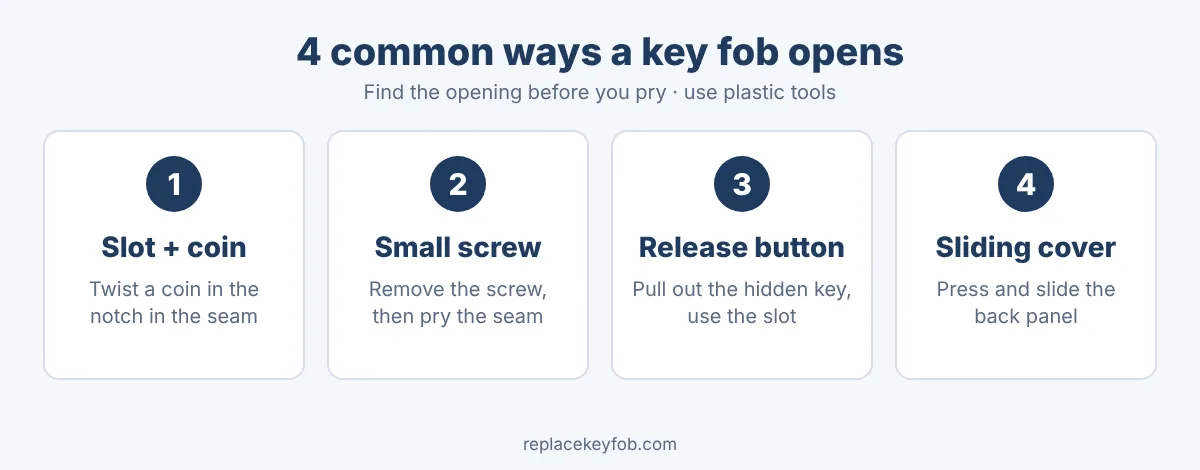
Most key fobs open in one of four ways: a slot you twist a coin or small screwdriver in, a tiny screw, a release button or latch, or a sliding cover. Find the seam and the mechanism, open the case gently with a plastic tool, and you will see the coin battery inside. This guide shows how to recognise each design and open it without scratching the case or breaking the clips.
Quick answer
Look for a small notch or slot along the seam, a screw on the back, or a release button. Use a plastic pry tool or the edge of a coin, work slowly around the seam, and never use force on a metal screwdriver. If you cannot see how it opens, check the owner’s manual before you pry.
What you need
- A small flat plastic opening tool (a guitar pick or a spudger works too).
- A coin or a small flat-head screwdriver, for slot-style cases.
- A small Phillips screwdriver, for fobs held by a screw.
- A new battery with the correct code. See the key fob battery size chart.
- A phone to photograph the open fob so you can reassemble it.
- A soft cloth or tray to catch small parts.
Step 1: Work out which design you have
Hold the fob in good light and inspect it before you touch anything. Look for these clues:
- A notch or small gap in the seam between the front and back halves: a slot design.
- A tiny screw head, often on the back or hidden under the key ring: a screw design.
- A button or switch near the key blade: a release-button design that lets the metal key slide out.
- A slide cover on the back or edge, sometimes with an arrow or a printed label.
Method 1: Slot and coin (most common)
- Locate the notch in the seam, usually at one end or near the key ring.
- Put a coin or a thin flat tool in the notch.
- Twist gently, as if turning a key, rather than levering. The two halves should click apart.
- Work your way along the seam with a plastic tool if it is stiff, releasing each clip in turn.
- Lift the back cover away. The battery sits under it or in a tray.
Twisting spreads the force and is kinder to the plastic than prying with a blade.
Method 2: Small screw
- Find the screw. Some fobs hide it under a rubber pad or a small cover.
- Use a small Phillips (or the type that fits) screwdriver. Do not use the wrong size, which can strip the head.
- Remove the screw and put it somewhere safe.
- Pry the case open at the seam with a plastic tool.
Some cases still have clips after the screw is out, so go slowly and do not force them.
Method 3: Release button and hidden key
- Press the release button and pull out the metal key blade.
- Look into the slot where the key was. There is often a small notch at the end, or a seam you can pry.
- Put the key blade or a flat tool in the slot and twist to separate the halves.
- Lift off the cover to reach the battery.
This design is common on smart keys. The hidden key often doubles as the opening tool.
Method 4: Sliding cover
- Locate the slide cover, usually on the back, and any arrow that shows the direction.
- Press down with your thumb and slide in the arrow’s direction.
- The cover comes off, revealing a battery tray or holder.
Opening different types of key
- Flip keys fold the metal blade into the fob. Fold the blade out, and look for a notch or a screw in the hinge area. Some open by sliding the back panel.
- Remote head keys have the remote and blade as one piece. The battery cover is usually on the back, with a notch at the seam.
- Smart keys are slim, with no visible blade. Release the hidden key and use the slot behind it.
- Sealed fobs. A few fobs are bonded or welded shut and are not designed for battery replacement. If you find no seam, screw or slot after a careful look, check the manual or ask the dealer rather than cutting into the case.
How to avoid scratching the case
- Wrap a layer of masking tape around the tip of a metal tool if you must use one.
- Place the fob on a soft cloth while you work, so it does not slide on a hard surface.
- Pry at the notch and then move along the seam, rather than forcing one spot.
- Support the fob with your other hand so the case does not twist or flex.
- Take your time. Most scratches happen when a tool slips.
Before you start: a quick checklist
- Confirm the battery code you need by checking the owner’s manual.
- Have the replacement ready, so the fob is not left open for long.
- Make sure you know where the spare mechanical key is, in case you need it to enter the car.
- Clear a table and use good light.
Expect the whole job to take about five to ten minutes once you know the design. It is a simple task, but a careful one.
Step 2: Remove the old battery
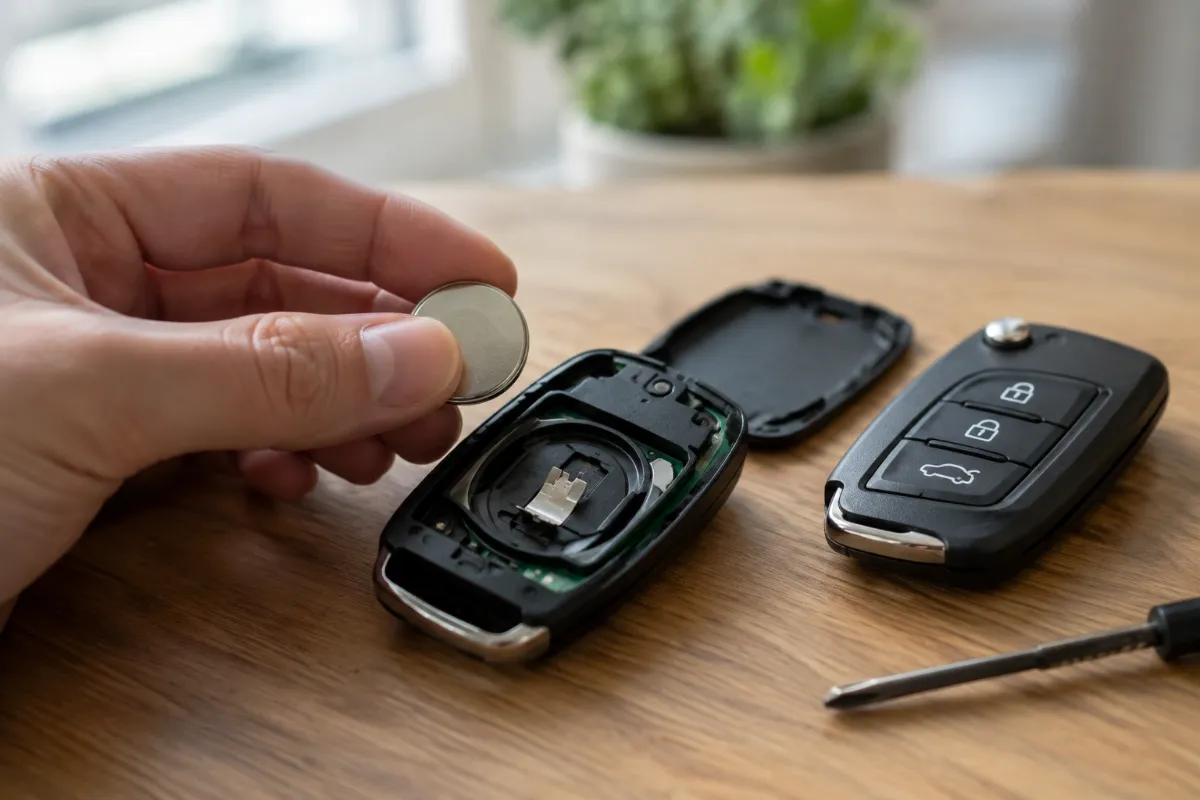
- Photograph the fob and battery before you take it out. This shows you the direction of the + side, so you can copy it. The polarity guide explains how to tell.
- Note the code on the battery (such as CR2032 or CR2025).
- Lift the cell out with a plastic tool or a fingernail. Do not use a metal screwdriver, which can bend the contacts or short the cell.
Step 3: Fit the new battery and close the fob
- Hold the new battery by the edges, without touching the flat faces.
- Drop it into the holder with the same side up as the old one.
- Line up the two halves and press together until every clip clicks.
- If there was a screw, refit it, but do not overtighten.
- Test the buttons next to the car.
Common mistakes when opening a key fob
- Prying with a big screwdriver. This scratches the case and snaps clips. Twist a coin or use a plastic tool.
- Forcing it before finding the screw. If it will not budge, check for a hidden screw under a pad or the key ring.
- Losing the tiny parts. Work over a tray. The rubber button pad and small screws are easily lost.
- Pulling out the circuit board. You do not need to remove it just to change the battery.
- Touching the board and contacts. Avoid bending the metal tabs that hold the battery.
- Using the wrong battery. Buy by code, not by looks. See CR2032 vs CR2025.
What to do if the fob will not open
- Re-check for a screw or release button you missed.
- Look up the opening method in the owner’s manual or on the car maker’s website.
- Try a different spot along the seam; some fobs have only one notch.
- Warm the case slightly in your hands if it is cold and brittle.
- If the plastic is cracked or glued, ask a locksmith or a dealer to do it rather than risk breaking the case.
If you are unsure whether to do this yourself, read can I replace a key fob battery myself?
Keep the fob clean and dry
While the case is open, check that there is no moisture, dirt or corrosion on the board or contacts. A wipe with a dry cloth is enough in most cases. If you find greenish or white residue, the fob may have taken in water; dry it thoroughly and see what to do when a battery replacement did not fix the problem.
After closing: will the fob still work?
For most cars, the fob keeps its programming when the battery is out for a short time, so you can simply test it. If it stops responding, check the battery direction first. Our guide on whether a key fob needs reprogramming after a battery change explains what to do next.
How long will the new battery last?
Often a few years, depending on how you use the fob. See how long key fob batteries last for what affects it. For battery picks, see the best CR2032 batteries for key fobs, or browse CR2032 batteries on Amazon. As an Amazon Associate, ReplaceKeyFob earns from qualifying purchases; see our disclaimer.
Safety: keep coin batteries away from children and pets
A swallowed coin cell can cause serious internal burns within hours. Keep spare and old batteries out of reach, and close the fob securely so children cannot open it. If you think a child has swallowed a battery, go to the emergency room straight away and call the National Battery Ingestion Hotline at 1-800-498-8666, or Poison Help at 1-800-222-1222. More guidance: Poison Control.
Frequently asked questions
How do I open a key fob without breaking it?
Find the notch, screw or release button first, then twist a coin or use a plastic tool. Avoid prying with a large metal screwdriver.
Where is the battery in a key fob?
Under the back cover, in a small holder or tray on the circuit board.
What tool do I need to open a key fob?
Usually a coin, a small flat tool, or a small Phillips screwdriver, depending on the design.
Why will my key fob not open?
You may have missed a screw or release button, or the clips are stiff. Check the manual for your model.
Can I open my key fob without a screwdriver?
Often yes, because many fobs open with a coin or fingernail in the seam.
Will opening the fob erase its programming?
Normally no. Changing the battery quickly does not erase the pairing in most cars.
How do I open a smart key?
Slide or press the release to remove the emergency key blade, then use the slot it leaves to pry the case open.
Bottom line
Identify the opening design, use a coin or plastic tool, photograph the battery before removal, and close it firmly. Go slowly: a key fob case is cheap to open and expensive to break.