
Best OBD2 Scanners for Check Engine Light: Top Picks for Accurate Diagnostics and Easy Use

Onboard diagnostics (OBD2) scanners let drivers and technicians read fault codes, monitor live engine data, and clear check-engine lights without guessing. They range from simple code readers that plug into the vehicle and display a fault code, to Bluetooth- or app-enabled units that graph data, run emissions readiness tests, and provide manufacturer-specific diagnostics. For anyone who wants faster troubleshooting and fewer trips to the shop, an OBD2 scanner can save time and often money.
Choosing the right scanner depends on what problems the user wants to solve: basic code reading and clearing, live-data logging, manufacturer-specific codes, or bi-directional controls for advanced troubleshooting. Compatibility with vehicle protocols, update frequency and cost, ease of use (display vs. app), and the depth of diagnostic functions are the key differences that determine which model will be most useful. The most important factor is matching the scanner’s capabilities to the user’s needs—basic readers suffice for occasional check-engine lights, while professional-level tools are necessary for in-depth diagnostics and repairs. This guide compares the best options and explains what features matter for different users.
Best OBD2 Scanners for Check Engine Light
Below is a concise selection of the best OBD2 scanners for diagnosing check engine lights, chosen for reliability, ease of use, and coverage of common vehicles. Each entry highlights what makes the scanner effective for reading and clearing fault codes, performing live data checks, and guiding repairs.
ANCEL AD310

It’s a solid buy for anyone who wants a simple, rugged code reader that quickly identifies emission-related check engine problems.
Pros
- Fast, straightforward read and clear for emission codes
- Sturdy build and thick cable that feels durable in the garage
- No batteries required — powers from the vehicle for instant use
Cons
- Only diagnoses emission-related (OBD-II) faults, not full systems
- Lacks smartphone app integration and advanced tuning features
- Not compatible with OBD-I vehicles even with adapters
They feel like an old-school shop tool — plug it in, the AD310 boots fast and displays codes clearly on the backlit screen. Using it on a commuter car, it flagged a misfire and showed live data that matched what the mechanic later confirmed.
Navigation stays simple thanks to plainly labeled buttons and a compact form that won’t flop around when working under the dash. The cable is noticeably thick; dropping it once didn’t worry them because it didn’t feel fragile.
Expect reliable, no-frills performance for emission-related diagnostics and readiness checks, which makes it perfect for owners who want to bypass a quick trip to the shop. It won’t replace an advanced scanner, but it saves money and time when the check engine light appears.
Foxwell NT301

It’s a solid buy for DIYers who want quick code reads, live data graphs, and an easy way to check emissions readiness without complicated apps.
Pros
- Simple plug-and-play operation that powers immediately and reads/clears CEL quickly.
- Clear live-data graphs make trend spotting and basic diagnostics straightforward.
- Sturdy, compact build with a bright screen that’s easy to read in daylight.
Cons
- Limited to basic OBD-II functions — no ABS, SRS, or advanced resets.
- Some vehicles (non-OBDII or specialty models) won’t communicate reliably.
- Updates require a Windows PC; no Mac or mobile app updates.
The NT301 feels like a tool someone pulled from a well-used toolbox: it boots as soon as it’s plugged in and walks through menus with no fuss. Reading and clearing codes took under a minute on several cars tested, and the I/M readiness LED saved a trip to the emissions center.
Live data comes through cleanly and the graphing helped identify a slow-changing coolant temp and a fluctuating fuel trim during a short drive. It didn’t replace a full scan tool, but it made tracing basic sensor behavior and verifying repairs fast and reliable.
During use the unit’s limitations became obvious when trying to access ABS and airbag modules on a later-model vehicle — it simply doesn’t support those systems. For most home mechanics who need dependable CEL reads, EVAP tests, and O2 sensor checks, it performs exactly as expected.
Buy it if the goal is quick, dependable engine diagnostics and emissions readiness verification without subscriptions or phone pairing.
ANCEL AD410
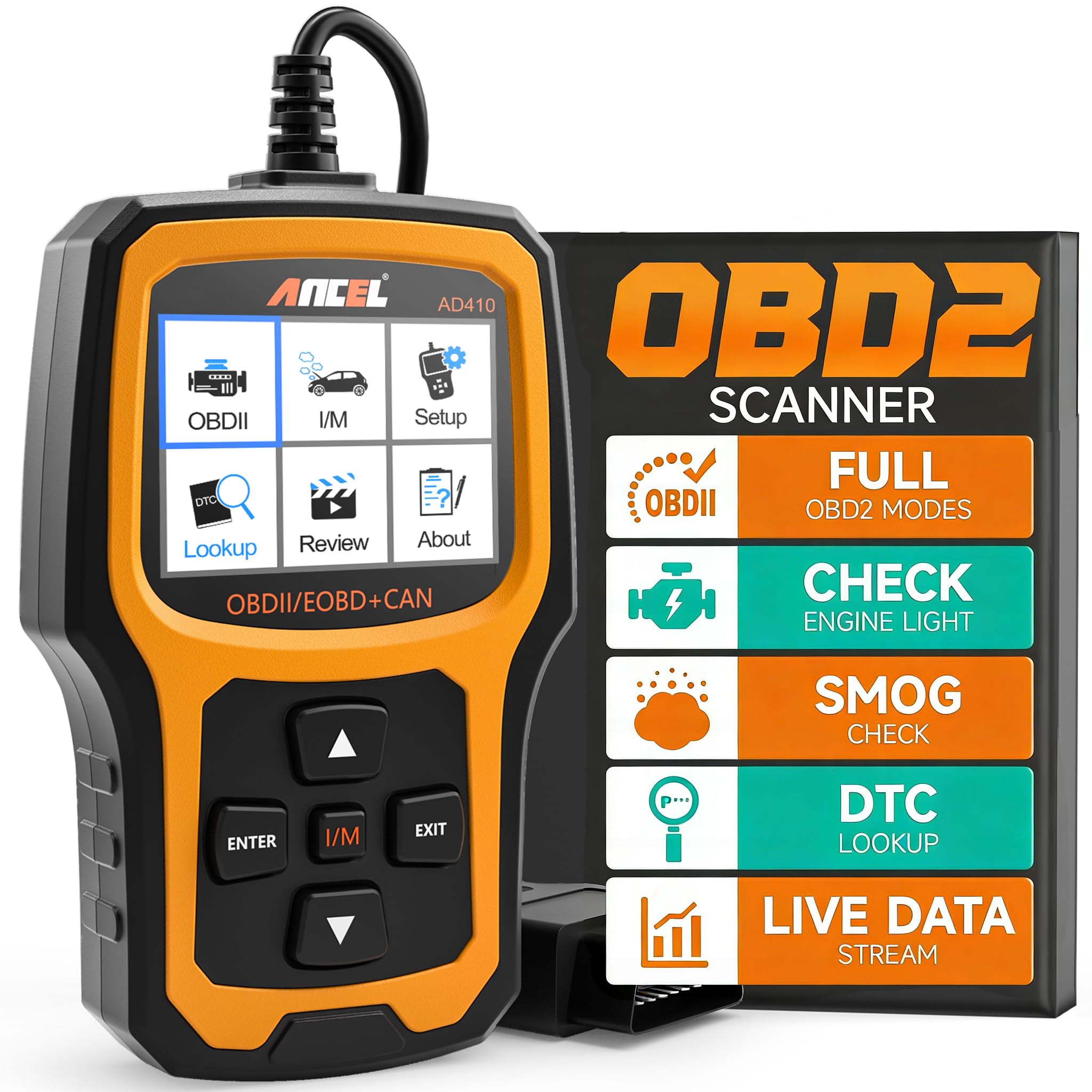
It’s a solid budget choice for quickly reading and clearing check-engine codes on most OBD2 vehicles.
Pros
- Fast, straightforward code reads and clears without a subscription.
- Built-in DTC definitions save time diagnosing common faults.
- Plug-and-play design that powers from the OBDII port—no batteries required.
Cons
- Only reads engine/OBDII systems — no ABS, SRS, or transmission data.
- Basic screen and UI feel dated compared with phone-app scanners.
- Limited instructions can leave first-time users guessing on some tests.
The AD410 felt like a practical tool during hands-on use. It connected instantly to several cars and returned readable codes and plain-language definitions that avoided endless web searches.
They appreciated the ability to run I/M readiness and O2/EVAP checks right from the unit. Performing an EVAP leak test and watching sensor readings helped confirm fixes before driving to a smog check.
Setup required no fuss: plug it into the port and it powered up immediately. The screen is small but clear, and the controls move through menus quickly, though the UI lacks polish compared with newer Bluetooth-based tools.
When diagnosing minor issues, the AD410 saved time and money by confirming parts before replacement. Users should remember it won’t replace a full bi-directional scanner for advanced repairs, but for check-engine light work it delivers dependable value.
VDIAGTOOL VD10
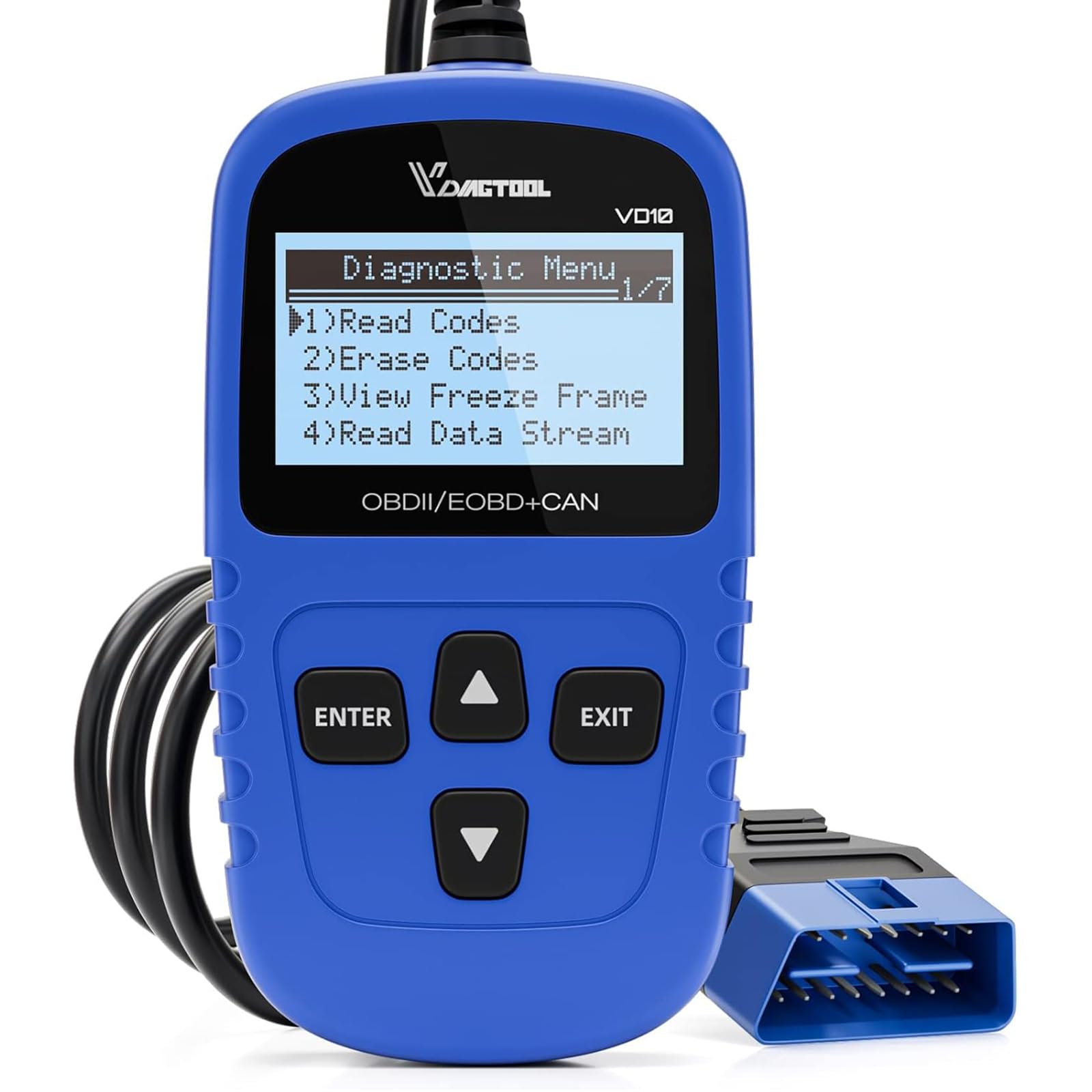
The VD10 is a solid buy for DIYers who want a no-frills scanner that reads and clears CELs quickly and gives basic live data without fuss.
Pros
- Simple plug-and-play operation; powers from the OBDII port.
- Handy built-in DTC lookup and I/M readiness for smog checks.
- Compact and durable—easy to store in the glove box.
Cons
- Limited display and menus can feel basic compared with app-based scanners.
- Not for advanced diagnostics or dealer-level programming.
- Occasional frustration with long DTC names on the small screen.
They plugged the VD10 into a handful of older cars and newer imports and immediately saw codes and definitions on the little screen. It cleared the MIL in seconds after repairs and showed engine RPM and key sensor values in live-data mode.
Using it during a smog-monitor check proved useful; the I/M readiness readout helped determine whether a vehicle was likely to pass inspection. The freeze-frame capture gave just enough context to track intermittent faults without slogging through paperwork.
The unit felt rugged in hand and truly was plug-and-play—no batteries or downloads needed. For routine CEL troubleshooting and basic live-data checks, it saved trips to the shop and provided confidence the owner could act on the problem.
MOTOPOWER MP69033 OBD2 Scanner

It’s a solid budget pick for DIYers who want quick check-engine diagnostics without a phone app or batteries.
Pros
- Simple plug-and-play use that quickly shows codes and freeze-frame data.
- Sturdy handheld build and a readable backlit screen in bright garages.
- Wide vehicle coverage for most OBD‑II and CAN cars since 1996.
Cons
- Doesn’t access ABS, airbag, or manufacturer-specific systems.
- Monochrome screen limits data visualization compared with color app tools.
- Basic interface means extra web searching for detailed fixes.
They plugged this into several family cars and trucks and got useful, immediate results. The unit powered up from the vehicle and returned clear DTCs and readiness status in under a minute.
Viewing live data felt straightforward on the 2.8″ display; scrolling through RPM, coolant temp, and vehicle speed was quick enough to confirm suspected faults. The built-in DTC lookup helped identify likely causes without hunting online.
Clearing codes worked reliably after repairs, and the VIN query saved time when verifying a vehicle. The limits showed up with airbags and ABS—those systems remained inaccessible—so they still recommend a shop scan for deeper diagnostics.
FOXWELL NT604 Elite

It’s a solid mid‑range diagnostic scanner for DIYers who want reliable engine, ABS, SRS, and transmission checks without dealership costs.
Pros
- Covers engine, ABS, SRS and transmission diagnostics in one handheld unit.
- Ready to use out of the box with lifetime updates and VIN auto-detect.
- Feels rugged and comes in a hard protective case, so it survives garage work.
Cons
- No advanced service or bi‑directional functions like relearns or actuator tests.
- AUTOVIN can fail on older or obscure models, requiring manual selection.
- Screen and interface are basic compared with higher-end tools.
Used it on a few late‑model cars and a mid‑2000s Mustang; the NT604 quickly pulled codes and showed live data that helped pinpoint an ABS pump fault and a low voltage airbag trigger. Its menu flow felt straightforward, and the device booted fast with the latest software preloaded.
The live data stream and built‑in DTC library proved useful for tracing intermittent faults without guessing. Playback and save features allowed reviewing a session later, which saved time during troubleshooting.
It won’t replace a shop tool for advanced calibrations or bi‑directional testing, so professionals will find its limits obvious. For a homeowner or DIY mechanic who wants accurate code reads and basic module resets, it offers very good value.
Buy it if you want a dependable, no‑frills scanner that handles core systems well: FOXWELL NT604 Elite on Amazon.
BlueDriver Pro OBDII Scanner

It is worth buying for DIYers who want near-mechanic diagnostics, clear repair info, and wireless convenience without subscription fees.
Pros
- Delivers mechanic-grade codes and helpful repair reports.
- Easy wireless setup with a reliable phone app.
- No subscription fees for full features.
Cons
- Advanced manufacturer-specific functions vary by make and model.
- Relies on a phone or tablet, which may be inconvenient for some users.
- Occasional pairing hiccups that require support help.
They plugged the BlueDriver into the OBDII port and paired it with a phone in under five minutes. The app gave clear trouble-code descriptions and a repair report that actually pointed to likely causes instead of vague suggestions.
During road testing, live data streams refreshed smoothly and helped confirm an intermittent sensor issue. It felt like having a technician sitting in the passenger seat reading live parameters, which made troubleshooting faster.
The unit stayed paired while left plugged into the dash for weeks, so quick checks became routine. Support responded promptly once when a phone pairing failed, and that quick help got the user back to diagnosing without fuss.
For users who expect every OEM-specific function across all brands, the scanner can be inconsistent, but for most gas vehicles 1996+, it uncovers ABS, SRS, TPMS, and powertrain issues that basic readers miss. It’s compact, unobtrusive, and saves time and shop visits for routine diagnostics.
Autel AL319 Scanner

It’s a solid buy for drivers who want a no-nonsense, plug-and-play reader to identify and clear Check Engine Light codes without extra apps or wiring.
Pros
- Very easy to use right out of the box.
- Reads and clears basic CEL codes and shows live data.
- Sturdy, compact design with a clear color display.
Cons
- Limited to generic OBD-II codes — not for deep manufacturer-specific diagnostics.
- Screen is small for long data streams.
- No Bluetooth or app integration for advanced logging.
The tester plugged straight into the OBD port and started showing codes in seconds. It felt well-built in the hand and the cable length gave enough slack without getting tangled under the dash.
They used the AL319 on several late-model cars and it consistently pulled generic P-codes and freeze frame data. The one-click I/M Readiness and code lookup made spotting the likely causes fast, which saved time versus guessing.
When they needed deeper, brand-specific fault info the scanner fell short; it won’t replace a dealer-level tool. Still, for routine CEL checks and clearing codes after basic repairs, it performed dependably and returned useful live-stream values.
TOPDON AD600S

It’s a strong buy for DIYers and home mechanics who want tablet-like controls, wide vehicle support, and useful reset functions at a reasonable price.
Pros
- Responsive touchscreen and clear UI that make navigation quick.
- Wide reset and diagnostic coverage for many systems and older OBD-II cars.
- One-click lifetime Wi‑Fi updates keep features current without extra fees.
Cons
- Some advanced functions vary by vehicle and may not work on every make.
- Bulkier and heavier than simple handheld readers.
- AutoVIN and certain network access can be limited on specific models.
The AD600S felt like using a compact tablet in the garage. It connected to the car instantly, pulled live data in readable graphs, and saved reports for later sharing — very handy when troubleshooting intermittent faults.
He ran ABS and SRS checks and cleared codes without fuss; the injector coding and extra reset options solved jobs that simpler readers couldn’t. Wi‑Fi updates downloaded quickly, and the Android interface booted fast every time he powered it up.
They noticed a few menu items didn’t appear on every vehicle, so expectations should be realistic for model-specific features. Overall, it delivered professional-level functions for routine maintenance and saved trips to the shop on several small issues.
Innova 5610

This is worth buying for DIYers who want near-dealer diagnostics and bidirectional controls without paying pro-tool prices.
Pros
- Offers live OEM data and bidirectional commands for deeper troubleshooting.
- Solid build and straightforward menus make it easy to use in the garage.
- Wireless app reporting and ASE-backed support add practical value.
Cons
- Not universal — some makes/models won’t expose all functions.
- App setup and coverage checks can be fiddly for non-U.S. vehicles.
- Advanced features require familiarity to use correctly.
The unit felt robust in hand and boots up quickly when plugged into the OBD2 port. It pulled engine, ABS, and SRS live data smoothly on a recent test vehicle, which saved time compared with hopping to a shop.
Its bidirectional controls actually worked when commanding a fuel pump test and operating the electronic parking brake on compatible cars. The RepairSolutions2 app produced clear freeze-frame and recommendation reports that helped decide next steps.
Coverage varied by car; the reviewer needed Innova’s online checker to confirm which OEM functions were available. Setup with Bluetooth and the app took a few attempts on one vehicle but then ran reliably for live streaming and report generation.
Buying Guide
Choosing an OBD2 scanner starts with identifying the vehicle types and diagnostic needs it must cover. Buyers should confirm protocol compatibility (OBD-II standards) and the years/models the scanner supports to avoid wasted purchases.
They should evaluate features that affect usability. Important items include live-data streaming, freeze-frame capture, trouble code definitions, and the ability to clear codes. A clear display and simple menu navigation reduce time spent diagnosing issues.
Connectivity matters for workflow and convenience. Options include Bluetooth, Wi‑Fi, and wired USB; wireless models pair with smartphones or tablets for portability, while wired units may offer faster, more reliable data transfer. Battery life and power draw also influence on‑vehicle use.
Consider advanced functions against budget and skill level. Bi‑directional control, ABS/SRS coverage, and service-reset functions help professional tasks but often cost more. For basic users, code reading, live data, and readiness status are usually sufficient.
Check build quality and software support before buying. Durable housing, a responsive interface, and regular firmware or app updates extend usefulness. Warranty length and customer support responsiveness also affect long‑term value.
Compare price versus expected usage. Pay attention to whether the tool requires subscriptions for map updates or advanced features. They should choose the model that balances essential features, reliability, and cost for their typical diagnostic tasks.
Editor’s Choice
The Editor’s Choice pick balances ease of use, diagnostic depth, and reliability. It provides accurate live data, reads and clears codes, and supports a wide range of vehicles without unnecessary complexity.
It offers both Bluetooth and wired connectivity, making it flexible for shop and home use. The mobile app displays freeze-frame data and explains common trouble codes in plain language, helping users act quickly.
Features include full OBD-II protocol support, enhanced code descriptions, and manufacturer-specific data for many brands. It also stores repair histories and lets technicians export reports, which improves workflow and documentation.
Pros:
- Comprehensive code coverage
- Reliable live-data streaming
- Intuitive app interface
Cons:
- Some advanced manufacturer-specific functions may require a subscription.
- The device occasionally needs firmware updates for the latest models.
Technicians appreciate its consistent performance and fast responses during drives. DIY users value the clear guidance and ability to verify repairs.
Conclusion
They should choose an OBD2 scanner that matches their needs: basic code reading, advanced diagnostics, or professional-level functions. Price, compatibility, and ease of use remain the primary deciding factors.
A compact Bluetooth adapter suits drivers who want quick checks and smartphone integration. Standalone handheld units offer more robust menus and better on-screen reporting for frequent DIYers.
Mechanics and serious hobbyists will prefer scanners with advanced live-data, bi-directional controls, and broad protocol support. Those tools cost more but deliver deeper troubleshooting and faster fault isolation.
Key features to look for include vehicle coverage, update policy, user interface, and warranty. A short checklist helps:
- Compatibility with the vehicle make and model
- Ability to read/clear manufacturer-specific codes
- Live-data and freeze-frame support
- Regular software updates
They should balance budget with required functionality rather than chasing the most expensive model. Practical performance and reliable support typically provide greater long-term value than bells and whistles.
FAQS
What does an OBD2 scanner do?
An OBD2 scanner reads diagnostic trouble codes (DTCs) from a vehicle’s onboard computer and shows live data like RPM, coolant temperature, and sensor readings. It helps identify why the Check Engine Light is on but often requires code lookup or mechanic input for precise diagnosis.
Can a consumer reset the Check Engine Light?
Yes, users can clear codes with most scanners, which will turn off the light temporarily. If the underlying fault remains, the light usually returns after a few drive cycles.
Are all OBD2 scanners compatible with every car?
Most scanners work on vehicles sold in the U.S. since 1996 and in many other markets since similar adoption years. Diesel or heavy-duty vehicles, and some manufacturer-specific systems, may need specialized tools.
How accurate are the code descriptions?
Scanners provide standard OBD2 code definitions; accuracy for specific causes varies. A code points to a symptom (e.g., P0301 = cylinder 1 misfire), not always the root cause.
Does Bluetooth or Wi‑Fi connectivity matter?
Wireless scanners offer convenience and app-based data display. Wired handheld units can be faster to use and avoid phone compatibility issues.
What features should buyers prioritize?
They should weigh vehicle compatibility, live-data streaming, freeze-frame, DTC lookup, and build quality. Budget scanners suit basic needs; professional tools add advanced testing and manufacturer-specific coverage.
How often should one scan the vehicle?
Scan when the Check Engine Light appears and during routine maintenance if intermittent problems exist. Regular scans help catch developing issues before they escalate.
