
10 Car Scanner ELM OBD2 Compatible OBD2 Adapter Buying Guide

Modern vehicles use onboard diagnostics (OBD2) to track engine performance and report certain problems. An OBD2 adapter connects to the car’s diagnostic port and sends this information to a phone or tablet, where an app can display fault codes, live data, and other readings.
A Car Scanner ELM OBD2-compatible adapter can help us check basic vehicle data without a dedicated scan tool. The most important buying factors are reliable ELM327 compatibility, support for the correct connection type, secure pairing, and a design that will not drain the car’s battery. We compared the features that affect daily use to identify which adapters offer the best balance of compatibility, ease of use, and value.
Best Car Scanner ELM OBD2-Compatible Adapters
We reviewed the best OBD2 adapters for use with the Car Scanner ELM OBD2 app. Our list includes reliable options with broad vehicle support, stable connections, and useful features for basic diagnostics.
Veepeak OBDCheck BLE Scanner

We recommend this adapter for checking standard engine codes and viewing live data through the Car Scanner ELM OBD2 app on iOS or Android.
Pros
- Quick Bluetooth LE connection through the app
- Reads and clears common check-engine codes
- Works with several popular diagnostic apps
Cons
- Requires a separate compatible app
- Does not handle many ABS, SRS, or service-reset tasks
- Advanced features depend on the vehicle and app
We plugged the adapter into the OBD-II port and connected it from inside the app. The setup felt simple once we selected Bluetooth LE; pairing through the phone’s normal Bluetooth menu can cause problems, especially with iPhones.
Using Car Scanner, we could view live sensor readings, freeze-frame data, trouble codes, and emissions readiness status. These tools helped us understand a check-engine issue before deciding whether the vehicle needed professional service.
The compact design stayed out of the way, and the included case made storage easy. We also found that the adapter worked with other apps, including Torque and OBD Fusion, although some apps or features may require separate payment.
This is a basic OBD-II scanner, not a full repair tool. It cannot perform many manufacturer-specific tasks, such as airbag diagnostics, ABS bleeding, oil resets, injector coding, or electronic parking-brake service. We recommend checking app and vehicle compatibility before buying, particularly for hybrids, electric vehicles, and older models.
Hirificing GM OBD1-to-OBD2 Adapter Cable

We recommend this cable only for users who have confirmed GM connector compatibility and a supported scanner, since customer results vary widely.
Pros
- Simple plug-in design with no driver setup
- Flexible cable helps reduce wear on the vehicle port
- Solid metal and PVC construction
Cons
- Does not include a scanner or diagnostic tool
- Compatibility problems appear with some GM vehicles and readers
- Several buyers reported no power or connection
We found the adapter easy to connect between a compatible GM 12-pin port and an OBD2 scanner. Its cable design also makes repeated testing more convenient because we did not need to handle the vehicle socket as often.
The main concern involves fit and wiring. Several buyers reported that the connector did not match their vehicle or failed to power the scanner, including users with 1990s GM models. Others said it worked correctly with their OBD2 readers, so the result may depend on the vehicle, scanner, and pin layout.
Before buying, we would confirm the car’s connector type and check whether the scanner supports that GM system. This product acts only as an adapter cable; it cannot read codes by itself.
OBDResource ELM327 USB Adapter
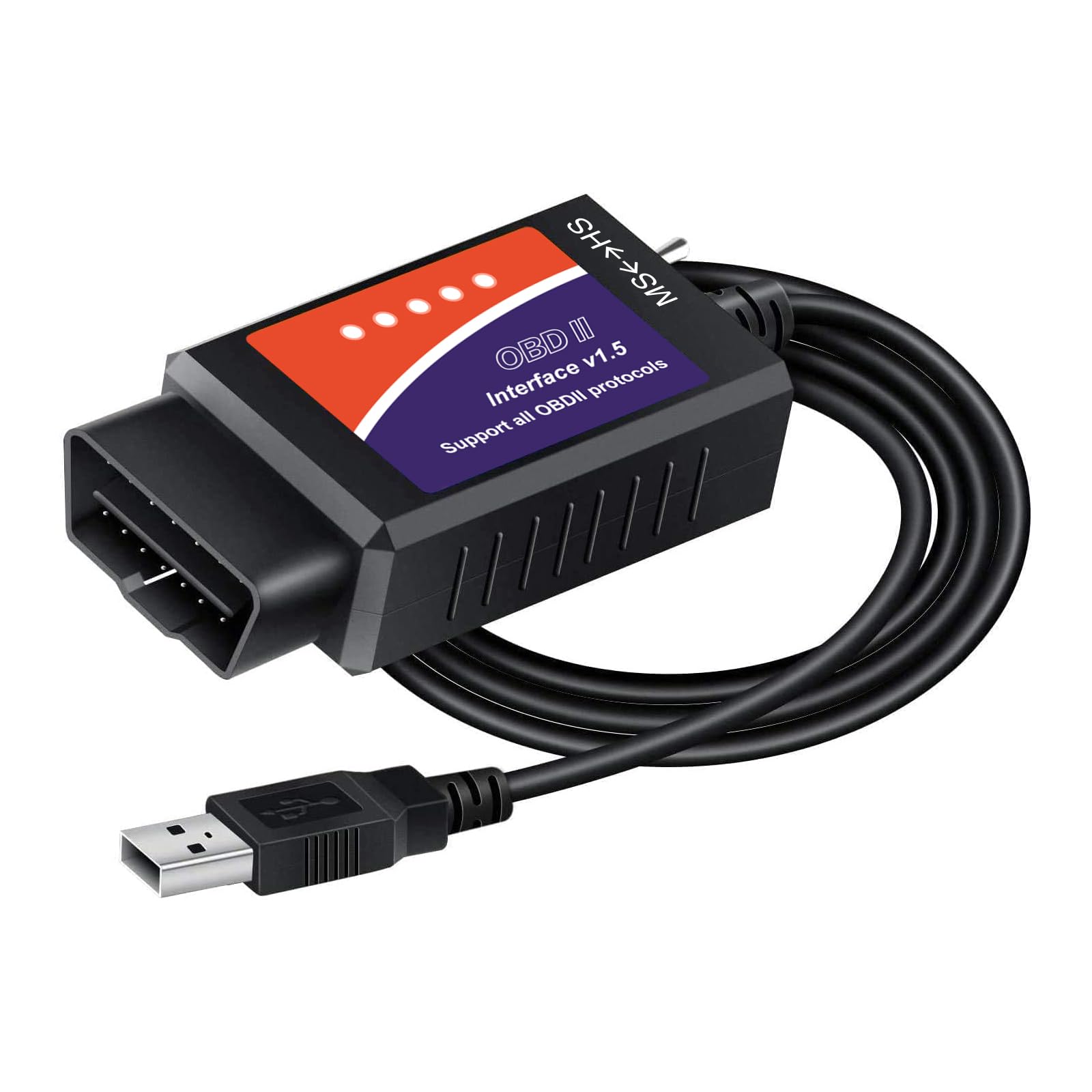
We recommend this adapter for Windows users who need wired diagnostics and Ford-focused features, but it requires software and driver setup.
Pros
- Stable USB connection for laptop-based scanning
- MS-CAN and HS-CAN switches support many Ford systems
- Works with several diagnostic programs
Cons
- Not plug-and-play
- Limited to Windows computers
- Results can vary by software and vehicle
We found the USB connection steady during scans, with fewer connection concerns than many wireless adapters. The MS-CAN and HS-CAN switches also make it useful for Ford, Lincoln, Mazda, and Mercury vehicles.
After installing the CH340T driver and compatible software, we could use tools such as FORScan, ELMconfig, and FoCCCus for code reading and selected service functions. The adapter can also help access settings that basic OBD2 readers may not support.
Setup takes patience. The included software resources may feel outdated, and some users may spend time finding the correct driver and configuring the program. We would not recommend it for anyone seeking a simple phone-based scanner.
This adapter suits owners who already use a Windows laptop and want deeper access to supported vehicles. It does not support trailers or semi-trailers, and compatibility depends on the vehicle, software, and task.
Veepeak OBDCheck BLE+

We recommend this compact adapter for affordable check-engine diagnostics through the Car Scanner ELM OBD2 app.
Pros
- Quick Bluetooth connection with iOS and Android phones
- Reads codes, live data, freeze-frame data, and readiness status
- Small design and included case make storage easy
Cons
- Requires a separate third-party app, and some features cost extra
- Mainly supports standard OBD-II functions
- Advanced vehicle data depends on the car and app
We connected the adapter through the app rather than the phone’s Bluetooth settings. Once the correct Bluetooth mode was selected, it provided a steady connection and displayed engine data without much setup.
Reading and clearing check-engine codes worked well for basic testing. We could also view live sensor readings and check whether the vehicle had completed its emissions monitors. These tools helped us understand a warning light before deciding whether to visit a repair shop.
The adapter does not support every advanced function. Features such as ABS, airbag, battery health, and transmission data depend on the vehicle and compatible app. Service resets, injector coding, ABS bleeding, and similar special functions are not supported.
Its small size made it easy to leave in a storage compartment or carry between vehicles. We also liked the included case, though Android head units are not supported. Buyers should confirm app and vehicle compatibility before ordering, especially for brand-specific features.
OHP FORScan ELM327 USB Diagnostic Tool
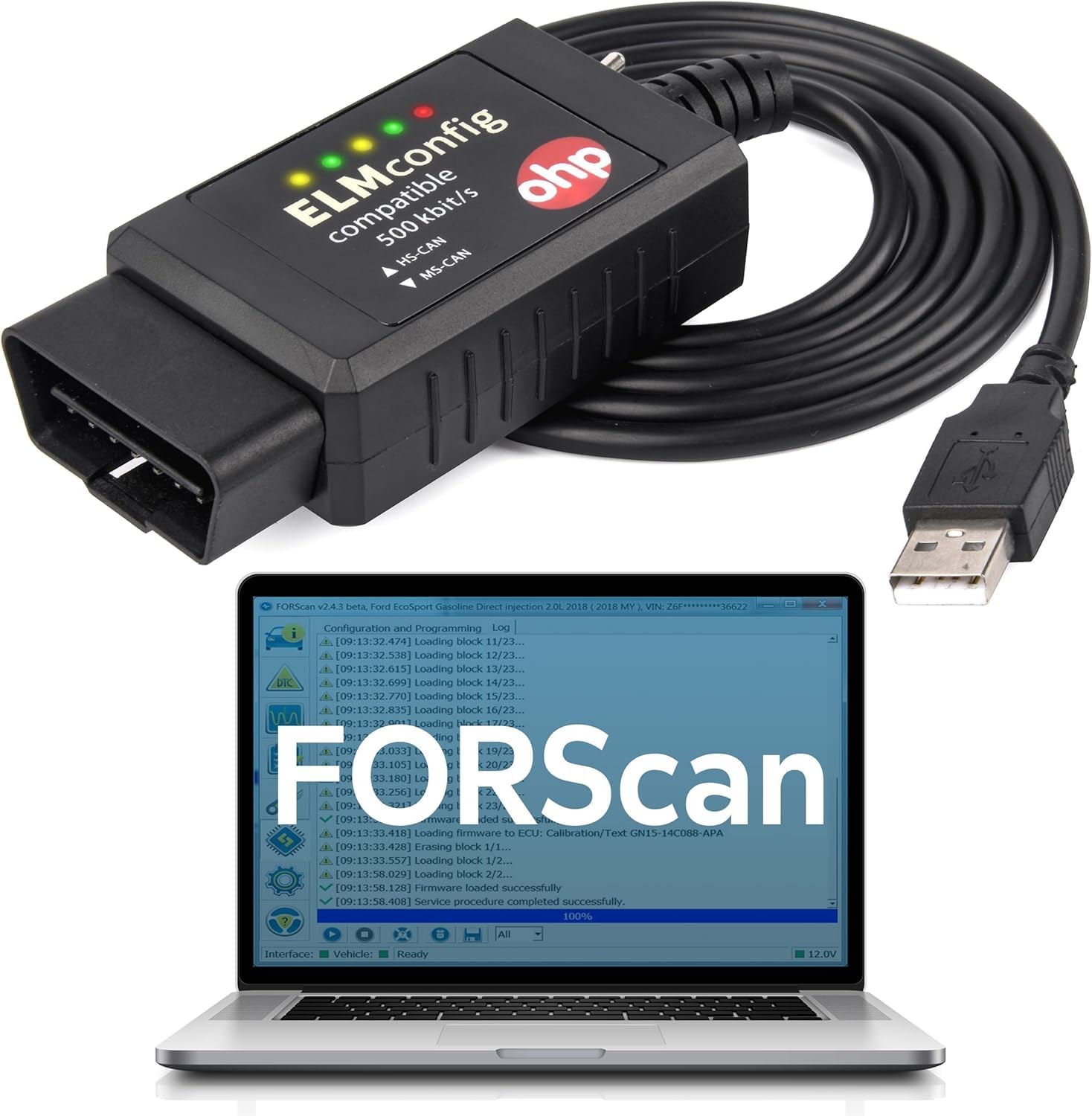
We recommend this adapter for Ford owners who want affordable Windows-based diagnostics through FORScan.
Pros
- Reads and clears fault codes across several vehicle systems
- Supports Ford MS-CAN and HS-CAN networks
- Offers a practical alternative to basic dealer diagnostics
Cons
- Works only with Windows devices
- FORScan setup may require driver and COM port changes
- Switch labeling can be confusing on some units
We used this cable with a Windows computer and FORScan to check vehicle faults and access Ford-specific systems. It connected reliably after the correct drivers were installed, and the physical switch let us move between network types.
The adapter can read and clear codes from systems such as the engine, transmission, and ABS. We found the fault descriptions useful for narrowing down problems, though users still need basic repair knowledge to confirm the cause.
Setup was not always automatic. We had to check the driver installation and, if FORScan did not detect the cable, lower the COM port number in Windows Device Manager. The cable is also limited to Windows, so it will not work directly with phones, tablets, Chromebooks, or Macs.
Compatibility depends on the vehicle and FORScan version. Some advanced functions may require a separate FORScan Extended License, and certain Mazda, joint-venture, and newer models are excluded. Check vehicle support before buying.
ANCEL AD310 OBD2 Scanner

We recommend the ANCEL AD310 for drivers who want a simple, corded tool for reading and clearing check-engine codes on compatible vehicles.
Pros
- Simple controls and a clear screen
- Reads live data and clears codes quickly
- Sturdy cable and compact design
Cons
- Handles engine and emissions codes only
- Does not support older OBD-I vehicles
- The small manual print may be hard to read
We plugged the scanner into the vehicle’s diagnostic port, and it powered on without batteries or a charger. The labeled buttons made the menus easy to follow, even for a first-time user.
The AD310 can read trouble codes, show freeze-frame data, check emissions readiness, and display some live engine information. We found it useful for narrowing down a check-engine warning, but the code still needs proper diagnosis before repairs.
Its thick cable feels durable, and the compact body stores easily in a glove box or tool bag. The screen shows basic results clearly, though its simple layout lacks the depth and convenience of a phone-based scanner.
Compatibility remains important. It works with many 1996-and-newer OBD2 vehicles, but it cannot read non-emissions faults or work with OBD-I systems. We would choose it for basic engine checks rather than advanced service work.
LJPXHHU Bluetooth OBD2 Scanner

We recommend this scanner for basic engine-code checks when you plan to use a compatible app and your vehicle meets OBD2 requirements.
Pros
- Connects with several Android, iOS, and Windows apps
- Reads codes, clears some check-engine lights, and shows live data
- Works with many cars built from 1996 onward
Cons
- Bluetooth pairing and long-term reliability can be inconsistent
- App features may vary or require paid subscriptions
- Does not support motorcycles, many hybrids, or 24-volt diesel vehicles
We found the scanner useful for checking engine codes and viewing data such as coolant temperature, engine speed, and vehicle speed. Apps such as Car Scanner and Torque can make the results easier to read, but the experience depends on the vehicle and the app we choose.
Setup felt simple on compatible devices, although iPhone users need to connect through the diagnostic app instead of the phone’s Bluetooth menu. We also noticed that some owners reported slower pairing, lost connections, or failure after several months.
This adapter suits basic engine diagnostics rather than advanced repairs. It may not reset body-control or other manufacturer-specific modules, even when it connects successfully. Before buying, we should confirm that our vehicle uses standard OBD2 and check whether our preferred app supports the needed functions.
OBDLink MX+ Bluetooth Scanner

We recommend it for drivers who want a reliable Car Scanner ELM OBD2 adapter with broad app support and access to more than basic engine codes.
Pros
- Connects reliably with iPhone, Android, and Windows devices
- Supports advanced vehicle data through several popular apps
- Offers battery protection and firmware updates
Cons
- Costs more than basic OBD2 adapters
- Requires checking vehicle and app compatibility first
- Advanced features may take time to learn
We found setup simple, and the adapter connected quickly to our phone. It worked well with common scan apps and gave us steady access to live engine data instead of dropping the connection during use.
The MX+ also supports apps such as Car Scanner, FORScan, Torque, BimmerCode, and Carista. On supported vehicles, we could view systems beyond the engine, including ABS, airbag, and tire-pressure data. Available features still depend on the vehicle and the app.
Its small size made it easy to leave in the diagnostic port, while the included case helped protect it between uses. Battery-drain and over-voltage protection added confidence during longer monitoring sessions.
The main drawback is the higher price compared with simple code readers. We also needed to check compatibility before using brand-specific functions. For buyers who want dependable connections and broader diagnostics, the OBDLink MX+ offers a strong balance of features and ease of use.
UBOG Bluetooth OBD2 Scanner

We recommend this adapter for Android users who want a low-cost way to read and clear basic engine codes.
Pros
- Simple Bluetooth setup with compatible apps
- Reads engine and emissions data
- Compact, affordable design
Cons
- Does not support iOS
- App compatibility can vary
- No manufacturer warranty listed
We plugged the adapter into a vehicle’s OBD2 port and paired it with an Android device. The basic setup was quick, although we needed to use the correct app and pairing code, such as 1234 or 0000.
Once connected, the scanner can show engine information such as speed, coolant temperature, vehicle speed, and oxygen sensor data. It can also read and clear trouble codes, but clearing a code will not fix the problem that caused it.
The main limitation is phone support. This model does not work with iPhones, and some users may need to test different Android apps before finding a reliable connection. Torque, Car Scanner, and similar apps may not all work equally well.
For basic code checks, the UBOG scanner offers useful value. We would choose it for Android phones and simple engine diagnostics, but buyers who need wider vehicle coverage or dependable plug-and-play operation should consider a more advanced adapter.
Vgate iCar Pro Bluetooth 4.0 OBD2 Adapter

We recommend this adapter for drivers who want a compact, reliable way to read standard engine codes with Car Scanner ELM OBD2 on iOS or Android.
Pros
- Connects smoothly with common diagnostic apps
- Small design and low power use
- Supports firmware updates
Cons
- Does not read ABS, SRS, or TPMS systems
- Android setup requires manual Bluetooth pairing
- May need reinsertion to wake on hybrid or electric vehicles
We found the Vgate iCar Pro easy to use in daily testing. It plugs into the vehicle’s OBD2 port without taking up much space, and the Bluetooth connection worked well with Car Scanner ELM OBD2. Android users need to pair with “Android-Vlink” using PIN 1234, while iPhone users connect through the app.
The adapter handled standard engine diagnostics, live sensor readings, and code clearing with compatible vehicles. Its low-power sleep mode also makes it better suited for leaving connected than many basic Wi-Fi adapters, although we would still remove it if the vehicle sits unused for a long period.
This model works with most gasoline cars from 1996 onward and many light-duty diesel vehicles. It does not support 24V diesel systems or advanced modules such as airbags and anti-lock brakes, so buyers needing those functions should choose a more advanced scan tool.
Its compact body, clear indicator lights, and support for firmware updates add practical value. We think it makes a strong choice for basic troubleshooting and live data, but app features may require separate purchases.
Buying Guide
We should choose an adapter that matches our phone, vehicle, and intended use. Confirm support for the phone’s operating system, the vehicle’s OBD2 standard, and the Car Scanner ELM OBD2 app.
| Feature | What we should check |
|---|---|
| Connection | Bluetooth, Wi-Fi, or USB compatibility with our device |
| Protocol support | Coverage for the vehicle’s required OBD2 protocols |
| App support | Reliable connection with Car Scanner ELM OBD2 |
| Security | Password protection and safe wireless pairing |
| Power use | Low standby drain if the adapter stays plugged in |
| Build quality | Firm connector, durable housing, and clear status lights |
We should prefer an adapter with a stable connection and short response times. Wireless models offer convenience, while USB models can provide a direct connection but require a compatible port and cable.
A compact design helps prevent accidental knocks near the driver’s legs. We should also check whether the adapter includes automatic sleep mode, since continuous power use may drain the vehicle battery during long periods of parking.
We should avoid products that make unclear claims about advanced functions. Read the technical details, check return terms, and confirm that the adapter supports the vehicle’s model year before buying.
Editor’s Choice
We recommend the Veepeak OBDCheck BLE+ for drivers using Car Scanner ELM OBD2. It connects through Bluetooth Low Energy, works with many Android and iOS devices, and supports common OBD2 functions such as reading trouble codes, viewing live data, and clearing codes.
Its compact design fits most standard OBD2 ports without blocking nearby controls. We can also leave it connected during normal driving, although we should remove it when the vehicle sits unused for long periods.
| Feature | Details |
|---|---|
| Connection | Bluetooth Low Energy |
| App support | Car Scanner ELM OBD2 and other compatible apps |
| Functions | Live data, code reading, code clearing |
| Vehicle coverage | Most OBD2-compliant cars and light trucks |
| Best for | Daily diagnostics and trip data |
We should check the vehicle’s model year and regional OBD2 requirements before buying. An adapter can display fault codes, but it cannot replace professional testing when a problem involves wiring, mechanical parts, or advanced manufacturer systems.
The adapter works best when we use it with a phone that supports the required Bluetooth connection. We should also keep the Car Scanner app updated to access current features and vehicle profiles.
Conclusion
We should choose a Car Scanner ELM OBD2-compatible adapter based on vehicle support, connection type, and app needs. A reliable adapter can read diagnostic codes, display live data, and help us monitor basic vehicle systems.
Bluetooth adapters work well with Android devices, while Wi-Fi models may suit iPhone users. We should check the product details before buying because some adapters use older ELM327 versions or lack support for advanced functions.
For regular code checks and basic data, a stable adapter with good app support offers practical value. We should also use a trusted app, follow safe connection steps, and treat scan results as useful information rather than a complete vehicle diagnosis.
FAQS
What does the Car Scanner ELM OBD2 adapter do?
We use this adapter to connect a vehicle’s OBD2 port to a phone or tablet. With the Car Scanner ELM OBD2 app, we can view live data, read fault codes, and clear some stored codes.
Which vehicles work with it?
Most petrol vehicles sold in the United States from 1996 onward support OBD2. Diesel vehicles and vehicles in other regions may follow different dates and standards, so we check the vehicle manual or adapter specifications first.
How do we connect the adapter?
We plug the adapter into the vehicle’s OBD2 port, turn on the ignition, and pair it with the phone through Bluetooth or Wi-Fi, depending on the model. We then select the adapter in the Car Scanner app.
Can it clear warning lights?
We can often clear an engine fault code after recording it. The warning light may return if the underlying problem remains, and the adapter cannot repair mechanical or electrical faults.
Will it work with iPhone and Android?
Compatibility depends on the adapter’s connection type. Bluetooth Low Energy and Wi-Fi models commonly work with iPhone, while some classic Bluetooth models work only with Android.
What should we check before buying?
- Confirm the adapter supports the vehicle’s OBD2 protocol.
- Check whether it supports iPhone, Android, or both.
- Choose a model with reliable security and sleep-mode features.
- Avoid leaving it connected if it drains the vehicle battery.
