
EXTRACTME OBD2 Scanner Review: Is It Worth It in 2026?

The EXTRACTME OBD2 Scanner Bluetooth with AI Assistant is a smartphone-based automotive diagnostic scanner designed to read vehicle faults and provide app-guided diagnostic information. Its primary use is helping DIY car owners investigate warning lights, access diagnostic trouble codes, and examine supported vehicle systems without paying an ongoing app subscription.
This EXTRACTME OBD2 Scanner review focuses on its most useful selling points: Bluetooth 5.1 connectivity, full-system diagnostic claims, AI-assisted fault analysis, broad OBD2 vehicle coverage, and a no-subscription app model. It sits above basic engine-code readers but still depends on a compatible smartphone and vehicle-specific system coverage.
🏆 My Quick Verdict
💡 Best For: DIY owners who want broader smartphone diagnostics and AI-assisted code explanations without a recurring subscription.
⚡ Key Specs:
Bluetooth 5.1; support for most 1996+ OBD2 vehicles; 9 standard plus extended protocols; transmission, ABS and SRS diagnostic support; AI-assisted fault analysis; no subscription model.
✅ Bottom Line: The EXTRACTME scanner offers considerably more diagnostic depth than a basic check-engine reader while keeping the hardware compact. Its main trade-off is that supported functions can vary by vehicle and everything depends on the companion phone app.
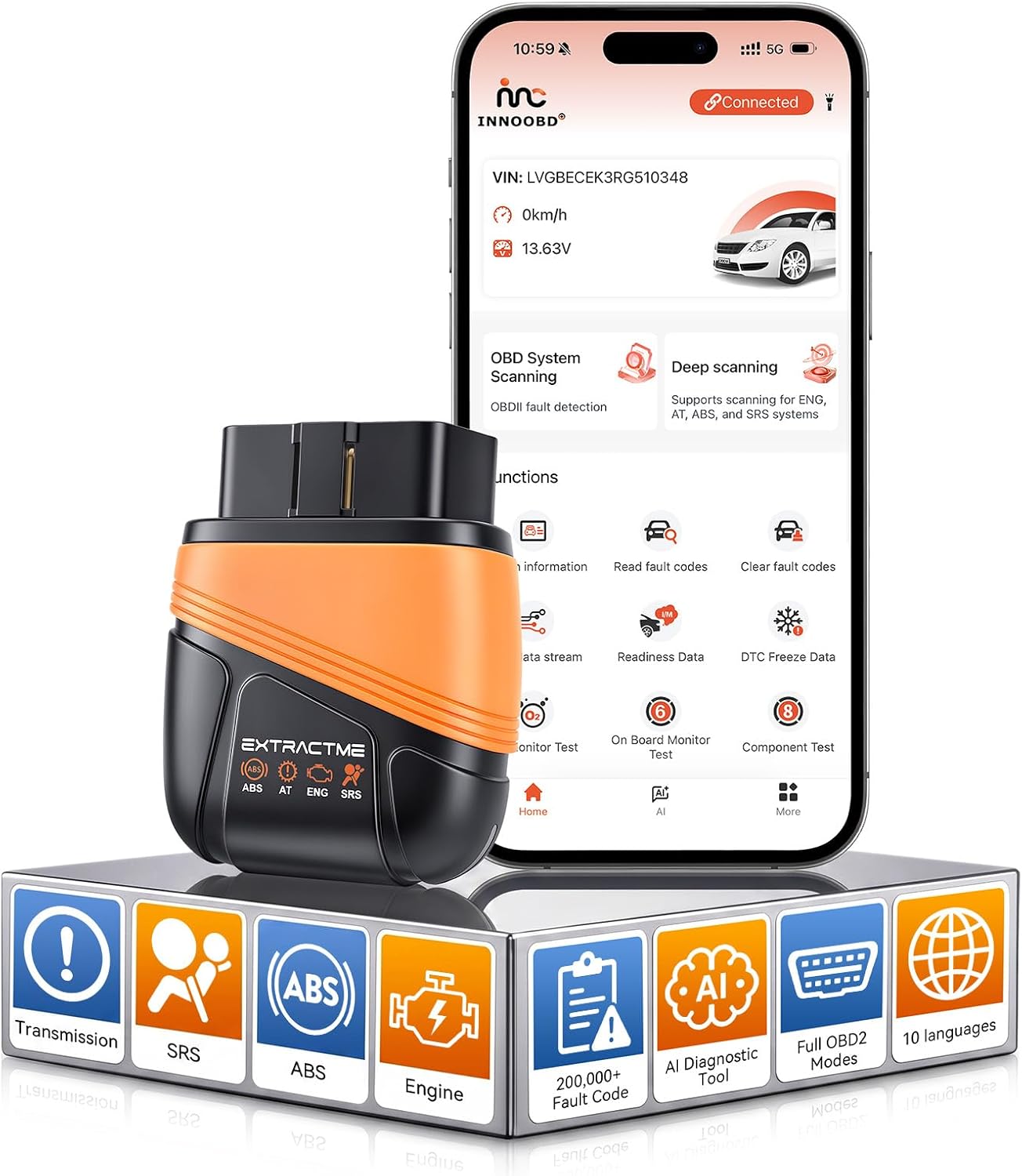
At a Glance
- Bluetooth 5.1 sends diagnostic information from the vehicle to a compatible smartphone.
- Full-system support can include engine, transmission, ABS and SRS diagnostics.
- AI-assisted fault analysis is intended to make diagnostic codes easier for DIY users to interpret.
- The advertised app model does not require an ongoing subscription for normal access.
- Vehicle coverage extends across most OBD2-compliant vehicles from the 1996 model year onward.
- Advanced system access remains dependent on the specific make, model and control modules.
Specifications
| Specification | Verified Detail |
|---|---|
| Product Type | Bluetooth OBD2 diagnostic scanner |
| Bluetooth | Bluetooth 5.1 |
| Vehicle Coverage | Most OBD2 vehicles from 1996+ |
| Protocols | 9 standard plus extended protocols |
| Enhanced Systems | Transmission, ABS and SRS support |
| Fault Database | More than 200,000 codes claimed |
| Languages | 10 |
| Housing | ABS and silicone |
Design & Build Quality
The EXTRACTME scanner uses a compact adapter-style design rather than a handheld scanner with its own display. An ABS and silicone housing gives the device a practical form for storage in a glovebox or tool kit.
Because the phone provides the interface, there are no menus or physical buttons to manage on the adapter itself. This reduces bulk, although it also means the scanner is not useful as a completely standalone diagnostic tool.
Setup, Installation & Ease of Use
- Locate the vehicle’s OBD2 diagnostic connector, normally found beneath the dashboard on the driver’s side.
- Insert the scanner securely into the diagnostic port with the ignition in the appropriate position.
- Install and open the companion application on a compatible smartphone.
- Enable Bluetooth and follow the app’s connection procedure to establish communication with the scanner.
- Select the vehicle or diagnostic function required before reading or clearing supported fault codes.
- Store the adapter in a dry, protected location when you do not intend to leave it connected.
Core Performance & Feature Breakdown
The most important advantage is access to more vehicle systems than an ordinary engine-only OBD2 code reader. Support for transmission, ABS and SRS faults makes the scanner potentially useful when a dashboard warning comes from something other than the powertrain.
The AI-assisted diagnostic function adds another layer by helping translate fault information into more understandable troubleshooting context. That can make diagnostic data less intimidating for owners who recognize a code but do not yet understand what component or system should be checked.
Expert Insight
Treat AI explanations as diagnostic guidance rather than proof that a named component has failed. A trouble code identifies a detected condition, while electrical testing, inspection and live-data analysis may still be needed to confirm the actual cause.
Bluetooth 5.1 also removes the cable between the diagnostic port and display. That makes it easier to view information from the driver’s seat or move around the vehicle while checking supported data.
Key Features Explained
Full-System Diagnostics
The scanner is advertised with diagnostic access beyond generic engine codes, including transmission, ABS and SRS systems. This matters when a vehicle displays brake, airbag or transmission warnings that a basic emissions-focused code reader may not identify.
AI-Assisted Fault Analysis
The AI assistant is designed to explain diagnostic information and support troubleshooting decisions in clearer language. It can help a beginner understand possible causes, but physical diagnosis should still confirm the underlying fault before parts are replaced.
No-Subscription App Model
A no-subscription design reduces the possibility of paying monthly or annual fees simply to continue using the scanner’s advertised functions. Buyers should still check current app availability and supported features for their specific phone before purchasing.
Extended Protocol Coverage
Support for nine standard plus extended protocols broadens the scanner’s potential compatibility across different vehicles. Enhanced module access is still manufacturer-dependent, so the presence of an OBD2 connector alone does not guarantee every advanced diagnostic feature.
Real-World Usability & Maintenance
For routine ownership, the scanner’s phone-based interface is convenient because diagnostic information appears on a larger familiar display. There is also no separate scanner battery or dedicated screen to maintain.
Keep both the connector and vehicle diagnostic port clean and avoid forcing the adapter into a damaged socket. If communication becomes unreliable, reconnect the adapter, restart Bluetooth and confirm that the vehicle ignition state matches the app’s instructions.
Users who routinely diagnose several vehicles should verify enhanced-system coverage for each model. Generic OBD2 functions are standardized more broadly than ABS, SRS and manufacturer-specific module access.
Pros & Cons
Pros
- Full-system support offers more diagnostic depth than an engine-only code reader.
- AI-assisted analysis can make unfamiliar fault information easier to interpret.
- The no-subscription model avoids mandatory recurring access fees.
- Bluetooth operation uses the smartphone as a convenient wireless display.
Cons
- A compatible smartphone and functioning app are required for operation.
- Enhanced system coverage can vary considerably between vehicle makes and model years.
- AI-generated diagnostic guidance cannot replace proper testing when confirming a repair.
Common Issues & Fixes
The Scanner Will Not Connect
A Bluetooth or ignition-state problem can prevent initial communication. Reseat the adapter, enable Bluetooth, restart the app and verify that the ignition is positioned as directed.
An Advanced System Is Missing
A vehicle may support standard OBD2 while lacking enhanced access through this particular scanner. Confirm make, model, year and module coverage before assuming the adapter is defective.
A Code Returns After Clearing
Clearing a diagnostic trouble code does not repair the condition that generated it. Diagnose and correct the underlying fault before clearing the code again.
What to Know Before You Buy
Vehicle compatibility deserves more attention than the feature list. Standard engine-related OBD2 coverage is relatively broad, while access to ABS, airbags, transmissions and manufacturer modules can differ by vehicle.
You should also be comfortable using a phone as the scanner’s primary interface. Buyers who want physical buttons, an integrated screen or a diagnostic tool independent of a mobile app may prefer a conventional handheld model.
Who Should Buy It / Who Should Skip It
✅ Who Should Buy It
- DIY owners who want more than generic check-engine diagnostics.
- Users interested in ABS, SRS or transmission fault information on supported vehicles.
- Buyers who prefer smartphone-based diagnostics and wireless operation.
- Owners who want diagnostic guidance without a mandatory recurring subscription.
✗ Who Should Skip It
- Anyone who wants a standalone scanner with an integrated display.
- Professional technicians who require guaranteed manufacturer-level functions.
- Owners whose specific vehicle is not confirmed for the enhanced modules they need.
Alternatives to Consider
BlueDriver Bluetooth Pro OBDII Scan Tool
Best For: Drivers wanting an established smartphone diagnostic ecosystem.
Main Advantage: Enhanced diagnostics can include ABS, SRS and other manufacturer-specific information on supported vehicles.
Trade-off: Enhanced coverage remains vehicle-dependent.
Key Spec: Bluetooth smartphone-based OBD2 scan tool.
FIXD Bluetooth OBD2 Scanner
Best For: Beginners focused on check-engine diagnostics and maintenance reminders.
Main Advantage: The app translates diagnostic information into straightforward explanations and provides maintenance tracking.
Trade-off: Some additional services are offered through FIXD Premium.
Key Spec: Supports gas-powered cars and trucks built after 1996 and diesels built after 2008.
Is It Worth It?
The EXTRACTME scanner makes the most sense for a DIY owner who wants deeper diagnostic access without moving to an expensive professional tablet. Its combination of enhanced-system coverage, wireless operation and AI assistance gives it a broader role than a simple code reader.
The purchase is less compelling if you only need occasional check-engine codes. In that situation, a simpler scanner can accomplish the core task with fewer compatibility considerations.
Final Verdict
The EXTRACTME OBD2 Scanner Bluetooth with AI Assistant is a capable option for smartphone-oriented DIY diagnostics, particularly when supported ABS, SRS and transmission access matters. Confirm enhanced compatibility with your exact vehicle first, because that determines how much value you will actually receive from its advanced features.
Frequently Asked Questions
Does the EXTRACTME OBD2 Scanner work with every car?
No, compatibility is not guaranteed for every vehicle or every diagnostic system. It is advertised for most OBD2 vehicles from 1996 onward, but enhanced functions such as ABS, SRS and transmission access can vary by make, model and year.
Do I have to pay a subscription to use it?
The product is advertised with a no-subscription app model. Check the current app listing before purchase in case software features or service terms have changed.
Can it diagnose ABS and airbag warning lights?
It supports ABS and SRS diagnostics on compatible vehicles. Coverage should be confirmed for your exact vehicle because enhanced module access is not universally standardized like generic OBD2 engine diagnostics.
Can the scanner clear fault codes?
Supported diagnostic codes can generally be cleared after the underlying problem is addressed. Clearing a warning without fixing its cause may only make the code return.
What maintenance does the scanner require?
The adapter requires very little physical maintenance. Keep its connector clean and dry, protect it from impact, and keep the companion app current for reliable operation.
What warranty does the EXTRACTME scanner include?
A specific warranty term could not be reliably verified from the available product information. Check the current seller or manufacturer warranty details before ordering if warranty coverage is important to your purchase.
Affiliate disclosure: replacekeyfob.com earns a small commission when you purchase through links on this page — at no extra cost to you. Our editorial process is independent: affiliate relationships never influence which products we recommend or how we rank them.
