
Key Fob Lock Button Not Working? A Practical Troubleshooting Guide

If your key fob lock button not working has turned a simple walk away from the car into a mini mystery, you’re in the right place. I’m Jason Carter, and after years around car electronics, I can tell you this: when one button quits while the others still seem alive, the fix is often simpler than people expect.
The trick is not guessing. Work through the problem in a logical order, and you can usually narrow it down to one of four things: the battery, the button itself, the fob’s internal contacts, or the car’s locking system.
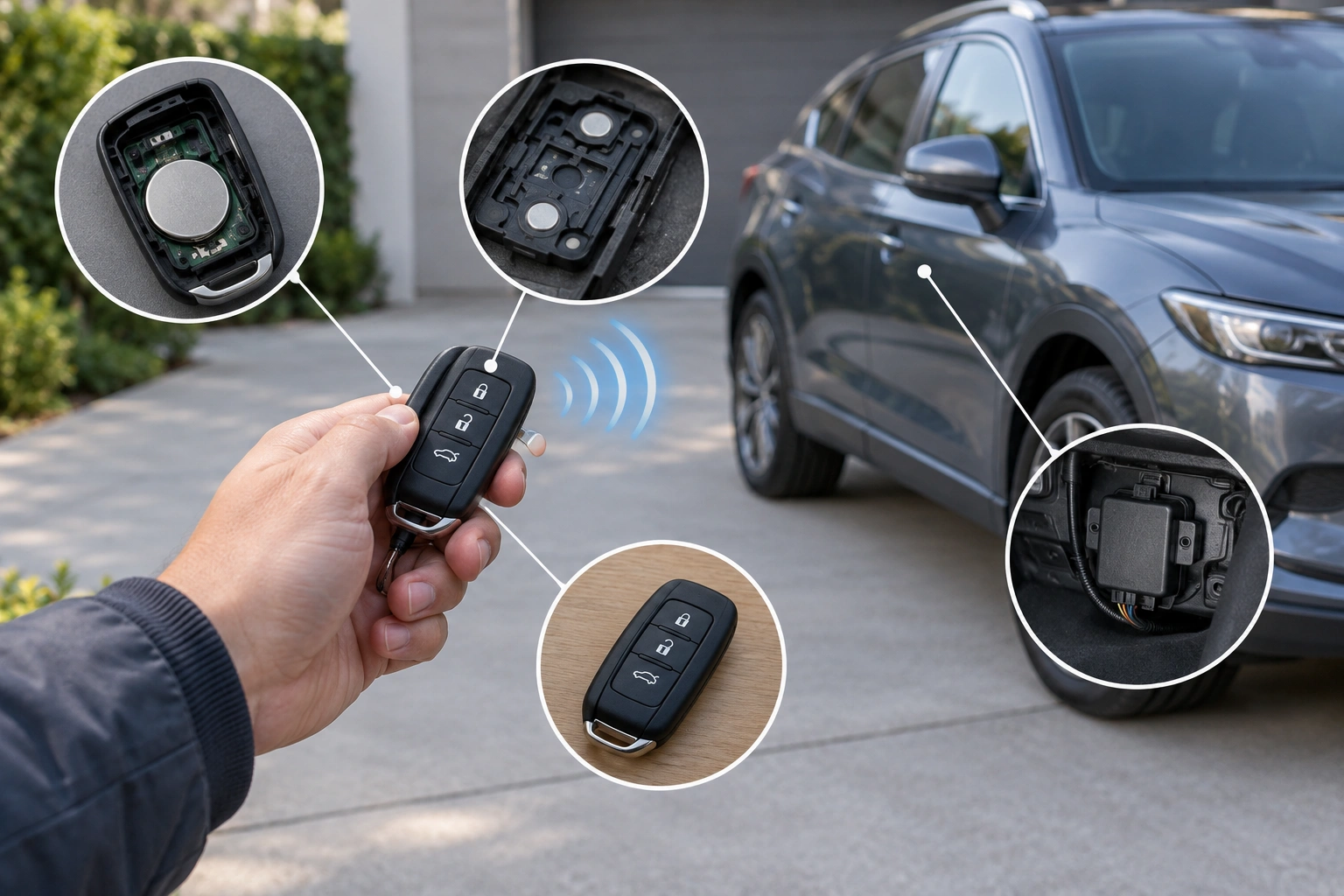
Quick Diagnosis: What the Symptom Usually Means
A lock button that does nothing is not the same as a fob that has died completely. The pattern matters.
If the unlock button still works but the lock button does not, that often points to a worn or contaminated contact under the lock button, not a dead battery. If the lock button works only sometimes, that leans toward a weak battery, a loose internal contact, or a button that is wearing out.
If none of the buttons work, the problem is more likely a dead battery, a broken internal connection, or a vehicle-side issue if you’re testing more than one fob.
Here’s a simple way to think about it:
| Symptom | Most likely cause | Best next step |
|---|---|---|
| Unlock works, lock does not | Worn lock-button contact or dirty internal pad | Check battery, then inspect and clean the fob |
| Lock works only close to the car | Weak battery or weak signal | Replace the battery first |
| Both buttons fail | Dead battery, damaged fob, or programming issue | Test with a spare fob |
| Both fobs fail the same way | Car-side fault | Check vehicle receiver, fuse, or actuator |
A good first test is distance. In general troubleshooting, make sure you are standing close enough to the vehicle to give the fob a fair test. Key fobs can seem “dead” when the signal is simply too weak to reach the car.
Quick decision path
– If the spare fob works: your original fob is the problem.
– If the spare fob also fails: look at the car-side receiver, fuse, actuator, or programming.
– If the lock button works only intermittently: start with the battery, then inspect the button contact and alignment.
– If only lock fails but unlock works: suspect the lock-button contact or alignment first; a weak battery can still cause intermittent behavior, but a single-button failure often points to the button itself.
– If the fob works only very close to the car: replace the battery first, then retest.
– If nothing changes after a battery swap and cleaning: move on to resyncing or a locksmith test.
Most Likely Causes, in Order of Probability
When a lock button stops responding, these are the usual suspects:
1. Weak or dead battery
This is the most common issue when a key fob stops working. The battery may still have enough power for one function to limp along, especially if the fob is on the edge of failure.
2. Worn lock-button contact
Many fobs use a small contact pad or membrane under the button. If that contact wears out, gets dirty, or shifts out of position, the lock button may fail while unlock still works.
3. Dirty or damaged internal parts
Dust, moisture, corrosion, or a cracked shell can interfere with the button or the battery connection.
4. Reprogramming or sync issue
If the fob lost its pairing, the car may ignore the lock command even though the fob looks fine.
5. Car-side lock system fault
If the receiver, fuse, or door lock actuator is the problem, the fob may be sending the signal correctly, but the car is not carrying out the command.
That order matters because it keeps you from replacing an expensive fob when a battery or contact issue is the real fix.
Step 1: Rule Out the Battery First
Even if the unlock button still works, replace the battery if it is old, unknown, or has never been changed. A weak battery can cause partial failures before the fob dies completely.
If you have a multimeter and know how to use it, you can check the battery’s voltage, but in most cases the practical move is simpler: install a fresh battery of the correct type for your fob and retest it. Battery type varies by vehicle and fob design, so check your owner’s manual or the old battery before buying a replacement.
After the new battery is in, test the lock button from beside the driver door. Then test again from a few steps back. If the button suddenly works normally, you likely found the issue.
If the battery replacement makes no difference, move on instead of forcing the issue. That saves time and avoids damaging the fob shell by repeatedly opening it.
Step 2: Check Whether Only the Lock Button Is Failing
This step tells you whether you’re dealing with a single-button failure or a broader fob problem.
Press the lock, unlock, trunk, or panic button one at a time and note what happens. If only the lock button fails, the battery is less likely to be the whole story. That pattern often points to a worn internal contact pad or a button that is no longer pressing the internal switch cleanly.
A common real-world pattern is this: the unlock button works every time, but the lock button only responds if you press it hard or at just the right angle. That usually means the lock side of the fob is mechanically worn, not that the whole remote is dead.
If the lock button works when you press it harder or at a slightly different angle, that’s another clue that the internal contact is failing. If nothing changes no matter how you press it, the problem may be battery-related, programming-related, or car-side.
Step 3: Clean, Reseat, and Inspect the Fob
Before you buy a new remote, open the fob carefully and inspect what you can see without prying on anything fragile.
Look for:
– A battery that is loose or not seated firmly
– Corrosion on the battery contacts
– Cracks in the shell
– Dirt around the button openings
– A rubber button pad that is shifted out of place
If the battery contacts look dirty, clean them gently. A dry microfiber cloth is the safest first move. If there is visible corrosion, use the cleaning method recommended for your specific fob model or service documentation. Avoid soaking the board or using random solvents on plastic or rubber parts unless you know the material can handle it.
For the button area, focus on two practical checks:
1. Clean the contact surfaces carefully. Dust, skin oils, and corrosion can interfere with the button’s ability to trigger the switch.
2. Check button alignment. Make sure the rubber pad, membrane, or plastic button is sitting where it should and pressing straight down on the internal contact.
If the shell is cracked, the button may not press the internal switch evenly. In that case, a replacement shell can be cheaper and more practical than replacing the whole fob.
Step 4: Test Whether the Fob Is Actually Transmitting
If you’re not sure whether the remote is sending a signal, use a few practical checks.
Start close to the car and press the lock button right next to the driver door. If it works only at very short range, that can point to a weak battery or a weak transmission.
Then compare it with your spare fob, if you have one:
– If the spare works normally at the same distance, the original fob is probably not transmitting reliably.
– If both fobs behave the same way, the car-side system is more likely involved.
If you do not have a spare, ask a locksmith or parts store that offers remote testing whether they can check the fob signal. Some can confirm whether the remote is transmitting, which is helpful when the issue is not obvious from simple button testing.
This kind of test is especially useful when the lock button seems to “do something” only sometimes. That can help separate a weak signal from a worn button contact.
Step 5: Try a Simple Resync or Reprogramming Check
If the battery is fresh and the button itself seems fine, a sync issue is worth considering.
Some vehicles allow a basic resync procedure, while others require dealer or locksmith equipment. Your owner’s manual is the best place to confirm the correct process for your model. Do not assume a universal sequence will work on every car.
Reprogramming is most worth trying when:
– The fob used to work normally and then stopped after a battery change or long storage
– The spare fob works differently than the original
– The fob responds inconsistently even with a new battery
– The remote seems to transmit, but the car does not respond
Reprogramming is less likely to help when:
– Only one button fails and the others work normally
– The lock button feels mushy, sticks, or presses unevenly
– The shell, button, or internal contact looks physically worn or damaged
In other words, resyncing can help with communication problems, but it will not fix a worn button contact or broken plastic. If the failure is clearly mechanical, skip the reprogramming rabbit hole and focus on the fob hardware.
Step 6: Check for Car-Side Locking Problems
If the fob seems fine but the car still won’t lock, the vehicle may be the real issue.
Possible car-side causes include:
– A blown fuse
– A faulty door lock actuator
– A bad receiver for the keyless entry system
– A wiring problem in the lock circuit
A quick clue is whether the locks respond to other inputs. For example, if the door lock switch inside the car also fails, that points away from the fob and toward the vehicle’s locking system. If the inside switch works but the remote does not, the receiver or programming becomes more likely.
When both key fobs fail the same way, I would not keep cycling the lock button over and over. That can waste time and, if an actuator is sticking, may make the problem more obvious without solving it.
Repair, Replace, or Rebuild the Fob: Which Option Makes Sense
Once you know where the fault is, the next decision is usually cost and effort.
Replace the battery
Choose this first if the battery is old, unknown, or weak. It is the fastest low-cost test and often the right answer.
Replace the shell
This makes sense when the buttons are worn, the case is cracked, or the shell no longer lines up with the internal contacts.
Repair the contact area
This can work when one button fails because of dirt, contamination, or a misaligned contact pad. It’s a reasonable DIY path if you’re comfortable opening the fob carefully and the damage is minor.
Replace the circuit board or the full fob
This is usually the better move when the board is damaged, water has gotten inside, or the fob has multiple failures that survive a battery change and cleaning.
The trade-off is simple: a shell or battery is cheaper, but only helps if the electronics are still healthy. A full replacement costs more, but it avoids repeated trial-and-error when the board itself is failing.
When to Consult a Locksmith
A locksmith is worth calling when:
– Your spare fob fails the same way as the original
– Reprogramming does not restore function
– You suspect the vehicle receiver, fuse, or actuator is the issue
– The fob has internal damage you do not want to risk worsening
– You need a replacement or programming help and the dealer is your only other option
A locksmith who works with automotive remotes can often test whether the fob is transmitting, compare it against a known-good remote, and in some cases reprogram or replace the fob. That can save you from replacing parts that were never the issue.
Preventing Repeat Key Fob Problems
A few habits help keep this from coming back too soon.
Keep the fob dry, avoid dropping it on hard surfaces, and do not store it where the buttons get pressed constantly in a pocket or bag. If the shell is loose, fix that early so the button contacts stay aligned.
If your fob battery is several years old, replace it before it dies completely. And if you notice one button starting to feel mushy or inconsistent, treat that as an early warning sign instead of waiting for the whole remote to quit.
FAQ
Why does my key fob unlock the car but not lock it?
That pattern often points to a worn lock-button contact, a dirty internal pad, or a button that is no longer pressing properly. A weak battery can also cause partial failures.
Is the battery dead if some buttons still work?
Not necessarily, but a weak battery is still one of the first things to check. Some functions can keep working after others begin to fail.
How do I know if the lock button is physically broken?
If the button feels mushy, sticks, presses unevenly, or works only at certain angles, the internal contact or button mechanism may be worn.
Can I fix a key fob button without replacing the whole fob?
Sometimes, yes. A battery change, cleaning, contact reseating, or a new shell can solve the issue if the circuit board is still good.
Does the fob need to be reprogrammed?
Possibly. Reprogramming is more likely if the fob stopped working after a battery change, storage, or a sync issue. It is less likely to help if the button hardware is worn out.
Could the problem be with the car instead of the remote?
Yes. If a spare fob fails the same way, the issue may be the vehicle receiver, fuse, or door lock actuator rather than the remote.
