
How to Program a GMC Key Fob (DIY, Dealer, or Locksmith)

Most GMC trucks and SUVs can add a key fob without the dealer. Push-button Sierra, Yukon, Acadia and Terrain models from the 2010s usually accept GM’s door lock cylinder sequence with two working fobs, or a 30-minute relearn without them. Turn-key models use GM transponder relearns. Some newer GMCs need a scan tool or dealer.
GMC shares its key systems with Chevrolet, so a Sierra and a Silverado of the same year use essentially the same fobs and procedures. GMC buyers are more likely to have upper trims, though, so smart keys with remote start, power liftgate and tailgate buttons are common, and those extra buttons must match on a replacement.
This guide covers the Sierra, Yukon, Acadia, Terrain and Canyon by era, with the onboard steps and the cases where a tool or professional is the only route.
GMC key types and security systems
| Era | Typical GMC models | Key and immobilizer | DIY route |
|---|---|---|---|
| About 1999-2006 | Sierra, Yukon, Envoy, Sonoma, early Canyon | Passlock (key has no chip) on many; separate remote | Key cutting only; remote via sequence or DIC; 10-minute relearn for security faults |
| About 2007-2014 | Sierra, Yukon, Acadia, Canyon, Terrain | PASS-Key III transponder key; separate remote or flip key | GM key relearns; remote via DIC or sequence |
| About 2014-2019 | Sierra, Yukon, Acadia, Terrain, Canyon | Flip key on turn-key trims; smart key on upper trims | GM relearns; door lock sequence for smart keys |
| About 2019 on | Sierra (2019 on), Yukon (2021 on), Acadia, Terrain, Canyon | Flip key or smart key, newer GM electrical architecture on some models | Door lock sequence on many; tool or dealer on some |
Which system a mid-2000s GMC has varies by model and year. If your key head has no chip and the dash shows a security light when there is a problem, it is probably Passlock.
What you need
- The right fob. Match FCC ID, part number and buttons (remote start, liftgate, tailgate). A fob missing a button your truck uses may still program but will not offer that function.
- A fresh CR2032 for most GMC flip keys and smart keys. See our GMC key fob battery replacement guide.
- A cut blade for flip keys, and the emergency blade from a smart key for the door lock method.
- About 30 minutes and a good 12V battery if you do not have two working fobs.
Replacement GMC Smart Key or Flip Key
Match FCC ID, part number and button layout to your truck. Buy new; many GM smart keys cannot be reprogrammed once registered to another vehicle.
As an Amazon Associate, ReplaceKeyFob earns from qualifying purchases.
How to program a GMC key fob: push-button models
Many 2010s push-button GMCs include “Programming with Recognized Transmitters” in the owner’s manual:
- Close all doors. Remove the key blade from a working fob.
- Insert it into the driver door lock cylinder (remove the handle cap if fitted) and turn to unlock five times within about 10 seconds.
- The Driver Information Center shows READY FOR REMOTE followed by a number.
- Place the new fob in the transmitter pocket. On many Sierra and Yukon models this is in the center console; check your manual. Press ENGINE START/STOP.
- When the display advances, the fob is learned. Repeat for any other new fob, then exit as the manual describes.
With fewer than two working fobs, the same start leads to REMOTE LEARN PENDING, PLEASE WAIT. You then wait through three 10-minute timers, pressing the start button when prompted. All existing fobs are erased, so relearn every fob you keep.
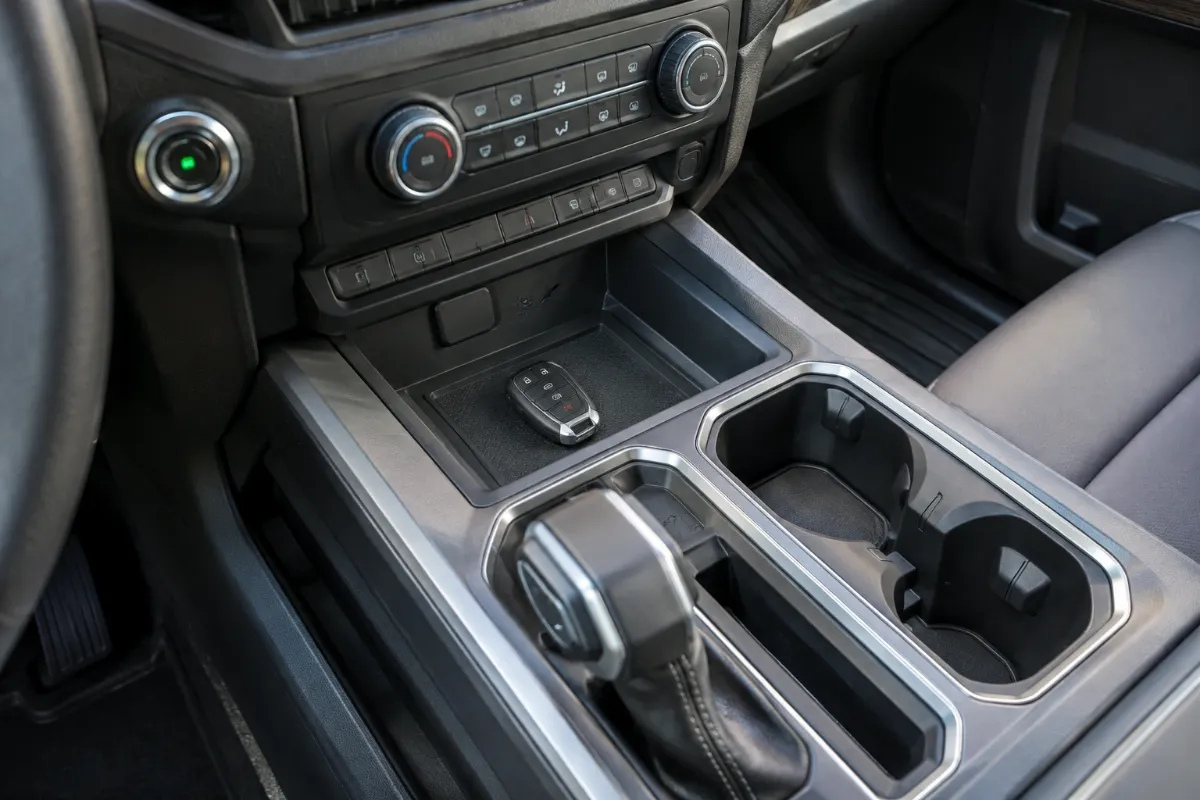
Turn-key GMC trucks with a flip key or transponder key
For PASS-Key III Sierras, Canyons, Acadias and Terrains with a turn-key ignition:
- With a working key: on many models, turn a working key to ON, turn off, insert the new cut key within a few seconds and turn to ON. The security light goes out after about 10 seconds when the key is learned.
- Without a working key: use the 30-minute relearn with the new key: ON for about 10 minutes until the security light changes, off for about 5 seconds, repeat three times, then start. Other keys are usually erased.
The remote buttons on flip keys usually learn with the key, or through a DIC remote relearn on some trucks. Older trucks with a separate remote may use a DIC menu or a button sequence listed in the manual. Our Chevy key fob programming guide covers the same GM procedures, and the Buick guide shows how they apply to crossovers.
Model notes: Sierra, Acadia, Terrain, Canyon
- 2020 Sierra: flip key on lower trims, smart key on upper trims. Many trucks accept the onboard methods; if not, a tool with current GM coverage is required.
- Acadia: 2007-2016 turn-key with a separate remote or flip key; 2017 and newer, including 2021, mostly smart key.
- Terrain: 2010-2017 flip key on most trims; 2018 and newer smart key on most trims.
- 2006 Canyon: uses a separate remote and a key that, on many trucks, has no transponder chip; a new key typically needs cutting only.
- Yukon: similar to the Sierra of the same era; Denali trims more often have smart keys.
Tips for fleet and work-truck owners
GMC trucks are often shared between drivers, so keys go missing more often than on a family car. A few practical points:
- Keep two programmed fobs at all times. The fast door lock procedure needs two recognized fobs; dropping to one means the 30-minute procedure or a tool.
- Program all fobs together. The 30-minute procedure erases fobs not present, so collect every key from every driver first.
- Label keys by vehicle. Sierra and Silverado fobs of the same year often look identical, and a fob programmed to one truck will not work on another.
- Consider a tool for larger fleets. If you manage several GM trucks, a key programmer with GM coverage can pay for itself, but check the coverage list for each model year you own.
- Check the 12V battery first. Long relearns on a truck with a tired battery are a common reason the procedure fails partway through.
If GMC key fob programming fails
- No READY message: check that all doors are closed, including the tailgate on some models, and the cylinder turns fully.
- Fob not learned: wrong FCC ID, a used fob or a dead coin cell.
- Security light keeps flashing: let each timer finish; a weak truck battery can interrupt the relearn.
- Newer truck ignores the procedure: use a GM-capable key programmer, a locksmith or the dealer. Our best OBD2 scanners for GMC covers tools.
GMC key fob programming cost
| Job | Typical 2026 cost |
|---|---|
| Onboard relearn (DIY) | Free, plus the fob and cutting |
| Locksmith: flip key | About $120-$250 |
| Locksmith: smart key | About $150-$350 |
| GMC dealer: fob plus programming | About $200-$500 |
| All keys lost | About $200-$500 |
See the key fob programming cost guide for ways to save, and the main guide on how to program a key fob.
Frequently Asked Questions
Push-button GMCs usually use the door lock cylinder sequence with two working fobs or a 30-minute relearn. Turn-key models use GM transponder relearns. Check the owner’s manual for your model year.
Turn the emergency key blade to unlock five times in the driver door within about 10 seconds, place the new fob in the transmitter pocket and press the start button. Flip-key Sierras use the GM key relearn.
Not always. Many models support onboard relearns. A tool is needed when the procedure is not in your manual or fails, and for some newer models.
Often not. Many GM smart keys lock to the first vehicle. Some older remotes can be reused if the FCC ID matches, but a new fob is the safer choice.
Most GMC flip keys and smart keys use a CR2032.