
VDIAGTOOL VD30 Pro Review: Is It Worth Buying?

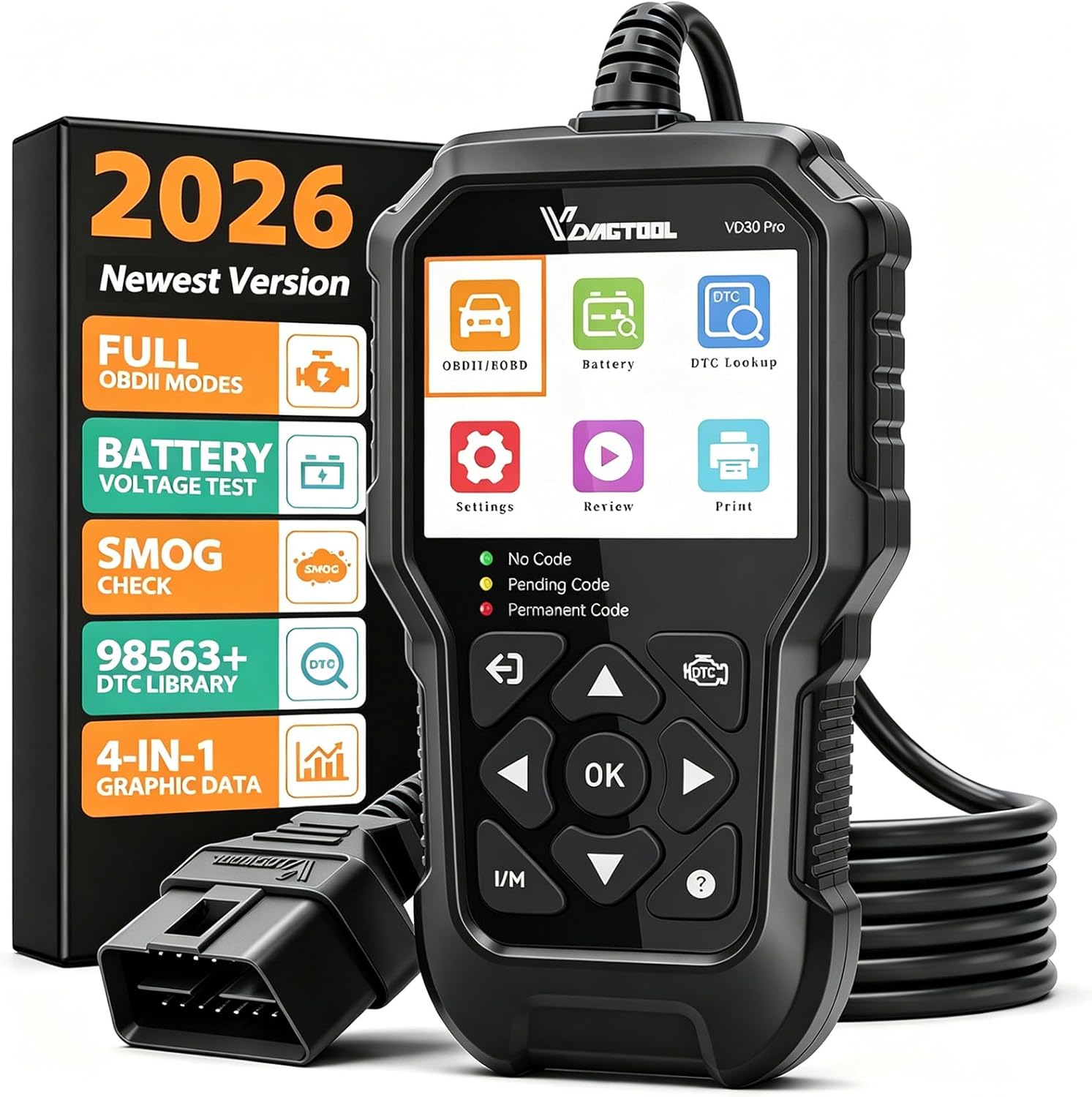
The VDIAGTOOL VD30 Pro is a handheld OBD2 scanner designed to diagnose engine-related faults and monitor vehicle data. It helps car owners read check engine codes, examine live sensor information, and check emissions readiness without visiting a repair shop for every warning light.
This VDIAGTOOL VD30 Pro review examines its diagnostic capabilities, usability, limitations, and overall value. It targets DIY mechanics and everyday drivers who want more information than a basic code reader provides.
The standout feature is four-parameter live-data graphing on a self-contained display. However, it is not a replacement for a professional full-system diagnostic scanner.
🏆 My Quick Verdict
💡 Best For: DIY mechanics, car owners troubleshooting check engine lights, and drivers preparing for emissions inspections.
⚡ Key Specs:
2.8-inch TFT display, four-parameter live-data graphing, ten OBD2 test modes, I/M readiness, freeze-frame data, and battery-voltage checking.
✅ Bottom Line: The VD30 Pro offers useful engine diagnostics in a straightforward handheld format. Its graphical data and emissions tools distinguish it from simpler readers, although buyers needing ABS, airbag, or advanced service functions should choose a more capable scanner.
VDIAGTOOL VD30 Pro at a Glance
- Reads and clears supported engine diagnostic trouble codes.
- Displays up to four live-data parameters together.
- Provides dedicated emissions readiness checking.
- Retrieves freeze-frame information associated with stored faults.
- Includes battery-voltage monitoring and onboard code definitions.
- Uses a wired connection without requiring a smartphone application.
VDIAGTOOL VD30 Pro Specifications
| Specification | Details |
|---|---|
| Display | 2.8-inch TFT color screen |
| Dimensions | 6.5 × 3.48 × 1.02 inches |
| Weight | 7.69 ounces |
| Connection | Wired OBD2 connection |
| Vehicle system | 12V OBD2/EOBD vehicles |
| OBD2 functions | Ten OBD2 test modes |
| Live data | Four-parameter graphing |
| Emissions check | One-click I/M readiness |
| Other functions | Freeze frame, DTC lookup, voltage test |
| Software updates | Manufacturer-listed free updates via Windows PC |
Design and Build Quality
The VD30 Pro uses a compact handheld housing with a built-in color screen and physical controls. Its wired configuration keeps diagnostic operation independent of wireless pairing, mobile applications, and phone battery levels.
VDIAGTOOL describes the housing as wear-resistant and drop-resistant, although no independently certified durability rating is specified. The compact format also makes it practical to store inside a glove compartment or garage toolbox.
The screen is adequate for fault codes and menus, but graphing four parameters simultaneously can feel crowded. Buyers wanting larger visualizations may prefer a smartphone-based diagnostic solution.
Setup, Installation, and Ease of Use
- Inspect the scanner, attached cable, and supplied documentation before use.
- Locate the vehicle’s OBD2 connector, generally beneath the dashboard.
- Connect the scanner securely without forcing its diagnostic plug.
- Turn the ignition to the position required by the selected test.
- Select the diagnostic function using the device’s physical buttons.
- Record stored codes and freeze-frame information before clearing anything.
- Disconnect the scanner carefully and store its cable without sharp bends.
Core Performance and Diagnostic Capabilities
The VD30 Pro’s principal strength is its collection of standard engine diagnostic functions. It brings trouble-code reading, sensor monitoring, emissions information, and vehicle data into one handheld interface.
Reading and Clearing Engine Fault Codes
The scanner retrieves diagnostic trouble codes related to supported powertrain and emissions systems. Built-in descriptions provide a starting point for understanding why the malfunction indicator light appeared.
Clearing codes is also supported, but removing a warning does not repair the underlying problem. Recurring faults require diagnosis and corrective work before the warning can remain resolved.
Interpreting Live Sensor Data
Live data is valuable when fault codes alone provide insufficient context. Owners can inspect supported readings such as engine speed, coolant temperature, oxygen-sensor information, and fuel-trim values.
Actual parameter availability depends on the vehicle’s ECU and supported diagnostic modes. Not every listed measurement will necessarily appear on every vehicle.
Emissions and Readiness Monitoring
The dedicated I/M readiness feature reports whether supported emissions monitors have completed their checks. This can help drivers assess inspection readiness before visiting an emissions-testing facility.
A ready status does not guarantee an inspection pass. Local requirements, stored faults, vehicle condition, and inspection procedures still determine the outcome.
Expert Insight
Always save diagnostic codes and freeze-frame information before erasing faults. Clearing codes can reset emissions readiness monitors and remove useful diagnostic context, making subsequent troubleshooting more difficult.
Battery Voltage and Diagnostic Context
The included voltage function helps identify unusually low or abnormal electrical readings during basic checks. However, voltage measurements alone cannot establish a battery’s remaining capacity or replace a proper load test.
This distinction matters when investigating intermittent starting issues. A separate battery tester may be necessary when electrical-system performance is the primary concern.
Key Features Explained
Four-Parameter Live-Data Graphing
The VD30 Pro can display four supported diagnostic parameters together, allowing users to compare changing sensor behavior. This is particularly useful when investigating relationships between engine load, fuel correction, and oxygen-sensor activity.
Freeze-Frame Retrieval
Freeze-frame data preserves selected operating conditions associated with a recorded diagnostic fault. Reviewing this information can reveal whether a problem appeared during cold operation, highway driving, or another identifiable condition.
Mode 06 Onboard Monitoring
Mode 06 provides available onboard diagnostic monitoring results beyond a simple fault-code list. Interpretation requires mechanical knowledge because thresholds, test identifiers, and supported results vary between vehicles.
Data Playback and Printing
Stored diagnostic records can be reviewed afterward, while the manufacturer documents computer-assisted printing through USB. This provides a practical way to preserve findings before discussing repairs with a technician.
Real-World Usability and Maintenance
A standalone scanner is convenient for quick garage diagnostics because the user does not need an active internet connection during ordinary OBD2 communication. Its wired connection also avoids Bluetooth pairing complications.
For longer diagnostic sessions, avoid leaving the ignition on unnecessarily because electrical accessories can drain the vehicle battery. Follow vehicle-specific procedures when working near moving or hot engine components.
Keep the diagnostic connector clean and protect the screen during storage. Check the manufacturer’s support resources occasionally for firmware updates and applicable installation instructions.
VDIAGTOOL VD30 Pro Pros and Cons
Pros
- Four-parameter graphing supports more informative sensor comparisons.
- One-click readiness checking simplifies emissions preparation.
- Standalone operation eliminates the need for a phone application.
- Freeze-frame retrieval and data review support more organized troubleshooting.
Cons
- It does not offer comprehensive ABS, SRS, or transmission module diagnostics.
- The small screen limits detailed multi-graph analysis.
- Advanced coding, programming, and bidirectional controls are unavailable.
Common Issues and Fixes
Scanner Cannot Communicate
Communication failures may result from an unsupported vehicle, ignition setting, or poor connector contact. Confirm OBD2 compatibility, check the connector, and repeat the connection procedure.
Readiness Monitors Show Incomplete
Emissions monitors may remain incomplete after codes are cleared or battery power is disconnected. Repair relevant faults and complete the manufacturer’s required driving conditions before checking again.
Expected Sensor Data Is Missing
Some vehicles do not expose every diagnostic parameter through generic OBD2 communication. Check the vehicle’s supported PID list before assuming the scanner is defective.
What to Know Before You Buy
The most important purchase consideration is diagnostic coverage rather than the number of advertised functions. Generic OBD2 access primarily addresses standardized emissions and powertrain information, not every electronic module installed in a modern vehicle.
Compatibility should be verified using your vehicle’s model year, market, fuel type, and OBD2 compliance. Manufacturer information generally targets compatible 12V OBD2 vehicles, including many American, European, and Asian models.
Also distinguish engine-code clearing from manufacturer-specific service resets. The VD30 Pro should not be purchased specifically for electronic parking brake service, transmission adaptation, key programming, or similar advanced work.
Who Should Buy It and Who Should Skip It
✅ Who Should Buy It
- Car owners investigating common check engine warnings.
- DIY mechanics wanting live sensor data.
- Drivers checking emissions monitor readiness.
- Users preferring a standalone wired tool.
✗ Who Should Skip It
- Technicians requiring comprehensive multi-module diagnostics.
- Owners specifically needing ABS or airbag troubleshooting.
- Users seeking ECU coding or programming functions.
- Buyers needing advanced battery load testing.
Alternatives to Consider
Two established alternatives may better suit buyers who prioritize different scanning features. Neither should be confused with a professional full-system diagnostic platform.
Autel AutoLink AL319
Best For: Beginners focused on engine codes and emissions readiness.
Main Advantage: Color-coded indicators and an audible readiness alert.
Trade-off: Less emphasis on simultaneous graphical sensor comparisons.
Key Spec: TFT color screen with dedicated I/M readiness button.
ANCEL BD310
Best For: Drivers wanting handheld operation alongside smartphone connectivity.
Main Advantage: Bluetooth functionality enables compatible mobile-app diagnostics.
Trade-off: Its connected features introduce additional device and app considerations.
Key Spec: Bluetooth 3.0+EDR and BLE 4.0 connectivity.
Is the VDIAGTOOL VD30 Pro Worth It?
The VD30 Pro represents a sensible purchase when your main objective is understanding everyday engine faults. Its value comes from making several useful diagnostic measurements accessible through one device.
For buyers who only need occasional code reading, a simpler scanner may be sufficient. Those who regularly investigate intermittent engine behavior will likely appreciate its additional data capabilities.
Final Verdict
The VDIAGTOOL VD30 Pro is a capable standalone OBD2 scanner for informed vehicle owners and DIY enthusiasts. Its strongest selling point is the combination of live-data graphing, diagnostic context, and accessible emissions checks without requiring professional equipment.
Choose it for engine-focused diagnostics, not comprehensive vehicle programming or multi-system repair work.
Frequently Asked Questions
Does the VDIAGTOOL VD30 Pro work with all cars?
No, it requires a compatible OBD2 or EOBD vehicle. Many US-market vehicles manufactured from 1996 onward support standardized OBD2 diagnostics. Check specific vehicle compatibility before purchasing.
Can the VD30 Pro reset the check engine light?
Yes, it can clear supported engine fault codes and turn off the associated warning. The underlying fault must still be repaired. Erasing codes may also reset emissions monitors.
Can it diagnose ABS and airbag problems?
No, it is primarily a standard engine-focused OBD2 diagnostic tool. ABS and airbag module diagnostics generally require equipment supporting those systems.
How large is the VD30 Pro?
The manufacturer lists dimensions of 6.5 × 3.48 × 1.02 inches. Its handheld construction is suitable for ordinary vehicle storage and garage use.
What warranty does the VD30 Pro include?
The manufacturer’s product specification page lists a one-year warranty. Other manufacturer promotional materials mention different periods, so confirm the applicable coverage with your seller before purchasing.
Does the scanner need maintenance or software updates?
It requires little physical maintenance beyond careful handling and clean connections. VDIAGTOOL advertises free software updates through a compatible Windows computer. Follow the manufacturer’s instructions for the correct update procedure.
Affiliate disclosure: ReplaceKeyFob earns a small commission when you purchase through links on this page — at no extra cost to you. Our editorial process is independent: affiliate relationships never influence which products we recommend or how we rank them.
