AirTag vs Tile for Car Keys (2026): Which Finds Keys Better?

We may earn a commission when you buy through links on this page, at no extra cost to you. How we pick products.
If you use an iPhone, the AirTag is the better car key finder: Apple’s Find My network is far larger, Precision Finding points you straight to the keys, and there is nothing extra to pay. Choose Tile if you use Android, or if a family with both iPhones and Android phones wants to share one set of car keys in one app. Tile’s built-in keyring hole is a small but real advantage on a bulky key fob.
AirTag and Tile are the two names most people think of when they want to stop losing their car keys. They look similar, they both ring from your phone, and they both show lost items on a map, but they work in different ways. AirTag is tied to Apple’s ecosystem and its huge network of devices. Tile, now owned by Life360, works on both iPhone and Android with its own smaller network. This comparison focuses on car keys specifically, using each maker’s published specs and long-term owner feedback.
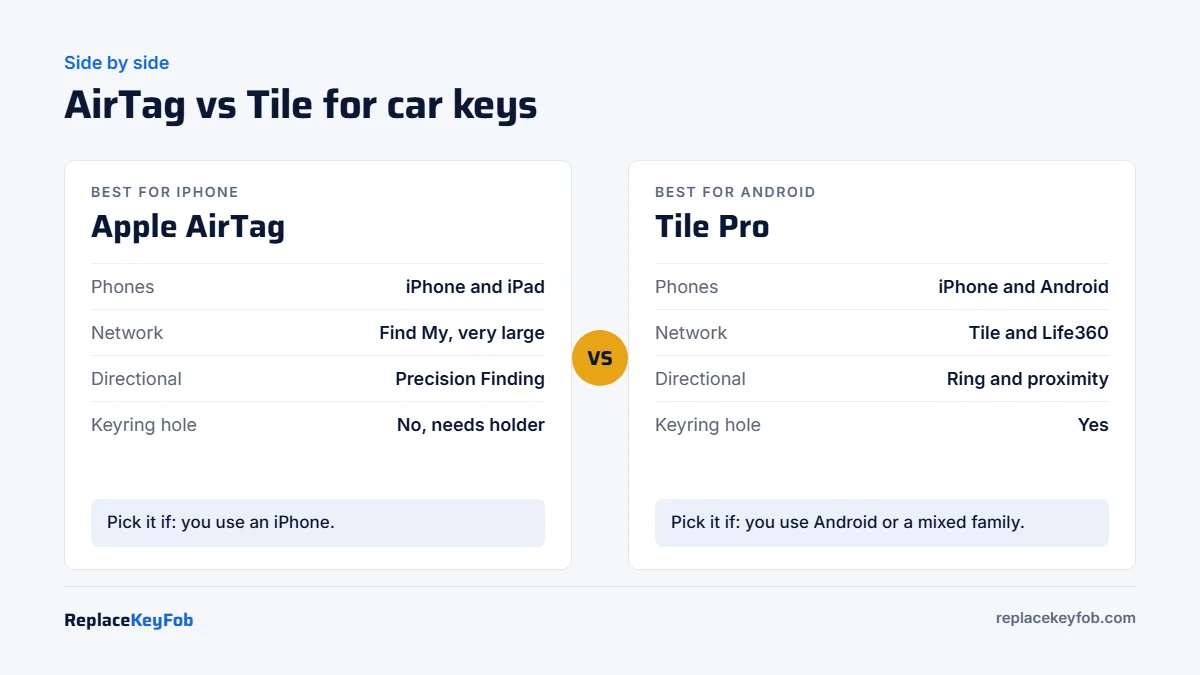
AirTag vs Tile: Side by Side
| Apple AirTag (2nd gen) | Tile Pro (Life360) | |
|---|---|---|
| Phones supported | iPhone and iPad only | iPhone and Android |
| Finding network | Apple Find My (very large) | Tile and Life360 (smaller) |
| Directional finding | Precision Finding with arrow, on iPhone and Apple Watch | Ring and proximity |
| Keyring hole | No, needs a holder | Yes |
| Find your phone from the tag | No | Yes, rings a silenced phone |
| Battery | Replaceable coin cell, more than 1 year | Varies by model |
| Extra features | Share location with contacts or airlines | SOS alert, family map in Life360 |
| Ongoing cost | None | Free basics; some features need a paid plan |
Apple AirTag (2nd Generation)
Find My network, Precision Finding
Check Price on AmazonLife360 Tile Pro Bluetooth Tracker
iOS and Android, keyring hole
Check Price on AmazonFinding Keys at Home
Most lost car keys are somewhere in the house: under a cushion, in yesterday’s jacket, in the bottom of a bag. Both tags let you ring them from your phone. The 2nd-generation AirTag has a speaker Apple says is 50% louder than before, and on recent iPhones and Apple Watch, Precision Finding uses Ultra Wideband to show an arrow and the distance to the keys. Tile Pro is also loud and easy to ring, and its button can ring your phone even when it is on silent, which helps when the phone is the thing you lost.
Winner: AirTag for iPhone users, thanks to Precision Finding.
Finding Keys Away From Home
When keys are left at a restaurant or dropped in a parking lot, both tags rely on other people’s phones passing nearby to report their location. This is where AirTag has a huge advantage. Every compatible iPhone, iPad and Mac in the world is part of the Find My network. Tile’s network is made up of phones running the Tile or Life360 app, which is much smaller. In a city, Tile can still work; in a quiet suburb or rural area, an AirTag is much more likely to report.
Winner: AirTag.
Phone Compatibility
This decides it for many people. AirTag does not work with Android phones at all, apart from scanning an unknown tag. Tile works on both, and the same account can be shared by family members on different phones. If your household has an Android driver, Tile (or a dual-network tag like the Chipolo POP in our car key finder guide) is the practical choice.
Winner: Tile.
On a Car Key Ring
A smart key fob is already bulky. Tile has a built-in hole, so it goes straight on the ring. AirTag needs a holder, which adds size and another part that can break. A good holder solves it, but it is an extra step and extra bulk in your pocket.
Winner: Tile.
Cost Over Time
AirTag has no subscription. Tile’s core features are free, but some extras, such as longer location history and some alerts, are tied to Life360 paid plans. For simply finding keys, both can be used without paying monthly. Both use coin-cell batteries; AirTag’s lasts more than a year and is easy to replace.
Winner: AirTag.
Privacy and Anti-Stalking
Both now include protections against unwanted tracking. iPhones and Android phones can alert users to unknown trackers moving with them. For car keys this rarely matters, but it does mean neither tag is a hidden car theft tracker; for that, see the best hidden GPS trackers.
Winner: Tie.
Which One Should You Buy?
| You are… | Pick |
|---|---|
| An iPhone user | AirTag |
| An Android user | Tile Pro |
| A family with both phone types sharing keys | Tile Pro |
| Someone who often loses keys away from home | AirTag (iPhone) |
| Someone who also loses their phone | Tile Pro |
| Wanting the slimmest key ring | Tile Mate or Pro |
Tips for Using Either Tag on Car Keys
- Name it clearly (“Car keys” or “Honda key”) so it is easy to find in the app.
- Turn on left-behind alerts if your phone supports them.
- Remember the Faraday pouch. If you store a keyless fob in a Faraday pouch, it blocks the tag’s Bluetooth too.
- Keep a spare battery. Both use coin cells; our CR2032 comparison helps you choose.
- Get a spare key anyway. A tag reduces the risk; a spare removes it. See how to get a spare key fob.
The Verdict
For iPhone owners, AirTag is the clear winner: a bigger network, better directional finding and no fees. Tile wins for Android users and mixed families, and for anyone who values a keyring hole and the ability to ring a lost phone. Pick by phone first, then by features.
See more options, including Samsung SmartTag2 and Chipolo, in our best car key finders guide.
Related Guides
- Best car key finders
- How to find a lost car key
- Lost car key replacement cost
- GPS trackers with no subscription
FAQ
Is AirTag better than Tile for keys?
For iPhone users, yes, because of the larger Find My network and Precision Finding. For Android users, Tile is the better option because AirTag does not work with Android.
Can Android users use an AirTag?
No. Android phones can detect an unknown AirTag for safety, but they cannot set one up or track it.
Does Tile need a subscription?
No for basic ringing and map location. Some extra features are part of paid Life360 plans.
Will a tracker interfere with my key fob?
No. Both tags use low-power Bluetooth and do not affect the fob’s remote or keyless entry signals.
Can I use an AirTag or Tile to track my car?
You can hide one in the car as a low-cost backup, but they are not GPS trackers. For reliable car tracking, use a GPS tracker.