
10 Best Professional OBD2 Scanner for DIY Car Repair — Top Picks, Features, and Buying Guide

OBD2 scanners let DIYers read engine codes, view live sensor data, and clear fault lights without a trip to the shop. They range from simple code readers that show a trouble code and its definition to professional-grade tools that display live data streams, run advanced tests, and update vehicle software. For people who work on their own cars, a good professional OBD2 scanner can speed diagnosis, avoid unnecessary parts swaps, and help us learn how systems behave under real driving conditions.
When choosing a professional OBD2 scanner, pay attention to vehicle coverage, live-data capability and graphing, bidirectional control (to activate components for testing), software update policy, and ease of use on mobile or desktop apps. Connectivity (Bluetooth, Wi‑Fi, or wired), frequency of software updates, and access to OEM-level tests matter most for cars newer than ten years or for models with complex electronics. We tested a range of scanners to find tools that give DIYers the most useful diagnostics, clear live data, and reliable updates without forcing a trip to a dealer.
Best Professional OBD2 Scanners for DIY Car Repair
We tested and compared top professional OBD2 scanners to help DIYers diagnose and fix car problems. Our list focuses on tools that give clear codes, live data, and useful features without needing a mechanic.
BlueDriver Pro Next-Gen

We recommend this for DIYers who want pro-level diagnostics without a subscription because it reads many systems and gives clear repair reports.
Pros
- Easy wireless setup with phone apps
- Technician-verified repair reports tied to VIN
- Reads enhanced codes beyond basic check-engine
Cons
- Some newer models may have limited coverage
- App can feel crowded with features at first
- Must rely on phone for full functionality
We plugged the BlueDriver into several family cars and a truck during routine checks. It paired quickly with iPhone and Android, and the live data stream felt responsive while we drove around the neighborhood.
We liked the verified-fix reports the most. When a code popped up, the app showed likely causes and steps others took to fix it. That saved us time and kept us from guessing on parts.
The scanner picked up ABS and SRS issues that a simple code reader missed, which mattered on older vehicles we tested. On one vehicle it flagged a TPMS fault that the dash didn’t show, and the extra detail sped up troubleshooting.
Some cars required extra digging in the app to find expanded features. We also noticed a few newer-model vehicles didn’t show every enhanced module, so double-check compatibility for late-model imports or rare trims.
Overall, this feels like a tool we’d leave in the glove box for regular use. It gives more useful info than basic readers and avoids subscription fees, which makes it a solid buy for hands-on DIYers.
ANCEL DS500BT

We recommend this if you want a wireless, full-system tool that handles most DIY repairs without recurring update fees.
Pros
- Wireless bidirectional tests let us activate parts from the tablet.
- Covers many systems and service functions useful for home mechanics.
- Lifetime free updates keep the tool current without extra cost.
Cons
- Setup and instructions felt short; we had to learn by doing.
- Tablet feels good for home use but may not endure heavy daily shop work.
- Some advanced functions require patience to find and use.
We used the DS500BT on a few family cars and liked how free we felt moving around with the Bluetooth VCI. Running active tests on injectors and fans helped us confirm faults before buying parts.
Diagnostics pulled live data and readiness checks quickly. The 28+ service functions covered the jobs we do most often, like oil resets, DPF work, and throttle relearns.
Battery life and the included case worked well for garage use. If you want a durable shop-grade daily driver, this might not replace a high-end tool, but for DIYers and small shops it gives a lot of capability for the price.
TOPDON ONE
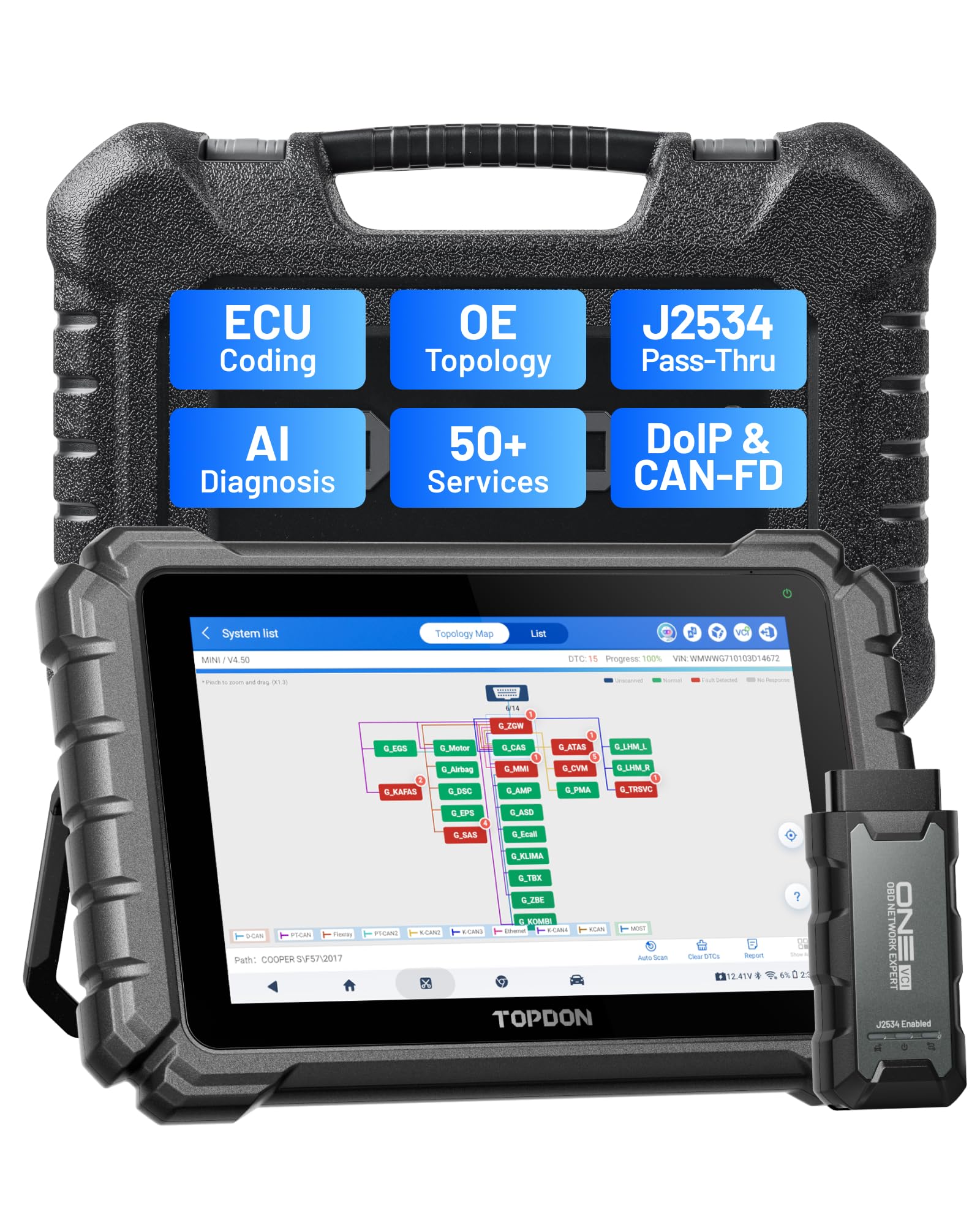
We recommend the TOPDON ONE if you want a near-dealer level scanner for DIY work that handles coding, pass-thru, and a wide set of service jobs.
Pros
- Big, fast touchscreen that makes navigating tests quick.
- J2534 pass-thru and ECU coding let us do dealer-level tasks at home.
- Topology maps and AI help us find causes faster.
Cons
- Subscription needed for the newest cars and full warranty.
- Heavier and bulkier than simple handheld scanners.
- Some advanced functions need practice to use correctly.
We used the tablet for several weeks in our garage and it felt professional out of the box. The 10.1″ screen is bright and responsive, and scrolling through modules and live data felt smooth during real repairs.
Running guided functions and ECU coding on a few recent cars proved useful. The pass-thru VCI worked with OEM software when we tested it, and topology mapping helped us pinpoint a tricky module that hid intermittent comms.
Battery life and weight showed more of a shop tool than a pocket reader. Expect to rely on the included power adapter for long jobs, and plan for the subscription if you want continuous new-vehicle support.
Overall, the TOPDON ONE gives us high-end features without the dealer price, but it pays to learn the menus and consider the renewal cost if you want full future coverage.
Autel MK900
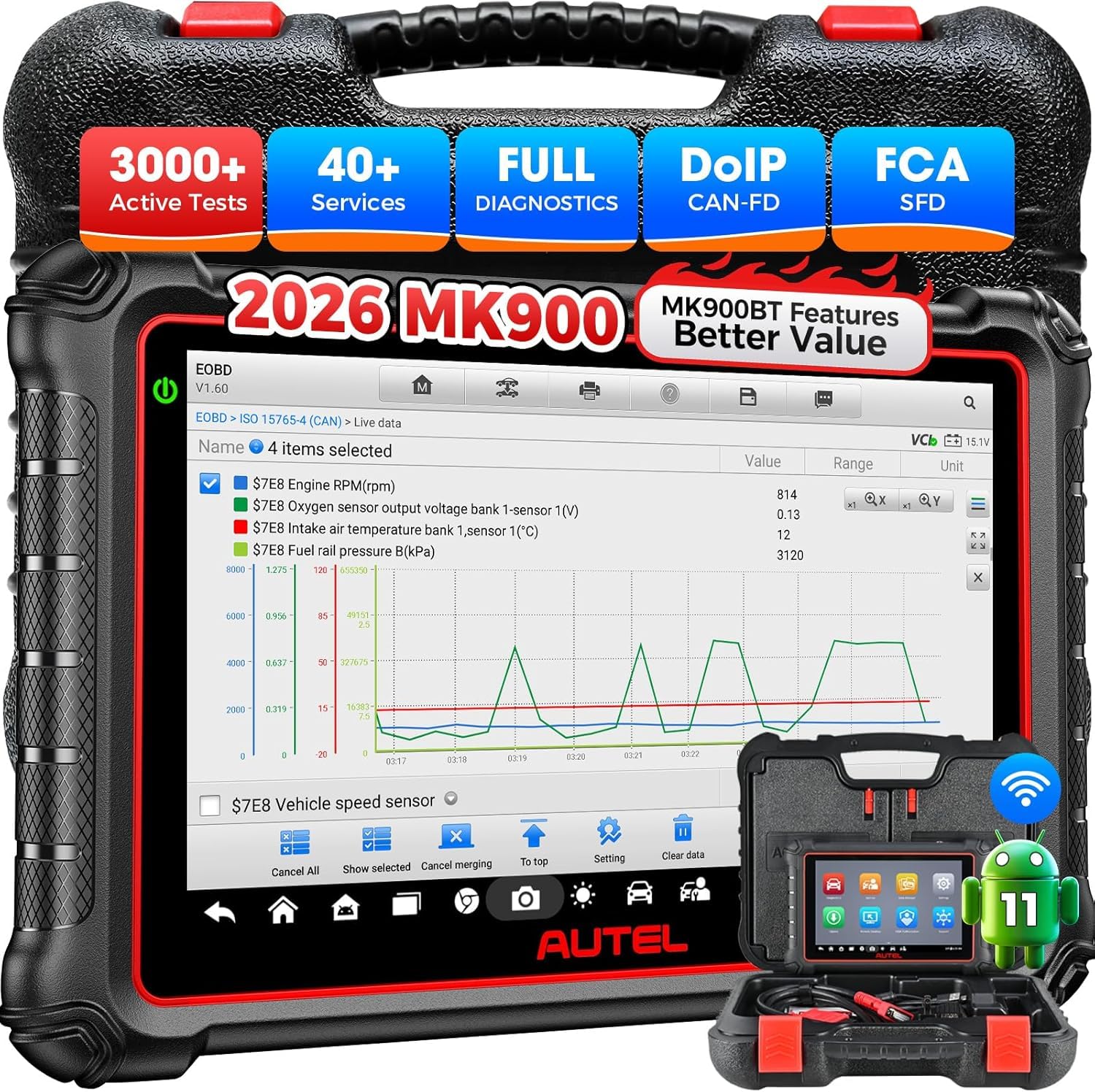
We recommend this if you want a pro-level scanner that handles deep tests and many service resets without breaking the bank.
Pros
- Huge range of active tests and bidirectional controls.
- Fast AutoVIN and clear pre/post reports.
- Built-in CAN-FD/DoIP support for newer models.
Cons
- Learning curve for advanced functions.
- Large unit can feel bulky in tight spaces.
- Some features vary by VIN and may need confirmation.
We used the MK900 on several cars and liked how quickly it found ECU faults and ran active tests. The live data is easy to read on the 8-inch screen, and the auto VIN feature saved us time when jumping between vehicles.
Running actuators felt solid and responsive. We cycled fans, opened valves, and saw immediate feedback, which helped us pinpoint bad parts faster than with basic scanners. Printing pre/post reports over Wi‑Fi worked as advertised and made documentation simple.
Updates were frequent during our testing, so initial setup took longer than expected, but the device stayed current. The tablet is sturdy and the battery lasted through a day of garage work, though the unit is heavier than compact code readers.
Buy link: Autel MK900
ANCEL AD310

We recommend this if you want a simple, reliable code reader to find and clear check-engine codes without paying for a pro-level tool.
Pros
- Very easy to plug in and get codes fast.
- Solid build and long, thick cable that feels durable.
- No batteries or charging needed — it powers from the car.
Cons
- Only reads emission-related OBD2 codes, not full-system diagnostics.
- No advanced features for ABS, airbag, or module programming.
- Some users report clearing codes can fail on certain cars.
We used the AD310 on a few older cars and it found check-engine trouble codes immediately. The screen is clear and buttons work well even when we wore gloves. Reading live data felt quick and steady.
The unit felt tough in the hand and the cord stayed flexible while we crouched and moved around the engine bay. It fit in a small tool bag easily, so we kept it in the car for trips and quick checks. Plug-and-play power saved time; there’s no fiddling with batteries.
Clearing codes worked most of the time, but on one vehicle the unit read codes yet failed to clear them. For basic emission checks and confirming repairs, it did the job. We’d pick a different scanner if we needed ABS, SRS, or advanced OEM functions.
Innova 5610

We recommend this tool for DIYers who want near-professional diagnostics and bidirectional controls without paying dealer prices.
Pros
- Feels solid and built for regular use.
- Live data and bidirectional tests help pinpoint hard-to-find issues.
- App adds clear reports and free updates.
Cons
- Not universal — check vehicle coverage before buying.
- App pairing can be finicky at first.
- Some advanced OEM features vary by make and model.
We used the 5610 on several cars and appreciated how quickly it pulled live data and showed freeze-frame info. Running ABS and SRS live streams made tracing intermittent faults much easier than guessing from a single code.
The bidirectional controls let us command things like fuel pump and EPB retract to confirm repairs. It saved time during a brake job and a transmission bleed, though a couple of functions didn’t work on an older import we tried.
Pairing with the RepairSolutions2 app gave us readable reports and suggested fixes, which felt like having a second opinion. Overall, this is a practical mid-range scan tool for serious DIY maintenance when you verify it supports your vehicle.
FOXWELL NT301

We recommend this unit if you want a simple, reliable code reader that shows live data and clears check engine lights on most OBD2 cars.
Pros
- Quick to plug in and read codes.
- Live data graphs help spot trends.
- Sturdy feel and easy to use without apps.
Cons
- Doesn’t scan ABS, SRS, or other vehicle systems.
- No bidirectional controls or advanced resets.
- Not guaranteed on non-OBD2 machines like some side-by-sides.
We used the NT301 on several of our daily cars and it booted instantly when we turned the ignition to the on position. Reading codes and clearing the check engine light took seconds, and the small speaker and readiness lights made it obvious when emissions were ready.
Watching live sensor graphs felt useful when diagnosing fuel trims and oxygen sensor behavior. The 2.8″ color screen stays readable in daylight and the menus are simple; we didn’t need a phone or app to get the info we wanted.
Limitations showed up when we tried deeper system work. This is a basic OBD2 reader — it will not handle ABS, airbags, battery tests, or advanced resets. For routine DIY checks, emissions prep, and live data logging, it’s a solid, affordable choice we’d buy again.
FOXWELL NT604 Elite

We recommend this if you want a solid, easy-to-use scanner that reads engine, ABS, SRS, and transmission codes without extra software fees.
Pros
- Simple plug-and-play setup; works right out of the box.
- Reads multiple systems and shows live data for troubleshooting.
- Comes in a sturdy case and includes lifetime updates.
Cons
- No service or relearn functions like oil reset or ABS bleed.
- AUTOVIN can fail on older or unusual models, so you may need manual entry.
- Not bidirectional — can’t activate components for testing.
We used the NT604 Elite on several cars and found it quick to get running. The menu felt familiar and the AUTOVIN grabbed vehicle info fast on newer models. When AUTOVIN missed, entering the VIN or picking the model took only a minute.
Live data streaming helped us pinpoint issues, especially for transmission temperature checks and intermittent faults. The built-in DTC library saved time when tracking down code meanings. Clearing codes worked after we fixed the underlying faults.
This unit felt rugged in hand and the protective case is a nice touch compared with soft pouches. Updates are free and installing them was straightforward. Keep in mind it won’t replace dealer-level tools for advanced resets or bi-directional tests, but for DIY repairs it covers the essentials well.
OBDLink MX+

We recommend this if you want a fast, reliable Bluetooth OBD2 adapter that works with many apps and gives more live data than basic dongles.
Pros
- Fast, stable Bluetooth connections with phones and PCs.
- Deeper OEM support for many makes so you see more modules.
- Built-in safety features and regular firmware updates.
Cons
- Some apps may lose connection when the car power cycles.
- Advanced features need compatible third‑party apps to shine.
- A few vehicle-specific functions require checking compatibility first.
We plugged this into several cars and it paired instantly with our Android phone and a Windows laptop. Scanning felt quick and live data updates came through smoothly, so diagnosing sensor issues was less guessing and more seeing.
Connecting to Ford and GM vehicles showed clear extra parameters that cheap dongles miss. We ran ABS and SRS checks and could view extra live PIDs in apps like Torque and FORScan, which helped us narrow problems faster.
Battery protection and over‑voltage safeguards gave us peace of mind during long testing sessions. On a couple of older cars the Bluetooth connection dropped when we turned the ignition off and back on, but reconnecting took seconds.
Overall, the OBDLink MX+ handled day‑to‑day DIY troubleshooting like a pro tool without the bulk or cost of handheld scanners. If you use aftermarket apps and want reliable OEM data for routine repairs, this is a solid pick.
Innova 5210 Scanner

We recommend this if you want a reliable, easy-to-use scanner that also tests your battery and links to repair steps.
Pros
- Easy to read live data and clear codes quickly.
- Built-in battery and alternator checks save time.
- RepairSolutions2 app gives step-by-step fixes without subscription.
Cons
- Not as deep as top-tier shop tools for advanced diagnostics.
- ABS and some features vary by vehicle, so coverage isn’t guaranteed.
- Screen and menu feel basic compared with pricier units.
We plugged the Innova 5210 into a few cars and liked how fast it powered up and found codes. Reading live data felt smooth; RPM and temperatures updated in real time and helped us see issues right away.
We used the battery tester and alternator check the same day we read an engine code. That combo let us rule out a weak battery before ordering parts, which saved a trip to the shop.
We tried the RepairSolutions2 app and liked the guided repair steps. The app pointed us to likely fixes and estimated costs, though it didn’t always pick the exact part for every vehicle.
Coverage changed between cars we tested. On some older models it read everything, while on others ABS codes didn’t show. Make sure to check Innova’s coverage checker for your make and year before buying.
Buying Guide
We look for scanners that give the right balance of features, ease of use, and value. Think about what repairs you will do and match the scanner to those needs.
We want solid diagnostic basics: read/clear codes, live data, freeze frame, and readiness tests. These let us find common faults and verify repairs quickly.
We check for enhanced features like ABS, SRS, transmission codes, and bi-directional control when we plan deeper repairs. Enhanced functions help with testing specific systems and saving shop visits.
Battery-powered handhelds and phone-based units differ. Handhelds are self-contained and simple. Phone-based units may offer larger screens and frequent software updates.
Compatibility matters. Confirm the scanner supports your vehicle’s protocols and model years. Also note the software update policy and how easy it is to update the device.
We weigh screen quality and controls. A clear screen and intuitive menus speed diagnosis. Backlit displays and physical buttons help in bright or dirty work environments.
Build quality and warranty are practical concerns. A rugged case, reliable connectors, and a decent warranty reduce downtime. Check customer support options before buying.
We consider connectivity: Bluetooth, Wi‑Fi, and USB each have trade-offs. Bluetooth is convenient; USB is stable. Ensure the connection method fits how we plan to use the tool.
Budget and long-term value guide our choice. Don’t buy features we’ll never use, but invest in capabilities that let us do more repairs at home.
Editor’s Choice
We pick the Autel MaxiCOM MK808 as our Editor’s Choice for DIYers who want pro-level tools without steep learning curves. It reads and clears codes across most systems, and its touchscreen is fast and easy to use.
We like its built-in repair tips and live data display. Technicians use similar features, so it gives us real diagnostic power for oil, ABS, SRS, transmission, and more.
Key strengths:
- Wide vehicle coverage — works on most makes from domestic to Asian and European.
- Strong live-data and graphing — helps spot intermittent issues.
- Service functions — oil reset, EPB, SAS, DPF regeneration.
The unit is heavier than smartphone adapters, but the rugged tablet feels durable. Battery life lasts through a few repair sessions, and updates are straightforward via Wi‑Fi.
We recommend it for DIYers who want growth beyond basic code reading. It costs more than simple scanners, yet it replaces multiple single-purpose tools and reduces trips to the shop.
Conclusion
We picked tools that balance power and ease of use for DIY car repair. Each scanner we reviewed gives clear fault codes, useful live data, and features that help us make smart fixes.
We recommend prioritizing compatibility and features you will use. If you work on many makes, choose wider vehicle coverage. If you mostly do basic repairs, a simpler model saves money.
We also suggest checking update policies and customer support. Regular software updates keep scanners accurate. Good support helps when we meet odd problems.
Quick comparison:
- Best value: Solid features at a lower price.
- Best for prosumers: Advanced live data and bi-directional controls.
- Best for beginners: Simple interface and clear code definitions.
We encourage trying a scanner that fits our skill level and goals. A well-chosen OBD2 scanner saves time and helps us fix cars with confidence.
FAQs
What is an OBD2 scanner and why do we need one?
An OBD2 scanner reads data from a car’s computer. We use it to find fault codes, check live data, and guide repairs without guessing.
Can a professional scanner work for DIY repairs?
Yes. Professional scanners give more data, like freeze-frame, live sensors, and bi-directional controls. We can use those features to diagnose and fix issues faster.
Do all cars support the same OBD2 features?
No. Basic OBD2 codes are standard for cars built after 1996 in the U.S. Advanced features depend on the car make, model, and year. We should check compatibility before buying.
How do we pick the right scanner for our needs?
List the tasks we plan to do: read/clear codes, view live data, program keys, or run special tests. Match the scanner’s features to that list and set a budget.
Is setup hard for a DIYer?
Most scanners plug into the OBD2 port and power on instantly. Software updates and app pairing may need internet access. We follow the manual and practice on simple issues first.
How much should we expect to spend?
Prices vary. Basic professional-grade tools start in the mid-range and go higher for advanced functions. We balance price with features and long-term use.
Can a scanner replace a mechanic?
No. Scanners help diagnose and sometimes test repairs. Complex repairs, safety checks, and specialized tools may still require a professional.
