
10 Best Bidirectional Scan Tool for ABS Diagnostics: Top-Rated Devices, Features, and Buying Guide

Anti-lock braking systems (ABS) keep cars safer by preventing wheel lockup during hard braking, and bidirectional scan tools let technicians communicate with ABS modules to read data, run tests, and activate components. These tools go beyond simple code readers: they can command ABS pumps and valves, run live actuations, and perform calibrated tests that help diagnose sensor faults, hydraulic issues, and control-module problems. A good bidirectional ABS scan tool saves diagnostic time and reduces guesswork by giving clear live data, bi-directional control, and broad vehicle coverage.
When choosing a tool, pay close attention to vehicle coverage, the depth of ABS bi-directional functions (like pump/valve activation and bleed procedures), software update frequency, and ease of use. Compatibility with your makes and models, reliable live-data graphs, and clear guided procedures matter more than extra features like engine tuning. We tested a range of scan tools to find ones that give accurate ABS diagnostics, reliable bi-directional control, and straightforward workflows for shops and serious DIYers, so you can pick the best fit quickly.
Best Bidirectional Scan Tools for ABS Diagnostics
Below is our full list of the best bidirectional scan tools for ABS diagnostics. We chose tools that give clear ABS data, allow active tests, and fit a range of budgets and skill levels. Use this list to find a reliable tool for diagnosing ABS faults and running live tests.
FOXWELL NT716
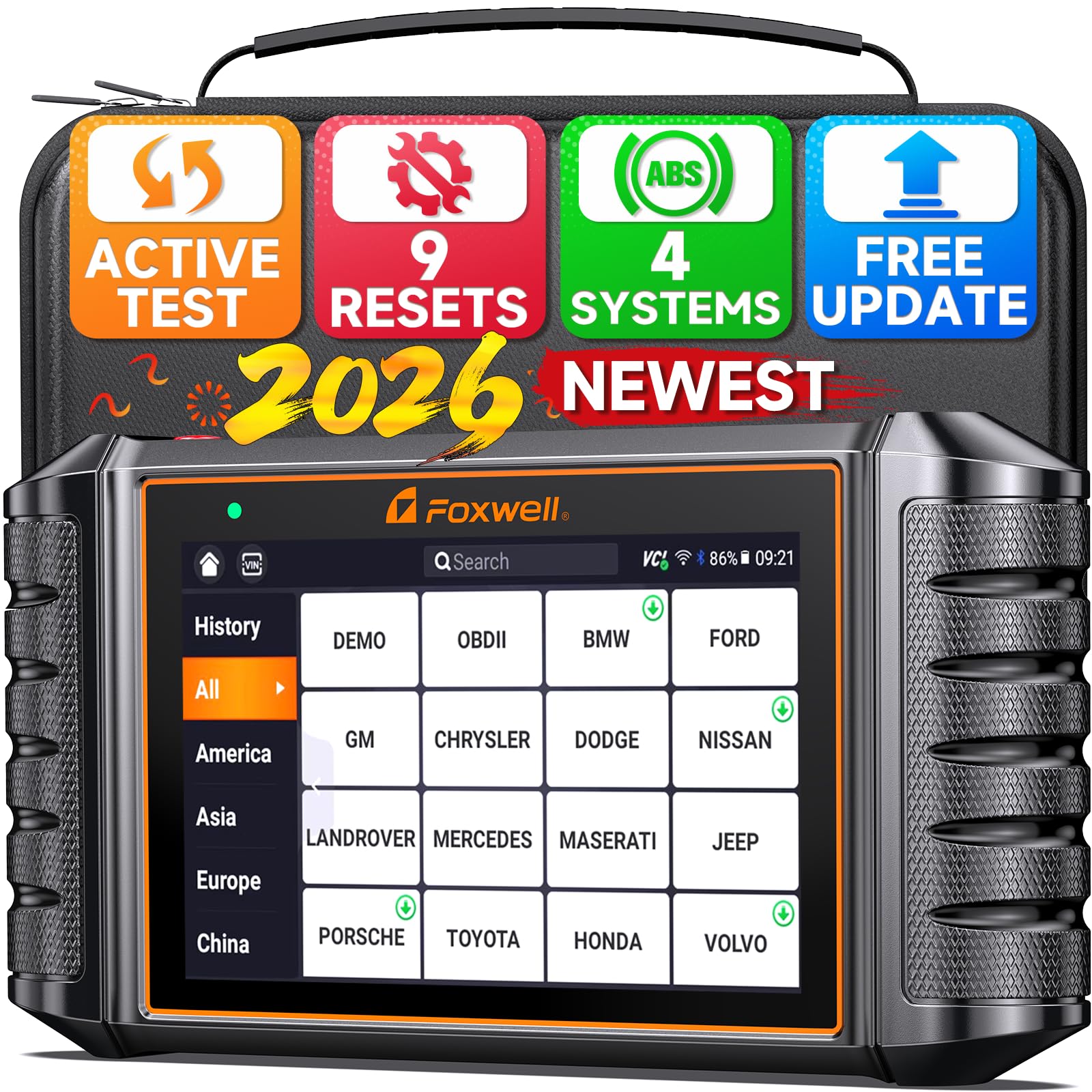
We recommend this if you want a solid bidirectional ABS tool that saves shop visits and handles many resets.
Pros
- Real bidirectional tests let us activate ABS pumps and valves for quick confirmation.
- Easy-to-read 5.5″ touchscreen makes live data and graphs simple to follow.
- Nine reset functions cover many service jobs without extra tools.
Cons
- Some vehicles need an extra adapter or paid upgrade for full active tests.
- Packaging and setup issues happen occasionally; check device activation first.
- Not suitable for key programming or a few older vehicle systems.
We connected the NT716 and ran ABS bleed and pump tests on a couple of late-model cars. The live data updated fast and the active test responses were clear, so we could tell which component stayed passive and which one answered commands.
The touchscreen and Android interface felt familiar. Navigating to ABS live data and starting a bi-directional command took only a few taps. Battery life and the tablet feel cut down bench time when we moved between vehicles.
We hit two snags: one truck needed an adapter the seller didn’t mention, and another unit arrived tied to a previous serial which blocked setup. When everything worked, the scanner let us isolate faults and avoid unnecessary part swaps, saving both time and money.
ANCEL FX6000
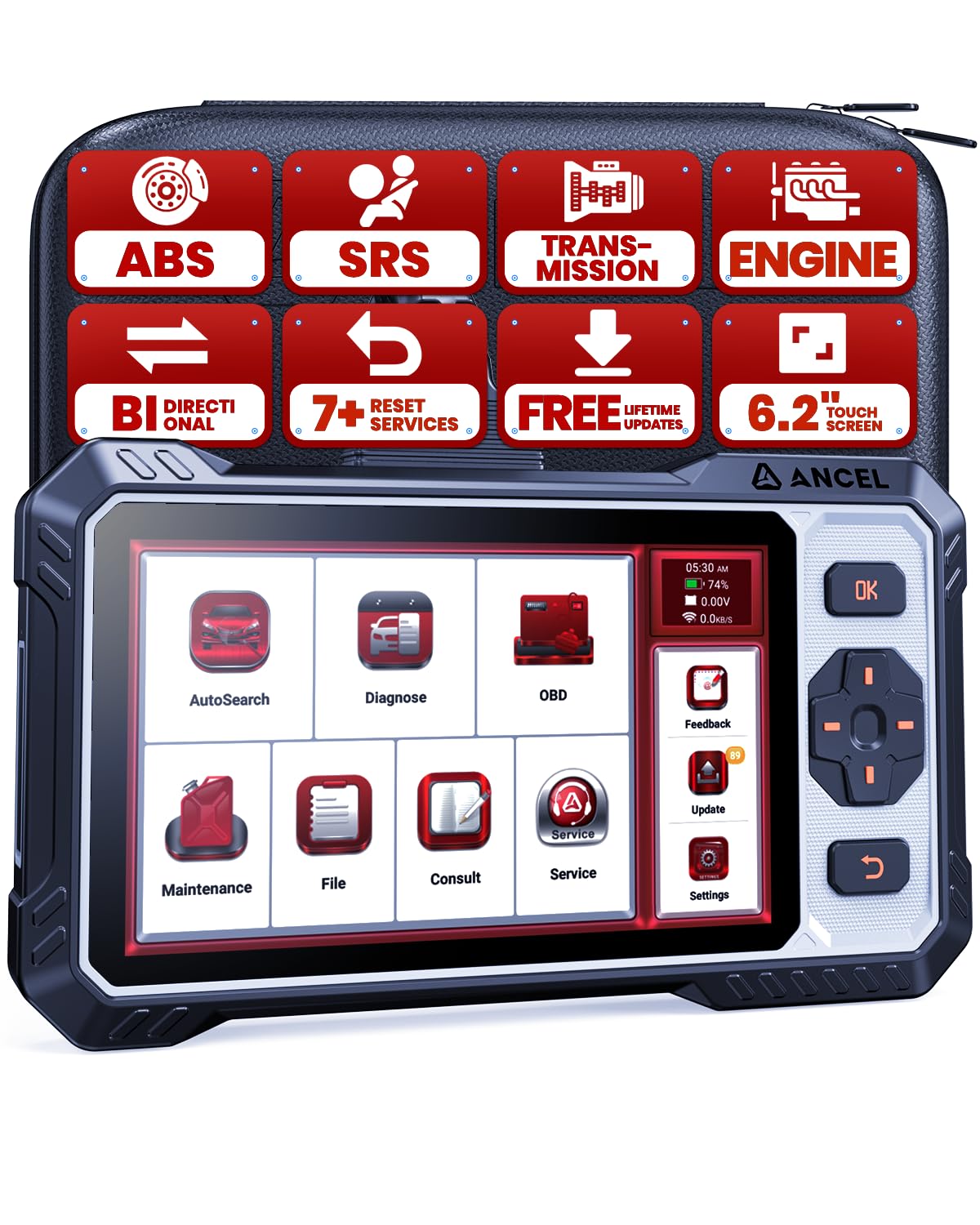
We recommend this if you want a mid‑range bidirectional scanner that actually runs active ABS tests and common resets without a shop visit.
Pros
- Clear active tests that let us command ABS pumps and see real responses.
- Lifetime Wi‑Fi updates keep the tool current for new vehicles.
- Large touchscreen plus buttons works well when our hands are dirty or gloved.
Cons
- Some advanced functions vary by car; compatibility checks are needed first.
- Not a full dealer tool — no deep ECU coding or advanced programming.
- Occasional firmware quirks mean we sometimes contact support for fixes.
We put the FX6000 on several cars and liked how quickly it ran active ABS commands. Telling the ABS pump to cycle and watching live data made it easy to tell if the pump, wheel sensor, or wiring was the problem.
The seven reset services saved us a trip to the shop on routine jobs like oil reset and EPB service. ABS bleeding worked on many models, but on a few vehicles the feature was limited or required a specific vehicle auth step.
The interface feels solid in the garage. Touchscreen navigation is fast and the physical buttons helped when gloves were on. Updates via Wi‑Fi kept adding improvements after our first use, though we did reach out to support once and they followed up.
Foxwell NT630 Plus

We recommend this if you want an affordable bidirectional ABS tool that actually runs ABS auto-bleed and live-data tests on many cars.
Pros
- Runs ABS active tests and can do ABS auto-bleed on supported vehicles.
- Simple Wi‑Fi updates with no subscription and clear on-screen guidance.
- Sturdy handheld build and useful for DIY brake troubleshooting.
Cons
- ABS auto-bleed only works on cars that support it and coverage varies by model.
- Menu layout can be clunky at first — learning curve required.
- Does not do ABS coding, advanced programming, or some vehicle-specific functions.
We plugged this into several cars and used the NT630 Plus for ABS troubleshooting and bleeding. It powered up right away and found VIN and basic codes without fuss. The 2.8″ screen and step-by-step prompts made the bleeding routine straightforward when the car supported it.
We ran live-data streams and bidirectional commands to cycle the ABS pump and valves on a compatible vehicle. That helped confirm a soft-pedal issue was hydraulic and not just a sensor fault. The graphs were basic but useful for spotting odd sensor readings.
We also hit limits. A few vehicles did not support the automated bleed, so we had to bleed manually. Menus felt nested and took patience to navigate, but once we knew where to go, tests flowed well. For the price, this is a practical tool for home mechanics who need ABS active tests without paying for pro-level gear.
XTOOL IP500 (GM)

We recommend this if you want a dealer-level GM scanner that handles ABS tests and active commands without a subscription.
Pros
- Strong bi-directional control for ABS motors and bleed commands.
- Lifetime free updates and a sharp touchscreen make daily use faster.
- Covers many GM models from 1999–2025, including CAN FD support.
Cons
- Works best only on GM vehicles; limited brand coverage.
- Occasional missing accessories in the box, based on reports.
- Learning curve for advanced functions if you are new to bidirectional tools.
We used the IP500 on a few GM trucks and SUVs and found the ABS active tests immediate and clear. Sending commands to the ABS motor and cycling valves saved us time compared with manual bench checks.
Navigating the menus felt modern and quick on the 5.45″ screen, which helped when checking live ABS data and I/M readiness before emissions tests. The bi-directional actions responded without lag, so we could confirm component function on the spot.
Updating the unit over Wi‑Fi was painless and free, which kept compatibility current for newer GM models. Expect to spend a little time learning the special functions, but once familiar it replaces several separate tools in the shop.
Innova 5610

We recommend this if you want dealer-level ABS tests and bidirectional controls without paying shop prices.
Pros
- Sends commands to test ABS components and other systems.
- Clear live data that helped us confirm repairs quickly.
- Good app support and US-based customer service.
Cons
- Not compatible with every make or model.
- App setup can be fiddly at first.
- Some international users report limited coverage.
We used the Innova 5610 on several cars and found the bidirectional controls helpful for ABS work. It let us activate parts and watch live data while we tested wheel sensors and modulator actions.
The RepairSolutions2 app paired with the tool and gave useful repair suggestions. That cut down our guesswork and helped us decide when to replace parts or continue testing.
Physical build felt solid in hand and the screen is easy to read during roadside checks. Connecting takes a moment, but once paired the tool stayed stable through multiple sessions.
For anyone doing DIY ABS diagnostics or wanting pro-level tests without a trip to the shop, this is a dependable choice—just check coverage for your vehicle first.
XTOOL A30M

We recommend this if you want a budget-friendly bidirectional ABS tool that actually works like a shop scanner for most DIY jobs.
Pros
- Full bidirectional control for active ABS tests and component commands.
- Lifetime free app updates—no subscription needed.
- Lightweight, Bluetooth setup lets us test parts from inside the garage.
Cons
- Some advanced service functions vary by vehicle and need extra setup.
- FCA AutoAuth access may require separate registration and fees.
- App instructions and language support can be inconsistent.
We used the A30M on several cars and trucks. It linked to our phone quickly and let us run active ABS tests, cycle the pump, and read wheel-speed inputs without fumbling with cables. The live data graphs helped us spot an inconsistent wheel sensor faster than a code alone.
Running resets and relearns felt straightforward for routine work. We cleared ABS codes, performed brake-bleeding routines, and did throttle relearns on two late-model cars. A few features required vehicle-specific steps, so we double-checked compatibility before starting.
The wireless range and small dongle made diagnosis tidy and mobile. At times the app wording was unclear and we needed a reply from support, which came through fast. For a DIYer or small shop looking for strong ABS diagnostics without a big price tag, this felt like a reliable pick.
ANCEL DS500BT

We recommend this if you want a wireless, shop-capable tool that runs active ABS tests and many service functions without recurring fees.
Pros
- Wide active-test coverage lets us run ABS bleeding and actuate modules to confirm faults.
- Wireless tablet form makes it easy to move around the car during testing.
- Lifetime free updates reduce long-term software costs.
Cons
- Menu layout felt confusing at first and took time to learn.
- Some advanced functions depend on vehicle make and model availability.
- Tablet size and case add bulk compared with small Bluetooth dongles.
We used the DS500BT on a few vehicles to chase intermittent ABS warnings. The bidirectional tests let us command pump and valve actions and watch live-data while performing bleeding routines. That saved us a parts swap and confirmed the pump was responding.
The tablet’s Bluetooth connection freed us from being tied to the car. We could stand at the wheel and run tests while someone else cycled brakes. The 7-inch screen shows live values clearly, though finding certain service functions required digging through menus the first time.
Running full-system scans felt thorough and faster than basic code readers. CAN FD support reached newer ECUs on one late-model car we tested. Still, we had to check vehicle compatibility for some service tasks before buying to avoid disappointment.
TOPDON ArtiDiag900 Lite

We recommend this if you want a wireless, budget-friendly bidirectional scanner that handles ABS and many service jobs.
Pros
- Strong bidirectional functions that let us activate components and test ABS parts directly.
- Large 8″ touchscreen and long battery life make workshop use comfortable.
- Wireless Bluetooth range and optional cables let us work around the car without tangles.
Cons
- Firmware and app updates can take a while and interrupt work.
- Some advanced OEM features vary by manufacturer and may be limited.
- Warranty and support routing can be confusing if bought through certain sellers.
We used the ArtiDiag900 Lite on several cars and found its bidirectional tests helpful for ABS troubleshooting. Activating the pump and valves from the tablet let us confirm parts quickly without guesswork.
The touchscreen and Android interface felt familiar and fast for basic tasks. Live data and active tests showed real-time ABS behavior and helped us narrow down faults in under ten minutes on most cars.
Occasionally updates ran long and one vehicle needed a specific OEM function that the unit didn’t fully support. Still, for the price and the range of reset services, it handled ABS bleeding and most component tests reliably.
Overall, this unit fits well for shops and serious DIYers who need bidirectional ABS checks without paying pro-level prices. TOPDON ArtiDiag900 Lite
FOXWELL NT604 Elite

We recommend this if you want a reliable ABS/SRS scanner that finds faults fast and costs much less than dealer diagnostics.
Pros
- Easy to use right out of the box.
- Covers ABS, SRS, engine, and transmission diagnostics.
- Comes with a sturdy case and lifetime updates.
Cons
- No bidirectional or advanced service functions.
- AUTOVIN can fail on some older or unusual vehicles.
- Can’t clear crash-related SRS codes or do relearns.
We plugged this unit into several cars and appreciated how quickly it identified ABS and SRS faults. The menu felt straightforward and the AUTOVIN usually grabbed vehicle info without us typing VINs, which saved time when testing multiple cars.
Live data streaming helped us watch ABS sensor outputs while we spun wheels by hand. That real-time view made it much easier to spot a flaky wheel speed sensor than reading codes alone.
Battery life isn’t a concern since it’s corded, and the solid case protected the tool during field use. Still, we missed bidirectional tests and service resets when trying more advanced repairs, so this is best for diagnosis and code clearing after a real fix.
Buy it if you want a solid, easy ABS/SRS scanner that’s cheaper than dealer tools and great for troubleshooting; skip it if you need active component tests or module relearns.
MUCAR 632

We recommend this for DIYers who want a powerful, budget bidirectional ABS tool with many reset functions and clear live data.
Pros
- Strong feature set for the price, including ABS actuator tests and 15 reset services.
- Fast touchscreen and AutoVIN make tests quicker in the bay.
- Lifetime updates and PC report export add long-term value.
Cons
- No Bluetooth — you must use the corded connection.
- Android 8.1 is dated and some menus feel clunky.
- Some advanced vehicles may need a higher-end brand for full module coverage.
We plugged this into several cars and ran ABS bleed, wheel-speed live data, and an actuator test. The unit found and cleared ABS codes quickly and showed wheel speed and pump activity in real time.
We liked the one-click WiFi update and the instant diagnostic suggestions from the AI system. Generating a printable report and exporting it to a laptop saved us time documenting repairs.
We noticed the lack of Bluetooth right away; the cord feels fine but limits hands-free work. The screen responds well, but the user interface can be slow on complex menus compared to newer tablets.
We’d pick this for home mechanics who want bidirectional capability without a heavy price tag, but professionals who need cutting-edge protocol support might prefer a pricier scanner.
Buying Guide
We focus on features that matter for ABS diagnostics. Start by checking whether the scanner supports bidirectional control. That lets us actuate ABS components and run active tests, not just read codes.
We look for vehicle coverage next. Wide coverage means the tool will work with many makes and models. Confirm compatibility with your vehicle year and protocols before buying.
Ease of use matters. Choose a tool with a clear interface and straightforward menus. Good documentation and on-screen guidance cut learning time.
Connectivity is important. Decide between Bluetooth, Wi‑Fi, or wired options based on how you plan to work. Stable connections reduce data dropouts during active tests.
Update policy affects long‑term value. Frequent software updates add new vehicles and functions. Check whether updates are free or require a subscription.
Data and reporting features help with troubleshooting. Look for live-data graphs, freeze-frame capture, and the ability to save or print reports. These features make diagnosis faster and communication clearer.
Durability and warranty protect our investment. A rugged build handles workshop use. A solid warranty gives peace of mind if the tool fails.
Price versus features requires balance. Prioritize the functions we need most for ABS work. Avoid paying extra for unrelated advanced functions we won’t use.
We recommend comparing specs side-by-side before deciding. Use a table to list bidirectional support, vehicle coverage, update terms, connectivity, and reporting features for the top candidates.
Editor’s Choice
We pick the Autel MaxiCOM MK808BT as our top bidirectional scan tool for ABS diagnostics. It balances advanced bidirectional control with an easy interface, so technicians can activate ABS components and run tests without a steep learning curve.
The MK808BT offers live data, active tests, and module coding on many domestic and import vehicles. It reads ABS fault codes, commands the pump and valves, and shows real-time sensor values for quick diagnosis.
We value build quality and software support. The tablet format feels sturdy, and regular updates keep vehicle coverage current. Battery life and wireless connection make bench and road testing simple and reliable.
Key reasons we chose it:
- Broad ABS bidirectional coverage across model years.
- Clear graphing of wheel speed and pressure sensors.
- Intuitive touch interface suitable for pros and experienced DIYers.
We also consider cost and usability. The MK808BT sits in a mid-price range but reduces diagnostic time and guesswork. That makes it a practical investment for many shops and serious home mechanics.
Conclusion
We chose tools that give reliable ABS diagnostics and real bidirectional control. Our picks work on many vehicle makes and let us read codes, run active tests, and reset modules when needed.
We focused on accuracy, ease of use, and coverage. That helped us find tools that save time and reduce guesswork during troubleshooting.
We recommend matching tool features to the jobs we do most. For routine checks, a compact scanner works well. For deeper diagnostics and coding, a more advanced model makes sense.
We kept cost and support in mind. A mid-range tool often gives the best mix of features and long-term value. Warranty and software updates matter for keeping the tool useful.
Bold considerations:
- Coverage: Does it work on your vehicle?
- Bidirectional tests: Can it command ABS components?
- Updates & support: Is software maintained?
We expect these tools to make ABS troubleshooting clearer and faster. Use them with proper safety steps and the vehicle’s repair manual.
FAQS
What is a bidirectional scan tool and why do we need one for ABS?
A bidirectional scan tool can send commands to vehicle modules and read live data. We use it to test ABS actuators, pump motors, and solenoids without removing parts.
Will any scanner read ABS trouble codes?
Many basic OBD-II scanners show ABS codes, but they often cannot clear or command components. We recommend a tool with bidirectional control for full diagnostics.
Which vehicles will these tools work on?
Compatibility varies by make, model, and year. We check the tool’s vehicle list before buying and use the manufacturer’s app or website to confirm support.
Do we need a subscription?
Some advanced features or updates may require a subscription. We weigh the cost against how often we’ll use those updates for different vehicles.
Can we perform ABS repairs with just the scanner?
A bidirectional tool helps diagnose and activate parts, but mechanical repairs still need tools and parts. We use the scanner to confirm which parts need replacement.
How do we choose the best tool for our shop or DIY needs?
Compare supported makes, bidirectional functions, update policy, and ease of use. We also read user reviews and watch demonstration videos for practical insights.
Is training required to use these tools?
Basic functions are often intuitive. For complex ABS work, we seek training or professional guidance to avoid misdiagnosis.
