
10 Best OBD2 Adapter for Android in 2026

A check-engine light rarely means what people assume it means. It could be a loose gas cap or a failing catalytic converter, and the only way to know is to plug in a scanner and read the actual code. For Android owners, that process depends entirely on which adapter you buy, since Bluetooth on this platform comes in more than one flavor and not every scanner talks to every app.
Android’s diagnostic ecosystem is more flexible than Apple’s, but that flexibility creates real compatibility gaps. Some adapters use Bluetooth Low Energy (BLE), others use classic Bluetooth, and a few work with only one or the other depending on your phone’s Android version. Layer on top of that the dozens of third-party apps (Torque, Car Scanner, BimmerCode, FORScan, MotoScan, Hybrid Assistant) and it becomes clear that “Bluetooth OBD2 scanner” is not a one-size-fits-all product category.
The right adapter for you depends on what you’re diagnosing and which app you plan to run it through, not just which one has the most reviews. We looked at general-purpose scanners, Android-only budget options, and brand-specific tools built for coding and dealer-level access to sort out which ones are worth plugging into your car.
Best overall for deep diagnostics: BlueDriver OBD2 Scanner
Best for multi-app flexibility: OBDLink MX+
Best budget BLE scanner: Veepeak OBDCheck BLE
Best cheap Android-only option: Veepeak Mini Bluetooth
Best low-power everyday adapter: Vgate iCar Pro
Best for BMW/Mini coding: OBDLink CX Bimmercode
Best for motorcycles and hybrids: OBDLink LX
Best for visual data tracking: UMEIJA OBD2 Scanner
Best no-frills Android reader: Panlong OBD2 Scanner
Best for Ford/Lincoln/Mazda FORScan users: OBDLink EX
BlueDriver OBD2 Scanner

Buy this if you want dealer-level diagnostics without paying a subscription, on Android or iPhone.
Pros
- Reads ABS, SRS, TPMS, and transmission codes beyond generic OBD2
- Technician-verified repair reports included with no recurring fees
- Own proprietary app instead of relying on third-party software
Cons
- Costs more upfront than basic Bluetooth adapters
- Limited to gas vehicles from 1996 or newer
- No FORScan, BimmerCode, or Torque support since it uses its own app
BlueDriver stands apart because it doesn’t depend on Torque or Car Scanner. Its dedicated app pulls manufacturer-specific fault codes and matches them to a VIN-based repair report explaining likely causes and fixes. That’s a real step up from a generic “P0420” code with no context.
For Android users doing their own troubleshooting, this is the adapter to reach for when a code reader alone isn’t cutting it. It won’t help with BMW coding or FORScan-style module programming, but for engine, ABS, and SRS diagnostics, it’s hard to beat for a one-time purchase.
OBDLink MX+

Buy this if you want one adapter that works reliably across the widest range of third-party apps.
Pros
- Compatible with FORScan, Torque, BimmerCode, Carista, AlfaOBD, and more
- Enhanced OEM support for major brands including Ford, GM, and Toyota
- Battery-drain and over-voltage protection for safe permanent installs
Cons
- Priced higher than basic Android-only scanners
- Some advanced app features require separate purchases
- Setup for PID logging has a learning curve for first-time users
The MX+ works on Android, iPhone, and Windows, which makes it a smart pick if your household mixes device types. Its enhanced OEM protocols mean it pulls more than generic codes on supported brands, including live ABS and TPMS parameters most budget adapters skip.
It’s the adapter we’d recommend to someone who wants to experiment with multiple diagnostic apps over time. Buying once and having it work with FORScan today and BimmerCode tomorrow saves money compared to owning several single-purpose scanners.
Veepeak OBDCheck BLE

Buy this if you want an affordable BLE scanner that works on both Android and iPhone.
Pros
- Bluetooth LE connects to both Android and iOS devices
- Works with Car Scanner, Torque, OBD Fusion, and several vehicle-specific apps
- Competitively priced for a cross-platform adapter
Cons
- No ABS, SRS, or oil-reset support out of the box
- Advanced features depend entirely on which app you pair it with
- Not compatible with Carly, MHD, or bootmod3
This scanner reads and clears standard check-engine codes and streams live sensor data, which covers most everyday diagnostic needs. Because it uses BLE rather than classic Bluetooth, iPhone owners in a mixed-device household can use the same adapter as Android users.
Setup requires pairing from inside the app, not the phone’s Bluetooth settings, which trips up first-time buyers. Once that’s understood, connections are stable and quick across the apps Veepeak lists as compatible.
Veepeak Mini Bluetooth

Buy this if you’re on Android only and want the cheapest reliable way to read check-engine codes.
Pros
- Inexpensive entry point for basic code reading
- Works well with Torque Pro and Car Scanner
- Compact size fits easily near the OBD port
Cons
- Does not work with iPhone or iPad at all
- No ABS, SRS, TPMS, or transmission diagnostics
- Classic Bluetooth pairing can be less stable than BLE on newer phones
This is a bare-bones scanner built specifically for Android using classic Bluetooth rather than BLE. That distinction matters: it won’t show up as an option for iOS users under any circumstances, so confirm your phone’s OS before buying.
For basic engine-code reading and live data logging while towing or road-tripping, it does the job at a low price. Buyers who need ABS or airbag diagnostics should look elsewhere on this list.
Vgate iCar Pro

Buy this if you want to leave an adapter plugged in permanently without worrying about battery drain.
Pros
- Auto-sleep mode draws minimal power to protect the car battery
- Works with iOS, Android, and Windows via Bluetooth 4.0 BLE
- Compatible with Dr. Prius, Carista, and other niche apps
Cons
- No ABS, SRS, or TPMS support
- Auto-wake can be unreliable on hybrid or electric vehicles
- MS-CAN protocol not supported
The iCar Pro’s low standby power draw makes it a sensible choice for anyone who wants to leave the adapter in the OBD port between drives, useful for tracking hybrid battery health with Dr. Prius or fuel trims with Torque. LED indicators make connection status easy to read at a glance.
It sticks to standard OBD2 functions, so buyers chasing airbag or ABS codes need a different adapter. For everyday monitoring on gas or light hybrid vehicles, it performs consistently.
OBDLink CX Bimmercode

Buy this if you drive a BMW or Mini and want reliable coding through BimmerCode.
Pros
- Built specifically for full BimmerCode feature coverage
- Bluetooth 5.1 connection stays stable during coding sessions
- Also works with the free OBDLink app for general diagnostics
Cons
- BimmerCode app sold separately
- Overkill for owners who only need basic code reading
- Older models (pre-2008 in some cases) may have limited support
Coding a BMW through a flaky adapter risks corrupting settings mid-write, which is why OBDLink built the CX around a stable, dropout-resistant connection. It’s the adapter BimmerCode’s own team recommends, and that endorsement carries weight given how connection-sensitive coding sessions are.
Non-BMW owners don’t need this level of specialization. But for retrofitting features or adjusting drive modes on a BMW or Mini, it’s the safer bet over a generic scanner.
OBDLink LX

Buy this if you need an Android or Windows adapter that also supports MotoScan for motorcycles.
Pros
- Recommended by the MotoScan team for motorcycle diagnostics
- Wide vehicle coverage for 1996-and-newer gas vehicles
- Works with Torque, DashCommand, and OBDLink’s own Android app
Cons
- No iOS support whatsoever
- Excludes hybrid and electric vehicle diagnostics
- Some features require paying for the full app version
Few adapters bother supporting motorcycles, which makes the LX notable for riders using MotoScan alongside car owners running Torque. Battery-safe low-power design means it can stay plugged in without draining a bike or car battery over time.
It’s a Windows-and-Android-only tool, so iPhone owners should skip straight to a BLE adapter. For Android riders and drivers who want one scanner across two vehicle types, it’s a practical fit.
UMEIJA OBD2 Scanner
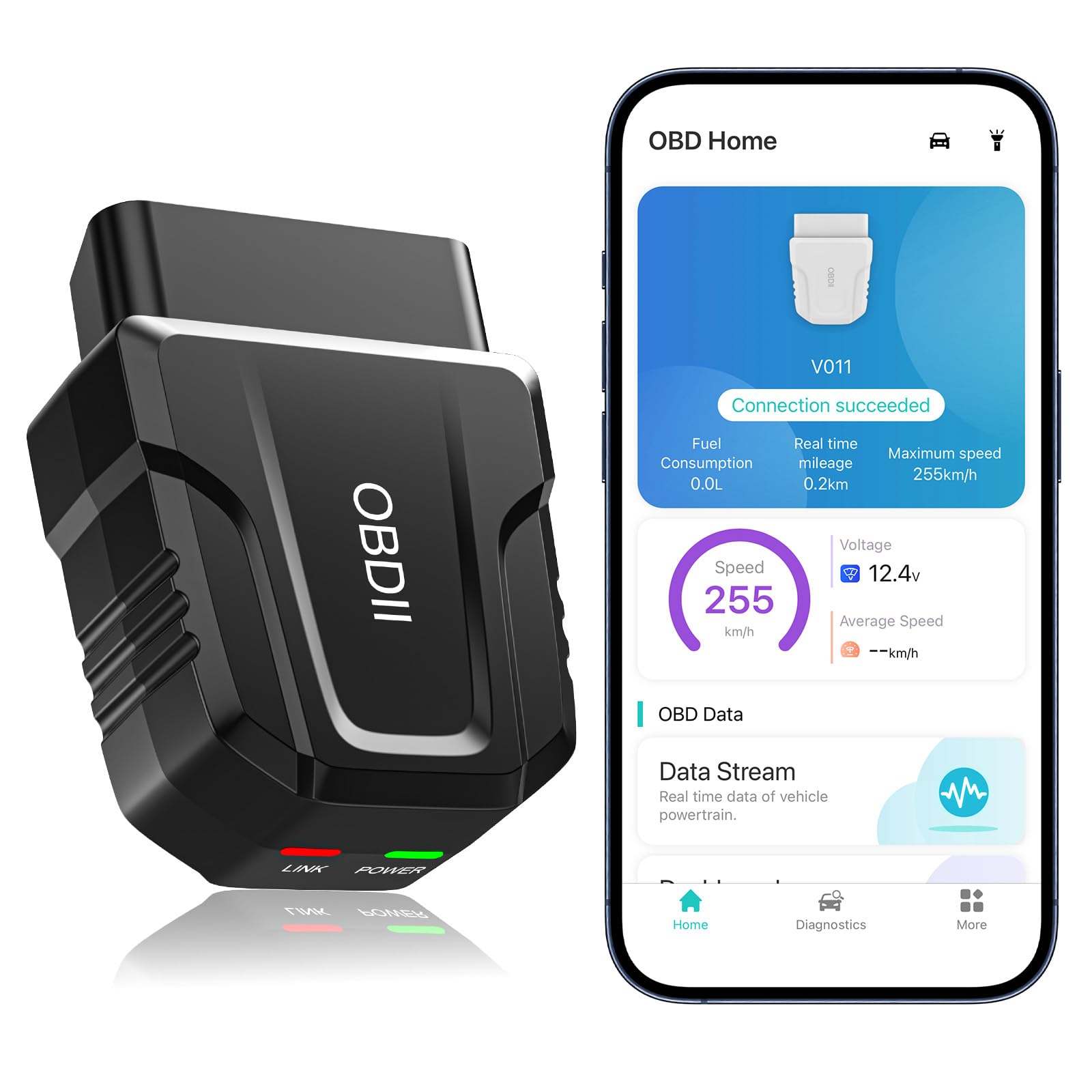
Buy this if you want an easy-to-read visual dashboard of your car’s live data without learning a third-party app.
Pros
- Own app displays data in clear charts rather than raw numbers
- Supports 9 OBD protocols across a wide range of makes
- Multi-language support for international buyers
Cons
- Clearing codes doesn’t stick if the underlying issue isn’t fixed
- Newer brand with a shorter track record than established scanners
- Bluetooth 5.4 pairing steps differ between Android and iOS
This scanner leans on its own app instead of Torque or Car Scanner, which keeps the interface simpler for beginners who don’t want to shop around for third-party software. Charts for coolant temperature, RPM, and voltage make it easy to spot an abnormal reading without knowing what “normal” looks like beforehand.
It handles generic OBD2 functions well but isn’t built for ABS or SRS-level diagnostics. Treat it as a solid starter scanner rather than a professional-grade tool.
Panlong OBD2 Scanner

Buy this if you want the cheapest reliable Android scanner for basic code reading and manufacturer-specific live data.
Pros
- Fully ELM327 compliant across 9 OBD2 protocols
- Works with Dr. Prius, Torque, OBD Fusion, and Car Scanner
- Low price point for occasional DIY use
Cons
- Android only, with no iOS support
- Multiple units show up under the same Bluetooth name, causing pairing confusion
- No advanced module access beyond generic engine codes
Panlong’s scanner covers the basics reliably: reading codes, clearing the check-engine light, and streaming sensor data through a free app of your choosing. Toyota and Lexus hybrid owners get extra mileage from Dr. Prius compatibility.
Buyers running more than one Panlong adapter in a household should expect to manually unpair devices in phone settings, since they broadcast identical Bluetooth names. Beyond that quirk, it’s a dependable low-cost option for Android users who don’t need ABS or SRS access.
OBDLink EX

Buy this if you own a Ford, Lincoln, or Mazda and want the most capable FORScan adapter available.
Pros
- Recommended directly by the FORScan development team
- Electronic switch accesses all CAN buses simultaneously
- Significantly faster throughput than toggle-switch adapters
Cons
- Wired USB connection instead of wireless
- Windows-focused, with limited use case outside FORScan
- Overkill for drivers who only want check-engine code reading
FORScan unlocks dealer-level configuration on Ford, Lincoln, and Mazda vehicles, but only if the adapter underneath it can keep up. The EX’s electronic switching design avoids the dropped packets and corrupted writes that plague cheaper “toggle switch” adapters during module programming.
It’s a specialist’s tool, wired rather than Bluetooth, and best suited to Windows laptops rather than Android phones. For anyone doing serious FORScan work on a supported vehicle, it’s worth the added setup complexity.
Buying Guide
Bluetooth Type: BLE vs. Classic Bluetooth
Android phones running recent OS versions increasingly favor Bluetooth Low Energy (BLE), while older classic Bluetooth adapters can behave inconsistently on newer devices. Check which Bluetooth standard an adapter uses and confirm your phone supports it before buying, especially if you also want the same adapter to work with an iPhone.
| Bluetooth Type | Works With Android | Works With iOS | Notes |
|---|---|---|---|
| BLE (Bluetooth Low Energy) | Yes | Yes | Preferred for newer phones; lower power draw |
| Classic Bluetooth | Yes | No | Common in budget Android-only scanners |
App Compatibility
The adapter is only half the equation; the app determines what you can actually see and do. Confirm the specific app you want to run (Torque, Car Scanner, FORScan, BimmerCode, MotoScan, or Hybrid Assistant) explicitly lists your adapter as supported, since ELM327 clones vary in chipset quality and command response speed.
Diagnostic Depth
Generic OBD2 scanners read and clear check-engine codes and stream basic live data. Enhanced scanners go further, accessing ABS, SRS, TPMS, and transmission modules that standard adapters can’t reach. Decide upfront whether you need manufacturer-specific diagnostics or just want to know why the check-engine light came on.
Vehicle and Platform Fit
- Generic gas vehicles, 1996 and newer: Most adapters on this list work fine.
- Hybrids and EVs: Support varies significantly by app; verify compatibility before buying.
- Motorcycles: Only MotoScan-compatible adapters apply.
- BMW/Mini coding: Requires an adapter built for BimmerCode’s protocol demands.
- Ford/Lincoln/Mazda module programming: Requires a FORScan-optimized adapter.
Subscription and Ongoing Costs
Some scanners bundle their diagnostic software free forever, while others require in-app purchases to unlock live data streaming or bi-directional tests. Factor in whether the companion app is a one-time purchase before comparing prices between adapters.
Editor’s Choice
The BlueDriver OBD2 Scanner earns our top recommendation for Android users who want serious diagnostic depth without ongoing subscription costs. Its ability to read ABS, SRS, and transmission codes alongside VIN-matched repair reports puts it well ahead of generic code readers, and it works identically whether you’re on Android or iPhone.
For buyers who plan to run multiple specialized apps over time, the OBDLink MX+ is the more flexible pick. Its enhanced OEM protocol support and broad app compatibility (FORScan, BimmerCode, Carista, AlfaOBD) make it the adapter least likely to need replacing as your diagnostic needs grow.
Drivers with a specific brand focus should skip the general-purpose models entirely. BMW and Mini owners get more value from the OBDLink CX paired with BimmerCode, and Ford, Lincoln, and Mazda owners doing serious module work should go straight to the OBDLink EX.
Conclusion
The right OBD2 adapter comes down to matching Bluetooth type, app support, and diagnostic depth to what you actually drive and want to fix. Android-only budget scanners like the Veepeak Mini or Panlong handle basic check-engine codes affordably, while BLE adapters like the Vgate iCar Pro or Veepeak OBDCheck BLE add cross-platform flexibility for mixed-device households.
Buyers chasing ABS, SRS, or transmission diagnostics need to step up to BlueDriver or the OBDLink MX+, and brand-specific coding work calls for a purpose-built adapter like the OBDLink CX or EX. Confirm your app of choice explicitly supports the adapter before buying, since that pairing determines everything the tool can actually do once it’s plugged into your car.
FAQS
Can I use an iPhone-only OBD2 scanner with an Android phone? No. Adapters that use BLE typically work with both platforms, but classic Bluetooth adapters marketed as iOS-only or Android-only are locked to that platform’s Bluetooth stack and won’t pair reliably with the other.
Do I need to buy a separate app, or does the adapter come with one? It varies. BlueDriver and the UMEIJA scanner include their own dedicated apps at no extra cost. Adapters built for Torque, Car Scanner, FORScan, or BimmerCode require downloading that app separately, and some advanced features inside those apps require an additional purchase.
Why does my scanner show up twice on Bluetooth if I own two of the same adapter? Some budget adapters, including the Panlong scanner, broadcast an identical Bluetooth device name across all units. You’ll need to manually unpair one device in your phone’s Bluetooth settings before connecting to the other.
Will a basic OBD2 scanner tell me why my airbag light is on? No. Generic scanners only read powertrain codes tied to the check-engine light. Diagnosing SRS, ABS, or TPMS issues requires an enhanced scanner like BlueDriver or an adapter paired with a vehicle-specific app that supports those modules.
Can I leave an OBD2 adapter plugged in permanently? Adapters with auto-sleep and over-voltage protection, such as the Vgate iCar Pro and the OBDLink lineup, are designed to be left in place without draining your car’s battery. Cheaper adapters without sleep mode should be unplugged after use.
