
Why Your Car Says “Hold Key Near Start Button” and What to Do Next

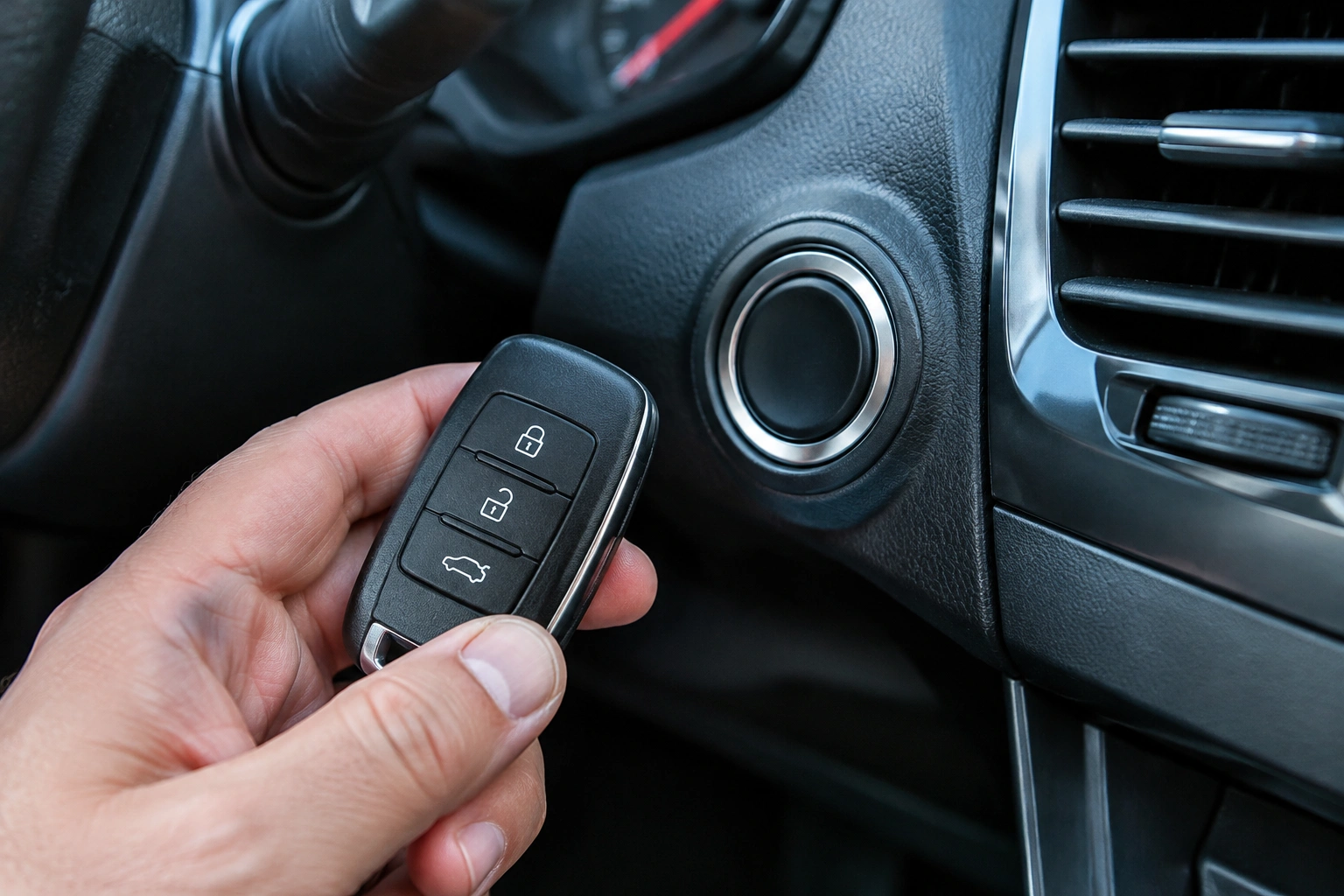
If your dashboard says hold key near start button, your car is telling you the smart key system is not detecting the fob the normal way. That message usually means the vehicle still has a backup way to recognize the key, but it needs the fob placed very close to the start sensor area so the car can read the transponder chip inside it.
In plain English: the car may not be seeing the fob’s radio signal, but it can often still start when the fob is brought right up to the correct spot. That’s why this warning is so common when the fob battery is weak, the car battery is low, or there’s signal interference nearby.
[Image: key fob close to push-button start area]
If you’re stuck in a parking lot or driveway, don’t panic. In many cases, you can get the car started and drive normally long enough to handle the real fix. The key is knowing whether you’re dealing with a weak fob battery, a weak vehicle battery, or a deeper smart key problem.
What the warning means
This message is a backup-start prompt. Your car’s immobilizer system wants to verify that the correct key is inside or very near the vehicle before it allows the engine to start. When the normal wireless detection fails, many vehicles can still read the fob at extremely short range.
That’s also why the message does not automatically mean the fob is ruined. A fob can still work well enough for a close-range start even if its battery is too weak for normal detection.
For a related breakdown of the same symptom, see our guide on why a car starts only when the key fob is held near the start button.
Try the backup start method first
The exact procedure varies by make and model, so your owner’s manual should always win here. But the general method is simple:
- Put the car in Park.
- Keep your foot on the brake.
- Bring the key fob directly against the designated sensing area near the start button or steering column.
- Press the start button while the fob is in that position.
- If the car doesn’t start, move the fob slightly and try again only as your manual allows.
Some vehicles want the fob touching the start button area. Others read it better when it’s held against a marked spot on the steering column or center console. In some cars, the backup sensing spot may be a marked pad, the start button itself, or a spot near the steering column, depending on the vehicle. If your manual shows a location, use that instead of guessing.
A useful comparison: this is a temporary backup start method, not a repair. If it works, you’ve confirmed the car can still recognize the key at close range, but you still need to find out why normal detection failed.
For another model-agnostic walkthrough, our post on push button start says key not detected covers the same troubleshooting path from a slightly different angle.
Most likely causes, in order
When a car says hold key near start button, these are the usual suspects:
1. Weak or dead key fob battery
This is often the first thing to check. A coin-cell battery inside the fob can fade gradually, so the fob may still unlock the doors sometimes but stop working reliably for starting.
2. Weak vehicle battery
A weak car battery can sometimes cause odd electrical behavior, including key recognition problems. If the dashboard is dim, the starter sounds sluggish, or multiple warning lights appear, the vehicle battery deserves attention.
3. Signal interference
Phones, other key fobs, metal cases, or even a crowded key ring can interfere with detection. It happens more often than people expect, especially when the fob is stored next to a phone or placed in a bag with other electronics.
4. Damaged fob
If the fob was dropped, exposed to moisture, or has a loose battery contact, it may work inconsistently. A new battery won’t fix broken internal parts.
5. Receiver, antenna, or immobilizer fault
If the car still won’t detect a known-good fob after battery checks and proper placement, the problem may be on the vehicle side. Clues can include no response from any fob, repeated “key not detected” messages even after replacing the fob battery, or intermittent recognition that changes little even when you try different spots or locations. That’s the point where reprogramming or diagnosis becomes more likely.
How to tell whether it’s the fob battery or the car battery
Here’s the fastest way to separate the two:
| Symptom | More likely fob battery | More likely car battery |
|---|---|---|
| Doors unlock poorly or only at close range | Yes | Not usually |
| Car starts only when fob is held near start button | Yes | Maybe |
| Dashboard lights are dim | No | Yes |
| Starter cranks slowly or clicks | No | Yes |
| Multiple electrical warnings appear | No | Yes |
| Spare fob works normally | Yes, original fob likely weak | Less likely |
| Car starts fine with backup method after fob battery swap | Yes | Not likely |
A practical rule: if the fob acts weak but the rest of the car seems electrically healthy, replace the fob battery first. If the car itself seems tired—slow cranking, dim lights, random electrical warnings—test the vehicle battery before spending time on the fob.
For broader context on modern push-button systems, Edmunds explains how keyless ignition has become standard on many vehicles, which helps explain why this issue shows up so often now.
Step-by-step troubleshooting checklist
Work through these in order so you don’t replace parts blindly.
1. Remove possible interference
Take the key fob away from your phone, other keys, magnetic cases, or anything metallic. Then try the start again.
This is a quick win because it costs nothing and can solve a “bad” fob that isn’t actually bad.
2. Try the spare fob
If you have a second fob, test it. If the spare works normally, the original fob is the likely problem.
That’s one of the cleanest comparisons you can make because it separates a fob issue from a vehicle-side issue without tools.
3. Replace the fob battery
If the fob is a few years old or the issue is intermittent, install a fresh battery of the correct type. A weak coin-cell battery is often the simplest fix.
4. Check the vehicle battery
If the dash is dim or the car has been sitting, test or charge the vehicle battery. A weak car battery can sometimes mimic a key detection problem.
5. Inspect the fob for damage
Look for cracks, water intrusion, loose buttons, or a battery compartment that doesn’t close tightly. A damaged shell can cause internal contact problems.
6. Retry the backup start method
After each change, test the car again using the proper close-range start method from your manual. If it works after a battery swap or interference removal, you’ve narrowed the cause.
How to replace the key fob battery
Most fobs use a small coin-cell battery, but the exact type depends on the vehicle. Check the owner’s manual or the old battery before buying a replacement.
General approach:
– Open the fob case carefully.
– Note the battery orientation before removing it.
– Install the new battery the same way.
– Snap the case back together fully.
– Test the lock/unlock buttons and the start function.
If the buttons work but the car still says hold key near start button, that tells you the fob battery may not have been the only issue.
A new battery is a smart first repair because it’s inexpensive and easy, but it does not rule out a bad fob, dead car battery, or programming issue.
When to use the emergency key
Many smart fobs contain a hidden metal emergency key. Use it when:
– the door won’t unlock electronically,
– the fob battery is dead,
– or you need to get into the vehicle before dealing with the start issue.
Keep in mind that the metal key usually only handles the door lock. It does not replace the transponder or smart-key recognition needed to start the engine.
That distinction matters. I’ve seen plenty of drivers unlock the car with the emergency key, then assume the same piece will start the engine. It won’t on most push-button systems.
When the problem is more than a battery
If the message keeps coming back after a fresh fob battery and a properly tested car battery, the issue may be bigger than normal maintenance.
Signs of a deeper problem include:
– the car never recognizes the spare fob,
– the backup start method only works intermittently,
– the fob was damaged or submerged,
– the dashboard shows other electrical faults,
– or the vehicle behaves normally one day and fails the next with no pattern.
More specific signs of receiver, antenna, or immobilizer trouble include no response from any fob, repeated no-key-detected messages right after a battery replacement, or recognition that comes and goes even when you try the fob in different spots. At that point, the likely suspects are the fob itself, the receiver/antenna system, or the immobilizer programming. A new battery won’t fix those.
When to consult a locksmith
A locksmith is often the right call if:
– the fob is damaged but the vehicle still seems healthy,
– you need a replacement or duplicate fob,
– the hidden key needs cutting,
– or you want help confirming whether the fob is still transmitting properly.
A dealer may be the better choice if the problem looks vehicle-side, especially if the car won’t recognize any known-good fob. If there are signs of electrical failure, burning smell, or multiple unrelated warnings, stop troubleshooting and get the car checked.
Can you drive the car after it starts?
Usually, yes. If the car starts with the backup method, it may drive normally afterward, but some vehicles may keep warning or may not restart reliably after shutdown.
If the fob battery is weak, the car may start acting up again when you shut it off. If the vehicle battery is weak, you may see more symptoms later, especially after sitting overnight. So once you get moving, plan the next step rather than waiting for the warning to return.
Quick decision guide
If you only want the shortest path:
- Try the backup start method first if the car won’t detect the fob.
- Replace the fob battery first if the fob is old or detection is intermittent.
- Check the vehicle battery first if the dash is dim or the car cranks slowly.
- Try the spare fob if you have one.
- Call a locksmith or dealer if the problem persists after fresh batteries and proper placement.
The good news is that this warning often points to a simple cause. The trick is not guessing blindly. Work from the easiest checks outward, and you’ll usually find out whether the issue is the fob, the car battery, or the smart key system itself.
FAQ
Why does my car say hold key near start button?
It usually means the car isn’t detecting the fob normally and wants you to use the backup proximity start method.
Where exactly should I hold the key fob?
Use the sensing spot shown in your owner’s manual. On many cars, that’s directly against or very near the start button area.
Can a dead car battery cause this message?
Yes. A weak vehicle battery can sometimes interfere with smart key recognition and cause key-not-detected behavior.
Will replacing the fob battery fix it?
Often, yes if the fob battery is weak. If the warning continues after replacement, the cause may be the car battery, interference, or a fob/system fault.
What if my spare fob has the same problem?
That points away from the original fob and more toward the vehicle battery, receiver, or immobilizer system.
