
Key Fob Battery Installed Correctly but Not Working? Here’s What to Check Next

If your key fob battery installed correctly but not working, don’t assume the whole fob is dead. In the shop, I’d usually see one of five things causing this: the battery is the wrong type or weak, the contacts aren’t making solid connection, the case isn’t fully seated, the fob lost sync, or the fob itself has internal damage.
The good news is that most of the early checks are simple and low-risk. You can usually narrow the problem down with a spare battery, a close look at the contacts, and a quick comparison to another fob if you have one. That saves a lot of guessing.
Quick symptom check: what exactly is failing?
Before you tear the fob apart again, figure out the symptom pattern. That tells you where to focus.
| Symptom | Most likely cause | Best next step |
|---|---|---|
| Nothing works at all | Battery issue, contact problem, or dead fob board | Recheck battery type, contacts, and case fit |
| Works only when squeezed or pressed closed | Loose or bent battery contacts | Inspect and gently restore contact tension |
| Works sometimes, then stops | Dirty contacts, cracked case, worn buttons, weak battery | Clean the compartment and test again |
| Short range only | Weak battery, poor contact, or internal damage | Try another battery and compare with a spare fob |
| Unlocks doors but won’t start car | Transponder or immobilizer recognition issue | Test the spare fob and check vehicle-side recognition |
| One button works, others don’t | Worn button pad or circuit board issue | Inspect the button pad and case for damage |
That last line matters. A fob can still send one signal while another button is worn out. So “partially working” usually points to a hardware issue, not just a battery.
Most likely causes, in order
When a battery is installed correctly but the fob still fails, I’d work through the likely causes in this order:
- The new battery is weak, wrong, or defective
- The battery contacts aren’t touching well
- The case isn’t fully snapped together
- The fob needs resynchronization or reprogramming
- The fob has internal damage from wear or moisture
- The vehicle receiver or immobilizer is the real problem
That order matters because the first three are cheap to check and often overlooked. A brand-new coin cell can still be the wrong size, poor quality, or too weak under load to power the transmitter properly. If the first replacement battery does not work, it is worth trying a second battery or checking the battery with a voltage test under load.
Step 1: Confirm the battery is truly the right one
Even when the battery looks correct, verify three things:
- Correct battery type
- Correct polarity
- Good seating in the holder
A battery that is off by size, chemistry, or shape may appear to fit but still not make reliable contact. That’s why I always tell people to compare the old battery and the new one side by side before closing the fob.
If you bought a low-cost aftermarket battery, don’t assume it’s fine just because it’s new. A fresh battery can still be underpowered or defective. If the fob was working before the swap and failed immediately after, trying a second battery from a different pack is a practical next move.
Also check whether the battery was meant to be installed with a thin insulating tab removed, if your fob uses one, and make sure there is no packaging film or residue blocking the contacts.
For some general background on remote and battery issues, AutoZone’s key fob troubleshooting guide is a useful starting point, but your vehicle’s manual still wins for model-specific details.
Step 2: Inspect and clean the battery contacts and case
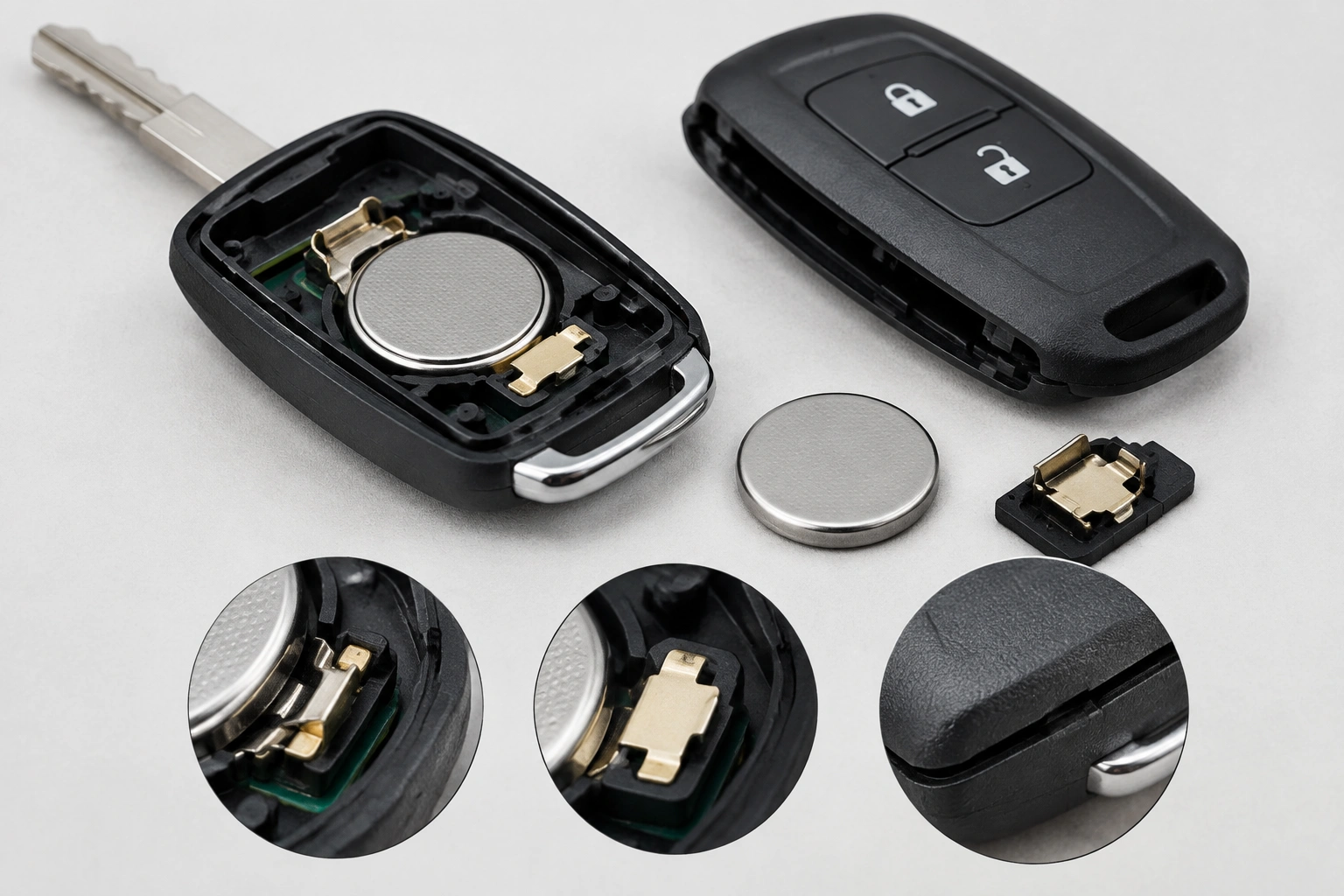
This is one of the most common reasons a fob dies after a battery change. If the contacts are dirty, corroded, bent, or loose, the battery can be installed correctly and still not complete the circuit.
Look for:
- Green or white corrosion
- Dark buildup on the contact points
- Contacts that sit too flat to press firmly on the battery
- A battery that rattles or shifts in the case
- Cracks in the shell near the battery holder
If the contacts look dirty, wipe them gently with a clean, dry cloth or a little isopropyl alcohol on a cotton swab. Let everything dry before reinstalling the battery.
If the fob only works when you squeeze the case together, that usually points to weak spring tension in the contacts or a case that is not seated tightly enough. In that situation, the fix may be as simple as snapping the shell together more firmly along the seam.
A careful, conservative contact adjustment can help too. In some fobs, the battery tabs lose spring tension over time. Gently restoring a little pressure can bring the connection back. The key word there is gently. If you pry hard enough to bend the contact too far, you can crack the board or make the fit worse.
After reinstalling the battery, the case should be snapped firmly together until it clicks along the seam. That is the kind of physical issue I would check first before assuming programming trouble. See the examples in this key fob contact fix video and this battery-check walkthrough.
Step 3: Test for button, casing, or water damage
If the battery and contacts look fine, inspect the rest of the fob closely.
Signs the fob hardware may be failing
- Buttons feel mushy, uneven, or stuck
- The shell has visible cracks
- The circuit board shows green or white corrosion
- The fob was exposed to rain, a spill, or a washing machine
- The case has been dropped enough to shift internal parts
Water damage is especially tricky because the battery compartment can look normal while the circuit board underneath is already damaged. If the fob got wet, cleaning the contacts may not be enough.
A cracked shell can also create strange symptoms. The battery may move just enough to break contact when you press a button or carry the fob in your pocket. In that case, a replacement shell may solve the physical problem without replacing the entire electronics board.
Step 4: Try resyncing or reprogramming the fob
Some vehicles lose synchronization after a battery change. Others do not. That’s why I treat this as a possible fix, not a universal one.
If the fob stopped working immediately after the battery swap, and the battery and contacts check out, a resync or reprogramming step may be worth trying according to your owner’s manual. This is a reasonable DIY step when the fob was working before, the case is intact, and there is no sign of water damage or internal corrosion.
What programming will not fix:
- Corroded contacts
- Broken buttons
- A cracked circuit board
- Water-damaged electronics
- A dead transmitter chip
So if the fob has visible damage or has been exposed to water, reprogramming is unlikely to help much. In those cases, the hardware problem usually comes first.
Step 5: Compare the problem fob with a spare fob
This is the fastest way to separate a fob problem from a car problem.
If the spare fob works normally, the vehicle receiver and immobilizer are probably fine, and the original fob is the likely failure point. That points you back to the battery, contacts, shell, or internal board.
If both fobs act up, the issue may be vehicle-side instead of in the fob itself. That’s when I start thinking about the receiver, antenna, or immobilizer system.
If you don’t have a spare, consider whether a locksmith or dealer can test one. It’s often a faster diagnosis than replacing parts blindly.
If the car unlocks but won’t start
This is where people get tripped up. A remote lock/unlock problem is not always the same as a push-to-start recognition problem.
The buttons on the fob usually handle remote entry, while the transponder or immobilizer communication handles start authorization. So you can have a fob that unlocks doors but still won’t let the car start. In plain terms, the remote signal and the anti-theft start signal are separate systems, and one can fail while the other still works.
That symptom often means:
- The remote signal still works
- The start recognition signal is weak or not being read
- The vehicle is not detecting the transponder properly
If your car has a push-to-start system, test the spare fob first. If the spare starts the car, the original fob is the likely issue. If neither works, the problem may be in the vehicle’s recognition system rather than the battery in the fob.
For more background on how remote and start recognition issues can differ, Edmunds’ car ownership resources can be a helpful reference point, especially when you’re trying to understand the system at a high level.
When the problem is likely in the vehicle, not the fob
A vehicle-side issue becomes more likely when:
- More than one fob fails
- The car does not recognize any known-good fob
- The problem shows up across multiple batteries and fobs
- The dashboard gives immobilizer or key detection warnings
At that point, the fob may be innocent. The vehicle receiver, antenna, or immobilizer may be the part that needs attention.
That said, don’t jump straight to that conclusion unless the simple checks are done first. I’ve seen a lot of “bad car” diagnoses end up being a loose battery contact in the fob.
What to replace: battery, contacts, shell, or the entire fob
Use the symptom pattern to decide what makes sense:
- Replace the battery again if the new one is untested, low quality, or suspiciously weak
- Clean or adjust the contacts if the fob works only when pressed together or only intermittently
- Replace the shell if the case is cracked but the electronics still work
- Replace the entire fob if there’s water damage, a dead board, or repeated failure after basic troubleshooting
A shell or contact repair is worth trying when the electronics still respond. Full replacement makes more sense when the board has clearly failed or the fob has been soaked.
If you’re unsure whether the issue is battery fit, contact pressure, or a detection problem, this related guide on what to check when a key fob is not detected but the battery is new walks through the same decision process from a slightly different angle.
When to consult a locksmith
Call a locksmith when you’ve already confirmed the battery, contacts, and case are in good shape, but the fob still won’t work or the car won’t recognize it.
That’s especially true if:
- The car uses push-to-start and won’t detect any fob
- Multiple fobs fail the same way
- The fob has water damage or a damaged board
- Reprogramming steps from the owner’s manual do not help
A locksmith can often tell you quickly whether you’re dealing with a fob issue, a programming issue, or a vehicle-side fault. That can save a lot of time compared with replacing parts one by one.
FAQ
Why is my key fob not working even though the battery is installed correctly?
Usually because the battery is wrong, weak, not making good contact, or the fob itself has damage. A correct install is necessary, but it does not guarantee the circuit is actually closed.
Could a brand-new battery still be bad?
Yes. A new battery can be weak, defective, or low quality. If the fob still fails, try a second battery from a different pack before assuming the fob is dead.
Do I need to reprogram the key fob after changing the battery?
Sometimes, but not always. Some vehicles only need resynchronization, while others do not need any programming at all after a battery swap.
What if only some buttons work?
That usually points to worn button pads, internal board damage, or case damage rather than a simple battery problem.
Can a dead key fob battery cause the car not to recognize the fob?
Yes, especially on push-to-start systems. But if the battery is already new and installed correctly, the issue may be the transponder, contacts, or the vehicle’s recognition system.
Should I replace the whole fob right away?
Not usually. Check the battery, contacts, and case first. Replace the full fob when there is clear water damage, board failure, or repeated failure after basic troubleshooting.
What if the spare fob works?
That’s a strong sign the original fob is the problem, not the car. Focus on the original fob’s battery fit, contacts, shell, or internal electronics.
Is this different from a keyless entry problem?
Yes. A keyless entry problem affects remote locking and unlocking, while a push-to-start problem may involve the transponder or immobilizer. A fob can fail in one area and still work in the other.
When a key fob battery is installed correctly but still doesn’t work, use a simple decision rule: try another battery or a load test first, then check the contacts and case, then try resyncing only if the fob was working before and shows no visible damage, and replace the fob or seek service when water, corrosion, or board damage is the real issue.
