
Key Fob Battery Contact Corrosion: How to Diagnose, Clean, and Fix It

When a key fob works one day and acts dead the next, the battery is usually the first suspect. But if you open the fob and see green, white, or crusty buildup around the battery area, you may be dealing with key fob battery contact corrosion instead of a simple dead coin cell.
That matters because a fresh battery won’t always solve a contact problem. Corrosion can block power flow, make the fob work only when the battery is pressed in place, or damage the holder enough that cleaning alone won’t restore a solid connection.
Here’s how to tell what you’re looking at, what you can safely try at home, and when the damage is too far along for a quick repair.
Quick Diagnosis: Corrosion, Dead Battery, or Something Else?
If the fob is completely dead, that doesn’t automatically mean the battery is the problem. A corroded contact can create the same symptom because the battery may still have voltage, but the fob can’t actually use it.
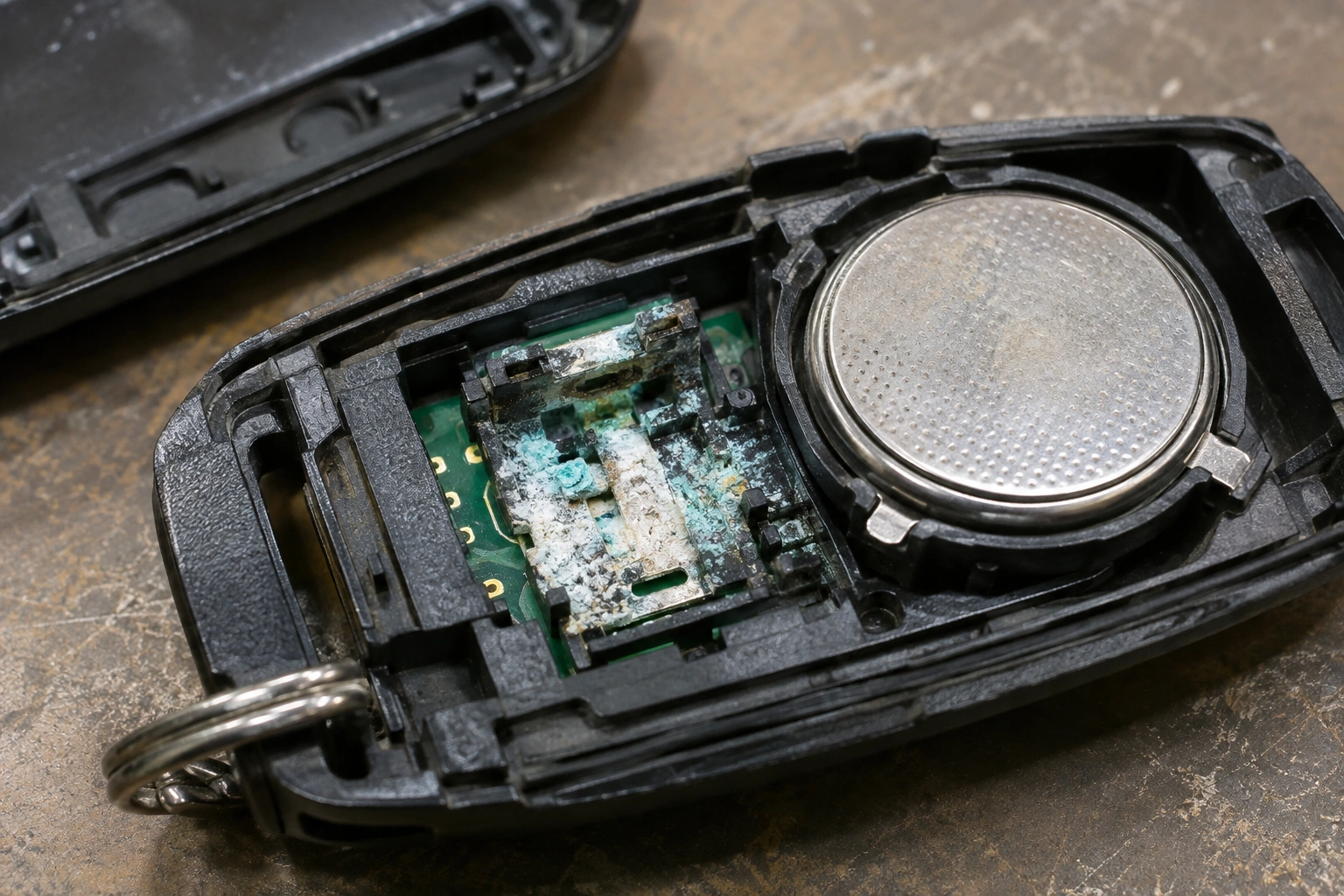
A few clues help separate the common causes:
- Dead battery: The fob failed gradually, range got shorter first, and there’s little or no visible residue.
- Corroded contacts: You see white, green, or crusty buildup around the battery edges or terminals, and the fob may work intermittently.
- Water-damaged fob: Buttons may feel sticky, the case may show moisture marks, or the circuit board may have widespread discoloration rather than just battery-area residue.
A useful test is to press the battery slightly into place after reinstalling it. If the fob works only while the battery is pushed one way, the contact pressure is probably poor. That points to bent, dirty, or corroded terminals rather than a bad battery alone.
| Symptom | Most likely cause | Best first move |
|---|---|---|
| No response, old battery, no residue | Dead coin cell | Replace battery |
| Works only intermittently | Corroded or loose contacts | Inspect and clean contacts |
| Visible green/white crust | Battery leakage or corrosion | Clean contacts, inspect for damage |
| Buttons feel sticky, board looks damp | Moisture intrusion | Dry, inspect, and assess damage |
| New battery doesn’t help | Contact or board issue | Check holder, springs, and traces |
If you also want to rule out a weak vehicle battery affecting the fob’s behavior, this guide on how a bad car battery can cause key fob problems is a useful companion read.
What Key Fob Battery Contact Corrosion Looks Like
Corrosion in a key fob usually shows up near the coin cell battery and the metal pieces that touch it. The exact color depends on the battery chemistry and how long the leakage has been sitting there.
Look for:
- White powdery buildup on the battery edges or terminals
- Green or blue-green residue on metal contacts
- Crusty flakes around the battery holder
- Dull, pitted, or blackened metal where the battery touches
- A battery that seems stuck because residue has glued it in place
If the residue looks fuzzy or crystalline, that’s a stronger sign of leakage than simple dust. Dirt wipes away; corrosion usually clings to the metal.
In many cases, the residue comes from battery leakage rather than ordinary dirt. For reference, Jiffy Lube describes battery corrosion as a white, blue, or greenish substance and explains that buildup can develop over time: battery corrosion overview.
Why Key Fob Contacts Corrode
The most common cause is battery leakage. A coin cell can leak as it ages, especially if it sits in the fob for a long time after it should have been replaced. Moisture exposure can make the problem worse, and so can storing the fob in a humid place or leaving it unused for long stretches.
In practical terms, corrosion can do three kinds of damage:
- Block the electrical path between the battery and the fob
- Weaken contact pressure if the metal spring or tab gets eaten away
- Spread onto nearby parts of the circuit board and cause hidden faults
That’s why a fob can look “sort of okay” on the outside but still fail after you install a new battery. The battery may be fine; the connection path may not be.
Tools and Safe Cleaners to Use
You don’t need a full electronics bench to handle light corrosion, but you do need the right supplies. Keep the job controlled and dry.
Useful tools
- Small screwdriver or pry tool for the case
- Cotton swabs
- Soft toothbrush or small nylon brush
- Isopropyl alcohol
- Clean microfiber cloth or lint-free wipe
- Replacement coin cell battery
- Optional: contact cleaner made for electronics
- Optional: multimeter for testing battery voltage and continuity
What to avoid
- Steel tools that gouge the contacts
- Sandpaper or aggressive scraping
- Soaking the fob
- Household cleaners that leave residue
- Too much liquid near buttons or the circuit board
If the residue is consistent with alkaline battery leakage, a mild acid can help neutralize it. In that case, vinegar or lemon juice can be useful, but only sparingly and only on the affected residue. A helpful electronics repair reference from Voniko notes that potassium hydroxide from alkaline batteries is a base and is best neutralized with an acid such as vinegar or lemon juice, then wiped away carefully: battery corrosion cleaning guidance.
For most key fobs, the safest approach is still to use the least amount of liquid that will do the job.
How to Open the Key Fob Safely
Open the fob slowly and look for the seam before you pry. Some cases snap apart cleanly, while others hide a small screw under a badge, sticker, or emergency key insert.
A few practical tips:
- Remove the emergency key first if your fob has one
- Work around the seam instead of forcing one corner
- Use a plastic pry tool if possible
- Keep track of rubber seals and button membranes
- Don’t twist the shell hard enough to crack the clips
If the case has a rubber seal, inspect it as you open the fob. A damaged seal can let in moisture later, which means the corrosion problem may come back even after a successful cleanup.
Step-by-Step: Clean Corroded Battery Contacts
This is the part where patience matters more than force.
1. Remove the battery
Take the coin cell out before cleaning. That prevents accidental short circuits and lets you inspect the holder properly.
2. Dry-brush loose residue
Use a soft toothbrush or dry cotton swab to remove the loose powdery material. Don’t grind it into the metal.
3. Apply a small amount of cleaner
For light corrosion, a cotton swab lightly dampened with isopropyl alcohol is often enough to lift grime and residue. For heavier leakage that looks like alkaline battery residue, a tiny amount of vinegar or lemon juice on a swab can help neutralize the buildup. You’re aiming for a targeted dab, not a soak.
If you use vinegar or lemon juice, let it sit briefly rather than scrubbing immediately. A repair guide on corroded battery terminals recommends covering the area for about 5 to 10 minutes before brushing it off, and notes that stubborn corrosion may need gentle scraping if it has been there too long: corroded terminal cleanup reference. For a key fob, use the same idea in a much smaller, more careful way.
4. Wipe and repeat as needed
After the cleaner has worked, wipe the area with a clean swab or lint-free cloth. Repeat until the metal looks clean and the residue stops coming off.
5. Dry everything completely
This part is not optional. If any liquid got into the battery compartment or near the board, let the fob dry fully before reinstalling the battery. The Instructables guide specifically warns that if cleaning fluid gets inside an item that can’t be fully taken apart, it should be allowed to dry completely before power is applied again.
6. Reinstall the battery and close the fob
Make sure the battery sits flat and the contacts press against it firmly. Reassemble the case carefully so you don’t pinch the seal or misalign the buttons.
Inspect the Contacts, Springs, and Circuit Board for Hidden Damage
Once the corrosion is cleaned off, look closely at the metal pieces that actually hold and touch the battery.
Watch for:
- Bent spring contacts that no longer press firmly
- Pitted metal where the surface has been eaten away
- Broken tabs that can’t hold the battery securely
- Dark or damaged traces on the circuit board near the holder
If the battery holder is loose or the contact has lost its shape, cleaning may only buy you a little time. A fob that works when squeezed closed but fails when you let go usually has a mechanical contact problem, not just a dirty one.
Replace the Battery, Contacts, or Holder if Needed
A new coin cell is enough when the old battery was weak and the contacts are still clean, flat, and springy. But if corrosion has damaged the metal, replacement becomes the better choice.
Use this rule of thumb:
- Clean only: residue is light, contacts are intact, and the battery fits securely
- Clean + new battery: the old battery leaked, but the holder still grips properly
- Replace contact parts: the contact assembly is a separate, removable piece and the metal is bent, broken, or heavily pitted
- Replace the whole fob: the contact assembly is molded into the shell, soldered to the board, or the board is damaged and leakage has spread widely
Some fobs have replaceable contact assemblies, but many do not. If the battery holder is molded into the shell or soldered in place, a full replacement is usually more practical than trying to rebuild the damaged area.
Test the Key Fob After Cleaning
Before you assume the repair worked, test the fob in a few simple ways:
- Stand near the vehicle and try lock/unlock several times
- Test from a normal distance, not just right next to the door
- Check both the buttons and any panic or trunk function
- If the fob is still unreliable, open it again and inspect the contact pressure
A multimeter can help confirm whether the battery itself is healthy and whether the contact path is making sense electrically. If you see good battery voltage but the fob still fails, that points you back to the contacts or the board.
When to Consult a Locksmith
If the corrosion has gone beyond surface cleaning, a locksmith or key fob specialist may be the smarter route. That’s especially true when:
- The contacts are missing or broken
- The battery holder is cracked or loose
- Corrosion has spread onto the circuit board
- The fob still fails after cleaning and a known-good battery
- The shell won’t close securely anymore
At that point, the issue is no longer just a dirty battery compartment. It’s a damaged electronic assembly.
How to Prevent Corrosion from Coming Back
The best prevention is simple maintenance with good timing.
- Replace coin cell batteries before they leak, not after the fob dies completely
- Don’t leave a weak battery sitting in the fob for months
- Keep the fob dry and away from repeated moisture exposure
- Check the battery area if the fob starts working intermittently
- Inspect the seal and case fit after any repair
If you ever see the first hint of white or green residue again, open the fob right away. Catching it early usually means you can clean the contacts before the damage reaches the holder or board.
Bottom Line
If your key fob has visible residue around the battery and acts unreliable, key fob battery contact corrosion is a strong suspect. Light corrosion is often repairable with careful cleaning, a fresh battery, and a full drying period. Heavy leakage, bent contacts, or board damage usually means the fob needs parts replacement or professional help.
The key is not to guess. Open it, inspect it, clean it carefully, and let the condition of the contacts decide the next step.
FAQ
Can corroded key fob contacts be cleaned?
Yes, light corrosion can often be cleaned carefully with isopropyl alcohol and, when appropriate, a small amount of vinegar or lemon juice for alkaline residue. Let the fob dry completely before reinstalling the battery.
Why does my key fob still not work after a new battery?
If the battery is new but the fob still fails, the contacts may be corroded, bent, or too pitted to make a reliable connection. In some cases, the circuit board is also damaged.
Is vinegar safe for key fob corrosion?
Only in small amounts and only when the residue appears consistent with alkaline battery leakage. Use it sparingly and avoid soaking the fob.
Should I replace the whole key fob if the contacts are damaged?
If the contact assembly is separate and replaceable, that may be enough. If it is molded into the shell, soldered in place, or the board is damaged, replacing the whole fob is usually the more realistic fix.
