
Why Your Key Fob Battery Drains Quickly and What to Check First

If your key fob battery keeps dying sooner than it should, don’t assume the battery itself is the only problem. In many cases, the real issue is the fob hardware, a stuck button, poor battery contact, or even a vehicle-side communication problem.
The good news: you can narrow it down with a few simple checks before buying another battery or replacing the fob.
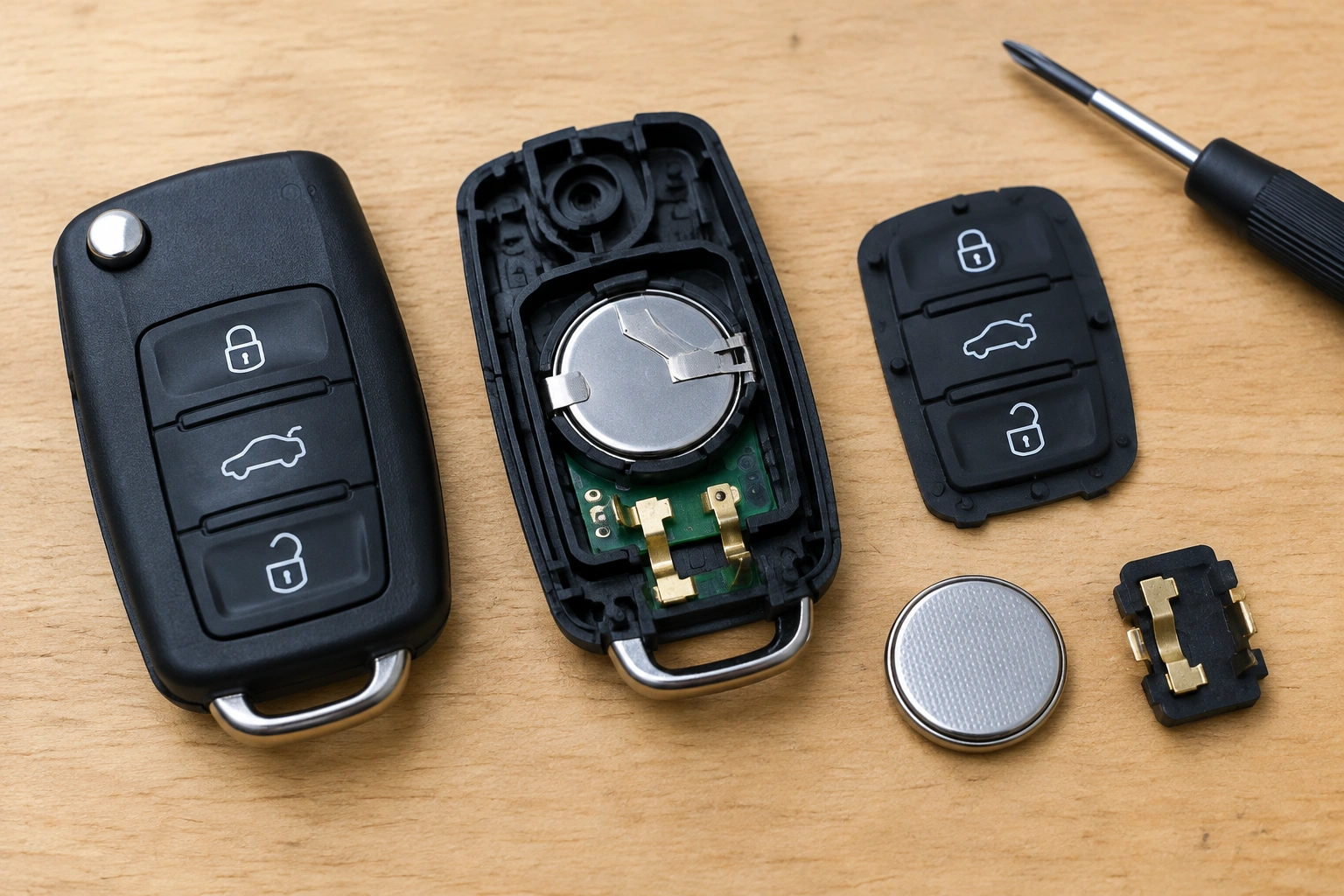
Quick diagnosis: what the symptom is really telling you
A fast-draining key fob battery usually falls into one of three buckets:
- The battery is the problem if the fob worked normally, then started failing after a battery change or after sitting unused for a long time.
- The fob is the problem if buttons feel sticky, the housing is cracked, or the battery seems to lose power even when the fob is barely used.
- The vehicle may be involved if more than one fob has the same issue or the problem seems worse when the fob is near the car.
That last point matters. A weak signal range and a battery that drains quickly are not always the same thing. Weak range can come from a tired battery, but it can also come from worn contacts or a damaged circuit board inside the fob.
Most likely causes of a fast-draining key fob battery
Here’s the order I’d check things in, based on the problems I’ve seen most often:
1. A weak, old, or low-quality battery
Not every new battery is a good battery. A cheap replacement can be weak right out of the package, and an old battery may have sat on a shelf long enough to lose useful life before you ever installed it.
If your fob uses a CR2032 or CR2025, make sure you install the correct type and check the date on the package if it’s available. A fresh, name-brand battery is a better baseline for troubleshooting than an unknown off-brand cell.
2. A stuck or partially pressed button
Yes, a button that feels “mostly fine” can still cause trouble. If one button is sitting slightly pressed because of a worn rubber pad, dirt, or a warped housing, the fob may stay active more often than it should.
That can shorten battery life and also make the fob behave oddly, such as unlocking the car when it’s not touched or working intermittently.
3. Dirty or loose battery contacts
Battery contacts inside the fob need solid pressure against the button cell. If they’re bent, dirty, or lightly corroded, the connection can become unstable. That doesn’t always kill the fob completely; sometimes it just makes the battery seem like it’s dying early.
4. Moisture or internal damage
A fob that has been dropped in water, exposed to humidity, or cracked open can develop board damage or corrosion. In that case, the battery may be fine, but the circuit board may be wasting power or failing to wake and sleep correctly.
5. The fob is waking up more often than normal
Some keyless entry systems use proximity sensing that can wake the fob more often when it stays near the vehicle. In that situation, the battery can drain faster because the fob and vehicle are repeatedly exchanging signals, not because of a vague “electronics nearby” issue.
That’s different from general RF interference. Nearby devices like phones, routers, or laptops are not a reliable explanation on their own. If battery drain seems tied to being parked or stored close to the car, it’s more useful to look at the vehicle’s proximity-key behavior, the receiver, or a vehicle-side fault.
A source focused on key fob battery drain notes that fobs can constantly send and receive signals, and storing them near electronics like Wi‑Fi routers, phones, or laptops may use extra power trying to stay connected. It also recommends keeping the fob away from high-interference areas when not in use. You can read that guidance here: Keyless Entry Remote’s explanation of rapid battery drain.
6. A vehicle-side issue
This is less common, but it matters when the problem affects more than one fob. A receiver fault, proximity sensing issue, or communication problem in the vehicle can make a fob “work harder” than it should.
If two different fobs are draining quickly, I’d pay attention to the car before I blame the batteries again.
Step-by-step troubleshooting checklist
Use this order so you don’t replace parts blindly:
- Verify battery quality
- Confirm the correct battery type, such as CR2032 or CR2025.
- Use a fresh battery from a reputable brand.
-
Avoid using a battery that has been sitting around for years.
-
Inspect for stuck buttons and corrosion
- Check whether any button feels pressed, sticky, or uneven.
- Look for corrosion on the contacts or moisture inside the fob.
-
Make sure the housing closes properly and isn’t cracked.
-
Test with a known-good battery
- Install a battery you trust.
-
If the same fob still drains it quickly, the battery is less likely to be the root cause.
-
Compare with a spare fob
- If you have a second fob, see whether it behaves normally.
-
If the spare works fine and the problem fob does not, the issue is probably in the fob itself.
-
Suspect the vehicle if multiple fobs fail
- If more than one fob drains quickly, the car’s receiver or proximity system deserves attention.
- At that point, a locksmith or dealer can help separate a fob problem from a vehicle-side fault.
Step 1: Check the battery first
Before opening the fob, verify the basics:
- Correct battery type: CR2032 and CR2025 are common, but not interchangeable in every fob.
- Battery age: A battery that has been sitting in a drawer for years may not be a reliable test battery.
- Brand quality: If the last replacement was a bargain pack from an unknown seller, swap in a better-quality battery before chasing more complicated causes.
- Visible damage: Look for leakage, discoloration, or a battery that looks swollen or unusually worn.
If the fob only started acting up after a battery swap, the battery itself is a strong suspect. That’s especially true if the old battery lasted a normal amount of time and the new one didn’t.
A practical comparison: if one battery gives you normal range for a while and another dies quickly in the same fob, the battery quality is probably part of the story. If every battery behaves the same way, the fob deserves a closer look.
Step 2: Inspect the fob for stuck buttons, damage, or corrosion
Open the fob carefully. Don’t pry hard enough to crack the housing or bend the battery contacts.
Look for these signs:
- Buttons that feel softer, tighter, or lower than the others
- Rubber pads that don’t spring back cleanly
- Cracks in the case
- Green or white corrosion near the battery contacts
- Moisture marks or a musty smell
- Loose internal parts rattling around
Press each button one at a time. You’re not trying to diagnose the electronics yet; you’re checking whether one button feels different from the rest. If one button seems to hang up, that’s enough reason to clean or repair the fob before installing another battery.
If the contacts look dirty, wipe them gently with a dry cotton swab or a swab lightly dampened with isopropyl alcohol, then let everything dry fully before reinstalling the battery. Keep liquid away from the circuit board.
Step 3: Test whether the problem is the fob or the vehicle
This is the part that saves people the most money and frustration.
If only one fob is draining quickly
That usually points to the fob itself: battery contacts, a sticky button, or damage inside the housing.
Try this:
1. Put a fresh battery in the problem fob.
2. Use the fob normally for a few days.
3. Compare it with your spare fob, if you have one.
If the spare fob works normally and the problem fob does not, the issue is likely inside the fob. If the same fob keeps failing even with a known-good battery, it’s time to consider repair or replacement.
If multiple fobs drain quickly
That’s when I start suspecting the vehicle. If two different remotes are going through batteries faster than expected, the car may be keeping the fobs awake or communicating too often.
That doesn’t automatically mean the car has a major failure. It could be a proximity system issue, a receiver problem, or a vehicle that’s unusually sensitive to the fob’s location. But when the same symptom appears across more than one fob, the odds shift away from “bad battery” and toward “car-side issue.”
Step 4: Try the basic fixes that often help
These are the fixes worth trying before you replace the entire fob.
Reseat the battery
Remove the battery and reinstall it so it sits firmly under the contacts. A battery that is slightly off-center can create weak or inconsistent connection.
Clean the contacts
If the contacts look dull, dirty, or lightly corroded, clean them carefully. Poor contact can make a healthy battery act tired.
Replace a bargain battery with a better one
This is one of the easiest comparisons to make. If the fob has already been through a low-cost battery and still acts up, install a higher-quality replacement before you condemn the fob. I’d rather test with one reliable battery than guess through three cheap ones.
Keep the fob away from the car when testing
If you suspect a proximity-key wake cycle, don’t store the fob right next to the vehicle while you’re trying to diagnose it. Move it farther away for a few days and see whether the drain changes. That’s a more useful test than assuming nearby electronics are the cause.
When cleaning, resetting, reprogramming, or replacing the fob makes sense
Cleaning makes sense when the problem is physical: dirty contacts, sticky buttons, or minor grime inside the housing.
Resetting or reprogramming may help if the fob is acting erratically after a battery change, but that’s usually a vehicle-specific step and not the first thing I’d reach for.
Replacement makes more sense when you see any of these:
- Cracked housing that won’t close tightly
- Corrosion that keeps returning
- Buttons that stay stuck even after cleaning
- Visible board damage
- A fob that fails with multiple known-good batteries
If the circuit board or button assembly is damaged, replacement is usually the more practical route than trying to nurse the old one along.
When to suspect the vehicle is causing the drain
The vehicle is more likely to be involved when:
- Two or more fobs have the same problem
- The drain seems worse when the fob is kept near the car
- The fob works, but only briefly before battery life drops off again
- The car behaves strangely with keyless entry or proximity detection
One useful reference point: NHTSA’s vehicle owner resources can help you find manufacturer guidance and safety-related information if you suspect a system issue. For a broader look at keyless-entry behavior and vehicle features, Edmunds’ car tech coverage can also be useful when you’re trying to understand how your system is supposed to act.
When to Consult a Locksmith
Call a locksmith or dealer when the problem keeps coming back after you’ve tried the basics, especially if:
- Multiple fobs drain quickly
- The fob has visible internal damage
- The vehicle seems to keep the fob awake
- You suspect the fob needs reprogramming or replacement
- The buttons or contacts are too damaged for a simple home repair
A locksmith can usually do more than just sell you a battery. Depending on the setup, they may be able to test the fob, reprogram it, replace the shell or battery contacts, and help determine whether the fault is in the fob or in the vehicle-side receiver/proximity system. If the issue shows up on more than one fob, that’s a strong sign to get a professional diagnosis before replacing more parts.
How to keep the battery from draining quickly again
A few habits make a real difference:
- Use quality batteries from a reputable brand
- Replace sticky buttons early, before they start holding pressure
- Keep the fob dry and avoid storing it where it can get wet
- Don’t force the housing open or bend the contacts
- Treat weak range as a warning sign, not something to ignore until the battery dies completely
If you’re trying to decide whether to replace the battery again or inspect the fob, use this rule: one bad battery is possible, two weak batteries in the same fob means it’s time to look inside.
FAQ
Why does my key fob battery keep dying so fast?
The most common causes are a weak battery, a sticky button, poor battery contact, or internal fob damage. If more than one fob has the same issue, the vehicle may be part of the problem.
Can a stuck button drain a key fob battery?
Yes. A button that is partially pressed can keep the fob active more often than normal and shorten battery life.
Does leaving the fob near the car drain the battery?
It can in some cases, especially with proximity systems. If battery drain seems worse when the fob is stored near the vehicle, that’s worth testing.
Should I use an OEM battery or an aftermarket one?
For troubleshooting, a quality OEM or name-brand battery is the safer choice because it gives you a better baseline. Cheap batteries can make diagnosis harder.
When should I replace the whole fob?
Replace the fob if the housing is cracked, the contacts are damaged, the buttons stick badly, or the battery problem continues with known-good batteries.
