
Where Is the OBD2 Port Located? How to Find It in Your Car

Quick Answer
The OBD2 port is usually underneath the driver’s side dashboard, near the steering column, above the pedals, or beside the driver’s knee panel. Look for a small, 16-pin trapezoidal socket, sometimes hidden behind a removable cover. If you cannot find it, check your vehicle owner’s manual for the exact location.
Where to Look First
- Under the steering wheel: Inspect the lower dashboard and the area above the pedals.
- Near the fuse panel: Check for a diagnostic socket or small access cover.
- Beside the steering column: Look around the lower knee panel and steering-column trim.
- Behind a cover: Some vehicles conceal the connector behind a small plastic flap.
- Near the center console: Check this area if the usual driver-side locations are empty.
Before Connecting a Scanner
- Verify the connector: Match its shape with your scanner plug before inserting it.
- Check the manual: Follow vehicle-specific instructions and never force a connector into the socket.
If you’re trying to read a check-engine light or diagnose a problem with an OBD2 scanner, finding the diagnostic port is your first step. The good news is that you usually won’t need special tools or dashboard disassembly.
I’ll explain where to look, what the connector looks like, and what to do if it isn’t where you expect. I’ll also cover scanner compatibility and a few mistakes that can make a simple diagnostic check more difficult.
In This Guide
Where Is the OBD2 Port Usually Located?
The OBD2 port is most commonly beneath the driver’s dashboard, close to the steering column. Depending on the vehicle, it may sit above the pedals, beside the steering wheel, or behind a small access panel.
OBD2 stands for On-Board Diagnostics II, a system that lets compatible diagnostic equipment communicate with a vehicle’s electronic control systems. The connector is also commonly called the diagnostic link connector, or DLC.
Start your search in these locations, working from the easiest areas to inspect toward less obvious ones.
- Below the steering column: Look upward beneath the dashboard, especially around the lower edge of the steering-column trim.
- Above the pedals: Check the space above the brake and accelerator pedals without placing yourself in an unsafe position.
- Beside the driver’s knee: Inspect the lower dashboard near the door-side edge and any nearby access covers.
- Around the fuse panel: Look for a diagnostic socket near the interior fuse-box area.
- Behind a dashboard flap: Check small removable panels that provide access to vehicle components.
- Near the center console: If the common locations do not help, consult the manual before checking less typical areas.
The connector’s exact position depends on the make, model, model year, and market in which the vehicle was sold. Even two cars from the same manufacturer may have different interior trim and access arrangements.
For an unfamiliar vehicle, I recommend checking the owner’s manual before removing any trim. The manual is more reliable than assuming the port must sit in the same place as it does in another car.
Section takeaway: Start beneath the driver’s dashboard and around the steering column. If you don’t find the socket, use the owner’s manual to identify the next location.
What Does an OBD2 Port Look Like?
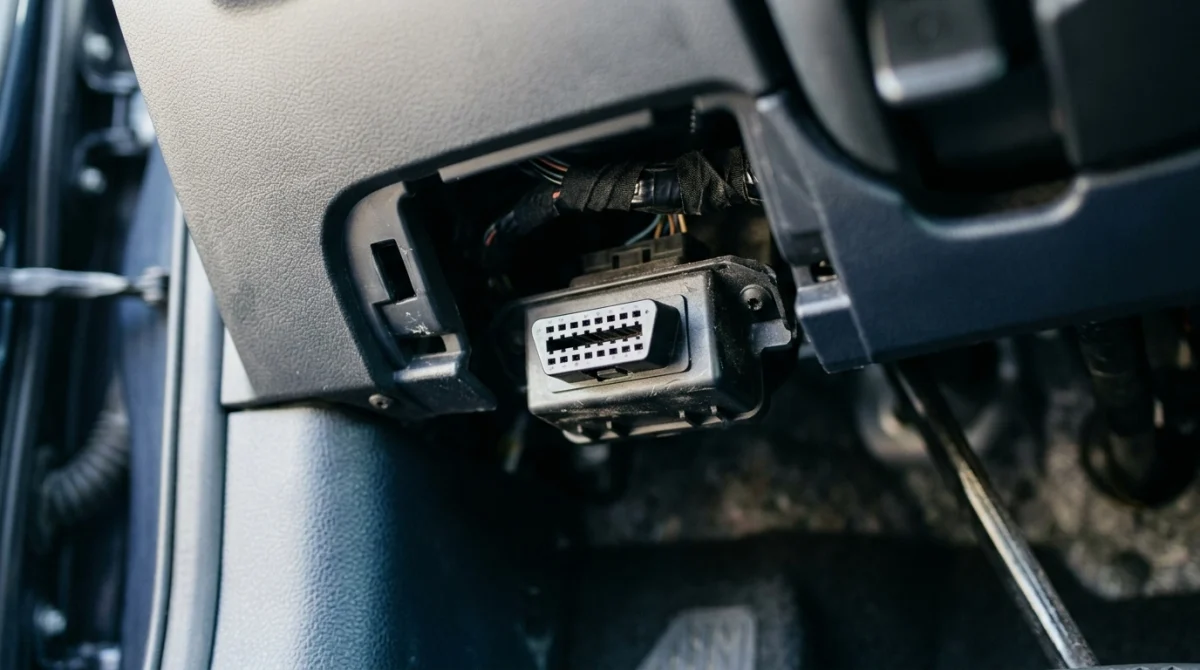
An OBD2 port is a small, trapezoid-shaped electrical socket with 16 pin positions. It is generally around 3 cm wide and usually faces downward, forward, or sideways beneath the dashboard.
Its shape is distinctive, but its color and mounting position can vary. You may find a black, gray, or differently colored connector mounted directly to a bracket or recessed behind a cover.
How to recognize the correct connector
- Trapezoidal shape: The opening has a wider edge and angled sides rather than the rectangular shape of a typical USB port.
- Sixteen pin positions: The standard connector has two rows of eight pin positions.
- Fixed mounting: The socket is normally secured beneath the dashboard rather than hanging loose like an ordinary cable.
- Matching scanner plug: A compatible OBD2 scanner has a plug shaped to fit this diagnostic socket.
Don’t confuse the OBD2 port with an electrical accessory socket, USB connection, or a separate manufacturer-specific service connector. These may look similar from a distance but serve different purposes.
The standard connector shape does not mean every scanner can access every vehicle system. Basic readers commonly focus on engine and emissions-related diagnostic information, while more advanced tools may support additional modules when the vehicle and tool allow it.
For a general explanation of vehicle safety systems and manufacturer information, you can consult the NHTSA vehicle safety resources. For port-specific information, the vehicle’s own documentation remains the best starting point.
Section takeaway: Look for a fixed, 16-position trapezoidal socket. Never force a scanner into a connector that doesn’t match.
How Do You Find the OBD2 Port Step by Step?
You can usually locate the OBD2 port by inspecting the driver’s footwell and lower dashboard in a few minutes. You don’t normally need to remove panels or use tools.
- Park safely: Stop on level ground, apply the parking brake, and switch the ignition off before beginning your inspection.
- Move the driver’s seat back: Create enough room to look beneath the steering wheel without straining.
- Inspect beneath the steering column: Use a flashlight to check the lower dashboard, the area above the pedals, and nearby trim.
- Check the sides of the lower dashboard: Look near the driver’s knee panel, interior fuse-box area, and small access covers.
- Compare what you find with the manual: Look under terms such as “OBD,” “diagnostic connector,” or “data link connector.”
- Check the connector orientation: Once you identify the port, confirm that the scanner plug lines up with its opening.
A flashlight and a phone camera can help. Taking a picture of the space beneath the dashboard may let you inspect an awkward area without repeatedly bending down.
Don’t pull hard on loose wires or remove fixed trim simply because the port isn’t immediately visible. Some panels contain electrical connections, and aggressive removal can damage clips or wiring.
What if the port is hidden behind a cover?
Some vehicles use a small cover or access flap to keep the connector out of sight. Check the owner’s manual to see whether the cover is designed to open by hand and how it should be accessed.
Only remove a panel when the manufacturer intends it to be removable without special tools. If the socket appears to be behind fixed trim, stop and check the vehicle-specific instructions.
Section takeaway: Search methodically, use a flashlight, and consult the manual before attempting to remove trim. Most of the time, the connector is accessible without disassembly.
Where Is the OBD2 Port on Different Cars?
Most OBD2-equipped passenger cars place the diagnostic connector in the driver’s area, but its exact position varies between manufacturers and model years. Use the following table as a starting point, not as a guarantee of the location on every vehicle.
| Vehicle or layout | Where to check first | What to remember |
|---|---|---|
| Toyota and Honda passenger cars | Under the driver’s dashboard and around the steering column | Confirm the position in the manual for the exact model year. |
| Ford passenger cars and SUVs | Lower dashboard near the steering column or driver’s knee panel | Trim design and connector access can differ between models. |
| BMW and MINI vehicles | Driver-side lower dashboard and nearby access panels | Check the vehicle documentation rather than assuming the port is beside the fuse panel. |
| SUVs and pickup trucks | Below the steering wheel, above the pedals, and around the lower dashboard | Cabin layout and model year affect accessibility. |
| Electric and hybrid vehicles | Start with the owner’s manual and the designated diagnostic-port location | Connector access and supported diagnostic functions vary by vehicle. |
These are general search areas, not verified locations for every vehicle in each brand. If you need an exact answer, identify the make, model, model year, and market first.
Does every car have an OBD2 port?
No. Compatibility depends on the vehicle’s age, market, powertrain, and applicable regulations. In the United States, OBD-II became mandatory for light-duty vehicles under applicable requirements beginning with the 1996 model year, while other markets adopted their own requirements and timelines.
Older vehicles may use different diagnostic connectors or systems. Some vehicles may also require manufacturer-specific equipment to access particular modules or functions, even when a standard diagnostic port is present.
For an imported vehicle, don’t rely on its brand or appearance alone. Check the specifications for the original market and the exact model year.
Section takeaway: Use general locations to guide your search, but rely on vehicle-specific documentation for confirmation. A standard-looking port doesn’t guarantee universal scanner compatibility.
What If You Cannot Find or Use the OBD2 Port?
If the port isn’t visible or your scanner won’t communicate with the car, the problem may involve access, electrical power, compatibility, or the diagnostic tool itself. Finding the socket is only the first part of troubleshooting.
The port seems to be missing
Check the owner’s manual and inspect the lower dashboard carefully before concluding that the vehicle lacks a diagnostic connector. A removable cover, unusual trim layout, or market-specific design may explain why you cannot see it.
If the manual identifies a location but the connector is absent, loose, or damaged, ask a qualified repair professional to inspect it. Avoid dismantling the dashboard to search for hidden wiring.
The scanner does not power on
Some scan tools receive power through the diagnostic connector, so a blank display may point to a power-supply problem. However, a faulty scanner, damaged connector, or other electrical issue can produce similar symptoms.
- Check the tool: Follow its instructions and confirm that it works as intended.
- Inspect the socket visually: Look for bent pins, debris, or visible damage without inserting metal objects.
- Review vehicle instructions: Follow the manufacturer’s guidance for ignition position and diagnostic-tool connection.
- Seek an electrical diagnosis: If the scanner remains unpowered, have the connector and its supply circuit checked.
Never bridge pins or probe the socket randomly to see whether it has power. Incorrect contact can damage electronic components or create an electrical fault.
The scanner powers on but cannot connect
A powered scanner may still fail to communicate if it doesn’t support the vehicle’s diagnostic protocol, the ignition conditions are incorrect, or a vehicle-side fault prevents communication.
- Confirm compatibility: Check that the tool supports the vehicle’s make, model year, and intended diagnostic functions.
- Follow connection instructions: Use the ignition position specified by the scanner and vehicle manufacturer.
- Check for visible damage: Look for a loose socket or damaged connector, but don’t force or wiggle the plug aggressively.
- Get professional help: Ask a qualified technician to diagnose persistent communication failures.
Keep in mind that a basic OBD2 reader may retrieve engine-related trouble codes but may not access airbag, anti-lock braking, body-control, or manufacturer-specific systems. A failed attempt to read one of these systems doesn’t automatically mean the port is faulty.
Section takeaway: Separate a location problem from a power, compatibility, or communication problem. If you see damaged pins or suspect an electrical fault, stop and arrange a proper inspection.
How Do You Connect an OBD2 Scanner Safely?
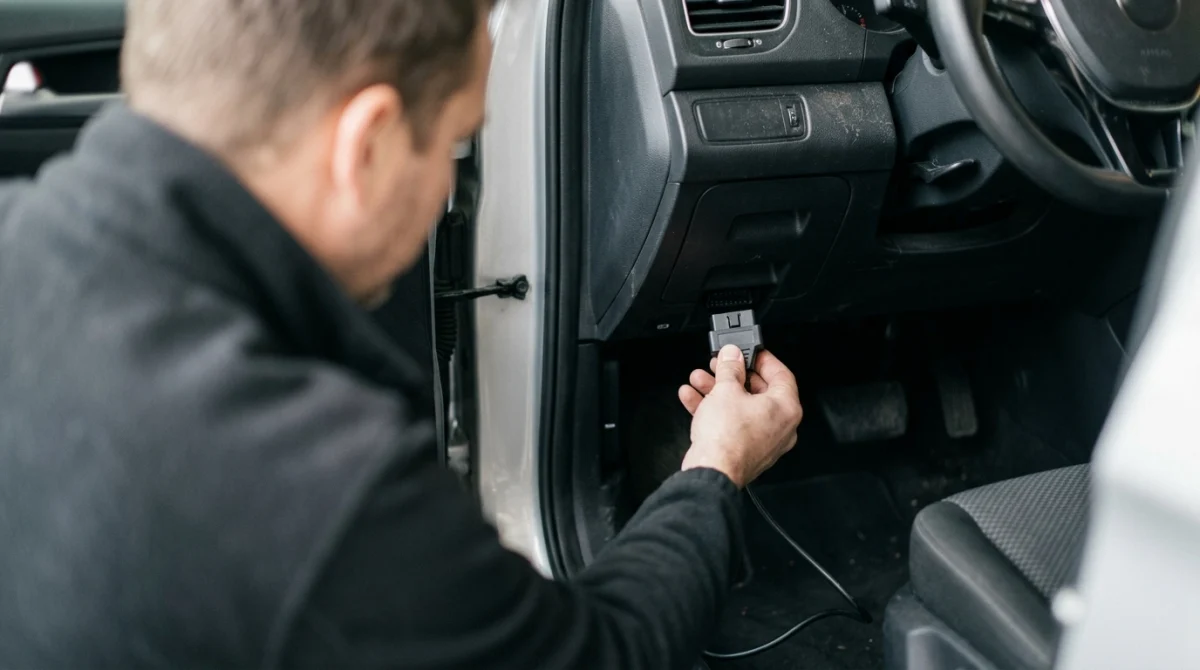
Once you’ve found the socket, connect a compatible scanner according to the instructions supplied with the tool and vehicle. A correct physical connection is important, but it doesn’t mean every diagnostic or programming function is safe or supported.
- Park the vehicle: Use a safe, stationary location and apply the parking brake.
- Read the instructions: Check the scanner’s connection requirements and any vehicle-specific warnings.
- Align the plug: Match the connector’s shape and orientation before inserting it gently.
- Follow the ignition instructions: Switch the ignition to the required position when directed by the tool manufacturer.
- Choose the appropriate function: Start with the diagnostic task your scanner supports, such as reading engine trouble codes.
- Disconnect correctly: Follow the tool’s instructions before removing the plug or ending a diagnostic session.
Don’t use excessive force, pull the connector by its wires, or leave a cable where it can interfere with the brake or accelerator pedals. Stop if the plug doesn’t fit or the socket appears damaged.
Can an OBD2 scanner program a key fob?
Not every OBD2 scanner supports key fob programming. Standard engine-code readers generally aren’t designed to add keys, pair smart keys, or perform immobilizer security procedures.
A transponder chip is an electronic component in many vehicle keys that communicates with the immobilizer, the system that helps prevent unauthorized starting. Some vehicles require specialized diagnostic equipment, security authorization, and vehicle-specific procedures to add or replace a key.
If your goal is key replacement, check the tool’s supported functions and the manufacturer’s requirements before buying anything. The presence of an OBD2 port alone does not establish that a scanner can program your key.
Locksmith’s note: Key programming depends on the vehicle’s security system, model year, and equipment. Confirm compatibility before attempting any immobilizer-related procedure.
Will connecting a scanner damage the car?
A compatible scanner used as directed is a routine diagnostic tool, but incorrect equipment or improper connections can cause problems. Some advanced functions can change vehicle settings or initiate procedures, so don’t select programming, coding, or reset functions unless you understand their requirements.
For vehicle-specific restrictions, consult the owner’s manual or an authorized service provider. Volvo, for example, publishes model-specific diagnostic-port guidance in its official support resources.
Section takeaway: Use a compatible tool and follow its instructions. An OBD2 connection provides diagnostic access; it does not guarantee support for advanced repairs or key programming.
Frequently Asked Questions
Where is the OBD2 port located in most cars?
In most cars, the OBD2 port is under the driver’s dashboard, near the steering column or above the pedals. It may also sit beside the driver’s knee panel or behind a small cover. Check the owner’s manual if you cannot locate it.
Is the OBD2 port always under the steering wheel?
No. The driver’s side dashboard is the most useful place to start, but the exact position varies by vehicle. Check nearby trim panels and the fuse-box area, then consult the owner’s manual for the correct location.
What does an OBD2 port look like?
An OBD2 port is a small, trapezoidal socket with 16 pin positions arranged in two rows. It is typically mounted beneath the dashboard and may face downward, forward, or sideways. Its color and surrounding trim vary between vehicles.
Can I use an OBD2 scanner with the engine off?
Often, you can connect a scanner with the engine off, but the ignition may need to be in a particular position for communication. Follow the scanner’s instructions and the vehicle manufacturer’s guidance. Don’t assume every diagnostic function works with the ignition off.
Why won’t my OBD2 scanner connect to my car?
Possible causes include an incompatible scanner, incorrect ignition position, a power-supply issue, damaged connector pins, or a vehicle communication fault. Check the tool’s compatibility and instructions first. If the problem continues, arrange a professional diagnosis.
Can I use the OBD2 port to program a replacement key fob?
Only if the vehicle, diagnostic equipment, and supported programming procedure allow it. Basic OBD2 code readers generally cannot program keys or authorize immobilizer changes. Confirm the requirements with a qualified automotive locksmith or your vehicle manufacturer.
What should I do if my car has no visible OBD2 port?
Check the owner’s manual for the designated diagnostic connector location and confirm the vehicle’s model year and original market. If the connector should be present but is missing, loose, or damaged, have a qualified technician inspect the vehicle instead of removing dashboard trim yourself.
Final takeaway: Start beneath the driver’s dashboard, especially around the steering column and pedals. Identify the correct 16-pin socket, confirm its location in the owner’s manual, and use only compatible diagnostic equipment.
If you’re looking for an OBD2 scanner to diagnose a check-engine light, verify that it supports your vehicle before purchasing. If your goal is key fob programming, choose equipment specifically designed for your vehicle’s key and immobilizer system rather than assuming a basic code reader will do the job.
