
What Is Freeze Frame Data on an OBD2 Scanner?

Quick Answer
Freeze frame data on an OBD2 scanner is a stored snapshot of selected vehicle operating conditions associated with a diagnostic trouble code (DTC). It can show engine RPM, coolant temperature, vehicle speed, engine load, and other available readings from around the time the vehicle detected a fault. This information helps narrow down possible causes, but it does not identify the failed part by itself.
What Freeze Frame Data Can Tell You
- Engine conditions: Check RPM, engine load, and coolant temperature to understand how the engine was operating.
- Driving conditions: Review recorded vehicle speed to help distinguish an idle-related issue from a problem that appeared while driving.
- Fault context: Match the snapshot to the associated trouble code instead of interpreting individual readings in isolation.
- Intermittent problems: Use stored conditions to investigate faults that disappear before a mechanic can reproduce them.
- Next diagnostic steps: Use the evidence to decide which systems, sensors, or operating conditions need further testing.
Before You Clear Any Codes
- Record the trouble codes and save or photograph all available freeze frame readings.
- Remember that clearing diagnostic codes can also erase stored freeze frame information and reset emissions readiness monitors.
If you’ve connected an OBD2 scanner to your car and found a menu labeled “Freeze Frame,” you may wonder what those numbers mean and how they help diagnose a problem. The feature is useful because a trouble code alone rarely tells the complete story.
In this guide, I’ll explain what freeze frame data records, how to read the main values, and how to use the information without jumping to the wrong repair. I’ll also cover its limitations and explain when professional diagnosis makes sense.
In This Guide
- What Is Freeze Frame Data on an OBD2 Scanner?
- What Information Does Freeze Frame Data Show?
- How Do You Read Freeze Frame Data?
- Freeze Frame Data vs. Live Data: What’s the Difference?
- How Do You Use Freeze Frame Data to Diagnose a Problem?
- What Are the Limitations and Common Mistakes?
- Frequently Asked Questions
What Is Freeze Frame Data on an OBD2 Scanner?
Freeze frame data is a stored record of selected engine and vehicle operating parameters associated with a detected fault. The vehicle’s onboard diagnostic system captures this information when certain diagnostic conditions are met, giving you a reference for investigating the problem.
Think of it as a snapshot rather than a continuous recording. It generally doesn’t show everything the car did before or after the fault, and it isn’t necessarily a complete record of the exact instant a problem first began.
How does the vehicle store freeze frame information?
Your car’s onboard diagnostics system monitors emissions-related systems and other supported engine functions. When the system detects a malfunction that meets the relevant criteria, it can store a diagnostic trouble code and associated operating data.
The scanner retrieves the information the vehicle makes available through its diagnostic connection. On standard OBD-II scanners, freeze frame information is commonly accessed through Mode $02, while current powertrain readings are generally accessed through Mode $01.
- ECU: The electronic control unit that manages a particular vehicle system.
- DTC: A diagnostic trouble code identifying a detected fault or abnormal condition.
- PID: A parameter identifier used to request a particular piece of diagnostic data.
- OBD2 scanner: A tool that communicates with a vehicle’s onboard diagnostic system to retrieve available information.
Standardized emissions-related freeze frame data is not the same as every manufacturer’s enhanced diagnostic information. Some advanced scan tools can access additional records, but their availability depends on the vehicle and the diagnostic equipment.
Why is freeze frame data useful?
A code tells you which monitored condition triggered a diagnostic response. Freeze frame data adds context about the engine’s operating conditions, which can help you decide where to investigate next.
For example, an engine-related fault recorded while the vehicle was idling may call for a different diagnostic approach from a similar complaint that occurs under heavy engine load. The snapshot helps distinguish those situations without proving a particular component has failed.
For background on how onboard diagnostics support emissions-related fault detection, see the U.S. Environmental Protection Agency.
What Information Does Freeze Frame Data Show?
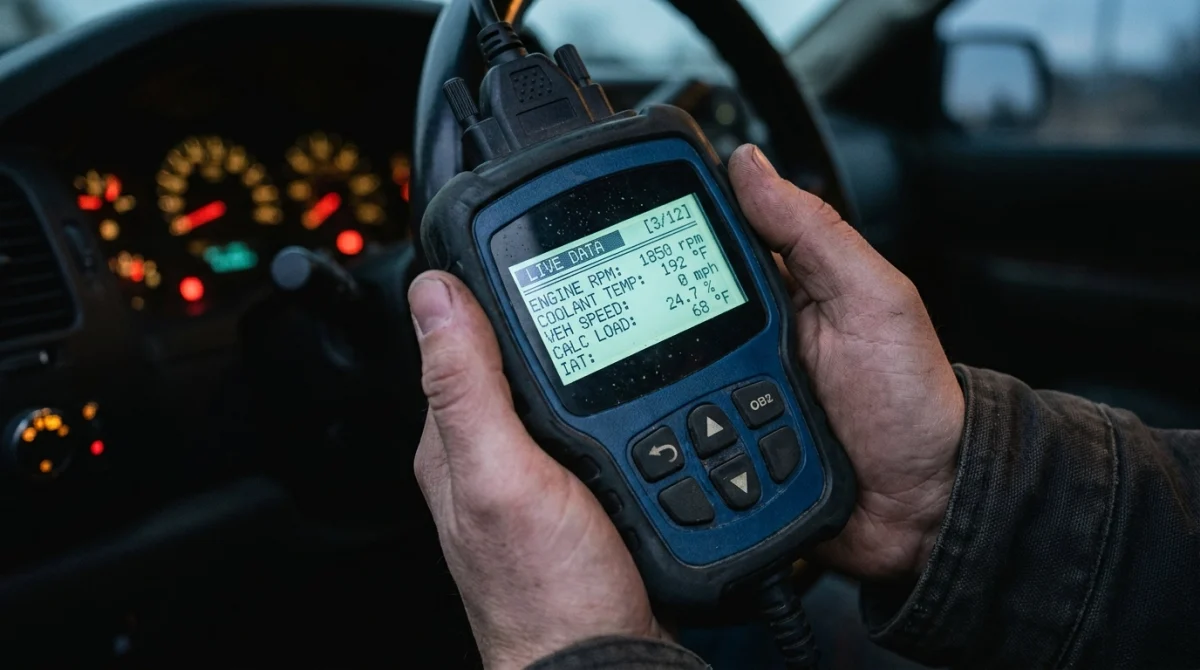
The available readings depend on the fault, the vehicle’s diagnostic system, and the scanner’s capabilities. Common freeze frame fields include engine speed, coolant temperature, vehicle speed, calculated engine load, and fuel-system status.
Not every scanner displays the same fields, and some values may be unavailable or represented differently. Always check the units and descriptions shown on your particular tool.
| Data field | What it tells you | Why it matters |
|---|---|---|
| Engine RPM | Engine rotational speed | Helps distinguish idle, moderate engine speed, and higher-speed operation. |
| Coolant temperature | Reported engine coolant temperature | Helps establish whether the engine was cold or warmed up. |
| Vehicle speed | Reported road speed | Helps identify whether the fault was associated with stationary or moving operation. |
| Calculated engine load | An estimate of engine load expressed as a percentage | Provides context about the engine’s workload when the record was captured. |
| Fuel-system status | Reported fuel-control operating state | Helps establish how the engine management system was controlling fueling. |
| Fuel trims, when available | Corrections the engine computer applies to fuel delivery | May help investigate fuel mixture problems when interpreted with other evidence. |
What do the numbers mean in practice?
Suppose a scanner shows an illustrative freeze frame with the engine at 2,000 RPM, vehicle speed at 45 mph, and coolant temperature at 90°C. Those values suggest the record was captured while the engine was running and the vehicle was moving, rather than during a cold start at rest.
These figures are examples, not readings from a particular vehicle. Their significance depends on the engine design, the fault code, the operating conditions, and the manufacturer’s specifications.
A single temperature or fuel-trim value rarely proves a problem. Compare related readings and use reliable service information before deciding whether a sensor, wiring circuit, fuel system, or mechanical component needs further testing.
How Do You Read Freeze Frame Data?
To read freeze frame data, retrieve the stored trouble code, open the scanner’s freeze frame menu, and review the recorded values alongside their units. Start with the overall operating conditions before focusing on individual readings.
Follow these steps on a typical OBD2 scanner
- Connect the scanner. Locate the vehicle’s diagnostic connector and follow the scanner manufacturer’s instructions for establishing communication.
- Read the trouble codes. Record stored, pending, and other available code statuses before changing anything.
- Open Freeze Frame. Look for a menu labeled “Freeze Frame,” “Freeze Frame Data,” or a similar term. Some tools list this under OBD-II diagnostic modes.
- Identify the associated code. Confirm which DTC the displayed snapshot belongs to, where the tool provides that information.
- Record the readings. Save or photograph the displayed parameters, units, and any additional available diagnostic information.
- Interpret the values together. Compare engine speed, coolant temperature, vehicle speed, load, and relevant fuel-system readings with the reported symptom.
Scanner menus vary by brand and model. If you cannot find the feature, consult the device’s manual rather than assuming the vehicle has no stored information.
What should you check first?
Begin with the code and the operating conditions. This prevents you from treating an unusual-looking number as the root cause without enough evidence.
- Cold or warm engine: Check coolant temperature to understand the engine’s reported thermal condition.
- Stationary or moving: Review vehicle speed and RPM to establish the operating situation.
- Light or heavy load: Use calculated load as context, not as a stand-alone pass-or-fail measurement.
- Related fuel readings: Review fuel trims or fuel-system status if the scanner provides them and they relate to the code.
- Other fault codes: Look for additional codes that could help explain the same symptom or system problem.
Diagnostic tip: record the original data before clearing codes, disconnecting the battery, or making repairs. Otherwise, you may lose useful evidence needed to reproduce the fault.
Freeze Frame Data vs. Live Data: What’s the Difference?
Freeze frame data shows a stored set of operating conditions associated with a fault, while live data displays supported parameters as the vehicle’s systems report them during the current diagnostic session. Both are useful, but they answer different questions.
Freeze frame helps you understand the conditions surrounding a recorded problem. Live data helps you observe what the vehicle is reporting now and can help determine whether the suspected issue is still present.
| Feature | Freeze frame data | Live data |
|---|---|---|
| Main purpose | Provides context for a recorded fault. | Shows current reported operating values. |
| Time reference | Stored snapshot from around the fault event. | Values available during the current session. |
| Best use | Understanding when and under what conditions a fault was recorded. | Checking current sensor behavior and monitoring changes. |
| Key limitation | Usually doesn’t provide a continuous history. | May not reproduce the conditions that originally triggered an intermittent fault. |
| Data availability | Depends on stored records and vehicle support. | Depends on supported parameters and scanner capabilities. |
When should you use each one?
Start with freeze frame when investigating a stored engine-related code, especially if the problem comes and goes. Then use live data, when appropriate, to check whether related readings appear normal or abnormal under current conditions.
For example, a recorded fault may have occurred when the engine was fully warmed up. If you inspect live data immediately after a cold start, the readings will naturally differ, so they may not explain the original event.
Neither feature replaces a proper diagnostic test. A technician may also need wiring checks, manufacturer-specific scan functions, physical inspections, or measurements with suitable test equipment.
For an example of how diagnostic tools present freeze frame alongside other OBD-II functions, see Snap-on’s OBD-II service modes documentation.
How Do You Use Freeze Frame Data to Diagnose a Problem?

Use freeze frame data to narrow down when a fault occurred and which diagnostic checks deserve attention next. The correct approach is to combine the snapshot with the trouble code, the driver’s symptoms, and further testing.
Example 1: An engine problem that appears while driving
Imagine that a vehicle stores an engine-related code after the driver notices hesitation during acceleration. The freeze frame shows that the engine was running above idle speed and the vehicle was moving when the record was captured.
That context suggests the technician should investigate the conditions associated with the complaint rather than focusing exclusively on idle behavior. Depending on the code, further checks might involve ignition, fuel delivery, air measurement, wiring, or another relevant system.
The snapshot does not prove which component caused the hesitation. It simply helps establish a more useful starting point for testing.
Example 2: A fault associated with a cold engine
Suppose a vehicle repeatedly develops a fault shortly after starting on a cold morning. The recorded coolant temperature and other available readings may help establish whether the fault occurred before the engine warmed up.
If the same complaint disappears once the engine reaches operating temperature, that information can guide the next diagnostic steps. The technician may investigate a temperature-sensitive fault or a system whose operation changes during warm-up, depending on the DTC.
However, a cold temperature reading alone does not prove that the coolant temperature sensor is defective. The value must make sense for the actual conditions and the vehicle’s specifications.
Example 3: A code appears, but the car seems normal now
An intermittent fault can be difficult to reproduce because the vehicle may operate normally when you connect a scanner. Freeze frame data preserves some information about the conditions surrounding the recorded fault, even when the symptom has disappeared.
Compare the snapshot with the driver’s description of when the problem occurred. A technician can then plan further tests under relevant conditions instead of replacing parts based only on the code description.
Use the code and snapshot as a pair
Neither the trouble code nor the freeze frame should be interpreted in isolation. A code can identify a monitored circuit or system without proving that the named sensor or component itself has failed.
A sensible diagnostic process is to:
- Identify the code’s exact definition for the vehicle.
- Review the stored operating conditions and any related codes.
- Compare the recorded values with the reported symptom.
- Consult applicable service information and test the suspected system.
- Confirm the repair through appropriate checks rather than assuming the code alone identified the cause.
Technician’s note: use the vehicle’s make, model, year, engine, and applicable service information when choosing diagnostic tests. The same general code can require different checks on different vehicles.
What Are the Limitations and Common Mistakes?
Freeze frame data is valuable evidence, but it has limits. It is a snapshot of selected parameters, not a complete video of the vehicle’s operation or a definitive diagnosis of the failed component.
Why might an OBD2 scanner show no freeze frame data?
A message such as “No Freeze Frame Data Stored” does not automatically mean the scanner is broken. The vehicle may not have a qualifying stored record, the relevant information may be unavailable, or the scanner may not support the diagnostic function needed to retrieve it.
Possible explanations include:
- No qualifying fault: The vehicle has not stored a freeze frame record for the conditions being checked.
- Data was cleared: Someone may have cleared codes or reset diagnostic information before you scanned the vehicle.
- Limited scanner support: The tool may not retrieve all enhanced or manufacturer-specific information.
- Vehicle-specific behavior: Storage rules and available records can vary with the vehicle and diagnostic system.
- Communication problems: A connection or communication issue may prevent the scanner from retrieving the expected information.
Check the scanner manual, confirm communication with the vehicle, and read all available codes and statuses before concluding that data is missing because of a fault.
Does freeze frame data always show the exact moment the problem started?
No. It generally represents the conditions associated with a detected fault at the time the system stored the record. The problem may have begun earlier, and the snapshot may not capture the first physical sign of failure.
Some faults also occur under conditions that the vehicle cannot easily reproduce while stationary. A snapshot can help describe the original conditions, but it does not guarantee that every relevant parameter was recorded.
Can clearing codes erase freeze frame data?
Yes. Clearing emissions-related diagnostic information can erase stored trouble codes and freeze frame records, and it can reset emissions readiness monitors. This can remove evidence that would otherwise help diagnose the problem.
Before clearing anything, save the codes, their statuses, and the available snapshot. If the vehicle needs an emissions inspection, remember that reset readiness monitors may need suitable driving conditions before the system reports them as complete again.
Can freeze frame data tell you which part to replace?
Not by itself. The readings can help narrow the investigation, but a suspected component should be tested before replacement whenever practical.
For instance, a code associated with an air measurement circuit does not automatically prove that the airflow sensor needs replacing. Wiring damage, connector problems, air leaks, or other faults may produce related symptoms, depending on the vehicle.
The same principle applies to electronic vehicle security systems. An OBD2 engine scan should not be confused with a full key-fob or immobilizer diagnosis, which may require a compatible advanced scan tool and vehicle-specific information.
As of 2026, the safest approach remains the same: preserve the available diagnostic evidence, interpret it in context, and verify the suspected cause before authorizing a repair.
Frequently Asked Questions
1. What does freeze frame mean on an OBD2 scanner?
Freeze frame means a stored snapshot of selected vehicle operating conditions associated with a diagnostic trouble code. Depending on the vehicle, it can include engine RPM, coolant temperature, speed, and calculated engine load. These readings help explain the conditions surrounding a detected fault.
2. Is freeze frame data important for diagnosing a check engine light?
Yes. Freeze frame data can help you understand what the engine was doing when a fault was recorded. It is particularly useful for intermittent problems that disappear before inspection. However, the snapshot must be interpreted alongside the trouble code, symptoms, and appropriate diagnostic tests.
3. Can I drive with a check engine light if freeze frame data looks normal?
Normal-looking freeze frame readings do not establish that the vehicle is safe to drive. If the check engine light flashes, the engine runs roughly, or you notice overheating, severe power loss, or unusual noises, stop safely and seek appropriate assistance. Follow your vehicle’s manual.
4. Why does my scanner show no freeze frame data?
Your vehicle may not have stored an eligible freeze frame record, the data may have been cleared, or the scanner may have limited diagnostic support. Check for stored and pending codes, confirm communication, and consult the scanner manual before assuming a vehicle fault.
5. Does freeze frame data get deleted when I clear a code?
Yes, clearing emissions-related diagnostic information can erase associated freeze frame data. It may also reset readiness monitors, which can affect emissions inspection readiness. Save the original codes and available readings before clearing them, especially when diagnosing a recurring or intermittent problem.
6. What is the difference between freeze frame data and a fault code?
A fault code identifies a detected malfunction or abnormal condition. Freeze frame data adds context by showing selected operating readings associated with that fault. Together, they help guide diagnosis, but neither necessarily identifies the exact component that needs repair.
7. Do all OBD2 scanners read freeze frame data?
No. Support depends on the scanner’s capabilities and the vehicle’s diagnostic system. Many code readers offer standard OBD-II freeze frame access, while some basic tools provide limited functions. Check the manufacturer’s specifications before buying a scanner if this feature is important to you.
Final Takeaway: Use Freeze Frame Data Before Clearing Codes
Freeze frame data is one of the most useful features to check when investigating a stored engine-related trouble code. It provides a snapshot of selected operating conditions, helping you understand whether a fault occurred during cold startup, idle, or driving under load.
For the best results, record the code and snapshot, compare the values with the reported symptoms, and use further testing to confirm the cause. Avoid replacing parts based solely on a trouble code or one unusual reading.
If your scanner shows an unfamiliar value or a recurring fault remains unexplained, consult a qualified technician with access to the appropriate service information. Accurate diagnosis starts with preserving the evidence and interpreting it carefully.
For additional diagnostic guidance, consult your scanner’s official documentation, such as the OBDLink support resources, and follow the service information applicable to your vehicle.
