
How to Reset Oil Light With a Scan Tool: Step-by-Step Guide

Quick Answer
To reset an oil change light with a scan tool, connect a compatible diagnostic scanner, switch the ignition to the position specified by the tool, and select the vehicle’s Oil Reset or Service Reset function. Follow the on-screen instructions and confirm the reset only after completing the required oil and filter service. If your scanner lacks this function, check your owner’s manual for the vehicle’s dashboard reset procedure.
Steps to reset the oil service reminder
- Verify the warning: Confirm that the light indicates an oil change or maintenance reminder, not low oil pressure.
- Check compatibility: Make sure your scanner supports oil reset for your exact make, model, and year.
- Connect safely: Plug in the scanner and follow its instructions for the ignition position.
- Select oil reset: Open the service functions menu and choose the appropriate oil-life or maintenance reset option.
- Complete the reset: Follow the prompts, confirm completion, and check the dashboard again.
- Verify the result: Confirm that the reminder has cleared and the oil-life display shows the expected value.
Important safety check
- Red oil-pressure warning: Stop the engine as soon as safely possible. Do not treat this warning as a routine maintenance reminder.
- Basic scanner limitation: A standard engine-code reader may not include the manufacturer-specific service-reset function.
Resetting an oil light with an OBD2 scan tool can be straightforward when you use the right equipment. The important part is knowing which warning you are resetting and whether your vehicle supports a scan-tool reset.
In this guide, I’ll explain how the process works, which scanner functions to look for, why some resets fail, and how to confirm the job is complete. The instructions cover general procedures applicable in 2026, rather than a single manufacturer’s button sequence.
In This Guide
What Does the Oil Light Mean?
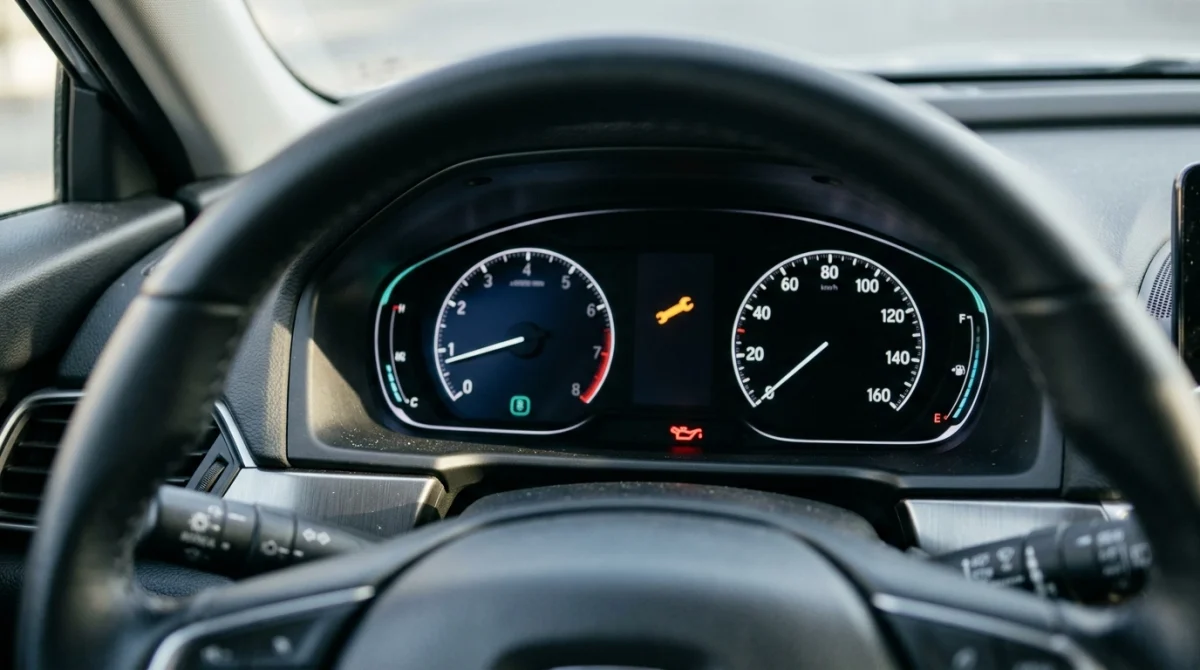
An oil light can indicate a routine maintenance reminder or a serious engine lubrication problem. Identify the warning before connecting a scanner or attempting a reset.
Oil change reminder vs. oil pressure warning
An oil change reminder tells you that scheduled maintenance is due or that the engine’s calculated oil life has reached its service threshold. Depending on the vehicle, the dashboard might display an oil-life percentage, a maintenance message, a wrench symbol, or a service indicator.
An oil pressure warning indicates that engine oil pressure may be dangerously low. It often uses a red oil-can symbol, although the exact display varies by vehicle.
- Oil-life or maintenance reminder: Arrange the required service, then reset the maintenance counter.
- Red oil-pressure warning: Stop safely and shut off the engine as soon as possible.
- Check-engine light: Read the diagnostic trouble codes to investigate an engine-management or emissions-related fault.
These warnings do different jobs. Clearing a diagnostic trouble code does not automatically reset the oil-life system, and resetting an oil-life counter cannot correct low oil pressure.
If the red oil-pressure warning appears while the engine is running, do not continue driving just to test whether a scan tool can clear it. Check the owner’s manual and arrange professional assistance if the warning persists.
What is an oil-life monitoring system?
An oil-life monitoring system estimates when engine oil needs replacement using factors such as operating conditions, driving habits, and elapsed time, depending on the vehicle. It does not necessarily measure the oil’s physical condition directly.
After an oil and filter change, the system generally needs a reset so it can begin calculating the next maintenance interval. If you skip that reset, the dashboard may continue showing the old reminder or an inaccurate remaining-oil-life value.
For more information about the importance of following vehicle-specific maintenance schedules, consult your manufacturer’s owner’s manual and the maintenance resources available through AAA.
Section takeaway: Identify the exact warning first. Reset maintenance reminders only after completing the required service, and treat an oil-pressure warning as a potential engine emergency.
What Scan Tool Do You Need to Reset the Oil Light?
You need a scan tool that explicitly supports the oil-life or service-reset function for your particular vehicle. A device that reads engine codes may not have access to maintenance-reset operations.
Basic OBD2 readers vs. service-reset scanners
An OBD2 scanner communicates with supported vehicle control systems through the diagnostic connector. However, the functions available depend on its hardware, software, and vehicle coverage.
- Basic code reader: Reads supported engine and emissions diagnostic trouble codes and may clear certain codes.
- Enhanced diagnostic scanner: Accesses additional vehicle-specific data or control modules where supported.
- Oil-reset scanner: Includes a dedicated maintenance or oil-life reset function for listed vehicles.
- Professional diagnostic tool: May offer several service functions, guided procedures, and broader vehicle coverage.
A scanner’s advertised number of functions does not guarantee oil-reset compatibility. Confirm that the exact make, model, year, and required service operation appear in its coverage information.
What features should you check before buying?
If you are choosing a scanner specifically to reset an oil reminder, prioritize compatibility over a long list of unrelated features.
- Dedicated Oil Reset, Oil Life Reset, or Service Reset menu.
- Support for your vehicle’s make, model, year, and engine configuration where applicable.
- Clear on-screen instructions for the supported reset procedure.
- Current software and any required updates, subscriptions, or paid functions.
- Manufacturer documentation confirming that the function is available for your vehicle.
For example, some advanced scanners include an Oil Reset menu that guides you through selecting the vehicle and confirming the service operation. Other devices may only display the manual procedure or report that the reset is unavailable.
You can review the official Autel website for diagnostic-tool documentation and product information. Always check the manual for the specific scanner you own rather than assuming every model supports the same functions.
Expert tip: Before purchasing a scanner, verify oil-reset coverage for your exact vehicle. Compatibility with standard OBD2 engine diagnostics alone is not enough.
Section takeaway: Choose a scanner with a documented oil-reset function for your vehicle. Basic code-reading capability does not guarantee maintenance-reset support.
How Do You Reset the Oil Light With a Scan Tool?
You can reset the oil maintenance reminder through a compatible scanner’s service menu. The exact menu names and prompts vary by tool and vehicle, so follow the instructions displayed for your specific application.
Step 1: Complete the oil change and prepare the vehicle
Before resetting the reminder, make sure the required oil and filter service has been completed. Check the oil level using the vehicle manufacturer’s recommended procedure.
- Park on a level surface in a safe location.
- Apply the parking brake and select Park or Neutral as appropriate.
- Switch off the engine unless the scanner’s vehicle-specific instructions state otherwise.
- Keep the ignition key or smart key available as required.
- Read the scanner’s safety instructions before connecting it.
Do not reset the counter simply because the reminder is inconvenient. The reset changes the maintenance tracking information, not the condition of the oil inside the engine.
Step 2: Locate the OBD2 diagnostic connector
The OBD2 connector is commonly located beneath the dashboard on the driver’s side. Its exact position varies, so check the owner’s manual if you cannot find it.
Connect the scanner firmly without forcing the plug. Inspect the connector for obvious damage, and stop if the pins appear bent or the plug does not fit correctly.
Step 3: Switch on the ignition as instructed
Many oil-reset procedures require the ignition to be on while the engine remains off. Vehicles with push-button ignition may use a different sequence, so follow the vehicle and scanner instructions.
Make sure the vehicle has sufficient battery power to maintain communication during the procedure. Avoid starting the engine unless the instructions specifically require it.
Step 4: Select the correct vehicle
Turn on the scanner and open its vehicle identification or diagnostic menu. Select the correct make, model, year, and any additional vehicle details requested by the tool.
If the scanner identifies the vehicle automatically, verify the displayed information before continuing. Incorrect vehicle selection can prevent the scanner from offering the correct reset function.
Step 5: Open the oil-reset function
Look for a dedicated service function in the scanner’s menu. Depending on the device, the option might appear under Reset, Service, Maintenance, or a similar heading.
Common labels include:
- Oil Reset.
- Oil Life Reset.
- Engine Oil Maintenance.
- Service Interval Reset.
- Oil Change Reset.
These labels are not interchangeable on every vehicle. Choose the function that specifically matches the oil maintenance reminder you need to reset.
Step 6: Follow the on-screen instructions
Once you select the correct function, the scanner may request confirmation, display vehicle-specific instructions, or offer a supported automatic reset. Follow the displayed prompts in order.
- Read any preliminary warnings or service requirements.
- Confirm that the correct vehicle and service function are selected.
- Complete any requested preliminary operations.
- Confirm the reset when the scanner instructs you to proceed.
- Wait for the scanner to report success, failure, or another required action.
Some tools perform the reset electronically, while others guide you through a manual procedure using the dashboard controls. Do not substitute a guessed button sequence for the instructions provided for your vehicle.
Step 7: Check the result
After the scanner reports completion, exit the function and check the dashboard. If your vehicle displays an oil-life percentage, verify that it shows the expected value according to the manufacturer’s procedure.
If the reminder remains, do not repeatedly issue reset commands without checking the cause. Review the scanner’s result message and the troubleshooting steps later in this guide.
Locksmith’s note: As with vehicle-specific key programming, diagnostic functions depend on the car’s electronic systems and the tool’s supported coverage. Always confirm compatibility before attempting a service operation.
Section takeaway: Use the correct vehicle profile, select the dedicated oil-reset function, and follow the scanner’s prompts. Confirm success on both the scanner and dashboard before considering the job complete.
Scan Tool vs. Manual Oil Light Reset
A scan tool is useful when the vehicle supports an electronic service reset, but it is not always necessary. Many vehicles provide an oil-life reset through the dashboard, instrument cluster, infotainment system, or a manufacturer-prescribed manual procedure.
Which method should you use?
The best method is the one specified for your exact vehicle. A manual reset may be quicker when the manufacturer provides a dashboard procedure, while a compatible scanner can help when the vehicle supports a dedicated diagnostic reset.
| Method | Main advantage | Main limitation | Best suited for |
|---|---|---|---|
| Basic OBD2 reader | Reads supported engine codes | May lack service-reset functions | Engine diagnostics |
| Oil-reset scan tool | Provides a dedicated reset function when supported | Vehicle coverage varies | Supported electronic service resets |
| Dashboard or infotainment menu | May require no extra equipment | Menu steps vary by vehicle | Vehicles with built-in reset options |
| Professional diagnostic tool | May support additional vehicle-specific service functions | Availability and coverage depend on the tool | Complex or unsupported DIY resets |
Can you reset the oil light without a scanner?
Yes, if the manufacturer provides a manual procedure. Depending on the vehicle, you may use the instrument-cluster menu, infotainment screen, steering-wheel controls, or another specified method.
For example, some vehicles let you open an oil-life screen and confirm a reset through the dashboard menu. Others require a specific ignition or pedal procedure, and some use different steps across model years.
Never assume a procedure that works on one model also works on another from the same manufacturer. Check the correct owner’s manual before attempting it.
Hyundai’s official owner’s manual resource, for example, provides vehicle-specific guidance for supported models and systems. Other manufacturers offer their own manual portals or maintenance instructions.
When is a professional scan tool worth using?
A professional tool may be appropriate when the vehicle does not offer a convenient manual reset, the scanner reports an unsupported function, or the service procedure requires manufacturer-specific diagnostics.
It can also be useful when several service reminders appear together and the correct maintenance procedure needs to be confirmed. However, a more advanced scanner cannot compensate for an incorrectly identified warning or unfinished maintenance.
Section takeaway: Compare the available methods before buying equipment. If the owner’s manual provides a straightforward reset procedure, a dedicated scan tool may not be necessary.
Why Won’t the Oil Light Reset?
An oil light that refuses to reset often points to an unsupported scanner function, an incorrect procedure, or an incomplete reset operation. Start by checking the warning type and tool compatibility rather than assuming a vehicle component has failed.
The scanner does not show an Oil Reset menu
A basic OBD2 reader may support engine-code diagnostics but lack maintenance-reset access. The same limitation can occur when an advanced tool supports other service functions but not oil reset for your particular vehicle.
Check the scanner’s vehicle coverage, software version, and official user manual. If the function is unavailable, use the manufacturer’s manual reset procedure or consult a qualified technician.
The scanner cannot communicate with the vehicle
A scanner that cannot connect may have a power, connection, ignition-state, or compatibility problem. In some cases, an electrical fault or vehicle communication issue requires further diagnosis.
- Confirm that the scanner is firmly connected.
- Check that the ignition is in the required position.
- Verify that the scanner powers on correctly.
- Inspect the diagnostic connector for visible damage.
- Check the vehicle battery condition if there are signs of low voltage.
- Follow the scanner manufacturer’s troubleshooting instructions.
Do not force the connector or bridge its terminals. If the scanner still cannot communicate, a technician can check the diagnostic circuit and related electrical systems.
The reset reports success, but the reminder returns
If the light returns after a successful reset, first determine whether it is the same warning. A maintenance reminder, check-engine light, and oil-pressure warning require different responses.
Possible explanations include:
- The wrong maintenance function was selected.
- The procedure was not fully completed or confirmed.
- The vehicle requires a different manufacturer-specific reset method.
- A separate warning or fault remains active.
- The dashboard display has not updated as expected.
Review the exact message and consult the owner’s manual. If the same maintenance reminder returns immediately, verify the reset procedure with a compatible tool before trying additional commands.
Can clearing trouble codes reset the oil reminder?
Usually, clearing engine diagnostic trouble codes is not the same as resetting the oil-life counter. These are separate operations, even though some scanners offer both functions in the same interface.
Clearing codes without recording them first can also remove useful diagnostic information from supported systems. Read and save relevant codes before erasing them, and investigate any underlying fault rather than treating a clear command as a repair.
Expert tip: If a reset fails twice, stop and verify the tool’s instructions and vehicle coverage. Repeating commands without understanding the result is unlikely to solve a compatibility problem.
Section takeaway: Diagnose the reason for a failed reset before trying again. Confirm the warning, scanner compatibility, connection, and correct procedure first.
How Do You Verify the Reset and Stay Safe?

A successful reset should clear the intended maintenance reminder and restart the vehicle’s oil-life tracking system as specified by the manufacturer. Verification matters because a dashboard message disappearing does not prove the oil service was completed correctly.
Use this final verification checklist
- Check the service: Confirm the oil and filter were changed when required.
- Check the oil level: Follow the manufacturer’s procedure and correct any level issue before driving.
- Confirm the reset: Look for a success message or confirmation from the scanner.
- Check the dashboard: Verify the maintenance reminder has cleared or the oil-life display shows the expected value.
- Review other warnings: Investigate any remaining warning lights separately.
- Record the service: Note the date, mileage, and maintenance performed for future reference.
For additional vehicle safety information, visit the National Highway Traffic Safety Administration (NHTSA). Follow the maintenance and warning-light instructions in your specific vehicle’s owner’s manual.
When should you stop and seek professional help?
Stop the reset attempt and seek qualified assistance if the warning indicates low oil pressure, the scanner reports an unexplained control-system fault, or the reset procedure requires a function you cannot verify.
Professional diagnosis is especially important when the warning persists despite the correct maintenance and reset procedure. A technician can distinguish a service-counter issue from a separate engine or electrical problem.
Section takeaway: Verify the reset, check the oil level, and investigate any remaining warning. A successful maintenance reset is not a substitute for inspecting or repairing the vehicle.
Frequently Asked Questions
Can any OBD2 scanner reset the oil light?
No. Many basic OBD2 scanners read engine diagnostic trouble codes but do not support oil-life or maintenance resets. Check the scanner’s documented coverage for your exact vehicle before buying or attempting a reset.
Does resetting the oil light mean I do not need an oil change?
No. Resetting the oil light changes the maintenance tracking information, not the oil’s condition. Complete the required oil and filter service first, then reset the system according to the manufacturer’s instructions.
Should the engine be running when resetting the oil light?
Many scan-tool procedures require the ignition to be on with the engine off. However, the required state varies by vehicle and scanner, so follow the specific instructions rather than assuming one procedure works for every car.
Can I reset the oil light with a Bluetooth OBD2 scanner?
Yes, if the adapter, application, and vehicle-specific software support the required oil-reset function. A Bluetooth connection alone does not guarantee access to maintenance service functions, so verify compatibility before purchasing.
Why is my oil light still on after an oil change?
The maintenance reminder may need a separate reset through the dashboard or a compatible scan tool. If the warning is a red oil-pressure light, stop the engine as soon as safely possible and investigate the cause instead of treating it as a routine service reminder.
Will clearing engine codes reset the oil-life percentage?
Usually not. Diagnostic trouble-code clearing and oil-life resetting are separate operations. Use the dedicated maintenance-reset function when supported, and record diagnostic codes before clearing them.
Can I reset the oil light without visiting a mechanic?
Often, yes. If your vehicle supports a dashboard reset or you have a compatible scan tool, you may be able to complete the procedure yourself. Seek professional help when the scanner cannot communicate, the reset fails repeatedly, or a serious warning remains active.
Final Takeaway: Reset the Oil Light the Right Way
Resetting an oil light with a scan tool is usually a simple process when the scanner supports your vehicle and you follow the correct service procedure. Connect the tool, select the appropriate oil-reset function, complete the prompts, and verify the result on the dashboard.
Remember that the oil change reminder and oil pressure warning are not the same. Complete the required maintenance before resetting the counter, and never clear a warning simply to hide a potential engine problem.
If your scanner does not offer the correct function, check your owner’s manual for an approved alternative. The right procedure for your exact make, model, and year is always more reliable than a generic reset sequence.
