
BLCKTEC 430 Review: Features, Compatibility & Limitations

The BLCKTEC 430 Bluetooth OBD2 Scanner is a compact wireless diagnostic tool that connects a compatible vehicle to an iPhone or Android phone through the RepairSolutions2 app. It helps drivers read diagnostic trouble codes, investigate check-engine warnings, and access supported ABS, SRS, and other vehicle-system diagnostics without paying a recurring subscription for standard app functionality.
This OBD2 scanner targets everyday drivers and DIY vehicle owners who want more information than a basic engine-code reader provides. However, its regional restriction matters: the manufacturer supports vehicles sold and registered in the United States and Canada, and the companion app is not available for use in other countries.
🏆 My Quick Verdict
💡 Best For: US and Canadian drivers who want smartphone-based diagnostics, supported ABS and airbag codes, and repair guidance without a mandatory recurring subscription.
⚡ Key Specs:
Bluetooth Low Energy connectivity, iOS and Android support, vehicle-powered operation, 16-pin OBD-II connector, and approximately 1.94 × 1.44 × 1.02 inches in size.
✅ Bottom Line: The BLCKTEC 430 combines convenient wireless scanning with access to multiple vehicle systems and useful diagnostic guidance. Its strongest limitations are regional compatibility, vehicle-dependent features, and reliance on a smartphone app.
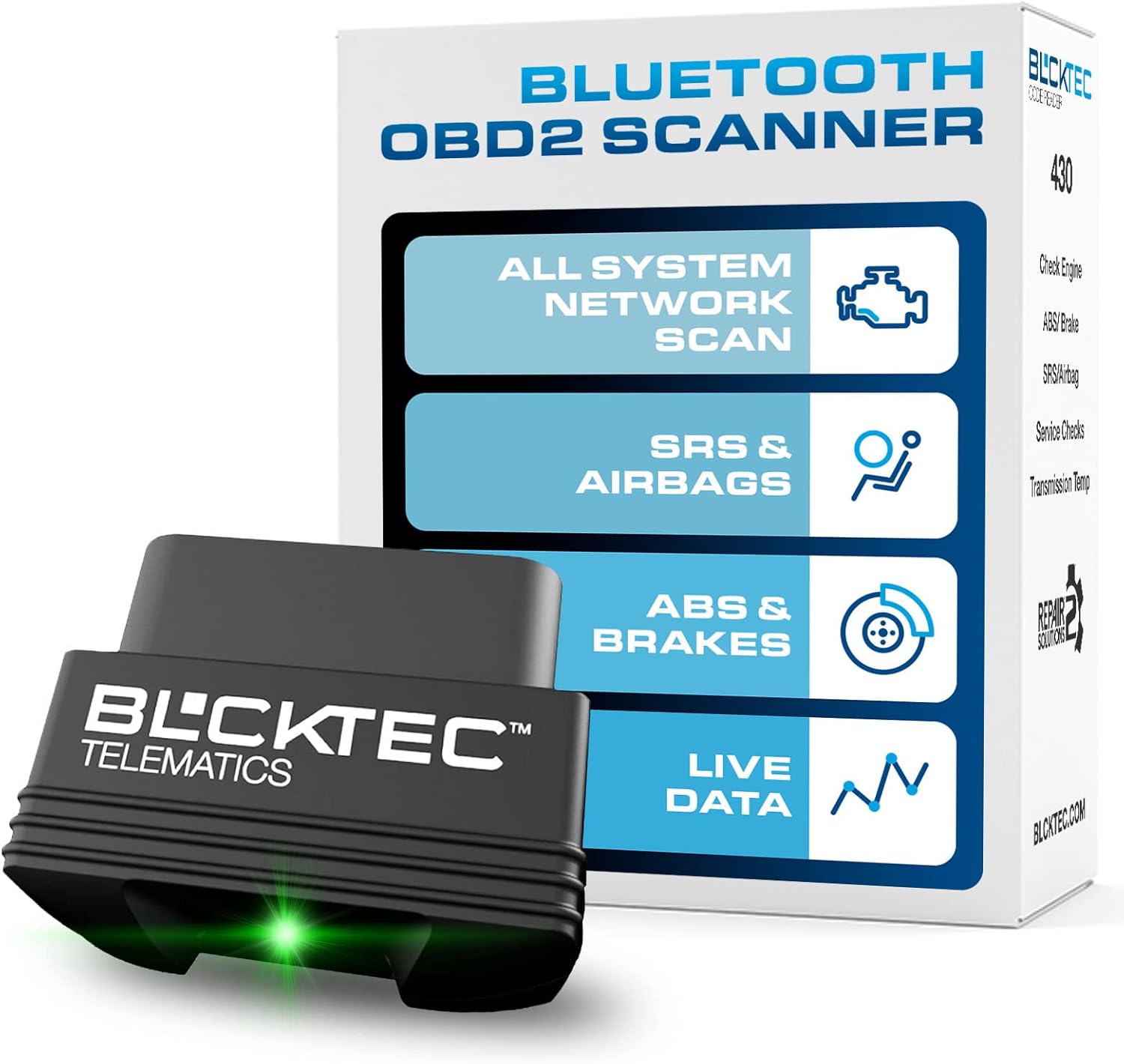
At a Glance
- Connects wirelessly to compatible iOS and Android devices through the RepairSolutions2 app.
- Supports engine-code reading and clearing, with additional system coverage depending on the vehicle.
- Provides access to supported ABS, SRS, and other module diagnostics.
- Runs on vehicle power and does not require separate batteries.
- Includes app-based diagnostic reports and repair information without a standard recurring subscription.
- Requires a compatible vehicle sold and registered in the United States or Canada.
Premium Specifications Table
| Specification | Verified Details |
|---|---|
| Brand and model | BLCKTEC 430 |
| Product type | Bluetooth OBD-II diagnostic adapter |
| Connectivity | Bluetooth Low Energy |
| Mobile operating systems | iOS and Android |
| Connector | 16-pin OBD-II |
| Power source | Vehicle diagnostic port |
| Dimensions | Approximately 1.94 × 1.44 × 1.02 inches |
| Diagnostic application | RepairSolutions2 |
| Vehicle coverage | Compatible OBD-II vehicles sold and registered in the United States and Canada, generally model year 1996 onward |
| Subscription | No mandatory recurring fee for standard app functionality |
Design & Build Quality
The BLCKTEC 430 uses a small dongle-style design that plugs directly into the vehicle’s diagnostic connector. Its compact footprint makes it easier to store in a glove compartment or tool bag than a larger handheld scanner.
Unlike a conventional scan tool with a built-in screen and physical controls, this model depends on your smartphone to display diagnostic results. That arrangement reduces the hardware footprint but makes a compatible phone an essential part of the experience.
The adapter receives power from the vehicle rather than requiring separate batteries. The manufacturer lists firmware updates through the RepairSolutions2 app, giving owners a way to maintain supported device software.
Setup, Installation & Ease of Use
- Confirm that your vehicle is supported using the manufacturer’s compatibility checker before purchasing.
- Check that the RepairSolutions2 app is available for your phone and region.
- Locate the vehicle’s 16-pin OBD-II diagnostic port, typically beneath the dashboard near the driver.
- Park safely and switch the ignition to the position required by the app’s instructions.
- Insert the BLCKTEC 430 firmly into the diagnostic connector without forcing it.
- Open RepairSolutions2 and follow its pairing instructions to connect the scanner through Bluetooth.
- Select the appropriate scan option in the app and allow the vehicle modules to respond.
- Review the diagnostic report and record any trouble codes before attempting repairs or clearing them.
- Remove the adapter when appropriate and store it where its connector will not be damaged.
Core Performance & Feature Breakdown
The BLCKTEC 430’s main advantage is access to multiple supported vehicle systems through a smartphone interface. Its actual diagnostic coverage depends on the vehicle’s make, model, year, and available electronic modules.
Engine Diagnostics and Check-Engine Codes
The scanner reads diagnostic trouble codes associated with the check-engine system and can clear supported codes through the app. Code descriptions and repair information help drivers understand what a warning may indicate before discussing repairs with a mechanic.
ABS and SRS Diagnostics
The BLCKTEC 430 supports reading and clearing ABS and SRS codes on compatible vehicles, extending its usefulness beyond basic engine diagnostics. These functions are not universal, so confirm coverage for your exact vehicle before relying on the scanner for brake or airbag troubleshooting.
Whole-System Scanning and Live Data
The RepairSolutions2 app provides a whole-system scan option for retrieving trouble codes from supported vehicle modules, while available live data can help users observe operating information. Neither feature guarantees access to every module or parameter on every vehicle.
Repair Guidance Without a Standard Subscription
The companion app offers diagnostic reports, code explanations, and repair-related information without a mandatory recurring subscription for its standard functions. Certain optional services, such as a vehicle-history report, may involve a separate charge.
Expert Insight
A diagnostic trouble code identifies a detected condition, not necessarily the failed component. Check the code definition, freeze-frame information when available, wiring, and related symptoms before replacing parts; clearing a code does not repair the underlying fault.
Product Image 2
Key Features Explained
Wireless Smartphone Connectivity
Bluetooth Low Energy connects the adapter to a compatible phone without a cable running to a handheld display. This setup is convenient for viewing reports, although it depends on correct app pairing and compatible phone settings.
Vehicle Health Information
The app can present supported vehicle-health information and diagnostic data gathered during scans. Available measurements depend on the vehicle and the data its control modules expose.
Firmware Updates
The manufacturer specifies firmware updates through RepairSolutions2, which can help maintain compatibility and functionality. Keep the app updated and follow its instructions rather than interrupting an update process.
Multi-Vehicle Use
The manufacturer states that the adapter can be used with multiple supported vehicles, making it practical for households with more than one compatible car. You should still verify the feature coverage separately for each vehicle.
Real-World Usability & Maintenance
The BLCKTEC 430 is most useful when you want to investigate a warning before scheduling a repair or understand a mechanic’s diagnosis more clearly. It can also help you monitor supported information during routine vehicle ownership, but it does not replace professional testing when a fault requires specialized equipment.
Keep the connector clean and free from moisture, and avoid pulling the adapter out by force. When the device is not in use, store it securely so its pins and housing are protected from damage.
Because the system relies on a mobile application, phone compatibility, Bluetooth permissions, and internet access for app-related functions can affect the experience. Do not assume that every diagnostic function will remain available offline.
Premium Pros & Cons
Pros
- Compact dongle design is easy to store and carry.
- Wireless smartphone connectivity avoids a separate display and cable.
- Supported ABS and SRS diagnostics offer more than basic engine-code reading.
- Standard app functionality does not require a recurring subscription.
Cons
- Compatibility is restricted to supported vehicles sold and registered in the United States and Canada.
- Diagnostic coverage varies by vehicle, so advertised features may not all work on your car.
- A compatible smartphone and the companion app are required for operation.
Common Issues & Fixes
Scanner Will Not Connect to the Phone
The app may fail to connect if Bluetooth permissions, pairing steps, or ignition settings are incorrect. Check the app’s pairing instructions, confirm Bluetooth is enabled, and restart the connection process.
No Codes Appear During a Scan
A scan may return no codes when the relevant module has no stored faults or the selected scan does not cover that system. Verify the scan type, ignition position, and vehicle-specific coverage before concluding that a suspected fault is absent.
ABS or Airbag Functions Are Unavailable
Some vehicles do not support every advanced diagnostic function through this adapter. Check the manufacturer’s compatibility information for your exact make, model, and year before relying on those functions.
What to Know Before You Buy
The most important check is regional compatibility: BLCKTEC states that its products support compatible vehicles sold and registered in the United States and Canada, while RepairSolutions2 is available only in those markets. A vehicle’s age alone does not establish compatibility, especially for an imported car or a model with manufacturer-specific systems.
Confirm the precise diagnostic functions you need, particularly ABS and SRS coverage, using the manufacturer’s compatibility checker. If you need bidirectional controls, extensive service resets, or advanced module programming, verify those capabilities separately because they should not be assumed from the presence of whole-system scanning.
Also remember that this is a diagnostic adapter rather than a repair tool. It can help you gather information, but mechanical diagnosis, component replacement, and safety-system repairs may still require a qualified technician.
Who Should Buy It / Who Should Skip It
✅ Who Should Buy It
- Drivers in the supported North American market who want smartphone-based diagnostics.
- DIY owners who regularly investigate check-engine warnings.
- Users who need supported ABS or SRS code access alongside engine diagnostics.
- Households that want one compact adapter for multiple compatible vehicles.
✗ Who Should Skip It
- Drivers whose vehicles are outside the manufacturer’s supported regions.
- Buyers who prefer a standalone scanner with its own screen.
- Technicians who require confirmed bidirectional tests or specialized service procedures.
- Owners who have not verified the advanced features required for their particular vehicle.
Alternatives to Consider
Autel MaxiAP AP200
Best For: DIY owners who want a Bluetooth diagnostic adapter with app-based all-system scanning.
Main Advantage: Autel documents support for all standard OBD-II functions and selected additional service functions, depending on coverage.
Trade-off: The initial purchase includes software for one vehicle, while expanded coverage may require additional in-app purchases.
Key Spec: Bluetooth connection to compatible Android and iOS devices.
Innova 5610 CarScan Pro
Best For: Advanced DIY users and technicians who need deeper diagnostic and service capabilities.
Main Advantage: It supports all-system diagnostics and bidirectional tests for supported vehicles.
Trade-off: Its handheld professional-style design is more involved than a compact Bluetooth dongle.
Key Spec: Bidirectional control and supported OEM live data across multiple vehicle systems.
Is It Worth It?
The BLCKTEC 430 makes sense for buyers who value a compact adapter, phone-based reporting, and access to more than basic engine codes. Its no-recurring-subscription approach for standard app functionality also makes ownership easier to plan.
Its value falls sharply if your vehicle or location is unsupported, or if you need advanced service procedures that the adapter cannot perform on your car. Verify compatibility before buying rather than relying on general claims about OBD-II vehicle coverage.
Final Verdict
The BLCKTEC 430 is a capable option for supported North American drivers who want convenient smartphone diagnostics, selected ABS and SRS coverage, and repair information without a mandatory monthly fee. Confirm your vehicle’s regional eligibility and exact feature coverage first; if either is uncertain, choose a scanner with verified support for your requirements.
Frequently Asked Questions
1. Is the BLCKTEC 430 compatible with all OBD-II vehicles?
No, compatibility and feature availability depend on the vehicle. The manufacturer supports compatible vehicles sold and registered in the United States and Canada, generally from model year 1996 onward. Check the exact vehicle and required functions before buying.
2. Does the BLCKTEC 430 work with iPhones and Android phones?
Yes, it supports compatible iOS and Android devices through RepairSolutions2. The app is restricted to the United States and Canada, so regional availability must be checked before purchase.
3. Does the BLCKTEC 430 require a monthly subscription?
No, standard app functionality does not require a recurring subscription. Some optional services, including certain vehicle-history reports, may cost extra.
4. Can the BLCKTEC 430 read ABS and airbag codes?
Yes, on vehicles where those functions are supported. ABS and SRS coverage varies by make, model, year, and available modules, so verify compatibility before relying on it for safety-system diagnostics.
5. Does the BLCKTEC 430 need batteries or regular maintenance?
No separate batteries are required because the adapter draws power from the vehicle. Keep the connector clean, protect it during storage, and follow the manufacturer’s instructions for app and firmware updates.
6. Does the BLCKTEC 430 include a warranty?
The manufacturer’s product information lists a one-year warranty. Confirm the applicable warranty terms, exclusions, and regional eligibility with the seller before purchasing.
Affiliate disclosure: replacekeyfob.com earns a small commission when you purchase through links on this page — at no extra cost to you. Our editorial process is independent: affiliate relationships never influence which products we recommend or how we rank them.
