
Key Fob Battery Contacts Not Touching: How to Diagnose and Fix the Connection

When a key fob acts dead even after you put in a fresh battery, the battery itself is not always the problem. In a lot of cases, the issue is mechanical: the key fob battery contacts not touching the coin cell closely enough to pass power reliably.
That can happen when a spring is bent, a contact tab is dirty, the battery sits loose in the holder, or corrosion adds just enough resistance to break the circuit. The good news is that this is often something you can inspect and correct at home without replacing the whole fob.
How to Tell the Battery Contacts Are the Problem
Before opening the fob, do a quick diagnostic check to separate a bad battery from a contact problem:
- Check the battery voltage with a multimeter if you have one. If the coin cell is already low, the issue may be the battery itself rather than the contacts.
- Try a known-good spare battery of the correct type. If the fob works with the spare, the original battery was the problem.
- Apply light pressure to the fob case near the battery area. If the fob only works when squeezed, the contacts are probably not making solid contact.
- Confirm the battery size and orientation before assuming the holder is damaged. A battery that is slightly wrong for the holder, or installed backward, can act like a contact failure.
A contact issue usually looks different from a plain dead battery. A dead coin cell tends to fail steadily: the range gets shorter, buttons become unreliable, and then the fob stops working. Poor contact is often more erratic.
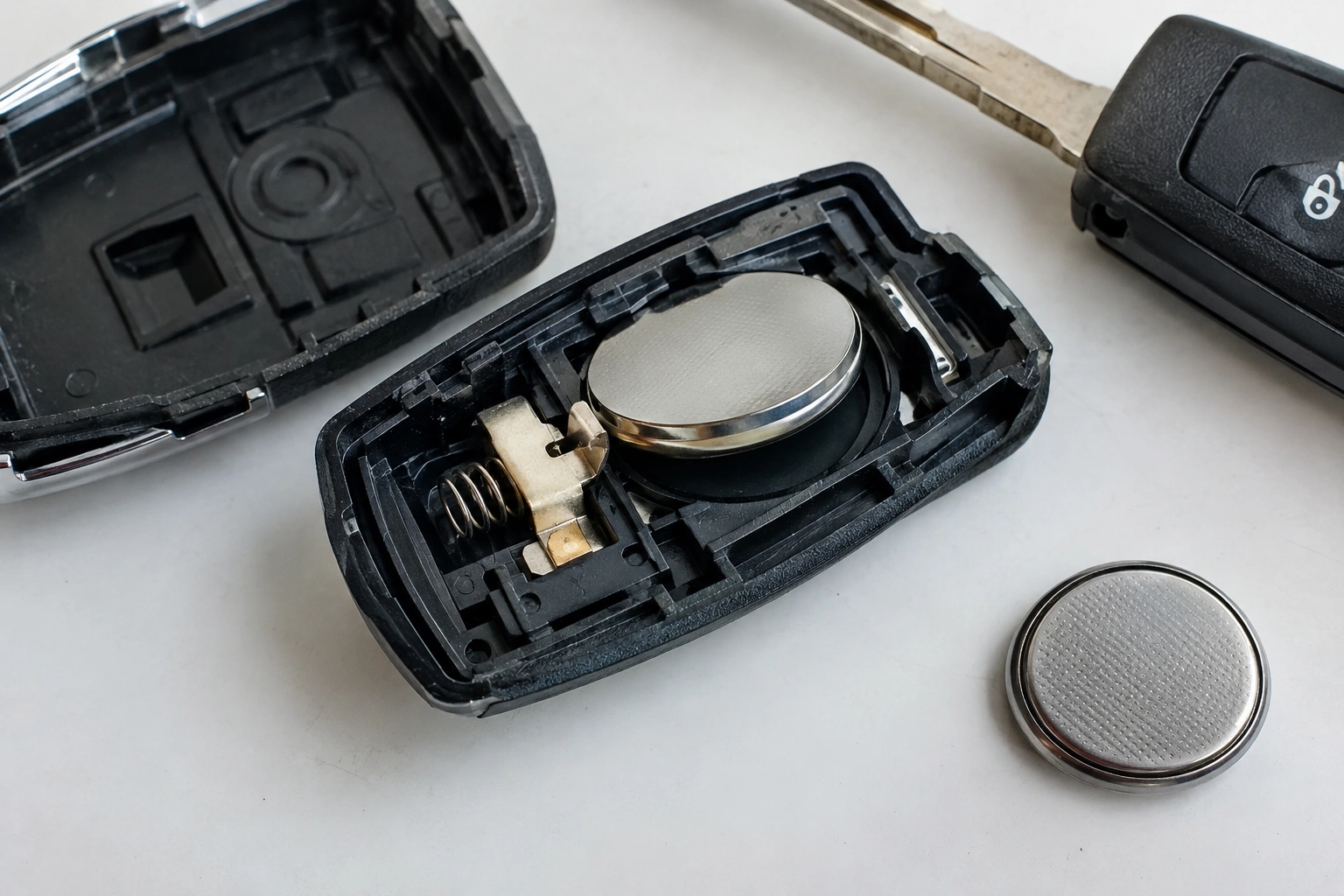
Watch for these clues:
- The fob works only when you press the case together.
- It works if you twist it slightly or squeeze near the battery.
- It fails after being dropped, then starts working again later.
- A new battery does not change the symptoms.
- The battery rattles or shifts when you shake the fob gently.
That last one matters. If the battery can move around inside the shell, the contacts may not be holding enough pressure against it. A fresh battery can still fail if it is not sitting firmly against the terminals.
Here’s a simple comparison to help narrow it down:
| Symptom | More likely cause | What to do first |
|---|---|---|
| No response at all, even with a fresh battery | Dead battery, wrong battery type, or contact issue | Verify battery type and check contact pressure |
| Works only when the case is squeezed | Loose or bent contacts | Inspect and realign contacts |
| Works after cleaning | Dirt or oxidation on terminals | Clean contacts and retest |
| Battery seems loose or rattles | Weak spring or worn holder | Check fit and battery retention |
| Fob still fails after cleaning and a new battery | Damaged holder, cracked solder joint, or board issue | Inspect for physical damage |
If you want a broader troubleshooting path after this step, our guide on what to check when a key fob battery is installed correctly but still not working walks through the next checks in order.
Most Likely Causes of Contact Failure
The contact problem usually comes from one of a few common issues, and the order matters.
1. Loose battery fit
Some fobs hold the coin cell tightly. Others rely on one spring and one flat tab to keep pressure on the battery. If the shell is worn or the battery is slightly smaller than ideal for that holder, the cell can sit too loose to make stable contact. At a glance, the battery may look centered but still wobble when you touch it.
2. Bent or flattened contact tabs
A contact can lose its shape over time. If the tab is flattened too far, it may touch the battery only at the edge. If a spring is bent outward, it may not press firmly enough. Bent contacts usually look out of shape but still attached, while flattened tabs often sit lower than the matching battery surface.
3. Corrosion or residue
A small amount of oxidation can interrupt the circuit. White, green, or crusty buildup on the battery terminals is a warning sign. Even if the contact still looks intact, corrosion can increase resistance enough to cause intermittent failure. Corrosion often looks rough, powdery, or discolored rather than simply bent.
4. Misalignment after battery replacement
Sometimes the battery is correct, but it is not seated fully in the holder. A coin cell that sits slightly off-center can miss one of the contact points. If the battery edge is not fully tucked under the retaining tab, the fit is often the issue.
5. Cracked solder joints or damaged holder
If the contact itself is attached to the printed circuit board and the joint has cracked, the terminal may look fine but move slightly under pressure. That is no longer a simple cleaning job. A cracked holder or solder joint may flex when you press it, even if the metal itself looks normal.
Tools and Safety Before You Open the Fob
You do not need a full electronics bench for this, but a few simple tools help you avoid damage:
- A small flat plastic pry tool or a thin plastic opening tool
- A precision screwdriver, if your fob uses screws
- Tweezers
- Isopropyl alcohol and a cotton swab or alcohol pad
- A fresh battery of the correct type
- A clean, well-lit work surface
Interstate Batteries notes that key fobs commonly use coin-cell batteries, but the exact battery type can vary by year, make, and model. Some fobs even use more than one battery. Check your owner’s manual or the old battery before buying a replacement. Their guidance also recommends using tweezers or another precision tool when handling the battery. You can read that note in their key fob battery guide.
A few safety habits save a lot of frustration:
- Work over a table, not a carpet.
- Open the shell gently so you do not snap the plastic clips.
- Do not use a metal screwdriver to pry against exposed circuit traces.
- Keep the battery out while you inspect and clean the contacts.
- Let alcohol dry fully before reinstalling the battery.
Open the Key Fob and Inspect the Battery Area
Most fobs split at a seam, but the opening method varies by model. If your fob has screws, remove them first. If it is clipped together, use a plastic pry tool and work around the seam slowly.
Once open, check four things:
Battery orientation
Make sure the battery is facing the right way. The positive and negative sides matter, and the holder may only make proper contact when the cell is installed in the correct direction. If the battery is backwards, the fob may appear dead even though everything else is fine.
Contact pressure
Look for a spring or tab that should press against the battery. If the battery looks like it sits too high or too low, the contact may not be pressing where it should.
Corrosion or debris
Dust, lint, adhesive residue, or battery leakage can all interfere with contact. Even a thin film on the terminal can cause intermittent operation.
Physical damage
Look closely for a cracked battery holder, a lifted contact, or a terminal that seems loose on the circuit board. If the metal part moves independently from the board, stop and reassess before forcing anything.
Clean the Contacts and Battery Terminals
If the contacts are dirty but not broken, cleaning is the first repair to try.
Use isopropyl alcohol on a cotton swab or alcohol pad and gently clean:
- The metal battery terminals
- The face of the coin cell
- Any visible residue in the holder
Work lightly and wipe rather than scrape whenever possible. If you need to remove stubborn buildup, use only enough pressure to clear the residue. Do not gouge the metal, bend the contact further, or scrape into the circuit board. The goal is to restore conductivity, not remove material.
Let everything dry before reinstalling the battery.
Gently Reposition or Bend the Contacts
If the battery is clean but still loose, the contact may need a small adjustment.
This is where caution matters. You want just enough pressure to hold the battery securely. Too much bending can weaken the metal or snap it off.
A safe approach:
- Remove the battery.
- Compare the spring or tab to the battery’s position in the holder.
- If a contact is flattened, nudge it slightly back toward the battery.
- If a spring is spread too wide, close it only a little.
- Reinstall the battery and check that it sits firmly without forcing the shell closed.
Think in small movements, not big ones. A tiny change is often enough to restore contact pressure. If you find yourself pushing hard, stop. The holder may be cracked or the shell may be preventing the battery from seating correctly.
Test with a Fresh Battery and Check for Intermittent Power
After cleaning and adjusting, test the fob with a fresh battery of the correct type.
If the fob starts working again, press the buttons several times and check whether the response is stable. Then squeeze the case lightly near the battery area. A fob that only works under pressure still has a contact problem, even if it seems “fixed” for the moment.
A multimeter can help if you want to go one step further. You can confirm the battery’s voltage and, in some cases, check whether the holder is actually passing power. That is useful when the battery tests fine but the fob still fails.
If the fob works for a minute and then cuts out, look again at the battery fit. Intermittent power often points to a contact that barely touches, not one that is fully making contact.
When the Problem Is Bigger Than the Contacts
Sometimes the issue goes beyond cleaning or bending.
Look for these signs:
- A contact tab is cracked at its base
- A spring is broken or missing
- The battery holder is loose on the board
- There is visible damage to the printed circuit board
- Corrosion has spread under the holder or onto nearby components
At that point, the repair becomes less about simple troubleshooting and more about part replacement. A cracked solder joint or damaged holder can cause the same symptom as a weak battery, but no amount of cleaning will make it reliable.
If the shell itself is worn out and no longer holds the battery firmly, a replacement shell or battery holder may solve the mechanical problem without replacing the whole fob. That is often a better middle ground than buying a complete fob right away.
Repair, Replace Parts, or Replace the Whole Fob
Here is a practical way to decide:
- Clean and retest if the contacts look dirty, the battery is loose, or the fob works intermittently.
- Adjust the contacts if the metal is intact but not pressing firmly enough.
- Replace the shell or battery holder if the plastic is worn, the holder is cracked, or the battery no longer sits securely.
- Replace the whole fob if the board is damaged, the contact pads are lifted, or multiple parts are failing.
Rule of thumb: if you have already cleaned the contacts and made a small adjustment, but the battery still will not stay seated or the fob only works when you press hard on the case, stop bending the contacts. At that point, the holder or fob is usually the better replacement.
That decision is usually about damage level, not just age. A fob can be old and still repairable if the issue is only the contact pressure. A newer fob may need replacement if the holder has broken away from the board.
If you have already changed the battery and the fob still seems dead, our article on what to check when a key fob is not detected after replacing the battery covers the next layer of troubleshooting.
When to Consult a Locksmith
Stop the DIY repair and get help if you see:
- Loose parts on the circuit board
- Severe corrosion
- A broken battery holder
- A contact pad that has lifted off the board
- A fob that only works after repeated pressing and still fails unpredictably
A locksmith or automotive key specialist can often replace a holder, shell, or damaged contact assembly more cleanly than a basic home repair. That is especially true when the fob has delicate internal parts or when the battery connection is part of a larger board issue.
FAQ
Can a new battery still fail if the contacts are bad?
Yes. A fresh battery will not help if the contacts are bent, dirty, or not pressing firmly enough against the cell.
What does a bad contact usually look like?
Common signs include a loose battery, visible corrosion, flattened springs, or a fob that only works when squeezed.
Should I clean the contacts before buying another battery?
If the battery is already fresh and the fob still acts up, clean the contacts first. If the battery is old or the wrong type, replace it with the correct one before assuming the holder is bad.
How much should I bend a contact?
Only enough to restore firm battery pressure. If the metal needs a large adjustment, the holder may be damaged and should be inspected more closely.
Can I use tape to hold the battery in place?
Only if the fob design allows it and the tape will not interfere with the shell or buttons. Temporary fixes may help confirm the diagnosis, but they are not a substitute for a proper repair.
When is replacement better than repair?
If the holder is cracked, the solder joint is broken, or the circuit board is damaged, replacement is often the more reliable path.
Will this fix every key fob problem?
No. If the issue is related to programming, the vehicle side, or a damaged circuit board, contact repair alone will not solve it.
What if the battery looks fine but the fob still fails?
Check fit, pressure, and corrosion next. A battery can test good and still not power the fob if the terminals are not making solid contact.
