
Why a Key Fob Battery Low Warning Can Stay On After Replacement

If your car still shows a key fob battery low warning after replacement, the problem is usually not mysterious. In most cases, the new battery is the wrong type, installed backward, not making solid contact, or simply weak out of the package. Less often, the fob itself is damaged or the vehicle needs a resync before the warning clears.
The good news: you can usually narrow it down with a few simple checks before you spend money on a dealer visit or a whole new fob.
The Fastest Way to Think About the Problem
A key fob needs three things to work correctly:
- The right battery.
- Clean, solid contact with that battery.
- A fob and vehicle that can still communicate normally.
If one of those breaks down, the car may keep warning you even after you installed a fresh cell.
Here’s the practical way to separate the likely causes.
| Symptom | Affects one fob or multiple fobs? | Most likely cause | What to do first |
|---|---|---|---|
| Warning stays on immediately after replacement | One fob | Wrong battery type, reversed battery, or poor seating | Recheck battery model, thickness, and polarity |
| Fob works only when pressed hard | One fob | Weak spring contacts or loose battery fit | Inspect contacts and battery tension |
| New battery did not improve range | One fob | Defective battery or contact corrosion | Try a better brand and clean contacts |
| Warning clears sometimes, then returns | One fob | Intermittent fob hardware issue | Check for cracked housing or worn contacts |
| Car says low battery but fob still locks/unlocks | One or multiple fobs | Stored warning, weak signal, or vehicle-side communication issue | Try resync or drive-cycle procedure |
| Nothing works after battery swap | One fob | Battery installed incorrectly or fob damage | Reopen the fob and inspect the board |
| Multiple fobs show the same warning | Multiple fobs | Vehicle-side receiver or communication issue | Check the car’s detection, not just the batteries |
For background on how key fobs warn you before they fail completely, NHTSA’s vehicle safety information is a useful starting point, especially if you want to understand why backup methods matter when a fob gets weak.
Check the Battery Type, Size, and Polarity First
This is the first place I’d look in the shop, because it solves a lot of these cases.
Many fobs use batteries that look almost identical but are not interchangeable. A CR2032 and a CR2025 may seem close, but the thickness is different. If the battery is too thin, it can sit loosely and lose contact. If it’s the wrong type entirely, the fob may act weak or keep triggering a low-battery message.
What to verify
- Match the battery model to the one the fob originally used.
- Confirm the voltage matches the fob’s specification.
- Check that the positive and negative sides are oriented correctly.
- Make sure the battery is fully seated under the retaining tabs.
- Confirm the battery thickness matches the fob, not just the general coin-cell type.
A battery can be brand new and still be wrong for the fob. That sounds simple, but it’s one of the most common mistakes I’ve seen. If the cell is even slightly off-center, the contacts may touch just enough to make the fob work intermittently, which can keep the warning alive.
If you want a quick reminder of the installation basics, the key point from this reset guide is to verify the battery is the correct type and seated properly before moving on to resync steps.
Inspect the Battery Contacts and Compartment for Poor Connection
A fresh battery won’t help much if the fob can’t actually get power from it.
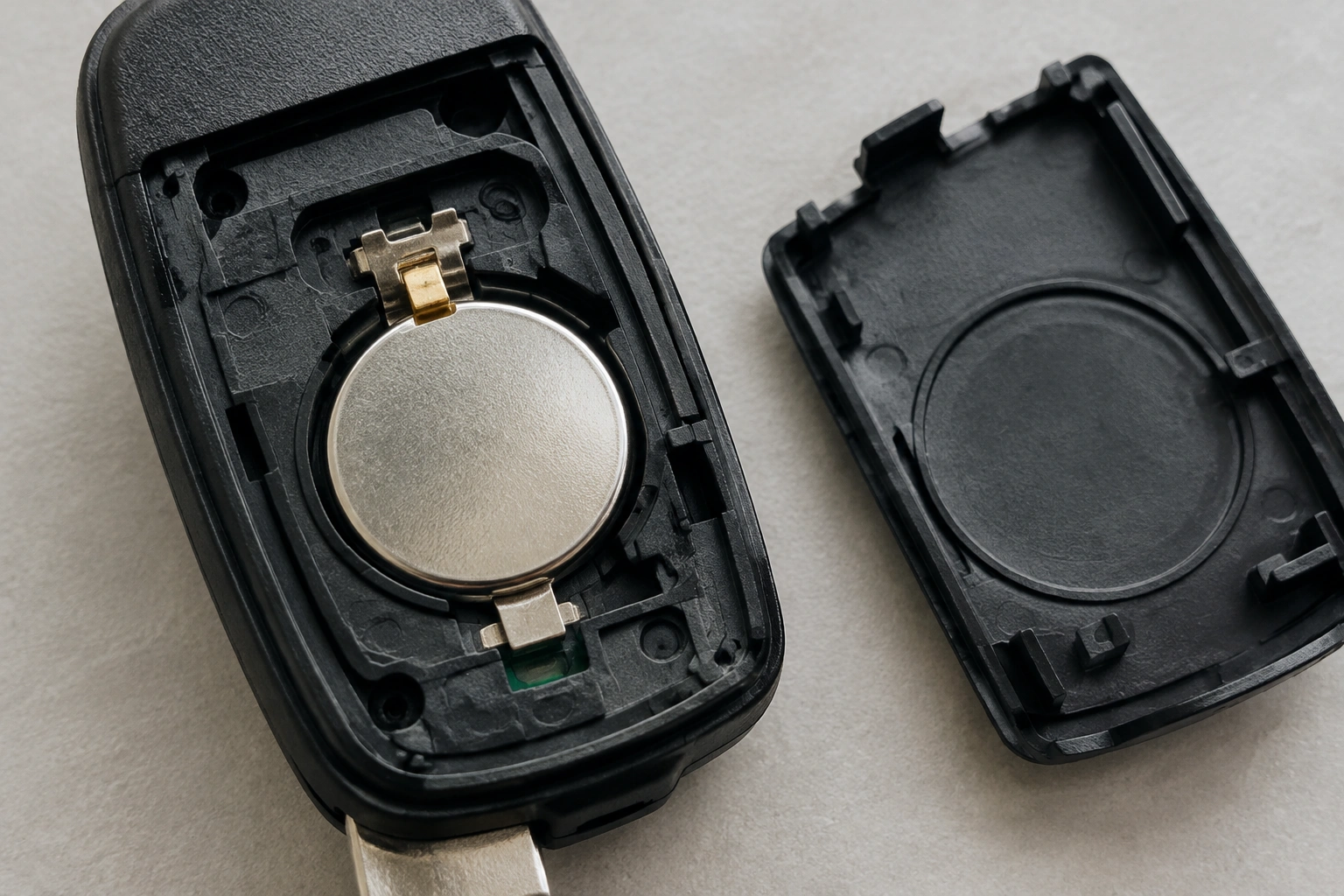
Open the fob and look closely at the metal contacts. You’re checking for:
– Dirt or residue
– Green or white corrosion
– Bent tabs
– Weak spring tension
– A battery that rattles in the compartment
If the contacts are dirty, a gentle wipe can help. If they’re corroded, clean them carefully and avoid forcing anything. A bent tab or loose spring can prevent the battery from pressing firmly enough against the terminals, which may make the fob seem dead even though the cell is good.
A useful clue: if the fob works only when you squeeze the case together, the issue is probably contact pressure, not the battery itself.
This is where many people replace the battery twice and still have the same problem. A new cell can still sit at the wrong angle, have poor contact alignment, or miss the terminals just enough to cause intermittent operation.
Try a Reset, Resync, or Drive-Cycle Clear Procedure
Some vehicles do not clear a low-battery warning instantly. Even after the fob is healthy again, the car may keep the message stored until it sees a successful resync, a normal drive cycle, or repeated valid signal from the fob.
That does not mean every car needs programming after a battery change. In many cases, the fob works normally again as soon as the battery issue is fixed. But some vehicles do benefit from a resync or relearn step, and some will keep the warning visible even after the fob is functioning again.
What to try
- Lock and unlock the car with the fob several times.
- Start the vehicle and let it run briefly.
- Drive the car through a normal cycle if the warning remains.
- If your owner’s manual lists a resync procedure, follow that exact sequence.
This is one place where vehicle-specific instructions matter. A universal reset method does not exist for every make and model, so treat generic advice carefully. If your manual gives a procedure, use that over internet shortcuts.
Some vehicles also have backup detection zones where you can hold a weak or dead fob near the start button or inside a marked compartment to start the car. That’s a workaround, not a fix, but it can help confirm the fob is still transmitting at least some signal. The idea is similar to the workaround described in this overview of low fob battery warnings.
Rule Out a Defective Replacement Battery
New does not always mean good.
A replacement battery can arrive weak, especially if it sat on a shelf for a long time or came from a low-quality pack. If the fob still gives a low-battery warning after you’ve confirmed the battery size and orientation, swapping in a different brand is worth considering.
Signs the battery itself may be the problem
- The fob worked briefly, then got weak again.
- The battery came from a bargain multipack with no clear date code.
- You had to press the case hard to get the fob to respond.
- The warning never changed at all after replacement.
If you have a multimeter, you can check the battery’s voltage. Even without one, a simple practical test is to install a fresh cell from a reputable source and see whether the warning behavior changes. If it does, the first battery may have been the issue.
The trade-off here is simple: a cheap battery may save a little up front, but a better-quality cell is often a better diagnostic step because it removes one major variable.
Signs the Key Fob Itself Is Failing
If the battery is correct, the contacts are clean, and the warning still will not go away, the fob hardware may be failing.
Common signs include:
– The case is cracked or warped
– Buttons feel mushy or inconsistent
– The fob only works at very close range
– It works sometimes, then stops for no clear reason
– The battery compartment looks fine, but the board is loose
Inside the fob, the circuit board and contact points can wear out. A cracked shell can let the battery shift just enough to break contact. In other cases, the internal pads on the board are damaged, and replacing the battery won’t change anything.
At that point, repeated battery swaps are just treating the symptom. If the electronics are unstable, the fob may need repair or replacement.
When the Problem Is with the Vehicle, Not the Fob
Sometimes the fob is fine and the car is the part that needs attention.
This is more likely when:
– Multiple fobs show the same warning
– The car intermittently fails to recognize the fob
– The message appears even after a correct battery replacement
– The fob works, but the vehicle keeps acting as if the battery is low
That pattern usually points more toward a vehicle-side receiver, security-system, or communication issue than a battery problem inside one fob. In some cases, a dealer or locksmith may need to check whether the car needs a relearn or whether the receiver is not reading the fob signal correctly.
If the issue is broader than one fob, the battery is probably not the root cause.
A Practical Troubleshooting Order
If you want the shortest path through this, use this order:
- Confirm the battery type, thickness, and polarity.
- Reseat the battery so it sits firmly against the contacts.
- Clean the battery contacts if they look dirty or corroded.
- Try a different battery brand.
- Follow any vehicle-specific resync or drive-cycle steps.
- Test whether the problem affects a spare fob too.
- Inspect the fob case and circuit board for damage.
- Escalate to a locksmith or dealer if the warning persists.
That sequence saves time because it starts with the most common and least expensive fixes first. It also helps you avoid replacing a fob that only needed a better battery, correct orientation, or cleaner contacts.
When to Consult a Locksmith
A locksmith is usually the right next step when the fob still misbehaves after you’ve checked the battery, contacts, and basic resync steps.
Call one if:
– The fob has physical damage
– The battery compartment is corroded
– The car needs relearn steps after power loss
– The fob works inconsistently even with a known-good battery
– You want a replacement fob without going straight to the dealer
A dealer may be the better route if the vehicle uses model-specific procedures that a locksmith cannot access, but many automotive locksmiths can handle common fob setup and replacement without the dealership wait.
Should You Repair or Replace the Entire Key Fob?
Here’s the practical decision rule I’d use:
- Repair the fob if the issue is a loose contact, dirty compartment, weak spring, or minor case damage.
- Replace the fob if the circuit board is cracked, the buttons are failing, or the warning returns after a known-good battery and contact cleanup.
- Get professional help if the car and fob both seem to be involved, or if the fob needs setup you can’t complete at home.
If the repair would only buy a little time before the same problem returns, replacement is usually the better long-term move.
FAQs
How long should it take for the warning to go away?
In some vehicles, the warning clears quickly after the fob is working again. In others, it may take a drive cycle or a resync procedure before the message disappears.
Do I need to reprogram the key fob after changing the battery?
Usually no, but some vehicles may need a resync or relearn step if the warning does not clear or if the fob lost communication.
Can a brand-new battery be bad?
Yes. A new battery can still be weak, old stock, or defective, which is why trying a different battery brand is a smart test.
Why does the fob work but the warning stays on?
That often means the battery signal is borderline, the contacts are poor, or the vehicle has stored the warning and has not cleared it yet.
What if both of my key fobs show the same warning?
That points more toward the vehicle or a shared communication issue than a battery problem in one fob.
If you’re still stuck after the battery, contacts, and resync checks, the next step is usually professional diagnosis rather than another battery swap. For many owners, that saves time and prevents damage to a fob that was already on its last leg.
