
Key Fob Not Detected After Replacing the Battery: What to Check Next

A key fob that still says “not detected” after a battery swap is frustrating, but it usually points to a short list of fixable problems. In my shop days, the battery itself was often innocent. More often, the issue was how the battery was installed, how the fob was snapped back together, or whether the car’s own battery was weak enough to confuse the system.
The good news: you can narrow this down pretty quickly without guessing.
What “not detected” actually means
This warning does not always mean the remote buttons are dead. On many vehicles, there are two separate jobs:
- Unlock/lock functions use the remote signal.
- Push-button start detection uses the smart key, transponder, or proximity system.
That means a fob can sometimes unlock the doors but still fail to start the car, or the reverse can happen if the battery is weak or the internal contacts are poor. If your car says “No Key Present,” “Key Not Detected,” or something similar right after a battery change, the problem is often physical rather than a lost programming issue. Some vehicles never need reprogramming after a battery change, while others may require a model-specific sync or backup-start procedure. The vehicle’s body control module typically keeps the key code in memory, so replacing the coin cell should not erase the fob’s identity.
For a deeper look at the “battery changed, still not detected” symptom, see our guide on key fob not detected but battery is new.
Most likely causes, in the order I’d check them
When a fob stops being recognized after a battery replacement, I’d work through these in order:
- Wrong battery type
- Battery installed backward
- Battery not seated firmly
- Bent, dirty, or weak battery contacts
- Case not fully reassembled
- Weak vehicle battery
- Vehicle-specific resync or reprogramming needed
- Internal fob damage
That order matters because the first four are common and easy to inspect. Reprogramming is not usually the first answer. If the problem started immediately after you opened the fob, the odds are better that something inside the shell shifted than that the car “forgot” the key.
Check the battery first: type, polarity, and fit
The fastest win is to reopen the fob and confirm the battery matches the old one exactly. Many fobs use a CR2032 or CR2025, but you should not assume the two are interchangeable just because they look similar. A battery that is the wrong size can sit loosely or fail to press firmly against the contacts.
Here’s the practical check:
- Compare the model number printed on the old battery and the new one.
- Make sure the plus and minus sides match the markings inside the fob.
- Confirm the battery sits flat and centered, not tilted.
- If the battery has a clear protective sticker, remove it before closing the case.
A common mistake is flipping the coin cell the wrong way. Another is leaving the battery half-seated so it touches only one contact. Either one can make the fob look dead even though the battery is brand new.
If you bought a replacement battery from a multi-pack and suspect one cell is weak out of the box, try a known-good battery from the same type before moving on. If the battery is the correct type but the fob still fails after careful installation, that helps separate a bad battery from a fob or contact problem.
Inspect the battery contacts and case alignment
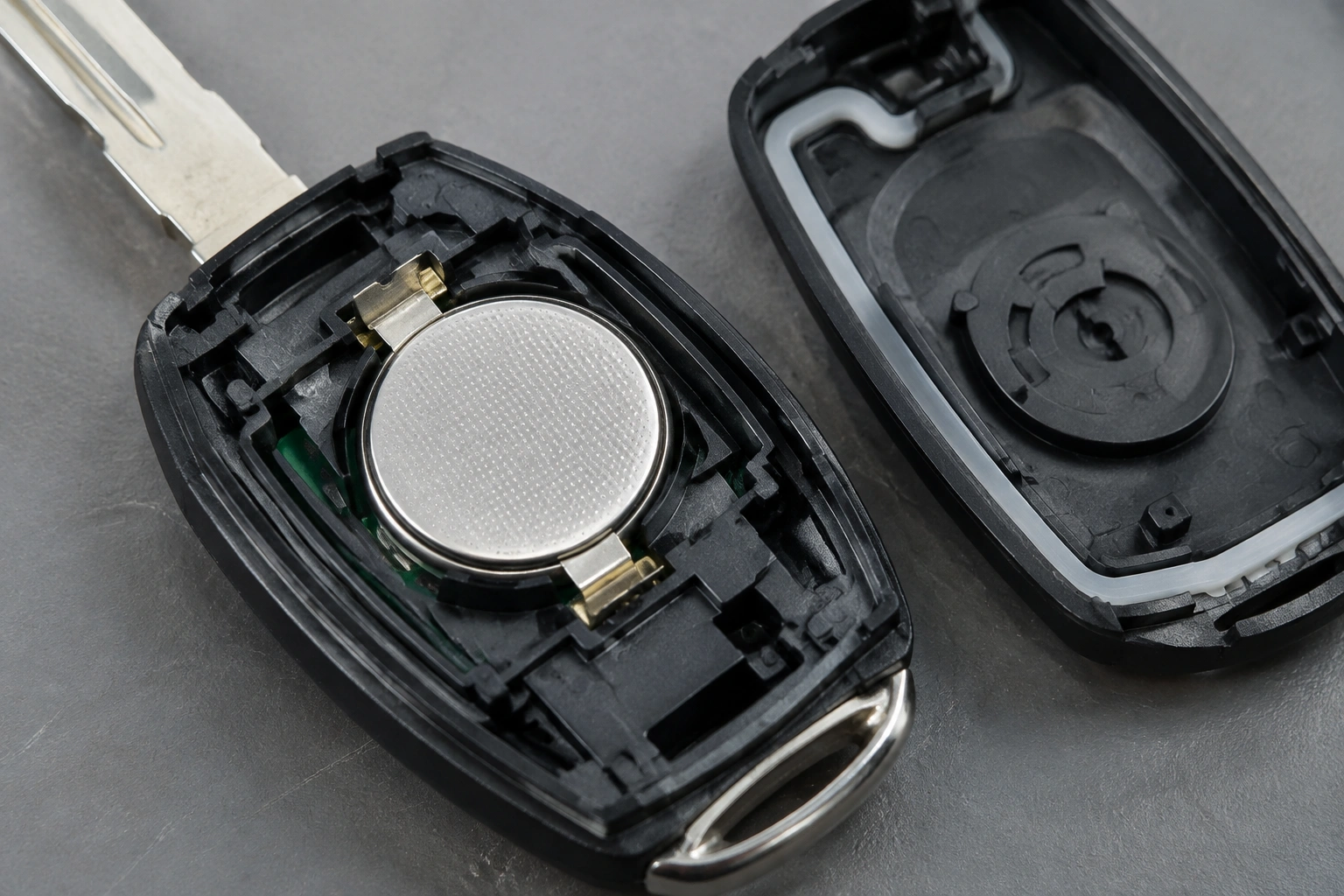
If the battery is correct and installed properly, look closely at the metal contacts inside the fob. These little prongs do the real work of holding pressure against the coin cell. If they’re flattened, bent away, or dirty, the fob may power up only intermittently.
What I look for:
- Bent contact prongs that no longer press on the battery
- White or green corrosion on the contacts
- Loose battery holder tabs
- Plastic shell pieces that keep the battery from sitting squarely
A fob can fail simply because the case wasn’t snapped together evenly. If one side is slightly open, the battery can shift when you press a button or when the fob rides in a pocket. That can interrupt contact just enough for the car to stop recognizing it.
A careful reassembly often fixes this. Press the shell halves together until every clip is fully seated. After reassembly, check that the battery is still being pressed firmly by the terminals and that it does not rock or move. If a contact is only slightly bent and it is safe to do so, gently restore its shape so it makes solid contact again. If the case is cracked or the internal holder is damaged, the fob may need a new shell or internal repair rather than another battery.
Quick comparison: battery problem, contact problem, or car-side issue?
| Symptom | Most likely cause | What to try first |
|---|---|---|
| Fob died right after battery replacement | Battery orientation or seating issue | Reopen the fob and check polarity |
| Fob works only when pressed hard | Weak battery contacts or loose case | Inspect prongs and snap the shell closed |
| Buttons work sometimes, but start says “not detected” | Contact issue or vehicle-side issue | Test the spare fob and check vehicle battery voltage |
| Neither unlocking nor starting works | Dead battery, wrong battery, or internal fob damage | Confirm battery type and fit |
| Spare fob works normally | Original fob problem | Focus on the original fob’s contacts or electronics |
| Both fobs act up | Vehicle battery or receiver issue | Inspect the car battery and related system |
That comparison saves time because it tells you whether the problem follows the fob or stays with the car.
Try a vehicle-specific reset or resync
Some vehicles need no reprogramming after a battery swap. Others may temporarily lose sync or need a specific owner procedure after a battery disconnect or electrical reset. This is where the owner’s manual matters more than generic internet advice.
If your manual lists a reset, follow that exact process. If it does not, don’t assume every “resync trick” on a forum applies to your car. Many vehicles have no user reset at all, and repeated reset attempts can waste time if the real problem is a loose battery, bent contact, or case that is not fully closed.
A few practical rules:
- If the fob started failing only after the car battery was disconnected, a resync may be worth trying.
- If the fob stopped working immediately after opening the shell, the issue is more likely inside the fob than in programming.
- If the spare fob works normally, the vehicle probably still recognizes keys and the original fob is the problem.
For model-specific guidance, consult the manufacturer’s procedure or a trusted repair source before trying repeated reset attempts. If you need broader context on detection problems, our article on car key not detected after battery change walks through the same diagnosis from the vehicle side.
Rule out the car battery and vehicle-side detection system
A weak car battery can interfere with key recognition on some vehicles. That surprises people, because the fob battery gets all the attention. But if the vehicle battery voltage is low, the receiver, proximity sensor, or immobilizer system may not behave normally.
Signs the car battery may be part of the problem:
- Slow cranking or a sluggish start
- Dim interior lights
- Warning lights or electrical oddities
- Multiple systems acting strange, not just the key fob
One useful test is to try the spare key fob. If the spare works and the original does not, the vehicle is probably fine and the original fob needs attention. If both fobs fail in the same way, the issue may be on the car side.
Another clue is the backup start method. Some vehicles have a designated spot where the fob can be held near the start button or steering column if the battery is weak. If that works, it points toward a detection or battery issue rather than a completely dead key.
For general vehicle-security context, NHTSA’s vehicle theft and anti-theft information is a useful reference point for how modern immobilizer systems fit into vehicle security.
Signs the key fob itself is damaged
Sometimes the battery change just exposes an existing problem. If the fob has been dropped, exposed to moisture, or pried open too aggressively, the circuit board or transponder chip may be damaged.
Watch for these signs:
- The fob worked before, but now only one button responds
- The case is cracked or the internal board looks warped
- The fob got wet, even briefly
- The battery contacts look fine, but the fob still won’t transmit
- The key only works intermittently after being handled
A damaged transponder chip or board usually will not be fixed by another battery. If the fob behaves erratically after you’ve confirmed the battery, contacts, and case fit, replacement becomes more realistic than repeated troubleshooting.
When to reprogram, replace, or get professional help
This is the decision point.
Choose DIY repair when:
– The battery was installed backward
– The wrong battery model was used
– The contacts are bent but repairable
– The shell was not fully closed
Choose an automotive locksmith when:
– The fob appears physically fine but still isn’t recognized
– You need help determining whether the fob or vehicle is at fault
– The vehicle may require reprogramming and you want a faster option than the dealer
Choose the dealer when:
– Your vehicle’s security system requires factory tools
– The owner’s manual or service procedure points to dealer-only programming
– You need a replacement fob matched to the vehicle’s immobilizer system
An automotive locksmith can often be the better middle ground because many can diagnose immobilizer and transponder issues, and some can reprogram or replace fobs without the wait of a dealer appointment. Dealer-only programming is model-dependent, not universal, so it is worth checking before assuming the dealer is the only option.
For a second opinion on the detection side, our guide to key fob not detected and the car won’t start can help you separate fob failure from start-system issues.
Quick troubleshooting checklist
Before you spend money on service, run through this list:
- Confirm the battery model matches the old one
- Check battery polarity
- Make sure the battery sits flat and tight
- Inspect and gently realign the contacts
- Snap the case fully closed
- Test the spare fob
- Check the car battery if the vehicle seems weak
- Follow the owner’s manual for any model-specific resync step
If you get through that list and the fob still is not detected, you’re probably looking at either internal fob damage or a vehicle-side issue that needs professional diagnosis.
FAQs
Does a key fob need to be reprogrammed after a battery change?
Usually no, but not always. Many vehicles keep the fob’s code stored in memory. If your car has a specific sync, resync, or backup-start procedure, follow the owner’s manual.
Why does my fob work sometimes but not all the time?
Intermittent operation usually points to weak battery contact, a loose case, or a failing internal board. It is less consistent with a simple dead battery.
Can a weak car battery cause “key not detected”?
Yes, on some vehicles. If the vehicle battery is weak, the receiver or immobilizer system may not recognize the key fob reliably.
How do I know if the battery I bought is bad?
If the battery is the correct type but the fob still fails after careful installation, try a second known-good battery of the same model. If the problem remains, the battery is probably not the cause.
Should I replace the whole fob if the new battery didn’t fix it?
Not immediately. Check the battery, contacts, case fit, and vehicle battery first. Replace the fob if the internal electronics appear damaged or the fob still fails after the basics are confirmed.
What if the spare key works but the main one doesn’t?
That usually points to a problem with the original fob, not the car. Focus on the battery contacts, shell alignment, or internal damage in the failing fob.
When should I call a locksmith instead of the dealer?
If the battery and contact checks don’t solve it and you want a faster diagnosis, an automotive locksmith is often the best next step. If your vehicle needs factory-level programming, the dealer may be necessary.
Can a protective sticker really stop the fob from working?
Yes. On some replacement batteries, leaving the clear protective film in place can prevent proper contact and make the fob appear dead.
