
LAUNCH CRP123I V3.0 Elite Review: Worth It in 2026?

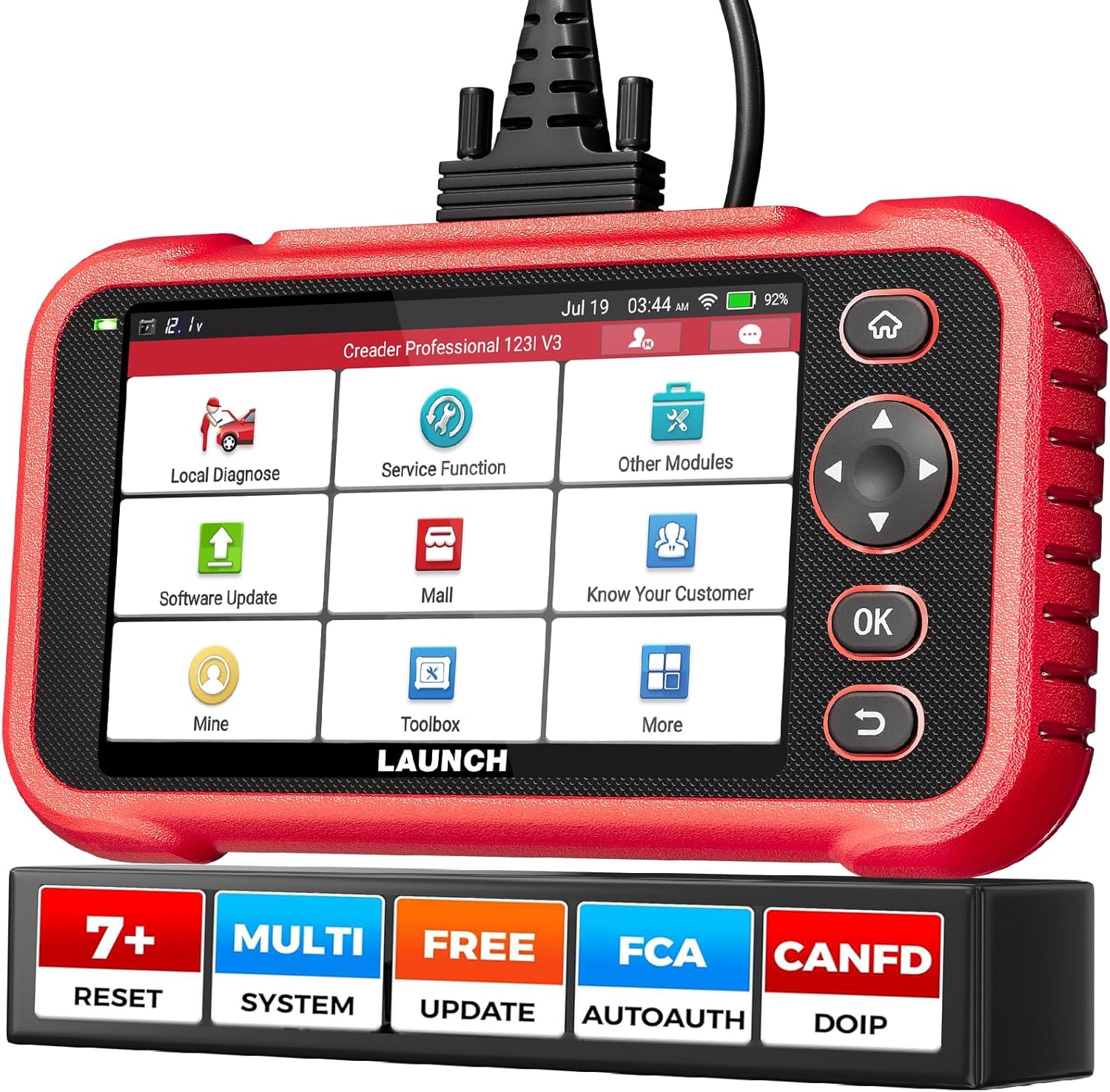
The LAUNCH CRP123I V3.0 Elite is a touchscreen OBD2 diagnostic scanner built to read and clear faults in the engine, transmission, ABS, and SRS systems. Its primary use is giving DIY owners and independent technicians deeper vehicle diagnostics plus common maintenance reset functions without moving to a higher-priced professional tablet.
In this LAUNCH CRP123I V3.0 Elite review, the strongest selling points are its four-system coverage, seven reset services, AutoVIN, live-data graphing, and lifetime Wi-Fi updates. It targets buyers who need substantially more capability than a basic check-engine code reader but do not require full workshop-level bidirectional control or comprehensive ECU programming.
🏆 My Quick Verdict
💡 Best For: DIY mechanics and home-garage users who need four-system diagnostics plus frequently used maintenance resets.
⚡ Key Specs:
5-inch touchscreen, Android 8.1, 2GB RAM, 32GB storage, four-system diagnostics, seven reset functions, dual-band Wi-Fi, AutoVIN, CAN FD and DoIP support.
✅ Bottom Line: The CRP123I V3.0 Elite provides a useful middle ground between inexpensive code readers and advanced professional tablets. Its main limitation is that special functions and protocol support vary by vehicle, so compatibility should be confirmed before purchase.
At a Glance
- Diagnoses engine, transmission, ABS, and SRS systems on supported vehicles.
- Includes seven maintenance functions covering common service and calibration jobs.
- Supports all ten standard OBD-II diagnostic modes for engine-related troubleshooting.
- Uses a 5-inch touchscreen with an Android-based interface and onboard battery.
- Wi-Fi enables software updates without connecting the scanner to a computer.
- Function availability varies by vehicle, especially resets and newer communication protocols.
Specifications
| Specification | Verified Detail |
|---|---|
| Display | 5-inch touchscreen |
| Operating System | Android 8.1 |
| Memory | 2GB RAM / 32GB storage |
| Diagnostic Systems | Engine, Transmission, ABS, SRS |
| Reset Functions | Oil, EPB, SAS, BMS, ABS bleeding, DPF regeneration, throttle relearn |
| Connectivity | 2.4GHz and 5GHz Wi-Fi |
| Update Period | Lifetime software updates |
| Vehicle Input Voltage | 9–18V |
Design & Build Quality
The CRP123I V3.0 Elite uses a self-contained tablet-style design rather than the small monochrome display found on basic OBD2 readers. The 5-inch touchscreen provides enough space for menus, diagnostic reports, fault information, and multiple live-data graphs.
A physical diagnostic cable connects the scanner to the vehicle, which removes concerns about losing a Bluetooth connection during a scan. An internal rechargeable battery also allows the interface to remain usable away from the diagnostic port for reviewing stored information.
Setup, Installation & Ease of Use
- Charge the scanner if needed and inspect the supplied diagnostic cable before initial use.
- Connect the cable securely to the vehicle’s OBD-II diagnostic port.
- Switch the vehicle ignition to the position required for diagnostic communication.
- Use AutoVIN when supported or select the vehicle information manually.
- Connect to Wi-Fi and install available software updates before extensive diagnostic work.
- Store the scanner and cable together to help protect the connector between uses.
Core Performance & Feature Breakdown
The CRP123I V3.0 Elite’s main advantage is access to four important electronic systems instead of engine diagnostics alone. Reading engine, ABS, airbag, and transmission faults provides a broader picture when warning lights appear or drivability problems involve more than the powertrain.
Live-data support adds useful context beyond stored trouble codes. Multiple data streams can be displayed together, helping users compare related sensor information instead of repeatedly moving between individual values.
The seven reset and maintenance functions add another layer of value for home servicing. Oil reset, steering-angle calibration, electronic parking brake reset, battery management reset, ABS bleeding, DPF regeneration, and throttle relearn cover several jobs commonly encountered after maintenance or component replacement.
Expert Insight
A scanner’s menu listing does not guarantee that every special function works on every vehicle. Check compatibility using the exact year, make, model, engine, and required service function before buying specifically for one maintenance procedure.
Key Features Explained
Four-System Diagnostics
The scanner reads and clears diagnostic trouble codes for the engine, transmission, ABS, and SRS modules on supported vehicles. This coverage is particularly useful when a warning light originates outside the engine-management system.
Seven Maintenance Functions
Seven service functions expand the scanner beyond code reading into maintenance-related resets and relearns. Their usefulness depends heavily on the specific vehicle because manufacturers implement these procedures differently.
AutoVIN and Diagnostic Reports
AutoVIN can reduce manual vehicle selection when the connected vehicle supports automatic identification. The device can also save diagnostic information and create reports that are easier to review after scanning.
CAN FD, DoIP and FCA Support
Support for newer communication technologies makes the V3.0 version more relevant to newer vehicles than older entry-level readers. Some implementations may require additional adapters, subscriptions, authorization, or vehicle-specific support.
Real-World Usability & Maintenance
The touchscreen interface should be easier to navigate than button-only code readers when reviewing multiple modules or live-data parameters. Wi-Fi updating also reduces the inconvenience of moving files through a separate computer.
Keep the operating system and vehicle software packages updated before diagnosing an unfamiliar vehicle. The diagnostic connector should also remain clean and undamaged because intermittent cable connections can produce failed communication attempts.
The internal battery should be periodically charged even when the scanner is stored for extended periods. For reliable results, the vehicle’s own battery should also have adequate voltage during diagnosis.
Pros & Cons
Pros
- Four-system diagnostics provide broader troubleshooting than basic engine-only readers.
- Seven service functions cover several common maintenance procedures.
- Wi-Fi lifetime updates reduce ongoing software-update costs.
- Touchscreen live-data graphing makes sensor information easier to review.
Cons
- Special-function compatibility varies significantly between vehicles.
- It does not replace a high-end bidirectional professional diagnostic tablet.
- Some newer protocol applications can require additional hardware or authorization.
Common Issues & Fixes
Scanner Will Not Communicate
A loose cable, unsupported vehicle, incorrect ignition state, or low vehicle voltage can prevent communication. Recheck the connection, ignition position, battery voltage, and exact vehicle compatibility before assuming the scanner is faulty.
A Trouble Code Will Not Clear
Some diagnostic codes immediately return while the underlying fault remains present. Repair the mechanical or electrical problem first, then rescan and clear the code.
A Reset Function Is Missing
A maintenance function displayed in the scanner’s general feature list may not be available for every model. Confirm function-level compatibility for the exact vehicle and install current software updates.
What to Know Before You Buy
The most important pre-purchase check is not whether the vehicle has an OBD-II connector, but whether the exact module and service function you need are supported. Basic OBD-II engine diagnostics have far broader compatibility than manufacturer-specific ABS, airbag, transmission, or reset procedures.
This scanner is also designed primarily around 12V passenger-vehicle diagnostics rather than heavy commercial vehicle applications. Buyers working on specialized trucks or commercial platforms should use equipment specifically approved for those systems.
Who Should Buy It / Who Should Skip It
✅ Who Should Buy It
- DIY owners who maintain several modern passenger vehicles.
- Users who need ABS, SRS, transmission, and engine diagnostics.
- Home mechanics who regularly perform compatible reset procedures.
- Buyers who value Wi-Fi updates and touchscreen navigation.
✗ Who Should Skip It
- Users who only need occasional check-engine-code reading.
- Professional shops requiring extensive bidirectional controls and ECU coding.
- Owners who have not confirmed a required special function is supported.
- Technicians diagnosing heavy commercial vehicles outside its intended coverage.
Alternatives to Consider
Autel MaxiCheck MX808S
Best For: Buyers wanting broader full-system diagnostics and bidirectional active testing.
Main Advantage: It offers all-system scanning, active tests, coding/adaptation capabilities, and a larger tablet interface.
Trade-off: Its professional-level feature set usually places it above simpler four-system scanners in cost and complexity.
Key Spec: 7-inch touchscreen with Android 11 and 64GB onboard storage.
Innova 5610
Best For: DIY users who prefer straightforward handheld operation and repair guidance.
Main Advantage: It combines onboard diagnostics with Innova’s companion-app repair information.
Trade-off: Its workflow and feature set differ from a touchscreen Android diagnostic tablet.
Key Spec: Supports vehicles manufactured from 1996 onward for the U.S. and Canadian markets, with individual functions varying by vehicle.
Is It Worth It?
The CRP123I V3.0 Elite makes the most sense when you expect to diagnose more than check-engine lights and can actually use its supported maintenance functions. Four-system coverage, live data, reporting, and Wi-Fi updates give it substantially more practical capability than an inexpensive generic reader.
Its value drops if your only goal is reading occasional emissions-related codes. It also should not be purchased as a substitute for a full professional bidirectional diagnostic platform.
Final Verdict
The LAUNCH CRP123I V3.0 Elite is a well-positioned diagnostic tool for serious DIY users who want engine, transmission, ABS, and SRS access together with frequently used maintenance resets. Confirm function-level compatibility with your exact vehicle, and it offers a strong balance between basic code readers and much more expensive professional scanners.
Frequently Asked Questions
What vehicles does the LAUNCH CRP123I V3.0 Elite work with?
It supports a broad range of OBD-II passenger vehicles, but advanced functions vary by year, make, model, and system. Confirm the exact vehicle and required feature before purchase rather than relying only on general OBD-II compatibility.
Does the CRP123I V3.0 Elite diagnose ABS and airbags?
Yes, it is designed to diagnose ABS and SRS systems in addition to the engine and transmission. Module access remains dependent on the connected vehicle’s supported diagnostic architecture.
What reset functions are included?
The scanner includes oil reset, EPB reset, SAS calibration, BMS reset, ABS bleeding, DPF regeneration, and throttle relearn. Individual procedures may be unavailable on some vehicles.
Does the scanner require paid software updates?
The CRP123I V3.0 Elite is advertised with lifetime software updates through Wi-Fi. Keeping vehicle software current is recommended before diagnosing newer models.
Does it need regular maintenance?
Maintenance is limited mainly to software updates, battery charging, and protecting the diagnostic cable and connectors. Avoid moisture, extreme storage conditions, and damaged OBD-II connections.
Does it come with a warranty?
Warranty terms can depend on the seller and region, so buyers should verify the coverage offered with the specific listing before ordering. Keep purchase documentation in case technical support or warranty service is required.
Affiliate disclosure: replacekeyfob.com earns a small commission when you purchase through links on this page — at no extra cost to you. Our editorial process is independent: affiliate relationships never influence which products we recommend or how we rank them.
