
10Best OBD2 Scanner With Live Data for Fuel Trim Analysis: Top Picks and Buying Guide

Modern vehicles use the OBD2 port to share information about the engine and emissions systems. An OBD2 scanner can read trouble codes, clear warning lights, and show live data while the engine runs. This makes it useful for drivers who want more detail than a basic code reader provides.
Fuel trim data shows how much the engine computer adjusts fuel delivery to maintain the proper air-fuel balance. The best OBD2 scanner for fuel trim analysis should display short-term and long-term fuel trims clearly, along with related data such as oxygen sensor readings, engine load, and airflow.
We also look for broad vehicle coverage, a clear screen or reliable app, fast data updates, and simple controls. We compared scanners with these features to find the models that make fuel system diagnosis easier and more useful.
Best OBD2 Scanners With Live Data for Fuel Trim Analysis
We reviewed OBD2 scanners that display live fuel trim data, including short-term and long-term readings. Our list highlights models with clear screens, useful diagnostic features, and reliable support for checking engine performance.
FOXWELL NT301 OBD2 Scanner

We recommend the FOXWELL NT301 for basic fuel trim checks, fast code reading, and simple no-subscription diagnostics.
Pros
- Shows live fuel trim, oxygen sensor, RPM, and coolant data
- Graphs readings to help us spot changes while the engine runs
- Uses a clear screen with simple controls and an I/M readiness button
Cons
- Does not scan ABS, airbag, transmission, or other non-engine systems
- Requires a Windows computer for updates
- Vehicle support can vary by model year and VIN
We plugged the NT301 into the diagnostic port and got basic engine data without an app or account. Its live-data screen let us watch short-term and long-term fuel trim while the engine warmed up, which helped us compare changing readings instead of relying on one frozen value.
The graphing feature made sensor trends easier to follow during a road test. We could monitor fuel trims, oxygen sensor activity, coolant temperature, and engine speed in real time. This makes the scanner useful when checking for possible vacuum leaks, fuel delivery problems, or sensor issues, though the readings still require proper testing and interpretation.
The 2.8-inch color display stays readable in daylight, and the tool draws power from the vehicle. We also found the dedicated readiness controls helpful before an emissions test. The NT301 can clear engine codes after repairs, but it cannot fix the underlying problem or prevent a code from returning.
This remains a basic OBD2 reader. We would choose it for engine diagnostics and fuel trim analysis, not for ABS, SRS, air conditioning, advanced resets, or bidirectional controls. It supports many 1996-and-newer U.S. vehicles and many 2000-and-newer European and Asian models, but we would confirm compatibility before buying.
Innova 5210

We recommend the Innova 5210 for DIY users who want clear fuel-trim data, basic code reading, and battery testing in one handheld tool.
Pros
- Displays fuel trims, oxygen sensor readings, RPM, and engine temperature in real time
- Includes battery, alternator, oil reset, and readiness checks
- Works with the free RepairSolutions2 app without a subscription
Cons
- ABS and service functions vary by vehicle
- The screen and controls feel basic compared with advanced scan tools
- The attached cable limits portability
During testing, we found the live-data menu useful for checking short-term and long-term fuel trims. We could watch the readings change while the engine warmed up and during throttle changes, which helped us look for signs of a vacuum leak, fuel delivery issue, or sensor problem.
The 2.8-inch screen presents common data without requiring a phone connection. Menus are simple enough for routine checks, although moving through several data points takes more effort than it does with a larger touchscreen scanner.
We also used the battery and alternator tests to check charging performance before deeper engine troubleshooting. The tool reads and clears engine codes, checks emissions readiness, and can reset the oil light when the vehicle supports that function.
Compatibility remains the main limitation. Innova notes that ABS, oil reset, and other features differ by make, model, and year, so we would check the company’s coverage tool before buying. Clearing a code or disconnecting the battery also resets readiness monitors, which then need a full drive cycle to return.
Autel MaxiCheck MX808S
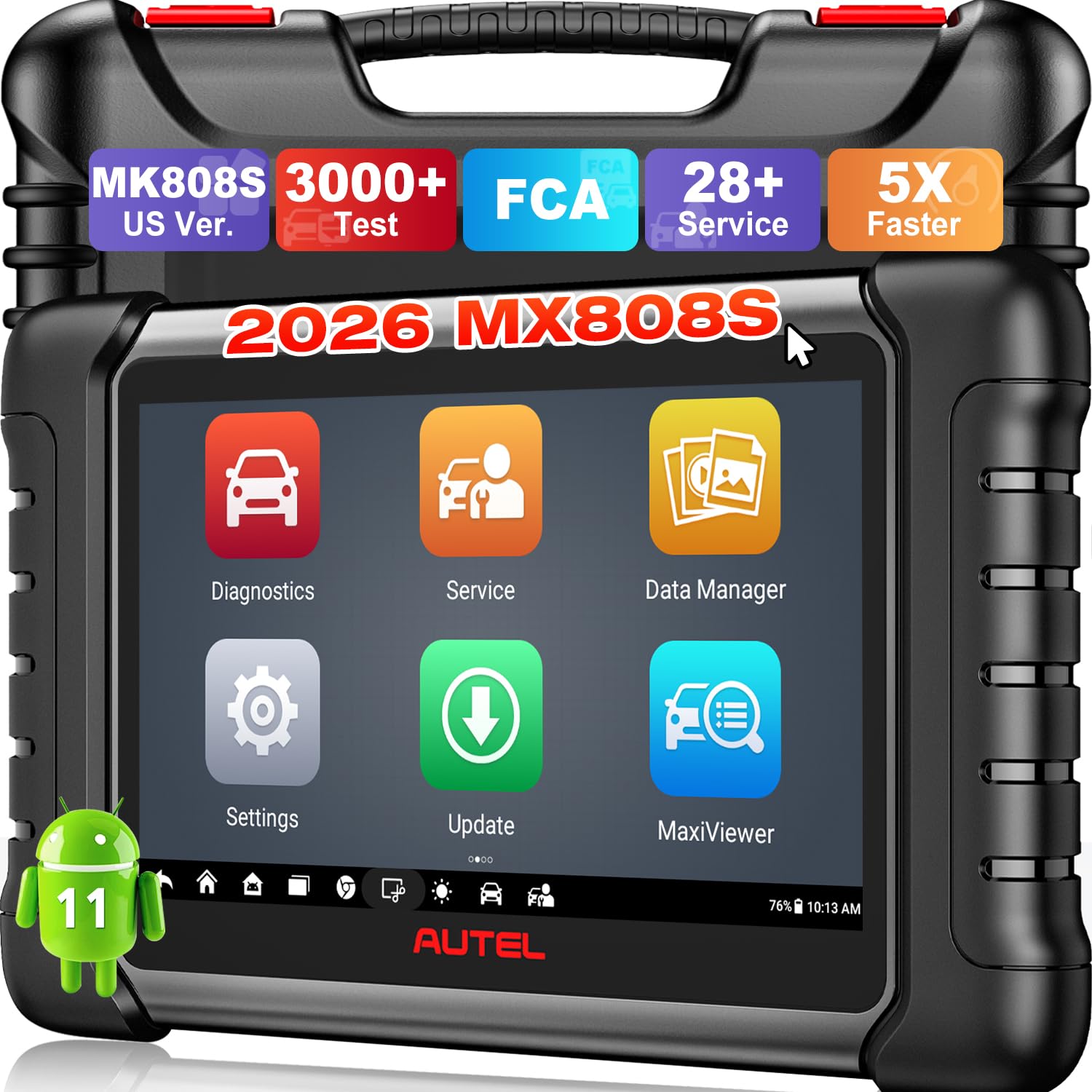
We recommend the MX808S for buyers who want detailed fuel-trim data, full-system scans, and bidirectional tests in one tool.
Pros
- Displays fuel trims, O2 data, MAF, MAP, and engine readings in graphs, meters, or text
- Offers more than 3,000 active tests for supported vehicles
- Includes 28+ service functions, such as ABS bleeding and battery registration
Cons
- Vehicle coverage varies by make, model, and year
- Advanced functions may require careful research before use
- Larger than a basic code reader
We used the MX808S to review live engine data, and its fuel-trim displays made it easy to compare short-term and long-term readings. The graph and waveform views helped us spot changes during acceleration and idle instead of relying only on stored trouble codes.
The tablet also scans systems beyond the engine, including transmission, ABS, SRS, and TPMS. Its fast startup and automatic vehicle identification kept basic testing efficient, while manual VIN entry helped when automatic identification did not work.
Bidirectional testing adds useful depth. We could command supported components, such as cooling fans, fuel pumps, and EVAP parts, to help confirm a suspected fault before replacing anything. We would still verify compatibility first, since active tests and service functions differ across vehicles.
The 6.99-inch touchscreen runs Android 11 and feels more capable than a simple handheld reader. At the same time, its size and broad feature set may feel unnecessary for drivers who only need to clear check-engine codes.
ANCEL FX6000
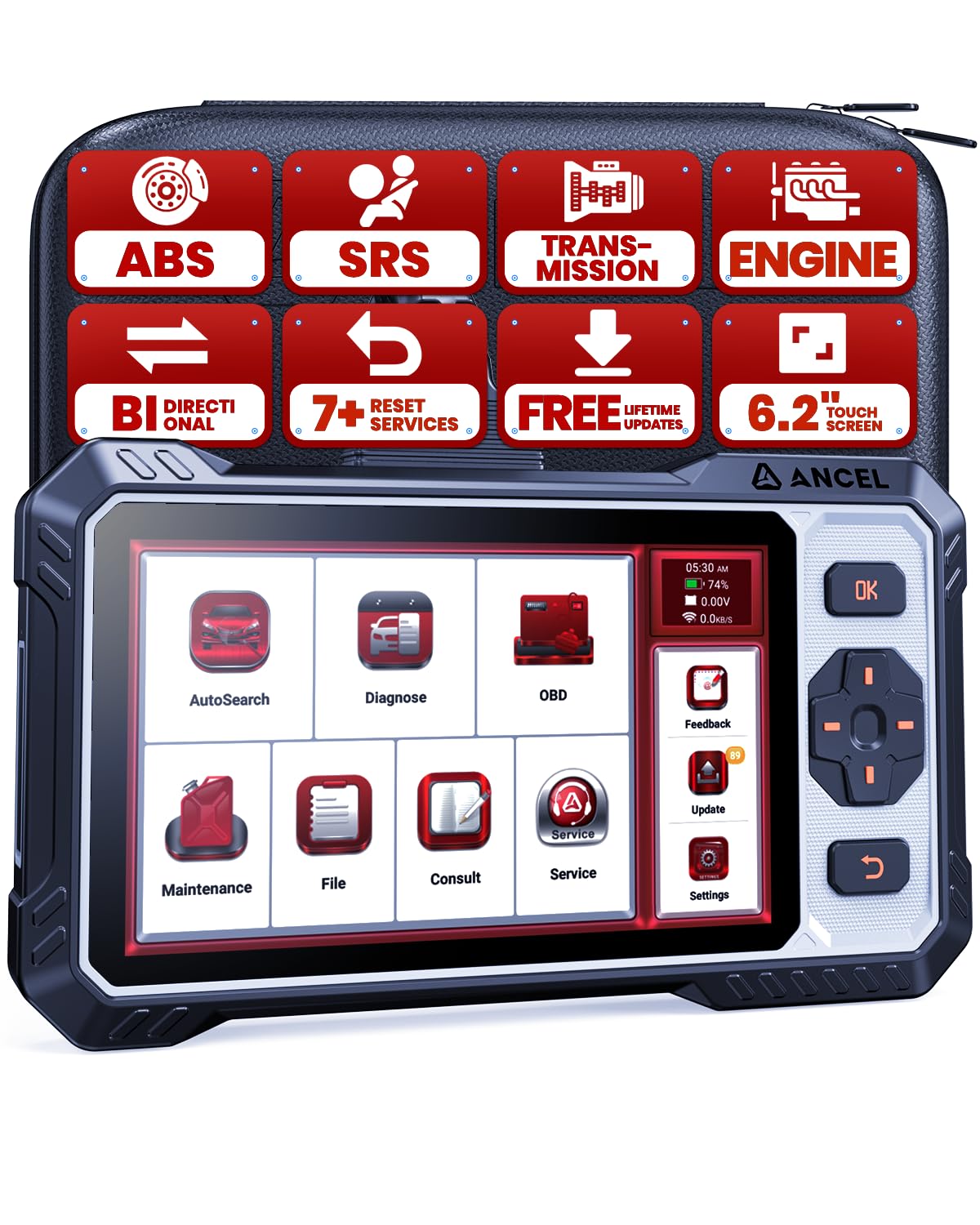
We recommend the ANCEL FX6000 for drivers who want detailed live data, fuel-trim readings, and bidirectional tests in one tool.
Pros
- Displays live engine data for checking fuel-trim changes
- Supports active tests for several major systems
- Includes lifetime Wi-Fi updates without a subscription
Cons
- Vehicle support varies by year, make, and model
- Some advanced functions require an FCA AutoAuth account
- Its many menus may take time to learn
We found the FX6000 more useful than a basic code reader when checking engine performance. Its live-data screens let us watch short-term and long-term fuel trim, oxygen-sensor readings, engine load, and other values while the vehicle runs. This helps us see whether the engine is adding or removing fuel instead of relying only on a stored trouble code.
The scanner also supports graphing and data playback, which makes changing fuel-trim values easier to review. We could compare readings at idle and during acceleration, though the amount of available data depends on the vehicle’s control modules.
Its bidirectional controls add practical value. We could command supported parts, such as cooling fans, fuel injectors, EVAP valves, and throttle actuators, to help separate a faulty component from a wiring or sensor problem. These tests require care, and not every vehicle offers every command.
The 6.2-inch screen gives live data enough room for comfortable viewing, while physical buttons help when working with gloves. The included case also makes storage easier. Before buying, we would check ANCEL’s compatibility tool because reset services, fuel-trim data, and active tests can vary widely between vehicles.
ANCEL AD310 OBD2 Scanner

We recommend the ANCEL AD310 for drivers who want an affordable wired scanner that shows basic live fuel-trim data and reads common engine codes.
Pros
- Clear screen and simple controls
- Shows live data, freeze-frame details, and readiness status
- Works with many 1996-and-newer OBD2 vehicles
Cons
- Supports emission-related engine diagnostics only
- Does not offer advanced graphing or bidirectional tests
- Its wired design limits convenience
We found the AD310 easy to connect and use because it draws power from the vehicle. Its labeled buttons and readable display make it practical for checking a warning light without a phone app or separate battery.
For fuel-trim checks, the scanner can display live sensor readings that help us compare short-term and long-term fuel trim. These values can point toward possible air leaks, fuel delivery issues, or sensor problems, but we still need service information and other tests before confirming a repair.
The 2.5-foot cable gives us enough reach to view the screen from the driver’s seat. Its compact body also fits easily in a glove box or tool bag. The scanner reads and clears codes, shows freeze-frame data, and reports emissions readiness monitors.
The main limitation is its basic design. We do not get advanced charts, system tests, or coverage for non-emission faults. For straightforward fuel-trim checks and check-engine-light diagnosis, the ANCEL AD310 offers useful features at a low price.
FOXWELL NT604 Elite OBD2 Scanner

We recommend this scanner for drivers who want live fuel-trim data plus engine, ABS, SRS, and transmission code reading at a reasonable price.
Pros
- Shows live engine data, including fuel-trim readings
- Scans four major vehicle systems
- Includes a sturdy protective case and lifetime updates
Cons
- Does not provide bidirectional testing
- Lacks service functions such as oil reset and battery registration
- Vehicle coverage can vary by make, model, and year
We found the NT604 Elite simple to use after plugging it into the OBD2 port. Its menus let us reach live data without much searching, so we could watch fuel-trim values while the engine ran. That helps us compare short-term and long-term corrections when checking for possible air leaks, fuel problems, or sensor issues.
The scanner also reaches ABS, SRS, transmission, and engine modules. We could read and clear common fault codes outside crash-related airbag data. This makes it more useful than a basic check-engine reader, especially when a warning light comes from the brake or airbag system.
Its 4.3-inch screen displays data clearly, and the included case makes storage easier. We also liked the built-in code library, data playback, and print support. Updates do not require an extra software fee, although downloading them can take time.
This is a diagnostic tool, not a repair device. We must fix the cause of a fault before clearing its code, and the NT604 Elite does not support functions such as oil resets, ABS bleeding, throttle relearn, or battery registration. We should also confirm vehicle compatibility before buying, since coverage differs across vehicles.
BLCKTEC 460T

We recommend the BLCKTEC 460T for DIY users who want graphing live data, broad system coverage, and useful reset functions in one scanner.
Pros
- Graphs, records, and overlays up to four live-data streams
- Reads engine, transmission, ABS, and SRS codes
- Includes many service resets and free lifetime updates
Cons
- Some functions vary by vehicle
- Requires compatibility checks before purchase
- Limited to use in the United States and Canada
We found the live-data tools useful for fuel-trim checks. The scanner can display and graph readings such as short-term and long-term fuel trim, which helps us compare changes while the engine idles or runs under load. Recording and replaying data also makes it easier to spot patterns instead of relying on one reading.
The 4.3-inch screen keeps common information easy to view, while AutoVIN and AutoScan reduce setup time. We also liked the ability to check freeze-frame data and inspection readiness monitors when a warning light appears.
Beyond fuel-system analysis, the 460T covers several vehicle systems and offers functions such as battery registration, throttle relearn, EPB service, ABS bleeding, and oil resets. These features can make it more useful than a basic code reader, but we would confirm support for our exact year, make, and model before buying.
The main limitation involves vehicle coverage for advanced functions. A feature may work on one model but not another, so the manufacturer’s compatibility checker remains important. The scanner includes a two-year limited warranty, a storage case, and free lifetime updates.
ANCEL AD410 OBD2 Scanner

We recommend the AD410 for drivers who want a simple, corded scanner that shows fuel trims and other engine data without a phone app.
Pros
- Displays live fuel trim, oxygen sensor, RPM, and coolant data
- Reads and clears engine codes quickly
- Includes built-in code definitions and readiness checks
Cons
- Does not diagnose ABS, airbag, or transmission systems
- The small screen limits how much data we can view at once
- The manual may take extra effort to follow
When we plugged the AD410 into a vehicle, it powered on through the OBD2 port and connected without a separate battery or setup process. The menus felt straightforward, and the color screen made common functions easy to find.
For fuel trim analysis, we could view short-term and long-term trim values along with oxygen sensor readings and engine speed. That data helps us spot possible fuel delivery, vacuum leak, or sensor problems, though we still need service information and testing tools to confirm a diagnosis.
The scanner also reads and clears check-engine codes, shows freeze-frame data, and checks emissions readiness. Its built-in code descriptions provide a useful starting point, but they do not replace a full repair guide.
The AD410 supports most 1996 and newer OBD2 vehicles, along with many newer European and Asian models. We should check compatibility before buying, especially because this tool handles engine and emissions systems only.
Innova 5610 OBD2 Bidirectional Scan Tool

We recommend the Innova 5610 for DIY users who want live fuel-trim data plus advanced testing and reset functions.
Pros
- Clear live data for engine and selected vehicle systems
- Bidirectional tests for functions such as fuel pumps and parking brakes
- Free updates and access to repair information
Cons
- Coverage varies by vehicle make, model, and year
- Some advanced features require checking compatibility first
- The wired design offers less convenience than wireless scanners
We found the live-data display useful for checking short- and long-term fuel trims while the engine ran. Watching the readings change during idle, acceleration, and steady cruising made it easier to spot possible air leaks, fuel delivery issues, or sensor problems.
The 5610 also reads enhanced data from systems such as ABS, SRS, transmission, and the engine on supported vehicles. Its bidirectional controls add value because we could command certain components instead of only reading stored codes.
The screen and controls felt straightforward during testing, and the included protective boot helped during garage use. RepairSolutions2 added code explanations and repair suggestions, but we would still confirm coverage before buying. Some functions do not work on every vehicle, and international users may face major limits.
For shoppers who want more than basic check-engine-code reading, the Innova 5610 offers strong diagnostic depth without a subscription fee. Its best feature remains the combination of live fuel-trim data, advanced system access, and active component testing.
BlueDriver Pro Next-Gen

We recommend BlueDriver for drivers who want phone-based live data, fuel-trim readings, and repair guidance without paying a subscription fee.
Pros
- Shows live sensor data, including short- and long-term fuel trims
- Reads enhanced systems such as ABS, SRS, TPMS, and transmission on supported vehicles
- Provides VIN-based repair reports and probable fixes
Cons
- Bluetooth connection may drop for some users
- App interface can feel less polished than factory scan software
- Coverage varies by vehicle make, model, and year
We found the live-data screens useful for checking whether the engine was adding or removing too much fuel. Watching short- and long-term fuel trims together with oxygen-sensor readings gave us a clearer view of possible vacuum leaks, injector issues, or air-metering problems.
The app made basic scanning simple. We plugged the adapter into the OBD2 port, paired it with a phone, and ran a full scan within minutes. Its repair reports helped explain codes, though some results offered several possible causes rather than one definite answer.
BlueDriver also goes beyond basic check-engine codes on supported vehicles. We could check readiness monitors, freeze-frame data, Mode 6 results, and selected ABS, airbag, TPMS, and transmission systems. Vehicle coverage remains the key limitation, so we would confirm compatibility before buying.
The wireless design worked well during normal testing, but customer feedback shows that some units lose connection or fail during firmware updates. We would keep the phone close to the adapter and avoid interrupting updates. Its 180-day money-back guarantee provides added protection.
Buying Guide
We should choose an OBD2 scanner that shows short-term fuel trim (STFT) and long-term fuel trim (LTFT) in real time. These readings help us compare how the engine adjusts fuel during idle, steady driving, and acceleration.
| Feature | What to look for |
|---|---|
| Live data | STFT, LTFT, oxygen sensor data, engine load, RPM, and coolant temperature |
| Data display | Graphs, quick refresh rates, and clear labels |
| Vehicle support | Coverage for the vehicles and model years we need to test |
| Connection | Wired or wireless use that works reliably with our device |
| Diagnostic tools | Code reading, code clearing, freeze-frame data, and readiness checks |
| Data storage | Reports, screenshots, or saved readings for later review |
We should check whether the scanner displays data from each engine bank and sensor when the vehicle supports those features. A tool that records or graphs readings makes it easier to spot changes during a road test.
Compatibility matters because OBD2 functions can vary by vehicle. We should confirm support for the required protocols, operating systems, and vehicle coverage before buying.
We should also consider ease of use. Clear menus, readable text, regular software updates, and helpful error-code descriptions can reduce the time needed to interpret fuel trim data.
Editor’s Choice
We choose the OBDLink MX+ for fuel trim analysis. It connects through Bluetooth, works with major mobile platforms, and provides stable data access for apps that display short-term and long-term fuel trims.
The scanner supports live readings such as:
- STFT and LTFT for each available bank
- O₂ sensor and air-fuel ratio data
- Engine coolant temperature
- Mass airflow and manifold pressure
- Engine load and RPM
We can view several data points at once, record readings, and compare fuel trims under different conditions. This helps us check whether the engine adds or removes fuel at idle, during cruising, and under load.
| Feature | OBDLink MX+ |
|---|---|
| Connection | Bluetooth |
| Live data | Yes |
| Fuel trim readings | STFT and LTFT |
| Vehicle coverage | Most OBD2 vehicles |
| Best use | Detailed mobile diagnostics |
We should confirm that our chosen app supports the vehicle’s available data. Some vehicles report fuel trims by bank, while others provide only a combined reading. The MX+ does not replace a professional scan tool for advanced manufacturer-specific tests, but it gives us a reliable way to monitor common fuel system data.
Conclusion
We should choose an OBD2 scanner that shows short-term and long-term fuel trims in real time. Graphing, freeze-frame data, oxygen sensor readings, and support for manufacturer-specific codes also help us test problems with greater accuracy.
A good scanner should offer:
- Clear live-data displays
- Fast data updates
- Reliable vehicle coverage
- Easy-to-read graphs
- Data recording or export tools
We should compare these features with our vehicle needs and testing goals. A basic scanner may suit simple checks, while a more advanced model can help us track changing fuel trims during idle, acceleration, and steady driving.
Fuel trim readings work best when we review them with engine speed, load, coolant temperature, and sensor data. By checking several readings together, we can reduce guesswork and make better repair decisions.
FAQs
What does live fuel trim data show?
Live data shows how the engine computer adjusts fuel delivery. Short-term fuel trim (STFT) reflects quick changes, while long-term fuel trim (LTFT) shows adjustments learned over time.
What fuel trim numbers should we look for?
Near-zero readings usually indicate balanced fuel control. Small changes are normal, but readings above about +10% or below -10% may need further testing. We should compare both banks and check readings at idle and under load.
Can an OBD2 scanner diagnose a vacuum leak?
A scanner can help identify patterns linked to a vacuum leak, such as high positive fuel trims at idle that improve at higher engine speeds. We should confirm the cause with a smoke test or other checks.
Does the scanner need graphing?
Graphing helps us see rapid changes in STFT, oxygen sensor data, and engine speed. This makes it easier to compare readings during acceleration, cruising, and deceleration.
Will every vehicle show the same data?
No. Available data depends on the vehicle’s model year, engine, and control system. We should confirm that the scanner supports enhanced data if we need manufacturer-specific readings.
Can we use a basic code reader for fuel trim analysis?
A basic reader may show trouble codes but often lacks live data or graphing. For fuel trim analysis, we should choose a scanner that displays STFT, LTFT, oxygen sensor data, engine speed, and coolant temperature.
