Best Settings for Dual Dash Cam to Maximize Video Quality

The best settings for dual dash cam recording usually combine strong front resolution, solid rear coverage, high bitrate, and moderate frame rate. Fine-tune parking mode, exposure, and memory card choice so the system stays reliable day and night.
Dual dash cams are popular because they record what happens in front of the vehicle and behind it at the same time. The best settings for dual dash cam use depend on your car, your driving habits, and how much storage and power you can support.
- Front focus: Prioritize front clarity for plates, lanes, and traffic signals.
- Rear balance: Keep the rear channel stable and usable, not overloaded.
- Storage matters: Use a high-endurance card and format it regularly.
- Parking mode: Tune sensitivity and voltage cutoff to protect the battery.
- Real testing: Review daylight and night clips before calling setup finished.
Best Settings for Dual Dash Cam: What Drivers Search for in 2026
Most drivers want a simple answer: the clearest front and rear footage without filling the memory card too fast. In 2026, that usually means balancing resolution, frame rate, bitrate, and parking mode instead of chasing the highest number on the box.
There is no single perfect setup for every vehicle. A compact sedan used for commuting, a rideshare car, and a truck with a tinted rear window may all need different settings to get usable video in real traffic, at night, and while parked.
How Dual Dash Cams Work and Why Settings Matter for Front and Rear Coverage
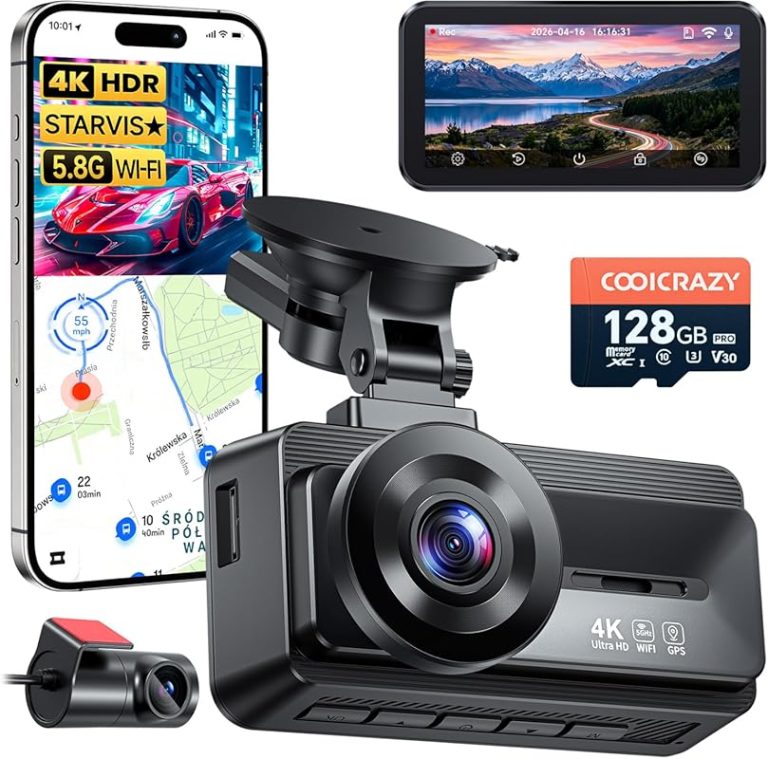
A dual dash cam uses one front-facing camera and one rear-facing camera, either in a single unit or as a paired system. Both channels record at the same time, so any setting change affects image quality, file size, heat, and how long the camera can keep recording.
If one channel is set too aggressively, the other can suffer. For example, a high-resolution front camera may look great, but the rear camera can become noisy or compressed if the system cannot keep up with storage or processing demands.
Front vs. rear camera priorities
The front camera usually deserves the highest quality settings because it captures lane position, traffic signals, and license plates ahead. The rear camera still matters, especially for hit-and-run claims, tailgating incidents, and parking damage, but it often works with less light and more vibration.
Because of that, many drivers prioritize the front lens for the clearest possible daytime plate capture and set the rear lens for stable, reliable coverage rather than maximum detail. That approach is usually more practical than trying to force both channels into the highest possible mode.
How resolution, bitrate, and compression affect both channels
Resolution tells you the pixel count, but bitrate determines how much data the camera uses to preserve detail. A high-resolution file with a low bitrate can still look soft, blocky, or smeared when the car is moving quickly.
Compression is also important. Strong compression saves space, but it can reduce clarity in motion, rain, and low light. If your camera offers separate front and rear bitrate controls, use the highest stable setting the system can handle without overheating or dropping frames.
Vehicle Compatibility Checklist Before You Change Any Settings
Before adjusting anything, confirm that your camera setup fits your vehicle and power source. Some settings only work correctly with hardwiring, and some rear-camera placements are limited by glass shape, tint, and cable length.
- Match year, make, model, and trim
- Check power source and parking mode support
- Compare rear glass shape, tint, and mounting space
12V vs. hardwired power and parking mode support
A basic 12V plug is fine for driving footage, but parking mode usually works best with a hardwired kit or a dedicated battery pack. If the camera is not getting stable power when the engine is off, parking settings may shut down early or fail to record incidents.
That matters because some dual dash cams draw more power than a simple single-channel unit. If your vehicle battery is older, or if the car sits for long periods, you should be conservative with parking mode settings and voltage cutoff levels.
Windshield size, rear window tint, and camera placement limits
Large windshields give you more placement options for the front camera, but the rear camera is often harder to position well. Heavy tint, defroster lines, spoilers, and narrow rear glass can all reduce clarity.
Try to place the rear camera where the lens has a wide, unobstructed view and is not aimed directly at a defroster wire if you can avoid it. If the rear window is deeply tinted, you may need stronger exposure control or HDR to keep the image usable.
Night driving, SUVs, trucks, and rideshare use cases
Night driving usually benefits from lower frame rates, stronger low-light processing, and careful exposure tuning. SUVs and trucks may need longer cable runs and different rear mounting angles because of the distance between the front unit and the back glass.
Rideshare drivers often need a setup that favors cabin awareness, rear coverage, and quick file protection. If your camera supports a cabin or interior lens, treat it separately from the rear road view because each channel may need different exposure behavior.
Best Video Settings for Dual Dash Cam to Maximize Clarity
For most drivers, the best settings for dual dash cam recording are the ones that keep footage sharp enough to identify vehicles and events without overloading storage. The goal is stable, readable video in daylight and acceptable detail at night, not just the highest spec sheet number.
Resolution and frame rate recommendations by driving condition
For everyday commuting, 1080p on both channels can still be practical if the camera has strong bitrate control and good sensor performance. If the system supports it, 1440p or 2K on the front camera with 1080p rear is often a balanced setup for many drivers.
Higher frame rates can make motion smoother, but they also increase file size and can reduce low-light performance on some cameras. In city traffic, 30 fps is usually a sensible baseline. For fast highway driving, a stable 30 fps with strong bitrate often works better than chasing 60 fps on both channels.
If storage fills too quickly, lower the rear resolution first before reducing the front camera quality.
Bitrate, exposure, HDR/WDR, and image sharpness settings
Bitrate is one of the most important settings for preserving plate detail. If your camera offers a choice between standard and high bitrate, choose the higher setting unless the unit gets hot, stutters, or corrupts files.
Exposure should be left near default at first, then adjusted slightly if plates are washed out or headlights are too bright. HDR or WDR can help with mixed lighting, tunnels, sunrise glare, and headlights at night, but overly strong processing can sometimes make motion look unnatural.
Sharpness should be used carefully. Too much sharpness can create halos around signs and plates, while too little can make footage look soft. A moderate setting is usually safer than maximum sharpness.
Some cameras handle HDR well only in daylight or only at low frame rates, so test before relying on it full time.
Loop recording, overwrite length, and file protection settings
Loop recording should stay on for normal use, since it allows the camera to overwrite old files automatically. Choose a clip length that gives enough context without creating huge files; 1 to 3 minutes is common for many drivers.
Use file protection for any incident you want to keep, but do not protect too many clips or the card can fill up faster than expected. If your camera has impact lock or manual lock, test both so you know how each one behaves during a real event.
Best Parking Mode and Security Settings for 24/7 Protection
Parking mode can be valuable, but only if the camera is powered correctly and the settings match your vehicle’s battery and parking habits. A poorly tuned parking mode can miss incidents or drain the battery too far.
Motion detection vs. impact detection
Motion detection records when the camera sees movement, which can be useful in busy parking lots but may create many false clips from shadows, rain, or passing cars. Impact detection records when the camera senses a hit or vibration, which is usually more focused but may miss slow or light contact.
Many drivers use a combination of both if the camera supports it. That can improve coverage, but it also makes tuning more important because sensitivity that is too high can overwhelm storage with false triggers.
Best for parking lots and visible activity, but it can trigger on harmless movement.
Best for hit-and-run protection, but light bumps may not always register.
Voltage cutoff, timer settings, and battery protection
If you hardwire the camera, set a voltage cutoff that protects the starter battery. Exact values vary by vehicle and kit, so it is safer to follow the dash cam maker’s guidance and keep a conservative margin if the battery is older.
Timer settings are also useful. If you rarely park overnight, a shorter parking window can reduce battery stress. If the car sits for long periods, a battery pack or external power solution may be more appropriate than running the camera directly from the vehicle battery.
Parking mode settings that are too aggressive can drain the battery and leave the vehicle unable to start.
How to reduce false alerts and missed incidents
False alerts often come from sensitivity that is too high, poor mounting, or unstable power. Missed incidents can happen when sensitivity is too low, the camera is aimed poorly, or the rear lens is blocked by tint or cargo.
Start with medium sensitivity, then test in your own driveway and on a short drive. If the camera records too many empty clips, reduce motion sensitivity first. If it misses bumps, raise impact sensitivity gradually and retest.
Practical Setup Steps for Better Day and Night Footage
Even the best settings will not help if the camera is mounted badly or the memory card is weak. A careful setup usually makes a bigger difference than one more menu adjustment.
Camera angle, horizon line, and rear lens alignment
The front lens should show a clear road view with the horizon sitting near the middle of the frame or slightly above it. If the camera points too high, you waste detail on sky; if it points too low, you may miss traffic lights and distant plates.
The rear lens should be aligned straight and level, not tilted toward the headliner or trunk lid. Small angle changes can make a big difference in how readable cars appear behind you, especially at night.
Adjust the front camera so the road, hood line, and traffic ahead are all visible.
Check that the rear camera captures following traffic without aiming too high or too low.
Memory card choice, formatting schedule, and storage capacity
Use a high-endurance microSD card that is rated for constant writing. A regular consumer card may work at first, but dash cams write far more often than phones or tablets, so wear resistance matters.
Format the card on a schedule recommended by the camera maker, or whenever you notice file errors, freezes, or missing clips. Larger cards can be helpful for dual-channel recording, but only if the camera supports them reliably.
Match the printed CR battery number, polarity, and case orientation before closing the fob.
Firmware updates, app pairing, and quick test recordings
Firmware updates can improve stability, video processing, and app connection quality. If your camera uses a phone app, pair it only after confirming the unit is powered correctly and the rear camera is fully connected.
After any change, record a short test drive in daylight and again at night. Review the clips on a larger screen so you can check plate readability, exposure, and whether the rear channel is syncing properly.
For drivers who also rely on diagnostic tools elsewhere in the car, it can help to understand the difference between camera performance and vehicle data. A dash cam does not replace a scan tool, and a scan tool does not improve video quality; they solve different problems, which is why guides like best scanner choices for home mechanics can be useful for separate maintenance tasks.
Common Dual Dash Cam Mistakes That Reduce Video Quality
Many bad recordings come from simple setup mistakes, not defective hardware. If your footage looks poor, check the basics before assuming the camera is broken.
Overexposed plates, blurry night footage, and wrong mount placement
Overexposed plates usually happen when exposure is too bright, the lens is angled toward headlights, or the windshield has strong reflections. Blurry night footage can come from too much motion blur, weak bitrate, or a sensor that struggles in low light.
Wrong mount placement is another common issue. A camera hidden behind a dark tint band, mirror housing, or wiper sweep zone may create more problems than it solves, especially when the rear lens is fighting tinted glass at night.
Plates are hard to read in headlights or daylight.
Exposure, angle, or bitrate is not balanced well.
Lower exposure slightly and retest with a short drive.
Using the wrong SD card or ignoring heat limits
Low-quality memory cards can cause freezes, missing files, and corrupted clips. Heat is another major issue because dual dash cams process two streams at once and often sit in direct sun for hours.
If the camera gets hot, shut it down and reconsider the settings before pushing it harder. Sometimes a slightly lower resolution or bitrate is the difference between reliable recording and repeated file errors.
Heat and battery health are also related in vehicle electronics. If you are troubleshooting a separate power issue, a broader battery check may help, and resources such as how to test a flooded lead acid car battery can provide general context for battery condition, though dash cam power needs are different from starting-battery testing.
Settings that look good in daylight but fail in real-world driving
Some settings look impressive in a parking lot but fall apart on the road. Extremely high sharpness, maximum contrast, or aggressive noise reduction can make daytime video seem crisp while destroying detail in motion or darkness.
That is why real-world testing matters. Drive in stop-and-go traffic, on a highway, and after dark before deciding the setup is finished.
Cost, Time, and Final Recommendation for the Best Dual Dash Cam Setup
Most drivers can dial in a good dual dash cam setup in under an hour, but a careful tune may take a few test drives. The extra time is usually worth it if you want footage that is actually usable after an incident.
How long setup and tuning usually takes
Basic installation and menu setup can be quick if the camera is already mounted and powered. Fine-tuning exposure, parking mode, and rear alignment may take longer because you need to review clips and make small changes.
Plan on a simple test-drive cycle: adjust, record, review, repeat. That process is more effective than changing multiple settings at once and guessing which one helped.
Budget vs. premium feature tradeoffs in 2026
Budget cameras can still deliver solid results if they have decent bitrate control, reliable loop recording, and a stable parking mode. Premium models often add better low-light performance, stronger app support, wider dynamic range, and more flexible power options.
The tradeoff is that more features can also mean more settings to manage. For many drivers, a dependable midrange unit with a good rear camera and a quality card is more useful than a feature-heavy system that is difficult to tune.
Best for daily drivers who want reliable front and rear coverage. Verify bitrate control, parking mode support, and high-endurance card compatibility first.
Final recap: the best settings for reliable front and rear recording
The safest starting point is a balanced setup: strong front resolution, solid rear coverage, moderate frame rate, high bitrate, and carefully tuned exposure. Add HDR or WDR only if it improves your own night clips, and keep parking mode conservative enough to protect the vehicle battery.
If you want the most reliable results, focus on clean mounting, a high-endurance memory card, and real-world testing more than on maximum specs. That combination usually delivers the clearest front and rear recording for everyday driving, parking protection, and incident review.
The best dual dash cam setup is balanced, not extreme. Prioritize stable recording, readable plates, and battery-safe parking mode over the highest possible settings.
8/10
Frequently Asked Questions
Start with the highest stable front resolution, a strong rear resolution, and the highest bitrate the camera can handle reliably. Keep frame rate moderate and test daylight and night footage before finalizing the settings.
Motion detection is useful for visible activity, while impact detection is better for hit-and-run events. Many drivers use both if the camera supports it, but sensitivity should be tuned to reduce false alerts.
Use a high-endurance microSD card that is designed for constant recording. If the camera freezes, loses clips, or shows file errors, the card may be the problem even if it is new.
Many drivers can handle basic mounting and menu setup themselves, but hardwiring and parking mode wiring may be more involved. If the setup affects vehicle power or electrical systems, a qualified technician may be the safer choice.
Check power support, rear camera cable length, storage compatibility, and whether the camera fits your windshield and rear window layout. Also review return policy, warranty terms, and seller details before purchase.
Contact a qualified technician if the installation involves hardwiring, battery drain, electrical faults, or any issue that could affect vehicle security. Professional help is also wise if the camera setup keeps failing after basic card, power, and placement checks.