
Car Key Fob Water Damage Repair: What to Do, What to Avoid, and When to Replace It

A wet key fob does not automatically mean the end of the road. In a lot of cases, the fob can be dried, cleaned, and brought back to life—especially if you act quickly and the water exposure was minor. But if the fob sat in floodwater, went through a washing machine, or shows corrosion on the battery contacts or circuit board, replacement becomes much more likely.
The practical goal here is not to “save” every fob at all costs. It is to avoid making the damage worse, figure out whether the battery, contacts, or electronics are the real problem, and decide whether repair is worth the time. Some industry guidance suggests that early action can improve the odds, but there is no guarantee a wet fob can be saved. If it works only sometimes after washing, corrosion may already be underway. Source
Can a Water-Damaged Key Fob Be Repaired?
Sometimes, yes. If the water exposure was brief and the fob was opened, dried, and cleaned before corrosion spread, the fob may recover fully or at least well enough to use again. If the damage is limited to the battery or battery contacts, a simple battery replacement and cleanup may be enough.
The harder cases are the ones that look fine on the outside but fail intermittently. That usually points to moisture trapped inside the housing, oxidation on the contacts, or damage on the circuit board. If the fob does not work at all after drying, that is a strong sign the electronics were hurt more deeply. A washed key fob that works only sometimes may be corroding internally; if it does not work at all, replacement is often the next step. Source
First 10 Minutes: What to Do Right After the Fob Gets Wet
The first response matters more than most people think. If your fob is still wet, every extra press of a button can push moisture deeper into the case or create a short.
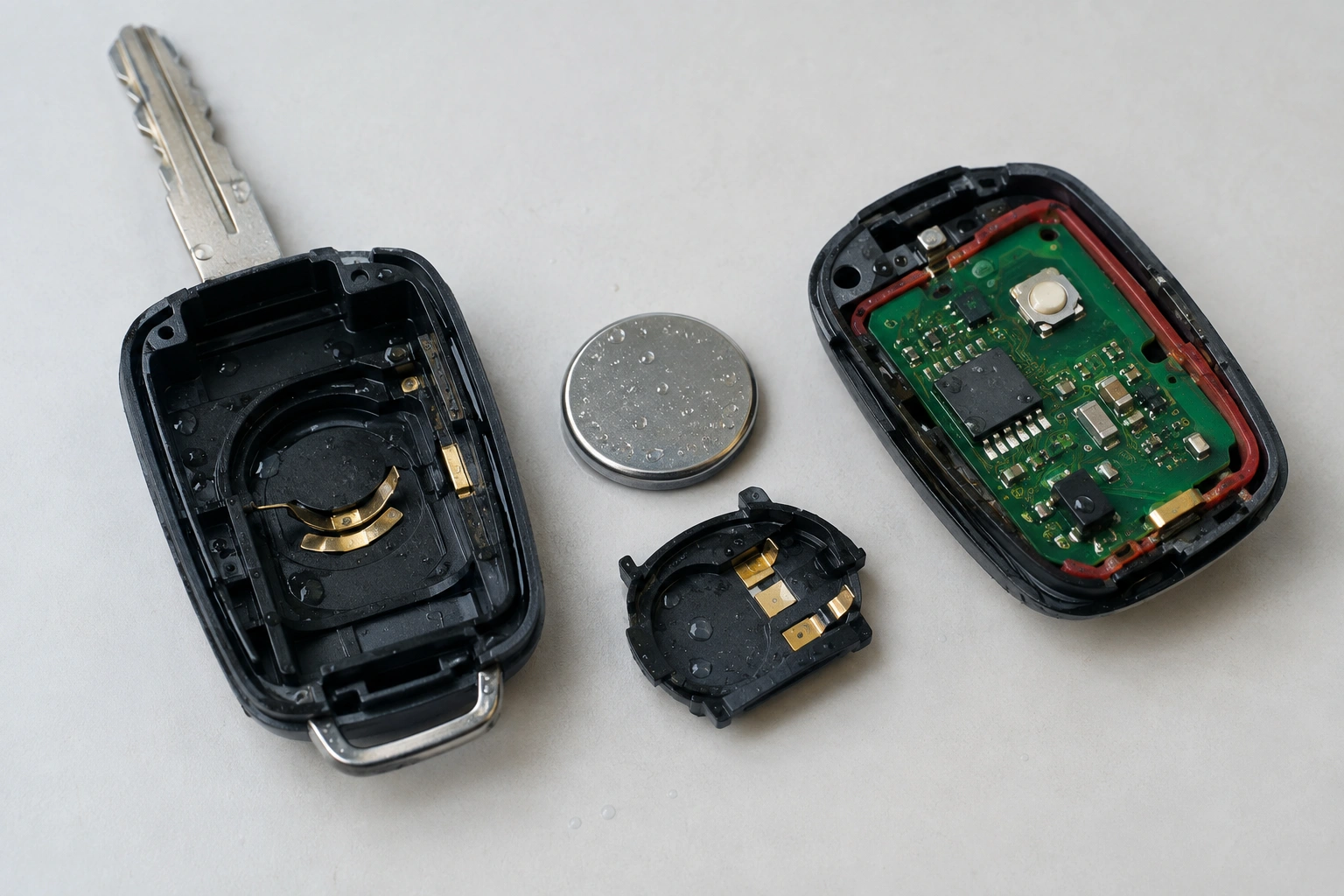
First-hour emergency checklist
- Stop pressing buttons immediately.
- Open the fob if you can do so safely.
- Remove the battery as soon as possible.
- Dry the parts separately.
- Do not test the fob until it is fully dry inside and out.
Follow this order:
-
Get it out of the water immediately.
Pull it from the sink, rain, washer, puddle, or spill as fast as you can. -
Stop pressing buttons.
Repeated button presses can force liquid across the circuit board. -
Open the fob carefully if you can do so without forcing it.
Many fobs split with a small seam or release point. Use the key blade or a small plastic pry tool if needed. -
Remove the battery right away.
If the fob is already wet, remove the battery as soon as you can safely do so. This is one of the best ways to reduce short-circuit risk. If the battery stays in place while moisture remains inside, the fob can keep drawing current and may corrode faster. -
Pat the outside dry.
Use a soft cloth or paper towel. Do not shake it aggressively. -
Set the parts aside to dry separately.
Keep the battery, housing, rubber buttons, and circuit board apart if possible.
If the fob was exposed to contaminated water, like floodwater, treat it as a higher-risk case. Dirt and minerals can speed corrosion and make a later repair less reliable.
What Not to Do With a Wet Key Fob
A few common “fixes” cause more trouble than they solve.
Do not use direct heat.
A hair dryer, oven, or heater can warp the case, damage the battery, or push moisture deeper into tiny components.
Do not keep testing it every few minutes.
That is a good way to keep current flowing through a wet board. If the fob is still damp inside, testing can worsen the damage.
Do not assume rice is a full solution.
Rice may help absorb some surface moisture, but it is not a dependable repair method for electronics with trapped liquid. Silica gel is often a more practical choice because it is designed to absorb moisture, but even that is not a guarantee if corrosion has already started.
Do not replace the battery before checking for residue.
If the contacts are green, white, or crusty, a fresh battery alone will not solve the problem.
How to Open the Fob and Check for Visible Damage
Once the battery is out, inspect the inside carefully.
Look for:
- Corrosion on battery contacts — green, white, or powdery residue
- Water spots on the circuit board
- Cracked solder joints or lifted components
- Sticky or swollen buttons
- A broken case seal or damaged rubber gasket
You do not need to scrub the board hard. In fact, aggressive rubbing can knock off tiny components. If you only see a light film or a few spots, the fob may still be salvageable. If you see heavy corrosion on the board or battery terminals, the odds of a reliable repair drop quickly.
A useful comparison: a rain-soaked fob with damp contacts is often a better repair candidate than a fob pulled from floodwater with visible crust on the board. The second case usually means contamination, not just moisture.
Drying Methods That Actually Help
For a wet key fob, the safest drying method is simple: open it, remove the battery, and let it dry thoroughly in a clean, dry place. If you have silica gel packets, place the parts in a sealed container with them. That gives moisture somewhere to go without adding heat or residue.
Air drying works best when the exposure was light and the fob was opened quickly. Silica gel can help speed the process. Rice is less reliable and messier, especially if grains or dust get into the housing.
Here is the realistic rule: do not test the fob until you are confident it is completely dry inside, not just dry on the outside. If you rush this step, you can mistake temporary recovery for a real fix.
If the fob was only splashed, a careful dry-out may be enough. If it was submerged for a long time, drying alone may not restore full function because the damage may be electrical, not just moisture-related.
How to Tell Whether the Battery, Contacts, or Circuit Board Are the Problem
When a wet fob fails, the likely culprit usually falls into one of three buckets.
1. The battery is the simplest possibility
If the battery was exposed to water, it may no longer deliver stable power. Even if it still has some charge, corrosion around the battery can make it unreliable.
Signs:
– Fob worked before the water exposure
– Battery contacts look clean
– No visible board damage
– Fob comes back briefly after a battery swap, then fails again
2. The contacts are the next likely issue
Corroded contacts can block power flow even if the battery is fine.
Signs:
– Green or white residue on the terminals
– Fob works intermittently
– Buttons respond only when pressed hard or at an angle
3. The circuit board is the hardest failure
If moisture reached the board and caused corrosion or a short, the fob may be unreliable even after drying.
Signs:
– No response after drying and battery replacement
– Visible corrosion on the board
– The fob works only once, then dies again
– Buttons trigger the wrong function or behave unpredictably
If you want a broader troubleshooting comparison, our guide on why your car key fob works intermittently can help you separate water damage from a weak battery or signal issue.
Cleaning Corrosion and Moisture Residue Safely
If you see light residue on the battery contacts or board, a small amount of isopropyl alcohol on a cotton swab can help clean away moisture residue and oxidation. Use it sparingly and let the parts dry fully afterward.
A few guardrails matter here:
- Use a light touch
- Avoid soaking the board
- Do not scrape hard with metal tools
- Stop if a component looks loose or fragile
Cleaning helps most when the problem is early corrosion, not heavy damage. If the board is already pitted, darkened, or flaking, cleaning may not restore dependable operation.
When to Replace the Battery vs. the Whole Fob
A battery swap makes sense when:
– The fob was only lightly exposed
– The inside looks clean
– The buttons and board are dry
– The fob worked before the battery was removed
A full replacement makes more sense when:
– The board shows corrosion
– The fob was in floodwater
– The case is cracked or sealed poorly
– The fob still fails after drying, cleaning, and a new battery
If you are deciding between a battery and a new fob, think in terms of reliability. A battery replacement is cheap and worth trying. But if the electronics are damaged, a fresh battery only delays the inevitable.
Will the Key Fob Need Reprogramming After Water Damage?
Not always. If the fob only needed drying and a battery change, it may work normally without reprogramming.
Reprogramming may be needed in some cases, such as:
– The board was damaged
– The fob lost power for a long time
– Internal components were replaced
– The vehicle or fob model is sensitive to pairing changes after service
If the fob starts working again after drying but acts inconsistently, that is usually a hardware warning, not a programming one. In other words, reprogramming may not fix a damaged board.
If your vehicle now says the key is not detected, our guide on how to start a car when the key fob is not detected can help you get moving while you sort out the fob.
Repair vs. Replacement: Cost and Reliability Comparison
Here is a practical way to think about the options.
| Option | Typical cost range (USD) | Best for | Pros | Cons |
|---|---|---|---|---|
| DIY dry-out and cleaning | $0 to $20 | Light water exposure | Lowest cost, fast to try | Not reliable for deep damage |
| Battery replacement | About $5 to $25 | Fob that was wet but otherwise clean | Simple and often worth trying | Won’t fix corrosion or board damage |
| Locksmith repair/service | Roughly $50 to $150, sometimes more depending on the fob | Suspected contact, housing, or light internal damage | Often more cost-effective than dealer service | Not every fob is repairable |
| Locksmith replacement and reprogramming | Roughly $100 to $300+ | Fob that cannot be repaired but can be matched to the vehicle | Can be faster than dealer service | Cost varies by vehicle and fob type |
| Dealer replacement | Roughly $150 to $600+ | New OEM fob or complex pairing | OEM compatibility, official service | Usually the most expensive route |
| Aftermarket replacement | Roughly $30 to $200+ | Older vehicles or budget-minded owners | Can be cheaper than OEM | Compatibility can vary |
The key trade-off is reliability versus cost. If your vehicle is newer or the fob is expensive and heavily integrated, OEM replacement may be the safer choice. If the vehicle is older and the fob is a straightforward remote, an aftermarket replacement may be enough.
For general vehicle ownership context, the NHTSA is a useful place to check safety-related recall and consumer information, though it will not diagnose your fob for you. If you are comparing repair paths, Edmunds and Car and Driver can also help you understand broader ownership costs and vehicle-specific considerations.
When to Consult a Locksmith
A locksmith is often the right next step when the fob is partially working, the battery contacts are corroded, or you want a repair opinion before buying a new remote. An automotive locksmith may be able to clean the fob, replace the battery, reprogram it, or replace the fob entirely, depending on how much damage the water caused.
Go to a locksmith sooner if:
– The fob is an OEM unit you want to preserve
– The dealer quote makes repair look unattractive
– You need a fast diagnosis
– The vehicle is older and uses a more serviceable remote
A dealer is usually the better choice when the fob is tied closely to the vehicle’s security system, when you need an OEM replacement, or when the model requires dealer-only access for programming.
If you have a proximity smart key with sealed electronics, it may be harder to open safely and harder to repair at home. In that case, it is often smarter to stop the DIY process early and let a locksmith or dealer assess whether cleaning, reprogramming, or full replacement makes more sense.
Signs the Fob Is Beyond Repair
Some fobs are not worth chasing.
Red flags include:
– Heavy green or white corrosion on the board
– Floodwater exposure
– Cracked circuit board
– Melted, swollen, or badly damaged battery
– No response after drying, cleaning, and battery replacement
– Intermittent operation that keeps getting worse
If the fob only worked once after drying and then failed again, that is often a sign of ongoing internal corrosion. At that point, replacement is usually the smarter move than repeated cleanup attempts.
Quick Decision Checklist
Use this quick path to decide your next move:
-
Was the exposure minor, like rain or a brief spill?
Try drying, battery removal, and a careful inspection. -
Did the fob go through a washer, sink, or puddle for a short time?
Open it, dry it thoroughly, and check the contacts before buying anything. -
Do you see corrosion on the battery contacts or board?
Clean lightly with isopropyl alcohol if the damage is minor. If it is heavy, consider replacement. -
Does a new battery bring it back?
If yes, you may have solved it. If not, the board may be damaged. -
Is the fob still unreliable after drying?
That usually means repair or replacement, not more waiting. -
Was it exposed to floodwater or contaminated water?
Treat it as a strong replacement candidate.
Water damage does not always kill a key fob, but it does punish delay. The faster you remove the battery, dry the parts, and inspect for corrosion, the better your odds of saving it.
FAQs
Can a wet key fob be saved after washing?
Sometimes. If you remove the battery quickly, dry the parts thoroughly, and there is no serious corrosion, the fob may recover.
Is rice a good fix for water-damaged key fobs?
Rice is not the best option. Silica gel or simple air drying is more reliable, especially if you have already opened the fob and removed the battery.
How long should I wait before testing the fob?
Wait until the inside is fully dry, not just the outside. If you are unsure, give it more time rather than testing early.
Can I just replace the battery and move on?
Only if the contacts and board look clean. If corrosion is present, a new battery may not solve the problem.
Will a dealer repair a water-damaged key fob?
Sometimes, but dealers are often more focused on replacement than board-level repair. An automotive locksmith may be a better first stop for a repair attempt.
Do all water-damaged fobs need reprogramming?
No. Some recover after drying and a battery change. Reprogramming is more likely when the board was damaged or replaced.
When is replacement the better choice?
If the board is corroded, the fob was exposed to floodwater, or it still fails after drying and a new battery, replacement is usually the safer bet.
How much does it cost to repair or replace a water-damaged key fob?
Costs vary by vehicle and damage level, but DIY cleanup is usually the cheapest, locksmith service often falls in the middle, and dealer replacement is usually the most expensive. A broad range can be from under $20 for a simple battery or dry-out attempt to several hundred dollars for dealer replacement and programming.
Can a locksmith always fix a water-damaged key fob?
No. A locksmith may be able to clean it, replace the battery, reprogram it, or replace it, but heavy corrosion, a cracked board, or severe water damage may make repair impractical.
