
How to Start a Car When the Key Fob Is Not Detected

If your dashboard says the key fob isn’t detected and the car won’t start, don’t panic. In many cases, the problem is something simple: a weak fob battery, a weak car battery, interference, or the need to use the vehicle’s backup start method.
I’m Jason Carter, and after years of working around automotive electrical systems, I can tell you this: the message is frustrating, but it usually gives you a clue. The trick is knowing whether you’re dealing with a fob issue, a vehicle battery issue, or a deeper problem in the smart key system.
What the Message Usually Means
A “key not detected” warning means the car isn’t getting the signal it expects from the fob. That doesn’t always mean the fob is dead. Sometimes the fob is still sending a weak signal, but the car can’t read it from normal range.
If you’re stranded right now, use this sequence first:
- Move the fob away from anything that could interfere with the signal. Take it out of bags with electronics, away from other keys, and away from metal objects.
- Try the normal start procedure again. Press the brake fully and use the start button the way your vehicle expects.
- Use the backup start method if the car still won’t detect the fob. The exact location and timing vary by make and model, so follow the vehicle-specific procedure.
Here’s the big picture:
- If the fob battery is weak, the car may only detect it very close to the start button or backup slot.
- If the car battery is weak, the whole system may act flaky or fail to wake up properly.
- If both batteries are fine, the issue may be interference, a damaged fob, a receiver problem, or an immobilizer issue.
For a deeper walk-through of the symptom itself, see our guide on why your car says key fob not detected but still starts.
Quick Diagnosis: Fob Battery, Car Battery, or Something Else?
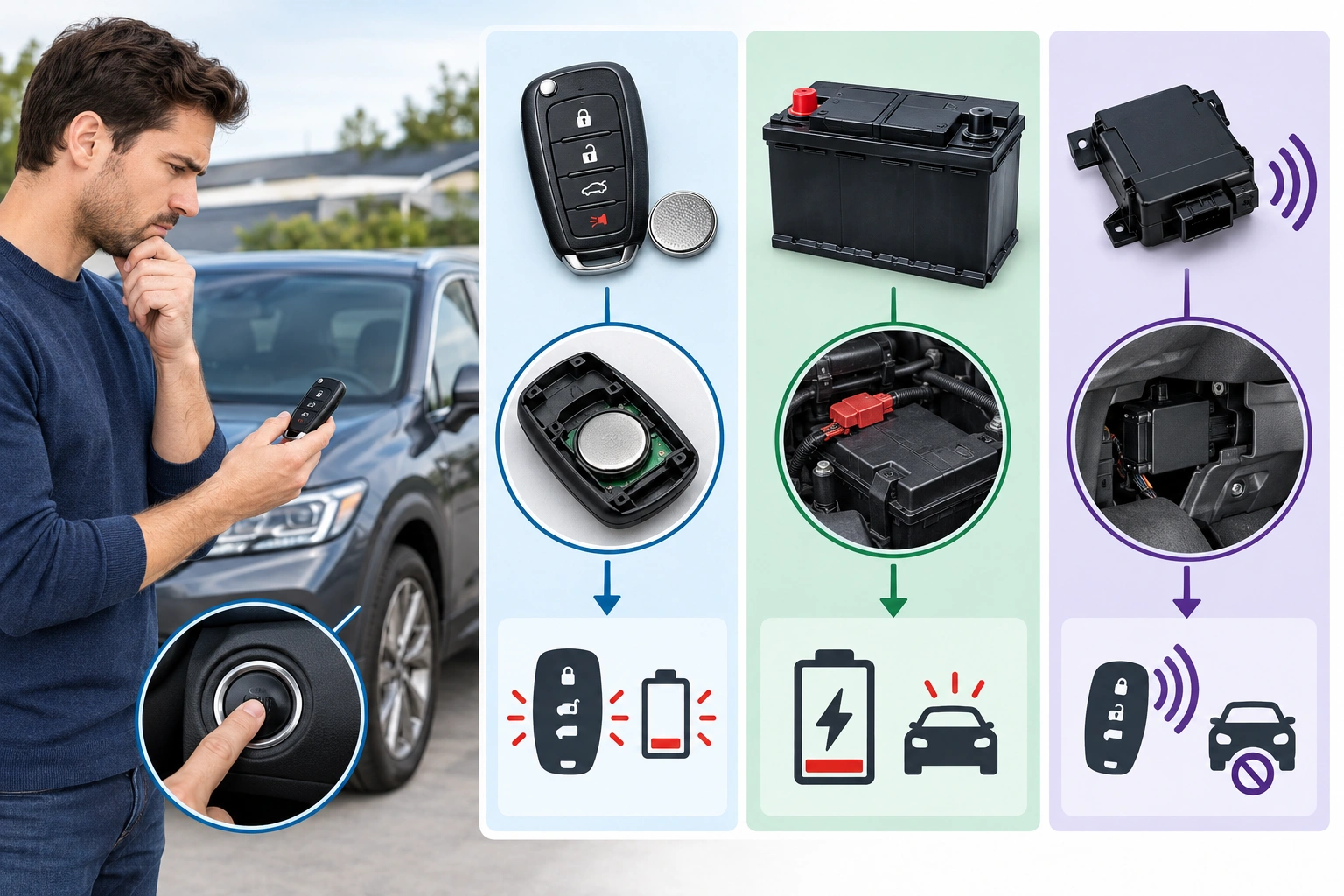
Use the symptoms you can see right now to narrow it down before you waste time swapping parts.
| Symptom | More likely cause | What to do next |
|---|---|---|
| Fob works only when held very close to the start button | Weak key fob battery | Replace the fob battery and retest |
| Dash lights are dim, electronics act slow, or the starter sounds weak | Weak car battery | Test or jump the vehicle battery first |
| Spare fob works, original fob does not | Bad original fob battery or damaged fob | Replace the fob battery, then test the spare for comparison |
| Neither fob is detected | Vehicle-side problem or interference | Check the car battery, then the receiver/immobilizer system |
| Message appears after parking near electronics or metal structures | Radio frequency interference | Move the fob away from the interference source and try again |
A good rule: if the car seems electrically tired, suspect the vehicle battery first. If everything else seems normal and only the fob is acting up, start with the fob battery.
First Things to Try Right Now
Before you dig into batteries or tools, try the simple fixes that often work in the real world.
Move the fob away from interference
If the fob is sitting next to a phone, another key fob, a metal case, or a bag full of electronics, move it. Radio frequency interference can block the signal enough to trigger a no-detection message.
Try the correct start posture
Some cars want the brake pedal fully pressed before they’ll respond. Others need the fob to be in a very specific spot for the backup reader to work. If the car is a push-button start model, try the start sequence exactly as the manual describes.
Use the backup recognition method
Many keyless cars have an emergency way to start even when the fob battery is weak. The vehicle may use a passive induction loop near the start button or steering column to read the fob’s immobilizer chip without needing the fob battery.
That’s the method you want if the car says the key isn’t detected but the fob itself is still physically in your hand.
How to Use the Hidden Mechanical Key and Emergency Start Method
Many fobs contain a hidden mechanical key. That key is usually there for one reason: to get you back into the car when the electronic side is failing.
Use the hidden key to unlock the door
If the doors won’t unlock electronically, look for the release switch or latch on the fob housing and remove the emergency key. Use it to open the driver’s door.
Be gentle. Don’t pry hard on the fob shell or twist the key like you’re forcing a stuck house lock. The parts are small, and the housing can crack.
Find the emergency start location
This is the part that varies the most from vehicle to vehicle. Some cars want the fob held directly against the start button. Others use a marked backup slot, a pocket in the center console, or a spot near the steering column.
A common template is:
- Unlock the door with the hidden key if needed.
- Enter the vehicle and sit in the driver’s seat.
- Press the brake pedal fully.
- Place the fob in the vehicle’s backup detection area, if your model has one.
- Press the start button once, then hold the fob in place if the vehicle asks for a longer read.
The exact placement and timing vary by make and model, so use the vehicle-specific procedure rather than assuming the same method works everywhere.
If your fob has no hidden mechanical key, or the key won’t open the door, stop there and call roadside assistance or a locksmith for access help. For a model-specific how-to, check your manual or the manufacturer’s support pages before guessing.
Check the Key Fob Battery
If the fob is old or has been acting inconsistent, the battery is one of the first things to replace.
Signs the fob battery is weak
A weak fob battery often shows up like this:
- The car detects the fob only when it’s very close
- Lock and unlock range gets shorter
- The warning appears intermittently, not every time
- The fob works better after sitting near the car for a moment
That last one can fool people. A fob with a weak battery may still work sometimes, which makes the problem feel random.
Replace the battery and test again
Open the fob carefully, note the battery type, and install the new cell in the same orientation. Then test the car again using the normal start method and the backup method if needed.
If the vehicle starts after the battery swap, you’ve likely found the issue.
If it still does not detect the fob, don’t assume the replacement battery was bad. The problem may be on the vehicle side, or the fob itself may be damaged.
Use a spare fob if you have one
A spare fob is one of the fastest ways to separate a fob problem from a vehicle problem.
- If the spare works, the original fob is the likely problem.
- If neither fob works, the issue is more likely with the car, the battery, or the receiver system.
That comparison saves a lot of guesswork.
Check the Car Battery and Electrical Signs
A weak car battery can absolutely cause a key fob not detected message. In fact, it can make the whole system behave strangely.
What points to the car battery
Look for these clues:
- Dash lights are dim or flickering
- The starter sounds slow or clicks
- Power windows or screens act sluggish
- Multiple warning lights show up at once
- The car has sat for a while and now acts dead or half-awake
If the vehicle shows several of those signs, the car battery is a strong suspect at the roadside. If the battery is weak enough, the smart key system may not wake up properly even when the fob is fine.
Why battery problems confuse the diagnosis
The smart key system and the immobilizer need power to communicate properly. If the vehicle battery is weak, the car may not wake up enough to recognize the fob, even if the fob battery is brand new.
That’s why I always tell people not to replace the fob battery blindly when the dashboard already looks weak. A bad vehicle battery can mimic a bad fob.
For general keyless ignition safety and system awareness, the NHTSA has useful consumer guidance on vehicle safety topics.
If the Car Still Won’t Detect the Fob After the Backup Method
If you’ve tried the backup start procedure, replaced the fob battery, and the car still won’t start, the issue is probably beyond a simple battery swap.
Possible causes at this stage
- The fob is damaged internally
- The vehicle’s receiver or antenna has a fault
- Wiring to the smart key system is damaged
- The immobilizer system is not reading the fob correctly
- The start button or related module is malfunctioning
At this point, repeated attempts usually don’t help. If the car isn’t responding after a correct backup procedure, it’s time to stop guessing and move to diagnosis.
A practical example is this: if a car starts normally with a spare fob but refuses to recognize the original one, the original fob is the likely problem. If both fobs fail in the same car, the vehicle-side system becomes the stronger suspect.
For a broader view of keyless-start behavior and backup recognition methods, Edmunds explains keyless ignition basics in a way many drivers find helpful.
Common Mistakes That Waste Time
A lot of people make the same few mistakes when the car won’t detect the fob.
Assuming the fob battery is always the problem
That’s the most common misread. Sometimes the fob battery is fine and the car battery is weak.
Using the wrong backup location
Emergency start methods are not universal. Holding the fob near the button may work on one vehicle and fail on another. Check the manual instead of copying a generic internet tip.
Forgetting the hidden key
If you can’t get into the vehicle, you may be stuck before you even reach the start procedure. The emergency key is there for a reason.
Forcing the fob apart
Prying too hard can crack the shell or damage the battery contacts. Work carefully and use the correct release point.
When to Consult a Locksmith
Call a locksmith or roadside assistance if you can’t unlock the vehicle, can’t access the hidden key, or need help verifying the emergency start procedure at the roadside.
You should also stop DIY troubleshooting if:
- You’re stranded in an unsafe location
- The car battery appears weak and the vehicle won’t respond normally
- Both the spare fob and original fob fail
- The car shows additional electrical or security warnings
A locksmith can often help with access, emergency key issues, or a fob that is no longer being recognized. If the problem looks more like a vehicle-side electrical fault, a mechanic or dealer service department may be the better next stop.
Model-Specific Note: Check Your Owner’s Manual
This is the one model-specific note worth keeping in mind: the exact emergency start procedure depends on the vehicle.
Your manual may show:
- Where to hold the fob
- Whether there is a backup slot
- How long to keep the fob in place
- Whether the brake pedal must be pressed in a specific way
- Whether the fob must be removed from a case or metal holder first
If you don’t have the manual handy, look it up by model and year from the manufacturer. That small step can save you from trying the wrong procedure and thinking the car is broken when it just needs the correct backup method.
Final Takeaway
If your car says the key fob is not detected, use a simple decision path: replace the fob battery if the fob seems weak, jump-start or test the car battery if the vehicle itself seems electrically tired, call roadside assistance if you can’t access the car or need help at the scene, and schedule dealer or mechanic diagnosis if both fobs fail or the backup method doesn’t work.
The good news is that many of these cases are fixable without a tow. The key is to match the symptom to the likely cause instead of replacing parts at random.
