
Car Won’t Start? What to Do When the Key Fob Battery Is Dead

If your car won’t start and you suspect the key fob battery is dead, the good news is that this is often a fixable problem, not a major breakdown. In many vehicles, a dead fob battery stops the remote unlock and lock functions first, but the car may still start through a backup method built into the push-to-start system.
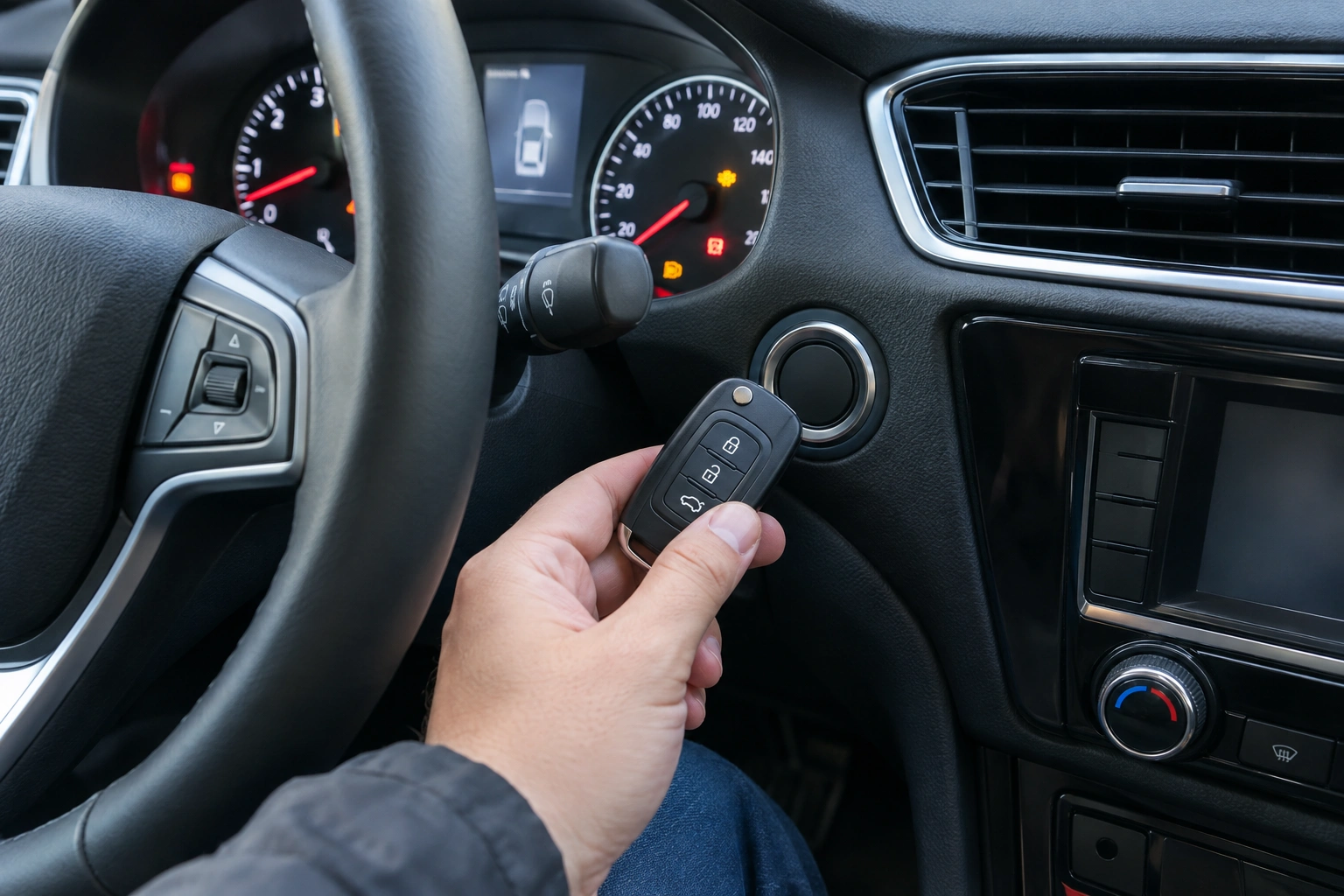
The catch is that the exact workaround depends on the vehicle. Some models want the fob held against the start button. Others use a marked backup slot, a center console pocket, or another sensor area. Your owner’s manual is the best source for the exact steps for your make and model.
If you have a push-to-start vehicle, the backup procedure matters. If you have a traditional keyed ignition with a metal key and ignition cylinder, the dead fob battery usually affects remote locking and unlocking first, while the ignition itself typically still works through the physical key. Because procedures are highly model-specific, check your manual before assuming the same fix applies to both systems.
Quick answer: can a dead key fob battery stop the car from starting?
Yes, it can — especially on push-to-start vehicles. If the fob battery is weak or dead, the car may not detect the fob well enough to allow normal starting. That does not always mean the car itself is broken.
On many vehicles, the fob contains a passive chip that the car can still read at very close range or in a designated backup location. That’s why the car may refuse to start normally, yet still start if you use the emergency method correctly.
If your vehicle has a traditional metal key and ignition cylinder, a dead fob battery usually affects remote locking and unlocking rather than the ignition itself. In that case, the issue may be the fob’s remote function, the vehicle battery, or a separate ignition problem.
For a broader look at what “not detected” can mean, see our guide on key fob not detected and the car won’t start.
How to tell if the key fob battery is the real problem
The symptom pattern matters. A dead fob battery usually shows up as weak or missing remote functions first.
Signs that point to the fob battery
- The unlock and lock buttons work only sometimes, or not at all.
- You have to stand unusually close to the car for the fob to respond.
- The car says it cannot detect the key, but the dashboard still has normal power.
- The fob worked recently and then gradually got worse.
Signs that point to the car battery instead
- The interior lights are dim or dead.
- The dash barely lights up when you press the start button.
- You hear clicking, but the starter does not turn.
- The car behaves like it has very little electrical power at all.
That difference matters. The fob battery powers the remote and detection side of the key fob. The vehicle battery powers the car’s electrical system. A dead fob battery can block recognition; a dead car battery can make the entire vehicle act lifeless.
Dead key fob battery vs dead car battery
| Symptom | Likely cause | What you may notice | Best next step |
|---|---|---|---|
| Remote buttons stop working | Dead or weak key fob battery | Lock/unlock range drops, buttons become unreliable | Replace the fob battery |
| Car says “key not detected” but dash powers up | Dead key fob battery or fob recognition issue | Push-button start won’t engage normally | Try the backup start method |
| Interior lights are dim or dead | Dead or weak car battery | Slow crank, clicking, weak dash lights | Jump-start or test the car battery |
| Fob works manually but not remotely | Fob battery or fob hardware issue | Mechanical key still opens door | Replace battery, then inspect fob |
| Nothing responds at all | Car battery or electrical fault | No lights, no accessory power | Check vehicle battery and connections |
If you want a general explanation of how keyless systems behave when the fob battery fails, Edmunds has helpful consumer-oriented car ownership resources, though your owner’s manual still matters most for the exact procedure.
Try the emergency start method for your vehicle
This is the step that gets many drivers moving again. But don’t assume every car uses the same workaround.
On many push-to-start vehicles, the backup method involves:
1. Putting your foot on the brake.
2. Holding the key fob very close to the start button or the vehicle’s designated backup detection area.
3. Pressing the start button while keeping the fob in place.
Some vehicles use a center console slot, a marked pocket, or another location designed to read the fob when the battery is dead. Others may require the fob to touch the start button itself.
A useful example: one sedan may start only when the driver presses the fob against the start button, while an SUV may need the fob placed in a console slot. The difference is why guessing can waste time. Check the owner’s manual for the exact backup location or method before you need the fix in a parking lot.
If you’re stranded and the car is in a safe place, try the backup method once or twice with care. If the start button press does nothing, stop and verify you’re using the correct backup area or contact method in the manual. Don’t force the button or keep cycling the ignition endlessly.
For official vehicle safety and owner resources, NHTSA is a reliable starting point for finding manufacturer guidance and vehicle information.
Use the mechanical backup key to get into the car
If the fob battery is dead, keyless entry may not unlock the doors. Most smart fobs include a hidden mechanical key inside the shell.
Look for:
– A release tab or button on the fob
– A small metal key blade that slides out
– A concealed door lock cylinder, often under a cap on the driver’s door handle
That backup key matters because you need access to the cabin before you can try the emergency start method on many vehicles.
A common mistake is trying to pry the door handle or fob case with too much force. If the key blade is hidden, use the release designed into the fob. If you can’t find it, check the owner’s manual rather than forcing parts apart.
Replace the key fob battery
If the fob battery is the issue, replacing it is usually straightforward.
What you need
- The correct coin-cell battery for your fob
- A small flat tool or the edge of a plastic pry tool, if the case allows it
- A clean surface so the tiny parts don’t get lost
How to do it
- Open the fob case using the release point or seam designed by the manufacturer.
- Note the battery type and orientation before removing it.
- Remove the old coin-cell battery carefully.
- Install the new battery with the correct polarity.
- Snap the case back together securely.
- Test the lock, unlock, and start functions.
Battery type matters. Many fobs use a coin-cell battery such as a CR2032 or CR2025, but not all do. Check the old battery or the owner’s manual before buying a replacement. Using the wrong size or installing it backward can leave you with the same problem and a fob that still will not respond.
If your fob works after replacement but the buttons feel intermittent, the issue may be dirty contacts, a worn shell, or a weak battery connection rather than the battery alone.
For more help after a battery swap, see our guides on why your key fob won’t unlock the car after a battery change and why your key fob won’t lock the car after a battery change.
If the car still won’t recognize the fob after battery replacement
If a fresh battery doesn’t solve it, move through the likely causes in this order.
1. The car battery is weak
A weak vehicle battery can confuse the system or prevent the electronics from waking up properly. If the dash is dim, the starter clicks, or accessories act sluggish, the car battery may be the real problem.
2. The fob battery was installed incorrectly
A backward battery, a loose contact, or a case that didn’t snap closed properly can make the fob act dead even with a new cell installed.
3. The fob itself has failed
The internal circuit board, buttons, or transponder chip may be damaged. This is more likely if the fob was dropped, got wet, or has been acting inconsistently for a while.
4. The vehicle-side system needs diagnosis
If the car still refuses to recognize the key after you’ve ruled out the battery and the fob, the issue may be on the vehicle side. On push-to-start vehicles, that can include the immobilizer system, key reader, brake pedal/start interlock, or another electrical fault.
At that point, stop DIY troubleshooting if the car still won’t respond after a correct battery check and a proper backup-start attempt. If you’re locked out or need the vehicle moved, roadside assistance or a locksmith may be the next practical step. If the problem appears to be inside the security or start system, a dealer or qualified repair shop may be better equipped for model-specific diagnosis.
When to Consult a Locksmith
A locksmith can be the right call when you need door access, a replacement fob shell, or help diagnosing a key that no longer communicates properly. That’s especially useful if:
– You’re locked out and the mechanical key isn’t available or isn’t working smoothly.
– The fob battery replacement didn’t restore normal operation.
– You need help determining whether the fob hardware has failed.
– You suspect the issue may involve the key or immobilizer rather than just the battery.
If the vehicle is stuck in a risky location, roadside assistance may be the faster first call. If the issue appears deeper than the fob, a dealer may be better equipped for model-specific testing and reprogramming.
Prevent the same problem next time
A dead fob battery is much easier to handle when you’re not already stranded.
A few practical habits help:
– Replace the fob battery at the first sign of weak range.
– Keep the owner’s manual in the glove box or on your phone.
– Test the backup start method at home, not in a parking lot at night.
– Make sure you know where the hidden mechanical key is stored.
– Keep a note of the correct battery type for your fob.
That last point saves time. If your fob uses a CR2032, for example, you can buy the right replacement before the battery fails completely. The goal is not to guess when the car refuses to start — it’s to already know the backup plan.
FAQs
Can a dead key fob battery stop my car from starting?
Yes, especially on push-to-start vehicles. Some cars will still start if you use the backup detection method, but the exact procedure varies by model.
Will my car still unlock if the fob battery is dead?
Sometimes not. Remote lock and unlock are usually the first functions to fail. You may need the hidden mechanical key to get in.
How do I know whether I need a fob battery or a car battery?
If the dash and lights seem normal but the key isn’t recognized, the fob battery is a likely suspect. If the whole car seems weak or dead, the vehicle battery is more likely.
Do I need to reprogram the fob after changing the battery?
Usually no, but not always. If the fob still doesn’t work after a correct battery replacement, the issue may be the fob, the car battery, or the vehicle’s security system.
What if my car has no visible keyhole?
Many vehicles hide the mechanical lock cylinder under a cover. Check the owner’s manual before trying to pry anything open.
Can I use an app or digital key instead?
Some manufacturers offer app-based remote start or digital key features. Availability depends on the vehicle and account setup, so check the manufacturer’s app documentation for your model.
If your car won’t start and the key fob battery is dead, the fastest path is usually simple: confirm the symptom pattern, try the vehicle’s backup start method, replace the coin-cell battery if needed, and escalate only if the car still won’t recognize the fob. That keeps you from chasing the wrong problem and gets you back on the road sooner.
