
Why Your Key Fob Won’t Unlock the Car After a Battery Change

You pop in a fresh battery, press the unlock button, and nothing happens. That’s frustrating, but it usually means the problem is still something small: the battery type, the way it sits in the fob, the contacts, or a resync issue. I’ve seen plenty of drivers replace a battery and assume the fob itself died, when the real issue was a loose coin cell or a reversed battery.
The good news is that you can narrow this down pretty quickly. In most cases, the fix is mechanical, not expensive electronics work. The trick is to check the simplest things in the right order so you don’t waste time replacing parts that were never the problem.
What usually goes wrong after a battery change
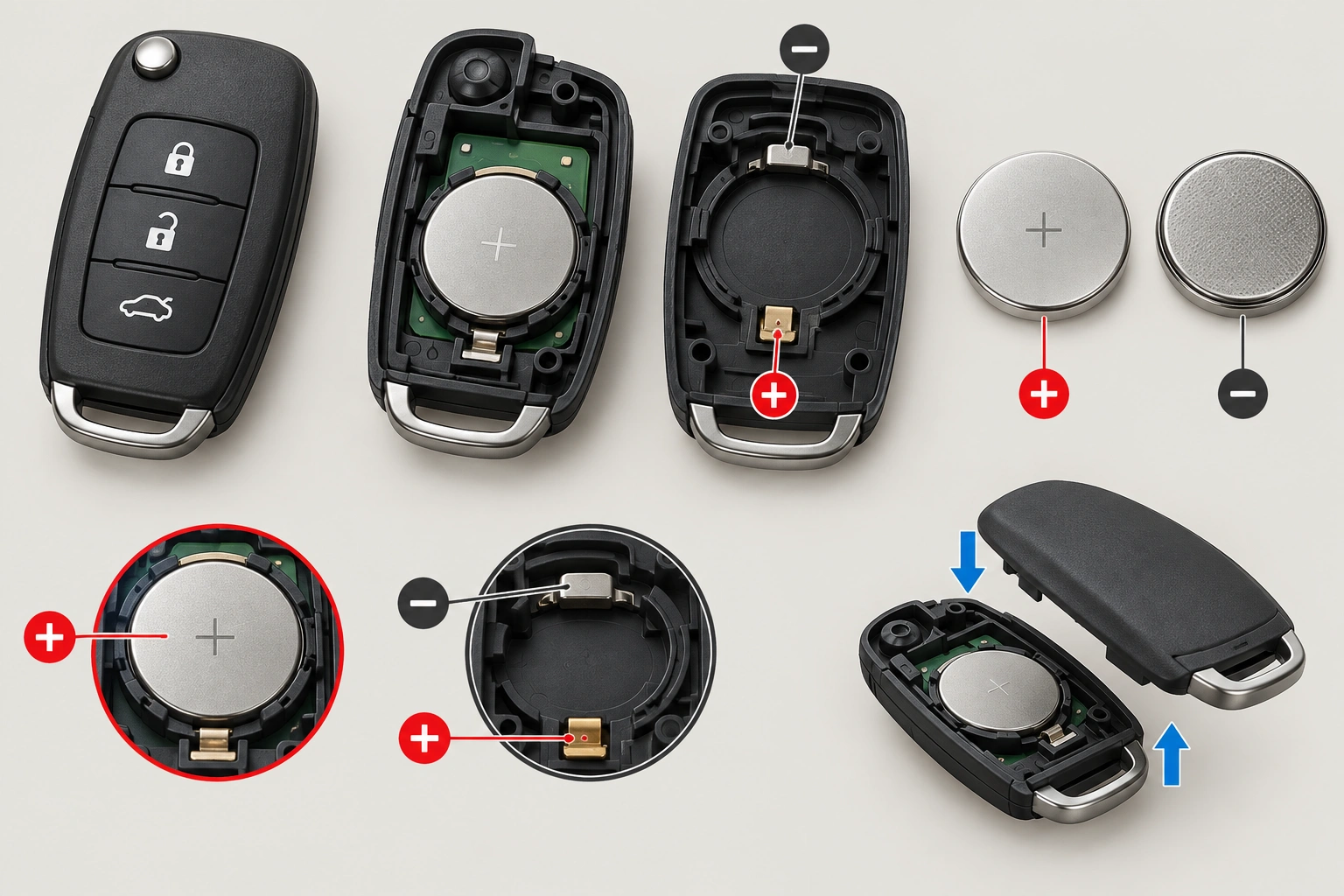
When a key fob stops unlocking the car right after battery replacement, the most likely causes are:
- the wrong battery size was installed
- the battery was put in backward
- the battery is not seated firmly against the contacts
- the fob case is not fully snapped together
- the replacement battery is weak or dead
- the fob needs a resync on that specific vehicle
- the button pad, contacts, or circuit board was damaged during opening
That last point matters. If the fob worked before you opened it and failed immediately after, the battery change itself may have created the issue. A bent contact or misaligned shell can stop the unlock signal even when the battery is brand new.
Quick comparison: battery issue, contact issue, or vehicle-side problem?
| Symptom | Most likely cause | What to check next |
|---|---|---|
| Fob does nothing after battery change | Wrong battery, reversed polarity, poor seating, dead replacement battery | Reopen the fob and verify battery type and orientation |
| Lock works but unlock does not | Worn unlock button, damaged contact, partial internal damage | Inspect the button pad and circuit board side that handles unlock |
| Fob works only when pressed tightly together | Loose battery fit or bent contacts | Re-seat battery and check spring pressure |
| Fob worked before but stopped after car battery was disconnected | Possible resync or programming issue | Try the vehicle’s owner-manual procedure |
| Neither key fob works, or response is weak from close range | Vehicle battery or receiver issue | Check the car battery and test from normal distance |
| New battery tested bad | Dead replacement battery | Replace the battery with a fresh, known-good one |
If you want a related walkthrough for a different symptom, this guide on key fob not detected after replacing the battery covers the vehicle-side checks in more detail.
First check: battery type, polarity, and fit
The fastest fix is often the simplest: confirm that the battery is the exact type your fob uses. Many remotes use a CR2032, but some use a CR2025 or another coin cell. Those batteries can look close enough to fool you, but if the thickness or fit is wrong, the fob may not make proper contact.
Here’s what to check:
- Match the battery code printed on the old battery or in the owner’s manual.
- Check polarity. The positive and negative sides must face the same way as the old battery.
- Make sure the battery sits flat in the holder and does not rock or slide.
- Close the case fully. If the shell is slightly open, the battery may lose contact when you press the unlock button.
A loose battery can be deceptive. The fob may light up, or one button may work intermittently, but the unlock signal can fail because the battery shifts when the button is pressed.
Inspect the battery contacts and fob reassembly
Once the battery is out, look closely at the metal contacts inside the fob. They should press firmly against the battery. If a contact is bent away from the battery, the fob may seem assembled correctly but still not power the transmitter reliably.
What to look for:
- bent or flattened contact tabs
- white or green corrosion
- plastic tabs that are not holding the battery in place
- a cracked case that keeps the halves from closing evenly
- a rubber button pad that is not seated correctly
If the fob was dropped during the battery change, the circuit board can also shift. That is especially worth checking if the lock button works but unlock does not. A partial failure like that often points to one button path or contact area, not the battery itself.
Test whether the new battery is actually good
A fresh battery is not always a good battery. Coin cells can sit on a shelf for a long time, and some are weak right out of the package. RAC notes that the battery is the most common issue when a key fob stops working, but that does not mean every “new” battery is usable.
If you have another battery of the same type, try it. If not, use a simple battery tester or a multimeter if you have one. You are looking for a battery that is not just new, but actually delivering the right voltage under normal conditions.
A practical rule: if you have already reopened the fob once and the battery still does not work, do not keep assuming the battery is fine just because the package was sealed. Swap in a known-good battery before moving on to programming steps.
Try a simple resync or reset
Some vehicles may need the fob to reconnect after a battery change or after the car battery has been disconnected. Others do not. That is why the exact steps matter by make and model.
If your owner’s manual includes a sync or programming procedure, follow that first. Typical examples include pressing a sequence such as lock/unlock while the key is in the ignition, or using an onboard menu that says something like “remote learning,” “keyless entry reset,” or “smart key registration.” If the manual gives a timed sequence, follow it exactly.
If the vehicle has a push-button start, the smart key system may behave differently from a traditional remote. A fob can sometimes still start the car even when remote lock and unlock act up, or vice versa. That split behavior is a clue that the issue may be in the remote function path rather than the whole fob.
If the fob still fails after a successful resync, the next question is whether the remote is repairable or simply worn out. When the battery, contacts, and sync steps are all ruled out, replacement is often the better option than repeated troubleshooting.
For a broader look at fob detection issues, see this guide to key fob not detected after battery change.
If lock works but unlock does not, suspect button or internal damage
When only one button fails, I stop blaming the battery first. A working lock button with a dead unlock button usually points to one of these:
- a worn unlock button pad
- a damaged contact under that button
- a cracked solder joint
- liquid or corrosion damage on part of the board
That kind of failure is different from a dead battery because the fob is still transmitting something. It just is not transmitting correctly for the unlock command. If the unlock button feels mushy, sticks, or requires a hard press, the button pad may be worn out.
If the fob took a hit while you were opening it, the circuit board may also have shifted enough to break a connection. In that case, replacing the battery again will not help.
Check the vehicle side: car battery, receiver, and smart key system
Sometimes the fob is fine and the car is the problem.
A weak vehicle battery can cause remote locking and unlocking problems, especially if the battery has been disconnected recently or the car has been sitting. RAC also notes that trying the fob from too far away, or even from inside the house, can make it seem like the remote has failed when the signal is just being blocked or weakened.
Check these vehicle-side clues:
- Do both key fobs act the same way?
- Does one fob work while another does not?
- Does the car respond at close range but not from farther away?
- Did the problem start after the vehicle battery was replaced or disconnected?
- Does the car still start normally?
If one fob works and another does not, the receiver is less likely to be the problem and the nonworking fob becomes the stronger suspect. If neither remote works, or both act weakly from close range, the vehicle battery or receiver side deserves more attention. And if the issue started right after a vehicle battery replacement or disconnect, that points even more toward a car-side resync or power issue than a dead fob.
If you are also dealing with start issues, this related guide on key fob not detected and the car won’t start can help separate a remote problem from a smart key problem.
Likely causes, from most common to least common
Here is the order I would check things in:
- Wrong battery type or reversed polarity
- Battery not seated firmly
- Poor contact inside the fob
- Dead or weak replacement battery
- Fob case not fully reassembled
- Need for resync or reprogramming
- Damaged button pad or circuit board
- Vehicle battery or receiver issue
That order saves time because the first four problems are cheap and easy to fix. Reprogramming and replacement should come later, after you have ruled out the battery and contact issues.
Step-by-step troubleshooting checklist
Use this sequence instead of jumping around:
- Open the fob again and verify the battery code.
- Confirm polarity against the old battery or the marked diagram inside the fob.
- Press the battery into place and make sure it sits flat.
- Inspect the contacts for bending, corrosion, or looseness.
- Snap the case together fully and make sure there is no gap.
- Test the fob close to the car in case range or interference is part of the issue.
- Try the other buttons to see whether only unlock is affected.
- Use a known-good battery if the first replacement may be weak.
- Follow the owner-manual resync procedure if your vehicle requires one.
- Test the vehicle battery and compare both key fobs if the problem still remains.
This sequence keeps you from paying for programming when the battery was simply installed backward.
When to consult a locksmith
If you have tried a known-good battery, checked the contacts, and the fob still will not unlock the car, it is time to think about repair or replacement. An automotive locksmith can often test the fob, confirm whether it is transmitting, and tell you whether the problem is the remote, the vehicle receiver, or the programming.
A locksmith is usually the better next step when:
- the fob was physically damaged during battery replacement
- the unlock button works inconsistently
- the vehicle manual does not provide a usable resync procedure
- both batteries and contact checks have failed
- you want a faster, lower-hassle diagnosis than trial and error
If the fob still fails after a successful resync and a known-good battery, replacement is often more sensible than repair, especially if the case, buttons, or board were damaged while opening it. A locksmith can usually tell you whether the remote is worth saving or whether a replacement fob is the cleaner fix.
A dealer makes more sense when the vehicle uses a more complex smart key system or when the car likely needs factory-level programming. That route costs more than basic DIY troubleshooting, but it can be the cleanest fix when the issue is on the vehicle side.
FAQ
Does a key fob need to be reprogrammed after a battery change?
Usually no, but some vehicles do need a resync or reprogramming step. The exact answer depends on the make and model, so the owner’s manual is the best place to check first.
Can a new battery still be bad?
Yes. A battery can be the wrong size, weak, dead, or not making good contact even if it is brand new.
Why does my fob lock the car but not unlock it?
That often points to a worn unlock button, a damaged contact, or partial internal damage rather than a battery problem.
What if the car battery is weak?
A weak vehicle battery can cause remote locking and unlocking problems. If both fobs act up, check the car battery and receiver side before replacing the remote again.
Should I buy a new fob right away?
Not yet. Recheck the battery type, polarity, fit, and contacts first. A lot of “bad fobs” turn out to be installation problems.
If you want more background on how remote systems behave after battery issues, the Edmunds car buying and ownership advice section and Car and Driver’s vehicle tech coverage are useful general references. For safety-related guidance around vehicle electrical problems, the NHTSA is also a reliable starting point.
