
Toyota Key Fob Not Working? A Practical Troubleshooting Guide for Drivers

When a Toyota key fob stops responding, the problem is usually simpler than it feels in the moment. The fastest way to narrow it down is this: if the fob works only when you are very close to the car, start with the fob battery. If the fob is completely dead, try the mechanical key and emergency start method first. If the fob still seems fine but the car does not respond, check the vehicle battery and basic car-side issues before assuming the fob itself is bad.
If your Toyota won’t lock, unlock, or start with the fob, the first question is whether the failure is complete or partial. A fob that works only up close points to a weak battery or signal problem. A fob that suddenly fails after a drop, water exposure, or button wear points more toward physical damage. And if the fob seems fine but the car does not respond, the vehicle battery or smart key system may be the real issue.
Quick diagnosis: what the symptoms usually mean
Here is the fastest way to narrow it down before you start replacing parts.
| Symptom | Most likely cause | What to try first |
|---|---|---|
| Works only when held very close to the car | Weak key fob battery or signal interference | Replace the fob battery, then test again away from electronics |
| Lock/unlock works sometimes, not always | Weak battery, worn button, loose battery contact | Check battery, open the fob, inspect the contacts |
| One button works but another does not | Worn button pad or internal damage | Test the spare fob if you have one, inspect the shell |
| Panic button works but lock/unlock does not | Button wear or partial internal failure | Compare with a second fob or replace the shell |
| Fob is completely dead | Dead battery, damaged fob, or loss of sync | Replace the battery first, then check for physical damage |
| Car won’t detect the fob after a battery change | Programming/sync issue, vehicle battery issue, or fob damage | Check the vehicle battery and try the emergency start procedure |
| Door locks work but push-button start does not | Weak fob battery or smart key detection issue | Use the emergency start method and test the fob battery |
That table is the fastest shortcut I know because it keeps you from guessing. A Toyota fob that still has some life usually gives you a warning before it dies completely. A totally dead unit is more suspicious, especially if it got wet or dropped.
Most likely causes, in the order I would check them
1) Weak or dead key fob battery
This is the first thing to check because it is the cheapest and most common fix. Toyota smart keys often get flaky before they fail completely. You may notice shorter range, delayed response, or needing to press the button more than once.
A battery problem does not always mean the fob is dead. Sometimes the battery still has enough power to send a weak signal, which is why the fob may work from one foot away but not across the driveway. That pattern usually points to the battery before anything else.
2) Vehicle battery problem
A weak car battery can make a Toyota act like the fob is bad when the car is actually the problem. If the dash lights are dim, the starter sounds weak, or the locks act sluggish, check the vehicle battery before blaming the remote. A dead or very weak car battery can also interfere with push-button start recognition.
3) Signal interference
Nearby electronics, another key fob, or even certain parking areas can interfere with the signal. If the fob seems to work better in one location than another, that is a clue. I would especially suspect interference when the fob is intermittent rather than fully dead.
4) Physical damage
Water, drops, cracked cases, and worn buttons can damage the internal board or battery contacts. If the fob stopped working right after it hit the floor or got wet, that is a different situation than a simple battery issue.
5) Programming or sync issue
If the battery is good and the fob still will not communicate with the car, the key may have lost sync or need programming. Some Toyota owners can solve a simple sync issue at home, but many smart key problems need a locksmith or dealer tool.
For broader button-specific troubleshooting, this guide on a key fob unlock button not working can help if only the unlock side is failing. If the lock button is the only issue, see the related key fob lock button not working article.
Fix 1: replace or test the key fob battery
If you have not changed the battery recently, this is where I would begin.
What to look for before replacing it
A weak battery usually shows up as:
– short range
– intermittent response
– needing to stand close to the car
– slower lock/unlock response
– the car recognizing the fob only sometimes
If the fob was already acting up before it died, that is a strong battery clue.
How to replace the battery
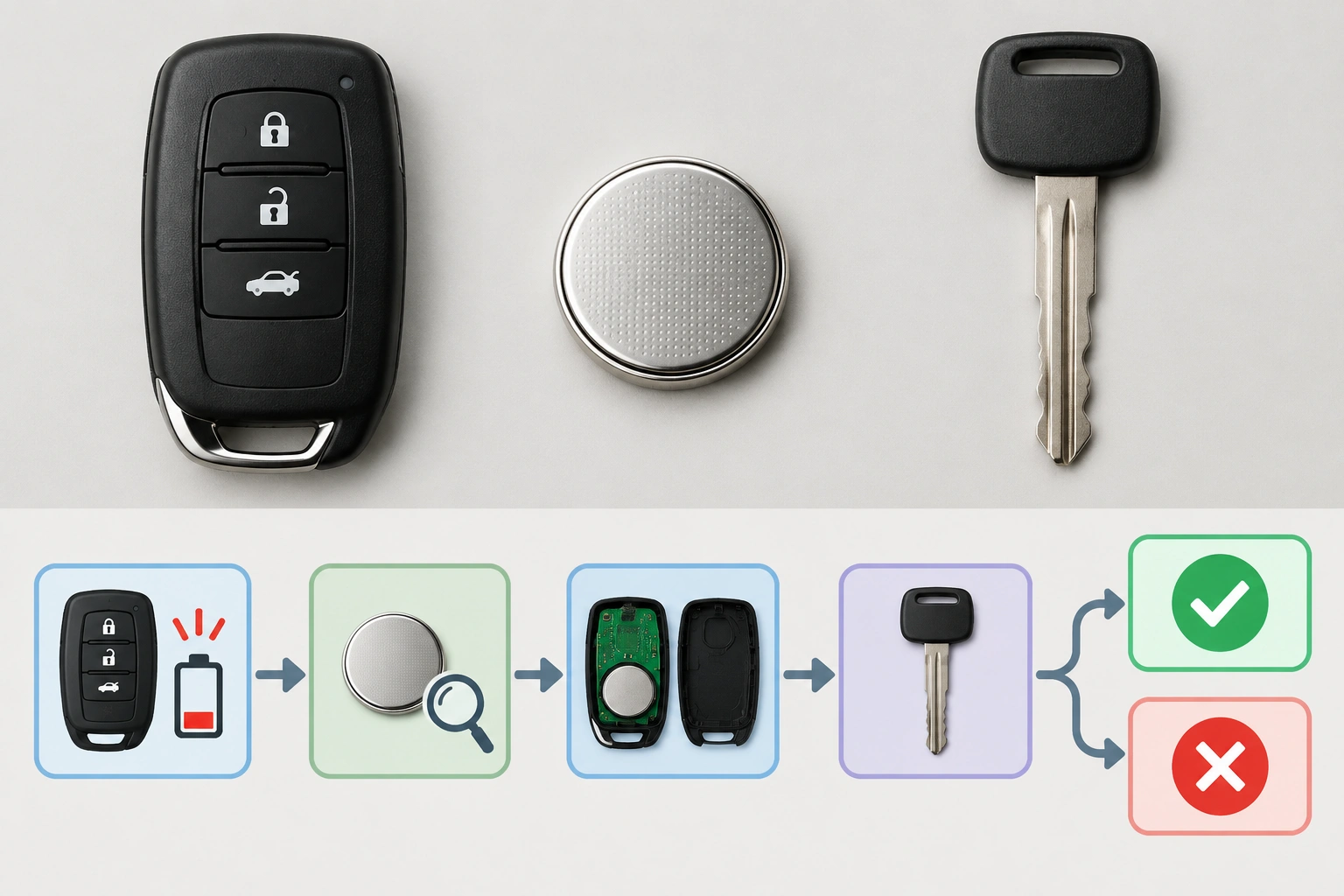
Open the fob carefully using the seam or release point on the case. Most Toyota remotes use a small coin-cell battery, but the exact type can vary by model and year, so check the old battery before buying a replacement. Match the number printed on the battery rather than guessing.
When you install the new battery:
– keep the positive and negative sides oriented correctly
– make sure the battery sits flat in the holder
– snap the case back together fully
– test lock, unlock, and start functions right away
If the fob springs back to life, you probably found the problem. If nothing changes, do not assume the battery was wasted; it still ruled out the easiest cause.
How to tell a weak battery from a dead one
A weak battery usually gives some warning signs first, such as shorter range or intermittent response. A dead battery usually means the fob does nothing at all, unless you use the emergency start method. If the fob works sometimes and fails other times, battery contact or battery strength is more likely than a total failure.
What a battery replacement can and cannot fix
A new battery can restore a weak fob, but it will not repair cracked circuit boards, water damage, or a lost program. That is why I always recommend testing the simplest fix first, then moving to the next layer only if needed.
Fix 2: use the mechanical key and emergency start procedure
If the fob is completely dead, Toyota gives you a backup way in.
Unlock the door with the mechanical key
Many Toyota smart keys hide a mechanical key inside the fob. Slide the release, remove the metal key, and use it to unlock the driver’s door. Be gentle with the lock cylinder if it has not been used in a while.
Start the car with a dead smart key battery
On many Toyota models, the car can still detect the fob when it is placed in the correct spot near the start button or key reader area, even if the fob battery is weak or dead. A model-agnostic way to try it is:
- Unlock the driver’s door with the mechanical key.
- Sit in the driver’s seat with the fob inside the car.
- Press the brake pedal as you normally would for push-button start.
- Hold the fob directly against the start button or place it in the vehicle’s designated emergency detection area.
- Press the start button while keeping the fob in that position.
If the engine starts, the fob battery is likely weak rather than the entire fob being unusable. If the car still does not respond, the issue may be with the vehicle battery, the fob itself, or the smart key system.
The exact emergency start method varies by Toyota model and year, so check your owner’s manual for the precise procedure for your vehicle. If you are stranded and unsure, the manual is the safest reference before trying repeated attempts.
A useful clue: if the car starts only when the fob is held very close to the start button, that usually points to a weak fob battery or detection issue, not a completely ruined remote.
Fix 3: check the vehicle battery, fuse, and basic car-side issues
This is the step many drivers skip, and it matters.
Check the car battery first
If the car battery is weak, the vehicle may not respond to the fob normally. Look for:
– slow crank
– dim interior lights
– warning lights on the dash
– electrical accessories acting strange
– push-button start that clicks, hesitates, or does nothing even when the fob is close
If those symptoms are present, charge or replace the vehicle battery before spending time on the fob. A weak car battery can reduce the car’s ability to detect the smart key and can make the whole system seem faulty.
Check for simple car-side symptoms
Ask yourself: does the fob fail everywhere, or only in the car? If the buttons work on some days and not others, the car’s receiver, battery, or smart key system may be involved. If only the push-button start is affected but the locks work, that narrows the issue further.
What about fuses?
A blown fuse can affect locking, starting, or the smart key system on some vehicles. A basic fuse check means locating the fuse box, finding the fuse labeled for the relevant circuit in the owner’s manual or fuse diagram, and inspecting whether the metal strip inside is broken. If you are not sure which fuse to check, or if the same fuse blows again after replacement, that points to a deeper electrical issue and is worth professional diagnosis.
Fix 4: try resyncing or reprogramming the fob
If a fresh battery did not help and the car battery is fine, the next question is whether the fob lost sync.
Some Toyota key systems can be resynced with a sequence of steps, but the exact process is model-specific. That is why I do not recommend random button presses from internet threads unless they match your exact Toyota year and trim. A wrong sequence may not help, but it also will not solve a programming problem that needs the right procedure.
Here is the practical rule:
– Try a simple home resync only if the battery is good and the fob still works intermittently or the car recognizes it sometimes
– Use dealer or locksmith programming when the fob is not recognized at all, when you have already replaced the battery and checked the car battery, or when you are adding a replacement fob
In other words, a home resync is for limited communication problems; full programming is for a fob that has lost its identity with the car or for a new replacement key. If your Toyota is a push-button-start model and the fob is not detected after battery replacement, professional programming is often the fastest path.
Inspect for physical damage, worn buttons, or water exposure
Physical damage changes the repair decision.
Signs the fob may be damaged internally
Look for:
– cracked shell
– loose battery compartment
– corrosion or green residue
– buttons that feel mushy or stuck
– damage after water exposure
– a fob that worked right after a drop, then failed later
If the shell is cracked but the circuit board still works, a shell replacement may be enough. If the board is corroded or the buttons are badly worn, a full replacement is usually the better call.
One-button failure is a clue
If only one button stops working, the problem may be the button pad rather than the whole remote. That is why I always test every function before deciding the fob is dead.
Signal range problems and interference: what to try
Short range is one of the best clues you can get.
Try these quick checks:
1. Stand several feet away from the car and test the fob.
2. Move to a different parking spot.
3. Remove other electronics from the area, including spare fobs.
4. Test the fob outside the vehicle instead of next to a phone charger or metal structure.
If the fob works better in one place than another, interference is likely part of the problem. If it works only when pressed against the door handle or start button, the battery is usually weak.
When to replace the battery, shell, or complete key fob
Use the cheapest fix that still makes sense.
- Replace the battery if the fob has weak range, intermittent response, or has not had a battery change in a long time.
- Replace the shell if the buttons or case are worn but the electronics still work.
- Replace the complete fob if there is water damage, internal corrosion, repeated failure after battery replacement, or no response after programming checks.
That decision saves time and keeps you from rebuilding a remote that is already beyond a practical repair.
When to Consult a Locksmith
Call a locksmith or dealer when:
– the fob still does not work after a new battery
– the car battery is good but the vehicle does not detect the fob
– the fob was exposed to water
– you need programming for a replacement key
– the smart key system seems inconsistent across multiple attempts
A locksmith is often the better first call if you want quicker turnaround and on-site help, especially for replacement fobs, lost keys, or situations where the car needs programming without a tow. A dealer is the safer choice when the problem appears tied to the Toyota smart key system itself, when you want an OEM replacement path, or when the vehicle requires model-specific programming that a locksmith may not support.
Toyota key fob troubleshooting checklist
Use this order and you will avoid most wasted effort:
- Check whether the fob has short range or total failure.
- Replace the key fob battery if it has not been changed recently.
- Test the mechanical key and emergency start method.
- Check the vehicle battery and obvious electrical symptoms.
- Look for water damage, cracks, or worn buttons.
- Try a model-correct resync only if the basics check out.
- Replace the shell, battery, or full fob based on the damage.
- Call a locksmith or dealer if the smart key system still will not recognize the fob.
The main thing is not to jump straight to replacement. Start with the battery, then check the car battery, then inspect for damage. If those do not solve it, move to resyncing, programming, or replacement based on what the symptoms are telling you. That keeps the fix simple when it can be simple, and it gets you to professional help sooner when the problem is bigger than a battery.
FAQ
Why does my Toyota key fob only work sometimes?
That usually points to a weak battery, loose battery contact, or worn buttons. If the range is getting shorter, start with the fob battery.
Can a dead car battery make the key fob stop working?
Yes, a weak or dead vehicle battery can affect smart key detection and push-button start. If the dash is dim or the car cranks slowly, check the car battery first.
How do I start my Toyota if the key fob battery is dead?
Use the mechanical key to unlock the door, then try the emergency start procedure in the owner’s manual. On many models, the fob must be held near the start button or designated reader area.
Can I reprogram a Toyota key fob at home?
Sometimes a simple resync is possible, but full programming is often a dealer or locksmith job, especially for replacement smart keys or fobs that are no longer recognized.
Should I replace the fob or just the battery?
Replace the battery first. If the fob still fails after that and there is no obvious physical damage, the issue may be programming or internal damage.
