
Key Fob Unlock Button Not Working? A Practical Troubleshooting Guide

When the key fob unlock button not working problem shows up, the goal is simple: figure out whether the issue is the fob, the car, or just a weak signal before you spend money on parts you may not need. In a lot of cases, the fix is something basic like a battery, a worn button, or a syncing issue. But the fastest way to the answer is to test the symptoms in the right order.
Quick Diagnosis: What the Symptom Usually Means
The exact symptom gives you a strong clue.
| Symptom | Most likely cause | Best next step |
|---|---|---|
| Only the unlock button fails, but lock still works | Worn unlock button, dirty contact, or internal button damage | Check the unlock switch and contact area first |
| The fob works only very close to the car | Weak fob battery, weak transmitter, or signal interference | Replace the battery and test again near the vehicle |
| Both the spare fob and the original fail | Car-side receiver, central locking, or vehicle power issue | Check the car battery and whether the vehicle is receiving the signal |
| The fob works sometimes and not others | Loose battery, failing contact, or a button that is wearing out | Open the fob and inspect the battery and contacts |
| Nothing works at all | Dead battery, damaged fob, or car-side issue | Start with the battery, then test the spare fob and the vehicle |
A useful rule of thumb: if one button still works, the fob is probably still sending some signal. That makes a dead battery less likely than a button or contact problem, though not impossible.
For a related issue where the car won’t recognize the fob at all, see our guide on what to do when the key fob is not detected.
Most Likely Causes, Ranked by Probability
Here’s how I’d rank the usual causes when the unlock button stops responding:
- Weak or dead key fob battery
- Worn unlock button or damaged internal contact
- Dirty, corroded, or loose internal parts
- Signal interference or being too far from the vehicle
- Vehicle battery or central locking issue
- Lost sync or programming issue
- Failed fob circuit board or receiver
That order is useful because it helps you avoid jumping straight to replacement. A battery or button problem is often cheaper and quicker to rule out than buying a new fob or paying for programming, though the exact cost and effort depend on the vehicle.
First Checks You Can Do in 2 Minutes
Before opening the fob, try these quick checks:
Move closer to the car
Make sure you are not too far from the vehicle or trying to unlock it from inside the house before assuming the fob has failed. That sounds obvious, but I’ve seen people troubleshoot for 20 minutes while standing in a place with weak signal or interference. RAC Drive
Try the lock button
If the lock button works but unlock does not, the battery is less likely to be the only issue. That pattern often points to a worn unlock switch or a contact problem inside the fob.
Try the spare key fob
If the spare works normally, you’ve already narrowed it down. The car is probably fine, and the original fob is the problem. If both fobs fail, look harder at the vehicle side.
Check whether the problem is intermittent
Intermittent operation is a clue. A fob that works once, then fails, then works again may have a loose battery, weak internal contact, or a cracked solder joint.
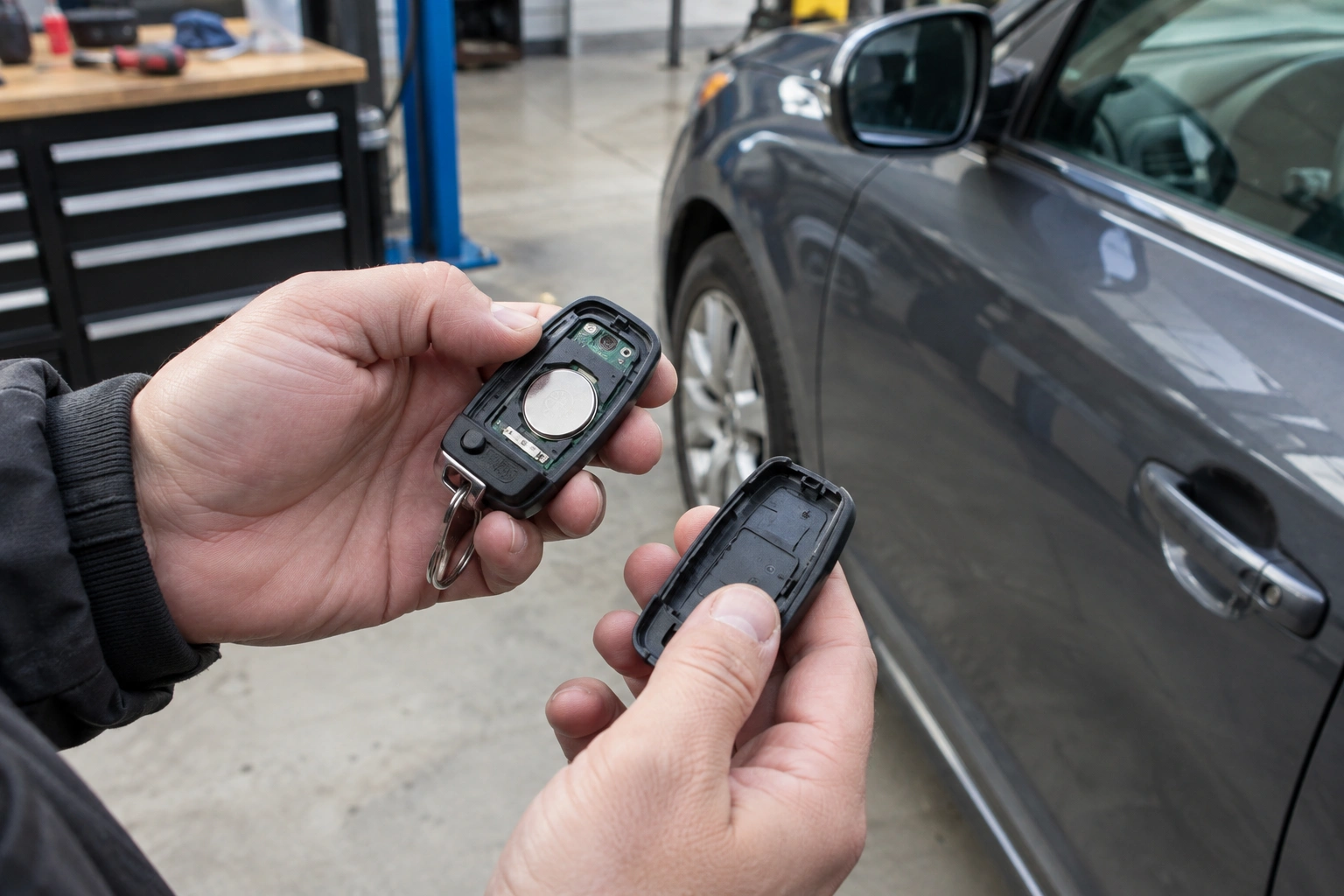
Replace the Key Fob Battery First
The battery is the most common issue when a car key fob stops working properly. That doesn’t mean it’s always the answer, but it is usually the best first DIY step because it’s cheap, fast, and low risk when done correctly.
Signs the battery is the likely culprit
- The fob works only at very short range
- The buttons respond inconsistently
- The fob has gotten weaker over time
- Multiple buttons are acting up, not just one
- The fob has not had a battery change in years
What battery type to look for
Most key fobs use a coin-cell battery, but the exact type varies by make and model. Common examples include CR2032, CR2025, and CR2016, but you should always confirm the number printed on the old battery or in the owner’s manual before buying a replacement. A battery that fits physically may still be the wrong thickness or voltage for your fob.
What to check before buying a battery
Open the fob carefully and verify the battery type printed on the old cell. Don’t guess based on shape alone.
Also check for:
- corrosion
- a loose battery
- bent battery clips
- cracked plastic inside the shell
If the battery looks swollen, damaged, or leaking, replace it and clean the compartment before reassembling.
Does battery replacement require reprogramming?
On most vehicles, simply replacing the battery does not require reprogramming. The fob usually keeps its stored programming when power is removed briefly. That said, some vehicles may need a resync after the battery change, and a few models are more sensitive than others.
What battery replacement can and cannot fix
A fresh battery can restore weak transmission, but it will not fix a broken button or a damaged circuit board. If the unlock button still does nothing after a new battery, move on to the button and contact checks.
If the battery swap changes nothing, the next best step is to decide whether the issue is a single worn button, a programming/resync problem, or a car-side issue.
If Only the Unlock Button Fails: Check for Button Wear or Internal Contact Damage
This is one of the most useful clues you can get. When the lock button still works but the unlock button does not, the fob is usually not “dead.” Instead, the unlock side may have worn out.
How to tell a bad unlock button from a low battery
A worn unlock button is more likely if:
- the lock button still works normally
- the unlock button feels mushy, sticky, or physically different
- you have to press harder than usual to get a response
- the failure is limited to one button
- the battery is new or recently replaced
A low battery is more likely if:
- both buttons have weaker range
- the fob works only very close to the car
- multiple buttons are getting unreliable
- the fob is getting worse gradually rather than failing one button at a time
What usually causes single-button failure
- worn rubber button pad
- dirty or oxidized contact
- cracked internal switch
- glue, residue, or debris on the contact area
- damaged circuit traces under the button
A repair video from Auto Repair Guys shows a case where glue on the contacted area of the metal plates prevented the fob from working, and cleaning it with acetone restored function. That’s a good example of why a nonworking button is not always an electronic failure. Auto Repair Guys on YouTube
When cleaning makes sense
Cleaning is worth trying if:
- the button feels sticky
- the fob has been dropped
- the shell was opened recently
- residue or dirt is visible inside
Use only a cleaning method that is safe for your specific fob model and battery type. Some plastics and electronics do not tolerate strong solvents well. If you’re not sure, dry cleaning with a soft brush or electronics-safe cleaner is the safer route.
When to repair the button versus replace the whole fob
If the unlock button is the only bad part, a button repair, contact cleaning, or replacement shell may be enough. If the circuit board is cracked, the contacts are badly worn, or the fob housing is damaged beyond a simple repair, replacing the entire fob may be the more practical path.
Use a Spare Key Fob to Isolate the Problem
The spare fob is one of the best diagnostic tools you have.
If the spare works
That points to the original fob, not the vehicle. Now you know where to focus:
- battery
- button wear
- damaged circuit board
- shell damage
- lost programming on that one fob
If both fobs fail
That’s when the car becomes the suspect. The issue may be in the receiver, the central locking system, or vehicle power.
If one fob works better than the other
Compare them side by side. If one unlocks the car from farther away, the weaker one may have a battery or transmitter problem. If one only fails on the unlock button, that’s a strong sign of a button/contact issue.
Check for Signal Interference, Range Problems, or a Weak Car Battery
Sometimes the fob is working, but the signal is being blocked or weakened.
Common causes of poor range
- standing too far from the vehicle
- using the fob near other electronics
- parking in an area with interference
- a weak transmitter battery
- a weak vehicle battery
A weak car battery can sometimes create odd electrical behavior, including remote locking problems, depending on the vehicle’s design and how low the battery has gotten. If the car has been slow to crank, dim on startup, or acting strangely with other electrical systems, don’t ignore that clue.
For more on how vehicle power issues can affect fob recognition and backup start procedures, see how to start a car when the key fob is not detected.
Try Reprogramming or Resyncing the Key Fob
If the battery is good and the fob still seems out of step with the car, resyncing may help. This is most useful when the fob appears to have lost communication rather than suffered a hardware failure.
When DIY resyncing is realistic
DIY resyncing is most realistic when:
- the fob stopped working after a battery change
- the fob works inconsistently even with a fresh battery
- the vehicle briefly lost power
- the owner’s manual includes a simple sync procedure
When a locksmith or dealer is more likely needed
A locksmith or dealer is more likely needed when:
- the vehicle requires a special programming tool
- the fob has to be added to the car’s security system
- the sync procedure is not listed for your model
- the car recognizes no fobs at all
- the issue is tied to a damaged immobilizer, receiver, or module
When resyncing is less likely to help
- the unlock button is physically worn out
- the fob casing is damaged
- the circuit board is cracked
- neither fob works and the car battery is weak
If your vehicle requires a specific resync procedure, follow the owner’s manual or manufacturer instructions. Different makes handle this differently, and the wrong sequence can waste time without fixing anything.
How to Unlock the Car Manually If the Fob Won’t Work
If the fob is dead or the car won’t respond, use the mechanical key if your fob has one.
Typical emergency access steps
- Remove the mechanical key from the fob.
- Find the hidden key slot or door lock cylinder.
- Unlock the driver’s door manually.
- If the alarm sounds, use the proper start or disable procedure for your vehicle.
Be gentle with the door lock and trim. Forcing the key can damage the cylinder or the surrounding panel, especially if the lock has not been used in a while.
When the Problem Is in the Car, Not the Fob
If both fobs fail, the car-side system deserves attention.
Signs the car may be the problem
- both the main fob and spare fail
- the car battery is weak or recently disconnected
- the vehicle does not respond to any remote locking command
- the issue affects all doors, not just one fob
- the car has other electrical symptoms too
Practical ways to check whether the car is receiving the signal
Before assuming the fob is bad, try to confirm whether the vehicle is actually seeing the remote signal:
- Listen for any response from the car when you press lock or unlock, such as door actuator movement, a flash of lights, or a brief relay sound.
- Try the fob at the driver’s door and at different distances. If the range is suddenly much shorter than usual, that can point to a receiver or vehicle power issue.
- Check whether one remote function works but another does not on the same vehicle. If the car responds inconsistently to multiple fobs, that supports a car-side fault.
- Use the manual door lock or mechanical key and then test the remote again. If the car still does not respond after being unlocked manually, the problem is less likely to be just a stuck door lock.
- Look for other central locking symptoms such as one door not responding, the locks cycling unexpectedly, or the alarm behaving oddly.
If you have a known-good spare and neither fob triggers any response, that is stronger evidence that the car is not receiving or acting on the signal.
In that situation, the receiver, central locking module, or power supply may need diagnosis. Replacing the fob first would be the wrong move if the vehicle is not receiving the signal correctly.
For broader manufacturer guidance on vehicle safety and electrical issues, the NHTSA is a useful reference point for official consumer safety information.
When to Consult a Locksmith
A locksmith is often the best next step when:
- battery replacement did not help
- the spare fob works, but the original does not
- the unlock button is physically damaged
- the fob needs programming and DIY steps don’t work
- you need the car opened without damaging the lock
A locksmith may be preferable to a dealership when the problem is a single fob, a battery issue, a damaged button, or a straightforward programming job. A dealer is more likely to be necessary when the vehicle uses a restricted security system, a special programming procedure, or module-level coding that a locksmith cannot perform.
If the fob shell is cracked, the button is worn out, or the circuit board is damaged, replacement may be the better path than repeated repair attempts. A locksmith can often diagnose whether the fob itself is the issue or whether the vehicle needs deeper work. In some cases, that’s faster and less expensive than going straight to a dealership, especially when the problem is a single broken fob rather than a vehicle-wide failure.
If you’re comparing vehicle repair advice and ownership costs, resources like Edmunds and Car and Driver can also help you understand the broader ownership side of the equation.
Common Mistakes to Avoid
A few mistakes come up again and again:
- Replacing the fob before testing the spare. That can lead to buying parts you didn’t need.
- Assuming the battery is always the answer. A dead battery is common, but a single-button failure usually points somewhere else.
- Forcing a stuck button. That can turn a small contact issue into a broken fob.
- Ignoring the car battery. A weak vehicle battery can mimic a remote problem.
- Trying repeated reprogramming without checking the basics. If the fob is physically damaged, syncing won’t fix it.
- Forgetting the mechanical key. That small insert can save you from being stranded.
The Fastest Way to Narrow It Down
If you want the shortest path to a real answer, use this order:
- Try the fob closer to the car.
- Test the lock button.
- Test the spare fob.
- Replace the fob battery.
- Check the unlock button for wear or damage.
- Try resyncing if the battery is good.
- Look at the car battery or receiver if both fobs fail.
Final next step by scenario
- If only the unlock button fails: inspect the button contact and consider repair or replacement of the shell/fob.
- If the fob works only at short range or inconsistently: replace the battery first, then retest.
- If both fobs fail: check the car battery, locks, and receiver/central locking system.
- If the fob stopped working after a battery change: try a resync procedure from the owner’s manual.
- If DIY checks do not help: contact a locksmith first for the fob side, or a dealer if the vehicle needs security-module programming.
FAQ
Why does my lock button work but not the unlock button?
That usually means the unlock switch, contact, or circuit path is worn out, while the rest of the fob still works.
Do I need to reprogram my key fob after changing the battery?
Usually no. Most vehicles keep the programming after a battery swap, though some may need a resync.
How can I tell if the car is receiving the signal?
Look for any response from the locks, lights, or alarm behavior when you press the fob, and compare the result with a spare fob if you have one.
Should I replace the whole key fob if only one button is bad?
Not always. If the issue is limited to one worn button or dirty contact, a repair or shell replacement may be enough.
