
Key Fob Not Recognized After Battery Change: How to Diagnose and Fix It

If your key fob not recognized after battery change problem showed up right after you swapped the coin cell, the good news is that the fob usually did not “forget” your car. In many cases, the issue is something physical: the battery is upside down, not fully seated, the contacts are bent, or the replacement battery is the wrong type or weak out of the package.
One important distinction up front: remote-button failure and engine-start recognition failure are different problems. A fob can lose lock/unlock function and still be recognized for starting, or it can fail to start the car even if the buttons seem fine. Those symptoms often point to different fixes.
The trick is to separate three different failures:
- the remote buttons do not work,
- the car won’t detect the fob for starting, or
- the fob is completely dead.
Those symptoms point to different fixes, and the fastest path is to test them one by one.
Quick Diagnosis: What the Symptom Usually Means
If the lock and unlock buttons fail but the car still starts when you hold the fob near the start button, the fob likely still has enough power for the immobilizer/transponder system, but the remote side of the fob is not making contact or is not transmitting properly.
If the car shows “Key Not Detected” or “No Key Present,” the problem is usually at the battery, contact, or vehicle-recognition level rather than a full reprogramming failure. The vehicle’s code is typically still stored, so a battery change alone does not normally erase it.
If nothing works at all, treat it as a power or contact problem first. A dead replacement battery, poor fit, or damaged internal contact can make a healthy-looking fob act completely lifeless.
The Most Likely Causes, in Order
After a battery swap, these are the causes I would check first:
- Wrong battery type — A CR2032 and CR2025 can look similar, but they are not always interchangeable.
- Battery installed backward — Coin cells are easy to flip upside down during reassembly.
- Battery not fully seated — The battery can sit slightly high and still let the case close.
- Bent or flattened contacts — The metal prongs may no longer press firmly on the cell.
- Protective sticker left on the battery — Some replacement batteries ship with an insulating tab or film that must come off.
- Weak or defective new battery — New does not always mean good.
- Fob needs a resync — Some vehicles briefly lose synchronization after battery removal.
- Vehicle-side issue — Low car battery voltage or receiver problems can mimic a bad fob.
That order matters because it keeps you from jumping straight to reprogramming or replacement when the fix is usually mechanical.
Check the Battery First: Type, Orientation, and Fit
Open the fob again and confirm the battery matches what the fob expects. Many remotes use a coin-cell battery such as CR2032 or CR2025, but the exact size and chemistry should match the vehicle’s specification.
A common mistake is using a battery that “almost fits.” If the holder was designed for a thinner cell, a thicker one may force the case shut while leaving poor contact. If the holder was designed for a thicker cell, a thinner one can rattle or lose pressure.
Next, check polarity. The positive side is usually marked with a “+” and must face the correct direction for that fob. If you are unsure, compare the battery orientation to the markings inside the case or the layout of the old battery before removal.
Also check for anything between the battery and the contacts. A clear protective sticker, shrink film, or even a tiny bit of packaging material can block power completely.
What a correct fit looks like
A properly installed battery should:
- sit flat in the holder,
- not wobble when you tap the fob lightly,
- allow the case to close without forcing it,
- and make the buttons feel normal, not unusually stiff.
If the battery looks slightly tilted, remove it and reseat it. That one step fixes more post-battery problems than most people expect.
Inspect the Battery Contacts and Fob Interior
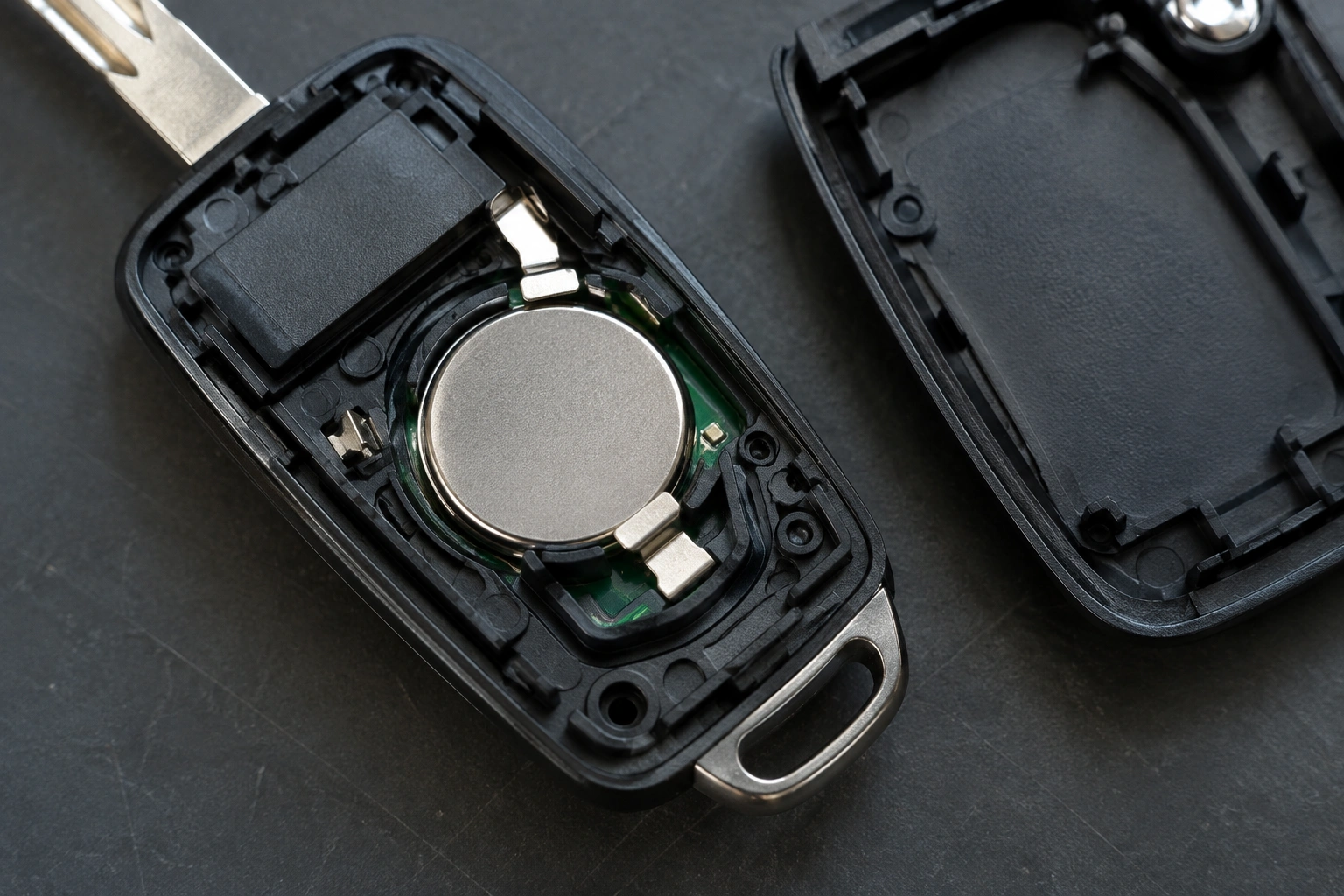
If the battery is correct and installed the right way, look at the metal contacts inside the fob. They should be clean, aligned, and springy enough to press against the battery.
You are looking for three common problems:
- Bent prongs that no longer touch the battery firmly
- Flattened contacts that lost tension during battery installation
- Corrosion or dirt that interrupts the connection
A small amount of grime on the contact can be enough to cause intermittent recognition, especially if the fob works only when you press the case together. If the contacts look dirty, a gentle cleaning with a dry, lint-free swab is safer than aggressive scraping. Avoid soaking the circuit board.
If a contact has been bent out of shape, be careful. A slight adjustment may restore pressure, but forcing it can crack the holder or snap the contact off the board. If the contact looks loose at its base or damaged, that is usually a repair-or-replace situation, not a “keep bending it until it works” situation.
Try a Basic Reset or Re-Sync
Some vehicles temporarily lose sync after the battery is removed, even when the fob itself is fine. In those cases, a simple reset or resync may restore normal operation.
Because procedures vary by make and model, some vehicles need a specific ignition/button sequence while others do not. The owner’s manual is the safest source for the exact steps. A simple example pattern on some vehicles is to get in the car, cycle the ignition or press the start button in the prescribed way, then press the lock/unlock buttons to confirm pairing. On other models, the steps are different or not user-serviceable at all.
A practical approach is this:
- Put the battery back in correctly.
- Close the fob fully.
- Stand near the vehicle.
- Try the lock and unlock buttons.
- If the buttons fail, try the backup start method your vehicle uses for a weak fob.
If the fob starts working again after a simple resync, the problem was a temporary communication issue rather than a failed key code.
For model-specific guidance, check your owner’s manual or a manufacturer source before trying repeated pairing steps. If you want a broader explanation of what usually causes detection problems after a battery swap, our guide on what to check next when a key fob is not detected after replacing the battery covers the same troubleshooting path from a slightly different angle.
Test the Spare Key Fob to Isolate the Problem
The spare fob is one of the best diagnostic tools you already own.
- If the spare works normally, the vehicle is probably fine and the problem is specific to the main fob.
- If both fobs fail, the issue is more likely vehicle-side, such as low car battery voltage, receiver trouble, or a system fault.
- If the spare starts the car but the main fob does not, the main fob likely has a contact, battery, or internal hardware problem.
This comparison saves time because it separates a fob-specific failure from a car-side failure without any tools.
If you are down to one working fob, be cautious about experimenting too much with the second one. You do not want to turn a “maybe bad” fob into a completely unusable one by forcing the case or prying the board.
Remote Buttons Work vs. Car Won’t Start
This distinction matters more than most drivers realize.
When remote buttons fail but the car still starts
That usually points to the remote keyless entry side of the fob. The transponder or immobilizer function may still be working, which means the vehicle can read the fob for starting even though the button transmitter is weak, misaligned, or not powered correctly.
When the car won’t recognize the fob at all
That points to the immobilizer recognition side. In that case, the issue could be the battery, the contact pressure, the vehicle’s receiver, or a low-voltage condition in the car itself.
If your vehicle has a backup start method for a weak key fob, use it as a clue. If the backup method works, the fob is still communicating at some level, which narrows the problem to battery strength, contact quality, or the remote side of the fob.
For context on why key recognition can matter beyond the remote buttons, the NHTSA’s vehicle safety information is a useful reference point for understanding how modern vehicle security and access systems are tied to the electronics in the key.
Check the Car Battery and Vehicle Voltage
A weak vehicle battery can cause keyless entry problems that look like a bad fob. Low voltage can confuse modules that read the key, especially on push-button start vehicles.
If the car battery is weak, you may notice:
- slow or dim interior lights,
- sluggish cranking,
- warning messages that come and go,
- or a fob that works inconsistently near the vehicle.
If the car had been sitting, or if the battery is older, do not assume the new fob battery is the culprit. A quick battery test or jump-start can tell you whether the vehicle itself is the weak link.
This is especially worth checking when both fobs act up at the same time. Two bad fobs at once is possible, but a low vehicle battery is usually the more likely explanation.
When the Fob Needs Reprogramming Instead of a Simple Reset
A simple reset and a true reprogramming are not the same thing.
A reset or resync is a short-term communication refresh. It may fix a fob that lost its place after the battery was removed.
Reprogramming is a deeper pairing process, usually needed when the vehicle no longer accepts the fob’s identity or the fob’s internal electronics have been replaced or damaged. On most vehicles, removing the battery alone does not erase the stored programming, so do not assume a battery change means the fob needs to be coded again.
Signs that point more toward reprogramming include:
- the fob never works after correct battery installation,
- the spare fob works but the main one does not,
- the fob works intermittently even with a known-good battery,
- or the vehicle repeatedly rejects the fob after basic checks.
At that point, a dealer or automotive locksmith with the right equipment can determine whether the fob itself is still valid. For many drivers, that is the point where DIY troubleshooting ends and diagnosis becomes more efficient than guessing.
When to Consult a Locksmith
Call a locksmith or dealer when you see any of these:
- cracked fob housing that no longer closes securely,
- broken battery clips or loose internal components,
- visible corrosion on the circuit board,
- both fobs failing after battery checks,
- or a vehicle that will not recognize any key at all.
An automotive locksmith is often the better first stop if you want a faster hands-on diagnosis than a dealership appointment. That said, if your vehicle uses a highly specific security system or the manufacturer requires dealer-level programming, the dealer may still be the right path.
Our related article on why a key fob won’t lock the car after a battery change is useful if your symptom is limited to the remote buttons and the car still starts normally.
Common Mistakes to Avoid
A few mistakes cause a lot of unnecessary parts swapping:
- Assuming the new battery is good without checking it
- Forcing the battery holder or case shut
- Ignoring a missing insulating tab
- Mixing up remote-button failure with start-recognition failure
- Replacing the entire fob before testing the spare
- Bending contacts too far while trying to “improve” contact pressure
The biggest one is replacing the whole fob too early. If the issue is a battery orientation problem or a bent contact, a new fob will not solve it.
Bottom Line
If your key fob is not recognized after a battery change, start with the basics in this order: check the battery type, polarity, and fit; inspect the contacts; test the spare fob; and check the car battery or vehicle voltage. If those look good and the fob still fails, then consider a model-specific resync or professional reprogramming. If the spare works, the main fob is the likely problem. If both fobs fail, the vehicle is more likely at fault.
