
Chevy Key Fob Not Working? A Practical Troubleshooting Guide for Quick Fixes

If your Chevy key fob suddenly quit unlocking the doors, starting the engine, or responding at all, the problem is usually something simple enough to check at home. Common causes include a weak fob battery, a weak vehicle battery, or a fob that has been exposed to water, wear, or lost programming.
The trick is not to guess. A little troubleshooting will tell you whether you need a battery, a reset, a replacement fob, or professional help.
Quick diagnosis: what exactly is happening?
Before you open the fob or buy parts, match the symptom to the failure pattern.
If the fob does nothing at all
No lock, unlock, panic, or remote start usually points to a dead fob battery, damaged electronics, or a lost sync.
If it works only from very close range
That’s a classic weak-battery clue. A low battery often cuts the operating range well before the fob dies completely. Chevy fobs use a short-range radio signal, so a weak battery can make the vehicle seem “picky” about distance.
If one button works and another does not
That usually means the fob itself is the problem, not the vehicle. A worn button pad, dirty contact, or damaged internal switch is more likely than a car-side issue.
If the car won’t detect a push-button start fob
That could still be a dead fob battery, but it can also be a vehicle battery issue, interference, or a programming problem.
If both of your Chevy fobs fail
That points away from a single fob and toward the vehicle battery, receiver, or a broader system issue.
Most likely causes, in order
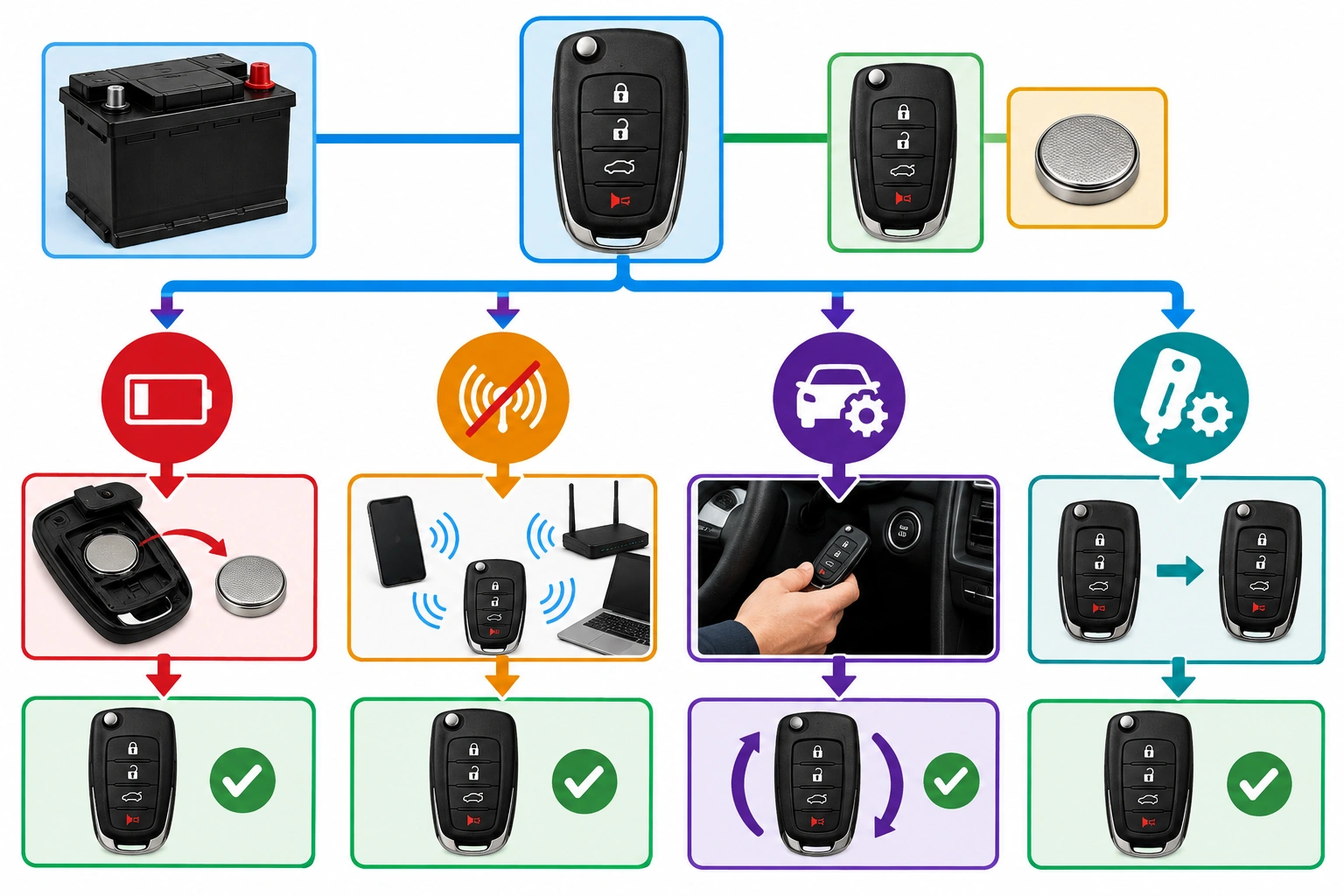
When a Chevy key fob stops working, these are the most common causes to check first:
- Weak or dead coin-cell battery in the fob
- Weak vehicle battery
- Signal interference
- Stuck, worn, or broken buttons
- Water damage or corrosion
- Programming or sync issue
- Damaged fob electronics
That order matters. Replacing a fob before checking the battery or trying the spare can waste time and money.
For background on how remote systems can be affected by interference and weak battery symptoms, Chevrolet owners can also review GM’s general owner support resources and the NHTSA vehicle safety page for broader vehicle-system guidance.
Fast checks before you open anything
These quick checks can save you from replacing the wrong part.
Try the spare fob
This is the fastest way to separate a fob problem from a vehicle problem.
- If the spare works: the issue is likely the original fob.
- If both fail: look at the vehicle battery, receiver, or programming.
Move away from possible interference
Chevy fobs use a short-range radio signal, and interference can block or weaken communication. Try the fob:
- away from large metal structures
- away from other electronics
- in a different parking location
- with other key fobs removed from the area, if possible
If the fob suddenly works in one spot but not another, that’s a clue the issue is not the fob battery alone.
Check for a stuck button
A button that is physically pressed in can cause odd behavior, including partial function or a dead-looking fob. Press each button a few times and make sure none feel jammed or mushy.
Look at the housing
Cracks, loose seams, or a rattling sound inside the fob often mean internal damage. If the case is broken, the circuit board may have shifted or been exposed to moisture.
How to replace the Chevy key fob battery
A weak battery is one of the most common reasons a Chevy key fob stops working. Many Chevrolet fobs use a CR2032 or DL2032 coin-cell battery, and battery life is often around a few years, depending on use.
What you’ll need
- The correct replacement battery for your fob
- A small flat tool or coin, if needed to open the case
- Clean hands and a stable work surface
Steps to replace it
- Remove the mechanical key if your fob has one.
- Open the fob carefully at the seam.
- Note the battery orientation before removing it.
- Swap in the new battery with the correct polarity.
- Snap the fob back together securely.
- Test lock, unlock, and remote start from a normal distance.
Common mistakes to avoid
- Installing the battery backward
- Using the wrong size battery
- Forcing the case open and cracking the shell
- Touching the battery contacts with dirty fingers
- Assuming a battery swap fixed everything without testing the fob again
If the fob still acts dead after a fresh battery, the issue may be deeper than power.
If the car battery may be the real problem
A weak vehicle battery can make a Chevy key fob seem faulty when the real problem is the car’s low voltage. This is especially likely if:
- the dash lights are dim
- the vehicle cranks slowly or not at all
- multiple electrical features are acting strange
- both fobs have the same problem
A dead or weak car battery can interfere with locking, unlocking, and push-button start detection. If you replaced the fob battery and nothing changed, test the vehicle battery next before replacing the fob again.
A practical rule: if the car is also showing weak electrical symptoms, don’t blame the fob first.
How to unlock and start a Chevy when the fob is dead
If the fob battery is dead, you may still be able to get into the vehicle and drive it.
Use the mechanical key
Many Chevy fobs include a hidden mechanical key. That key can usually open the driver’s door manually.
If you’ve never removed it before, check your owner’s manual for the release method for your exact model.
Use the emergency start method on push-button start Chevys
Many push-button start Chevys have a backup start procedure that works when the fob battery is weak or dead. For example, on some models you place the fob against the marked sensing area inside the cabin, then press the brake and the start button. On a Chevy Equinox, that sensing area may be in a center console pocket or another marked spot, while other models may use a different location.
Because the sensing location and procedure vary by model and year, confirm it in the owner’s manual before relying on it. If you’re stuck in a parking lot, the manual is worth checking before you start guessing.
For model-specific operating details, the best source is your Chevy owner’s manual or Chevrolet’s support pages, such as Chevrolet owner resources.
When reprogramming or resyncing is the next step
If you changed the battery and the fob still won’t communicate, the fob may have lost sync with the vehicle.
That’s more likely when:
- the fob has power but does nothing
- the buttons feel normal
- the housing is intact
- the spare fob still works
That combination suggests a communication issue rather than a broken shell or dead battery.
Practical rule for reprogramming
- Likely to help: the fob is intact, has a fresh battery, and the vehicle still does not recognize it.
- Usually will not help: the fob has cracked housing, corrosion, water damage, or buttons that fail mechanically.
- Replacement is the better next step: the fob is visibly damaged, intermittent after a battery change, or still fails after resync attempts.
If the circuit board is damaged, reprogramming usually won’t fix it.
Reprogramming vs. damaged hardware
- Reprogramming issue: fob appears normal, but the vehicle doesn’t respond
- Hardware damage: cracked case, corrosion, water exposure, or intermittent button behavior
If the fob has visible damage, skip the hope-and-pray reprogramming route and move toward replacement.
Signs the fob is damaged, worn, or water-damaged
A Chevy key fob can look fine on the outside and still be failing inside. Watch for these signs:
- cracked plastic housing
- corrosion on the battery contacts
- moisture under the battery cover
- buttons that sink too far or feel inconsistent
- a fob that works one day and fails the next
- response that changes when you press on the case
Water damage is a particularly bad sign. If a fob has been soaked, remove the battery right away and avoid repeatedly trying to power it on. Corrosion can spread and make the damage worse.
Repair, replace the shell, or replace the whole fob?
This is where many Chevy owners can save money by choosing the right fix.
Replace only the battery
Best when:
– the fob is old
– range has dropped
– the fob works intermittently
– the case and buttons still feel normal
Replace the shell
Best when:
– the outer case is cracked
– buttons are worn but the electronics still work
– the circuit board and battery contacts are intact
This is cheaper than replacing the whole unit, but only makes sense if the electronics are healthy.
Replace the whole fob
Best when:
– the board is corroded
– the fob was water-damaged
– the buttons are failing internally
– reprogramming doesn’t help
– the fob is cracked and unreliable
If you’re comparing OEM and aftermarket replacements, compatibility and programming support can vary, so it’s worth confirming the exact part number before you buy.
When to consult a locksmith
A locksmith is often the right next step when DIY checks don’t solve the problem, especially if:
- you lost all working fobs
- the vehicle needs programming
- the fob is damaged and needs replacement
- you want a faster option than the dealer
- you’re not sure whether your Chevy requires dealer-only programming
A dealer is more likely to be required when the vehicle’s security system, immobilizer programming, or an unavailable OEM-only procedure is involved. A locksmith can often handle battery replacement, key cutting, and many Chevy fob programming jobs, but not every model or situation is the same.
Chevy model and year differences to know
Chevy key fob symptoms are similar across many models, but the details are not identical.
A Silverado, Equinox, Malibu, Traverse, or other Chevy may use a different fob style, battery access method, or emergency start location. Even within the same model line, trim and year can change the procedure.
That means two things:
– Don’t assume the battery size or start method is the same
– Check the owner’s manual before forcing a fix
If your fob seems dead but the vehicle behaves normally, that usually points to the fob. If the vehicle itself is showing weak electrical symptoms, turn your attention to the car battery first.
Practical decision guide
If you want the shortest path forward, use this sequence:
- Try the spare fob.
- Replace the fob battery.
- Check for interference or a stuck button.
- Test the vehicle battery if both fobs fail or the car shows weak power.
- Try the emergency start method if your Chevy has push-button start.
- Move to reprogramming or replacement if the fob is intact but still not recognized.
- Call a locksmith or dealer if all working fobs are gone or the fob is visibly damaged.
That order solves a lot of cases without unnecessary parts swapping.
FAQ
Why did my Chevy key fob suddenly stop working?
The most common reasons are a weak fob battery, a weak vehicle battery, signal interference, or a damaged fob. If it worked yesterday and not today, battery issues are usually the first thing to check.
Can I still start my Chevy if the key fob battery is dead?
Often yes, especially on push-button start models with an emergency start procedure. The exact method varies by model and year, so check the owner’s manual.
Does my Chevy key fob need reprogramming after a battery change?
Usually not, but it can happen. If a fresh battery doesn’t restore normal operation, reprogramming or resyncing may be the next step.
What if only some buttons on the fob work?
That usually points to a worn button, dirty contact, or internal damage inside the fob rather than a vehicle-side problem.
Should I replace the whole fob or just the battery?
Replace the battery first if the fob is old, weak, or intermittent. Replace the whole fob if there’s corrosion, water damage, cracked housing, or failed electronics.
If you want more help diagnosing a specific button issue, see our guides on a Chevy key fob lock button not working and a key fob unlock button not working.
