
Key Fob Not Detected: How to Fix It and Get Your Car Started Again

“Key fob not detected” means the car cannot read a valid signal from your smart key, so it will not start. The usual causes are a weak fob battery, a weak car battery or signal interference. Use the emergency start method in your manual (often holding the fob against the start button), then replace the fob battery and test your spare.
If your car says the key fob is not detected, the vehicle’s security system is telling you it cannot confirm that the smart key is nearby and authorized. On a push-button start car, that usually means the engine will not crank until the system can read the fob’s RF signal or its backup transponder.
The good news is that this problem often comes down to a simple cause: a weak fob battery, a weak vehicle battery, or signal interference. I’ve seen plenty of drivers assume the fob is dead when the real issue was something much smaller.
Here’s the practical way to work through it without wasting time or money.
CR2032 3V Lithium Coin Battery
Most fobs that use this size take a CR2032 cell. Check the number printed on your old battery first, buy a name brand and check the date on the pack.
As an Amazon Associate, ReplaceKeyFob earns from qualifying purchases.
What “Key Fob Not Detected” Actually Means
Your car is not just looking for a metal key. It is looking for a coded signal from the smart key or transponder inside the fob. If the signal is too weak, blocked, or not being received, the immobilizer system keeps the car from starting.
That protection is intentional. It helps prevent theft, but it also means a small electrical problem can leave you stranded.
A useful way to think about it: if the doors still unlock but the car won’t start, the fob may be partially working. That often points to a battery or communication issue rather than a totally dead fob.
The Fastest Safe Fixes to Try First
Use this order so you do the most likely fix first:
- If the dash is dim or the engine cranks slowly, check the vehicle battery first.
- If the doors unlock normally but the car says the fob is not detected, check the key fob battery first.
- Move the fob away from your phone, other keys, and metal objects.
- Try the emergency start method.
- Try your spare key fob.
- If both fobs fail, move to professional diagnosis.
That order matters. It keeps you from buying parts you may not need and helps match the fix to the symptom.
Step 1: Check the Key Fob Battery
A weak coin-cell battery is one of the most common reasons a smart key stops being detected. Some fobs still unlock doors at close range when the battery is fading, but they no longer send a strong enough signal for the car to authorize starting.
If the fob has been working less reliably for weeks, especially with reduced range, the battery is the first thing I’d change. That’s a low-cost test with a high payoff.
What to look for
- The fob works only when you stand right next to the car
- Buttons feel inconsistent or need multiple presses
- The warning appears intermittently, not every time
- The fob battery is older and has never been replaced
How to replace it correctly
Open the fob carefully, note the battery orientation, and install the exact battery type specified for your fob. Many smart keys use common lithium coin cells, but the exact size varies by make and model.
Two mistakes cause a lot of frustration here:
– Installing the battery backward
– Using the wrong battery size even though it “looks close”
If the fob case is cracked or the battery contacts look corroded, a fresh battery may not help for long.
For a deeper walkthrough on that exact situation, see our guide on a key fob not detected but battery is new.
Step 2: Try the Emergency Start Method
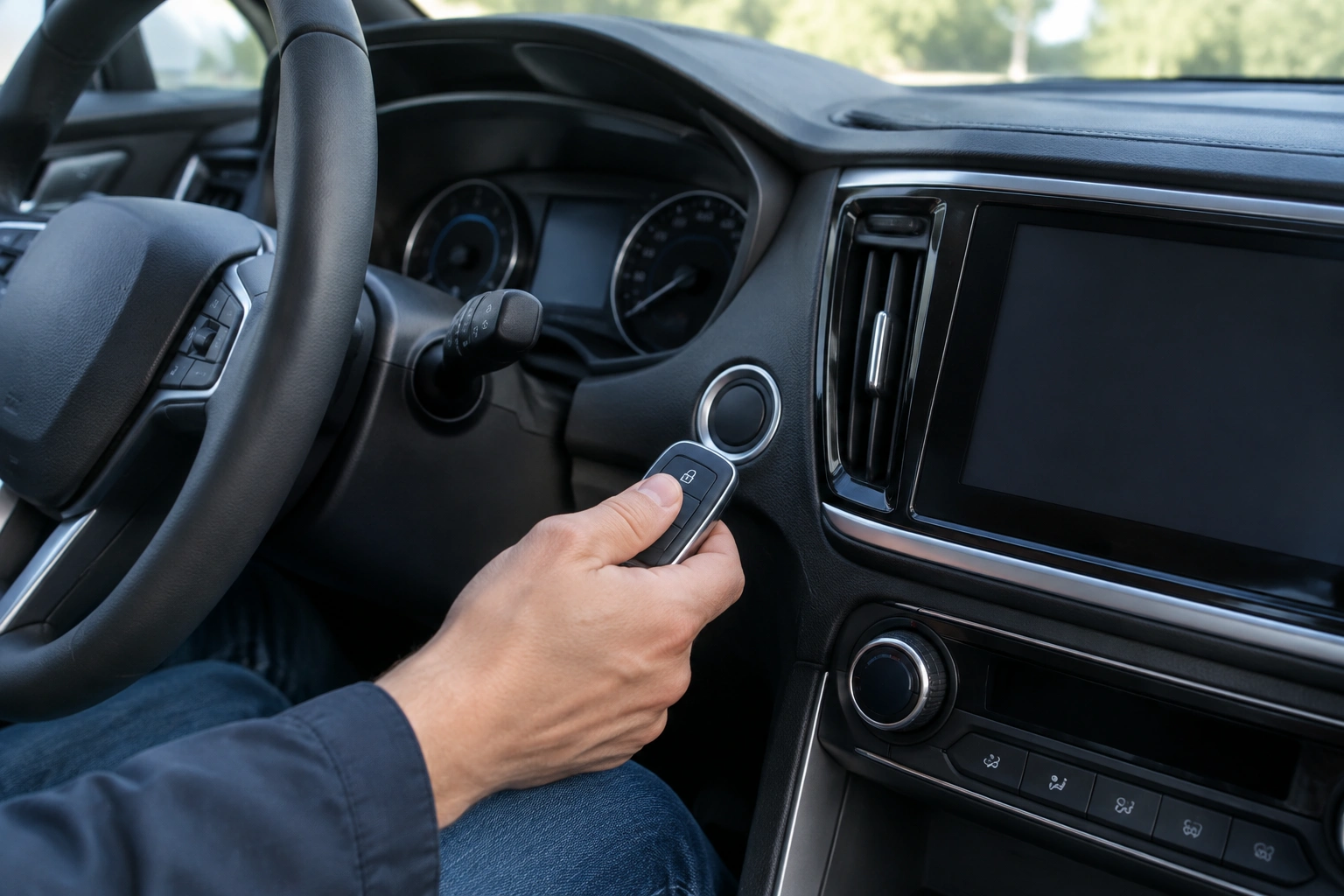
If the fob battery is dead but the fob itself is still valid, many vehicles have a backup way to start. If you do not have the manual handy, use this model-agnostic sequence:
- Sit in the driver’s seat and make sure the car is in Park.
- Press the brake pedal.
- Hold the fob directly against or very near the start button.
- If your vehicle has a marked backup slot, place the fob in that designated slot instead.
- With the fob in position, press the start button as normal.
The exact location varies by model, but common places include:
– Right next to the start button
– A marked backup slot in the center console
– A cup holder area
– A spot near the steering column
– A designated area in the dashboard or console
Some vehicles use a passive backup system that can read the fob even when the coin battery is dead. If your owner’s manual shows a special placement point, use that exact spot rather than guessing.
For a broader model-specific overview, our article on push-button start backup methods explains how these emergency starts usually work.
If this method starts the car, you’ve likely confirmed the fob battery is weak or dead. Replace it soon, because the problem will return.
Step 3: Rule Out a Weak Vehicle Battery
A weak vehicle battery can mimic a key fob problem. If the car’s electrical system is struggling, it may not power the receiver and immobilizer properly, even if the fob is fine.
Watch for these clues:
– Dim interior or dashboard lights
– Slow cranking
– Electronics resetting
– The car has been sitting for a while
– Multiple warning lights appear at once
If the dash looks weak and the car acts sluggish, the vehicle battery deserves attention before you blame the fob. Jump-starting the car or testing the battery may solve the issue if the battery is simply too low to support the system.
This is one reason I tell drivers not to replace the fob battery and walk away too quickly. The car may be the real problem.
Key Fob Battery vs. Car Battery vs. Interference
Here’s a quick comparison to help you narrow it down.
| Likely cause | Common signs | Best first test | What usually happens |
|---|---|---|---|
| Key fob battery | Reduced range, intermittent warning, doors may still unlock | Replace the coin-cell battery | Detection improves or returns to normal |
| Vehicle battery | Dim lights, slow crank, weak electronics | Test or jump-start the car | Car may start once system voltage recovers |
| Signal interference | Problem happens in one location or near electronics | Move the fob away from devices | Warning disappears when interference is removed |
| Fob damage | Water exposure, dropped fob, worn buttons | Inspect the housing and contacts | Battery swap may not help |
| Receiver/antenna issue | Multiple fobs fail | Try spare fob and battery checks | Professional diagnosis is usually needed |
Step 4: Eliminate Signal Interference
Sometimes the fob is fine, but the signal is getting blocked. Modern smart keys use low-power radio communication, so nearby electronics can matter more than people expect.
Try these simple tests:
– Remove the fob from a bag packed with metal items
– Move your phone away from the fob
– Take off other key rings or extra remotes
– Step away from parking garages, radio towers, or dense electronic areas
– Try starting the car in a different location
A real-world example: a driver keeps the smart key in a bag with a phone, wallet, and metal water bottle. The car works some days and fails on others. Moving the fob into a pocket often fixes it immediately.
If the problem only happens in one spot, interference is more likely than fob failure.
Step 5: Check for Fob Damage or Wear
If the fob was dropped, soaked, or crushed, the issue may be inside the housing rather than the battery. A damaged fob can seem “mostly alive” but fail when the vehicle tries to authenticate it.
Look for:
– Cracked case
– Loose battery fit
– Green corrosion on contacts
– Sticky or worn buttons
– Signs of water inside the shell
A fob with physical damage may still unlock doors occasionally but fail to start the car reliably. That pattern usually means the electronics are compromised.
At that point, a battery swap is worth trying, but don’t expect it to cure water damage or broken solder joints.
Step 6: Re-sync or Reprogram the Key Fob
If the battery is new and the fob still isn’t detected, the system may need a re-sync. After a battery change, some vehicles only need a brief re-learn or reset to recognize the fob again.
A simple re-sync is more likely when:
– The fob worked before the battery change and stopped afterward
– The car briefly lost power
– The fob’s buttons still work, but the car needs to recognize the fob again
True programming is more likely when:
– A new fob has never been paired to the vehicle
– The spare fob works but the original does not, even with a fresh battery
– The car does not recognize any fob consistently
– The problem points to the immobilizer system, receiver, or vehicle-side memory rather than the battery
Sometimes a reset is enough. Other times the fob or vehicle needs manufacturer-level programming. If the issue persists after battery replacement and emergency-start testing, the problem may be beyond a simple re-sync.
When the Problem Is Likely in the Car, Not the Fob
If two different fobs both fail, and the vehicle battery is known good, the car may have a receiver, antenna, or immobilizer issue.
That is especially likely when:
– Both fobs are equally unrecognized
– The emergency start method does not work
– The problem appears suddenly and stays consistent
– Other electrical systems are normal, but the car still refuses to detect either fob
At that point, the issue is probably not the coin battery. It may be the receiver antenna, the smart key module, or another vehicle-side fault.
When to Consult a Locksmith, Dealer, or Mechanic
Choose the right pro for the symptom:
- Automotive locksmith: Best when you need fast help with a dead or damaged fob, emergency access, spare key cutting, or some reprogramming jobs.
- Dealer: Best for model-specific programming, immobilizer issues, or situations where the vehicle requires manufacturer-level tools.
- Mechanic: Best when the car battery, charging system, receiver, antenna, or other vehicle-side electrical fault seems more likely than the fob itself.
Call one of them when:
– The spare fob also fails
– The fob is water-damaged or physically broken
– The car battery is good, but the car still says key not detected
– You need programming and the owner’s manual does not provide a home procedure
– The car is stuck in a location where you cannot safely keep troubleshooting
A dealer usually has the most model-specific tools. An automotive locksmith can often be faster for diagnosis, emergency access, and some reprogramming jobs. If you need the car moving again quickly, that distinction matters.
How to Prevent the Problem From Coming Back
A few habits reduce the chance of another surprise:
– Replace the fob battery at the first sign of reduced range
– Keep the fob away from phones and metal clutter
– Store a spare battery at home if your fob uses a common coin cell
– Don’t leave the fob in damp bags, cup holders, or places where it can get crushed
– Test the spare fob occasionally so you know it works when needed
If your fob is already showing weak range, that is your early warning. Don’t wait until the car refuses to start in a parking lot.
For broader vehicle guidance on battery-related no-start situations, the National Highway Traffic Safety Administration is a useful consumer resource, and Edmunds has practical owner-focused explanations of keyless start systems.
Test the spare key fob
The spare fob is one of the best diagnostic tools you have. It separates a bad fob from a vehicle-side issue.
What the spare tells you
- If the spare works normally: the main fob is the likely problem.
- If both fobs fail: suspect the car battery, interference, receiver/antenna, or immobilizer system.
- If both work only intermittently: the issue may be low vehicle voltage or a weak detection system.
This comparison matters because it keeps you from replacing the wrong part. If the spare works, don’t chase vehicle electronics first. If both fail, don’t keep buying batteries for the fob and hoping for the best.
What to Do If the Spare Key Fob Works
If the spare fob works immediately, you have a useful comparison test.
That usually means the car is fine and the original fob is the weak link. At that point, the next decision is usually between:
- replacing the battery in the original fob,
- repairing damage to the original fob if possible,
- or replacing the whole fob if it has water damage, cracked casing, or worn-out buttons.
If the spare works and the original does not, do not keep guessing at the car side unless the problem returns with the spare too.
Signs the Key Fob Is Damaged
A fob can fail without looking completely broken. Still, some signs are hard to ignore:
- visible water damage,
- a cracked shell,
- buttons that feel mushy or stuck,
- a fob that was dropped hard,
- intermittent detection that seems random,
- battery contacts that look corroded.
If the fob has been wet, the internal electronics may be damaged even if it still works occasionally. In that case, a battery swap may not solve the underlying issue.
A damaged fob that fails only sometimes can be the most misleading kind, because it may work just enough to delay replacement.
What to Do Right Now if the Car Won’t Detect the Fob
If you’re stuck in a parking lot or driveway and the car won’t see the fob, use the fastest path back to normal operation.
1. Move the fob out of the heat
Take it out of a hot pocket, off the dashboard, or away from direct sun. If you’re carrying it in a bag, move it to a cooler spot for a few minutes.
2. Try the spare fob
This is the quickest comparison test. If the spare works normally in the same conditions, the original fob is the more likely problem.
3. Use the emergency key blade if you need to unlock the door
Many fobs contain a hidden emergency key blade. That lets you get into the vehicle even when the electronic part isn’t being detected. Your owner’s manual shows where the release is and where the lock cylinder may be hidden.
4. Hold the fob at the backup sensing point
Many push-button start vehicles have a backup sensing area near the start button, steering column, center console, or cupholder area. In some vehicles, placing the fob there allows the car to recognize the transponder even when the battery is weak. The exact method varies by model, so follow the owner’s manual.
If you need a more model-specific overview of backup starting, our guide to key fob not detected on push-button start covers the usual procedures.
5. Replace the coin-cell battery
If the spare works, or if the original fob only works when held very close to the car, the battery is a strong suspect. Replacing it is often the simplest next step.
Using the Spare Key Fob and Preventing Repeat Failures
If the spare fob works, use it while you sort out the original. That keeps you mobile and gives you a reference point for diagnosis.
To reduce repeat problems:
- keep the fob out of direct sun,
- don’t leave it on the dashboard,
- avoid storing it in a hot cup holder,
- don’t leave it in a parked car for long periods,
- keep an eye on battery age if the fob has already become inconsistent.
I’ve seen plenty of fobs fail because they were stored in a sun-baked car interior. Heat may not kill a healthy fob, but it can push a weak one over the edge.
For broader lock and remote access context, Edmunds has helpful owner-oriented coverage on keyless entry and smart key systems, which can be useful if you’re comparing how your vehicle’s system should behave.
When cold weather is exposing a failing fob
Sometimes the cold is not the real cause—it’s the trigger.
A fob that has been aging for a while may still work most of the time, but fail when conditions get less forgiving. Look for these patterns:
- the range has been shrinking over time
- you need to press buttons more than once
- the car detects the fob only intermittently
- the problem improves after a battery swap, but only for a short time
- the fob works better indoors or in warmer weather
That pattern usually means the fob battery is weak, the contacts are marginal, or the fob itself is aging out. If a fresh battery fixes the issue for a while and then the symptoms return, the fob may be nearing the end of its usable life.
FAQ
Why does my car say key fob not detected?
The car’s security system is not receiving a valid signal from the smart key. That can happen because of a weak fob battery, a weak vehicle battery, interference, damage, or a receiver issue.
Can a dead key fob battery cause this?
Yes. A weak battery is one of the most common causes, and replacing it is usually the first low-risk fix to try.
How do I start my car if the key fob is not detected?
Use the emergency start method in your owner’s manual. Many cars require you to hold the fob near the start button or place it in a backup slot, then press the brake and start button.
Could my car battery be the real cause?
Yes. If the dash is dim, the car cranks slowly, or the vehicle has been sitting, a weak battery can prevent the system from recognizing the fob.
Do I need to reprogram the key fob?
Sometimes. If the battery is new and the fob still fails, the car may only need a re-sync after the battery change, or it may need full programming if the immobilizer system is not recognizing the fob.
Should I replace the fob or repair it?
If the fob is intact and only the battery is weak, replace the battery first. If the fob is water-damaged, cracked, or fails even with a known-good battery, replacement is often the more practical path.
What if both of my fobs fail?
That usually points away from the fobs and toward the vehicle battery, receiver, antenna, or immobilizer system.
Is it safe to keep trying to start the car?
If the vehicle battery is weak, repeated attempts can make things worse. If the car is in a risky location or the electrical system seems unstable, get help rather than draining it further.