
Why Your Key Fob Stopped Working After a Battery Change — and How to Fix It

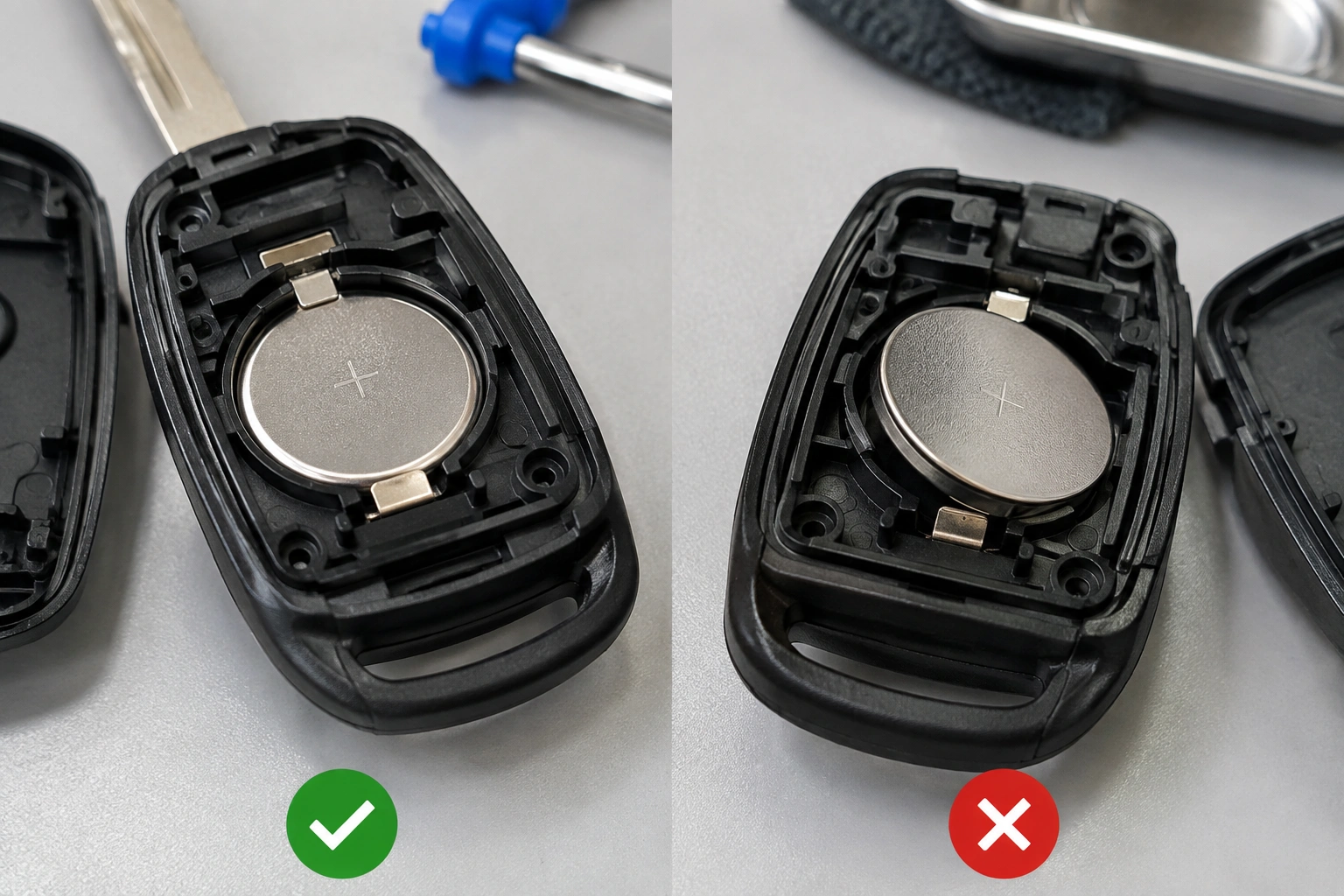
If your key fob stopped working after changing battery, the good news is that the problem is often simple. In a lot of cases, the fob did not “lose its mind” or need expensive dealer programming. More often, the battery is installed backward, the replacement cell is the wrong size or defective, or one of the tiny battery contacts is not touching the cell properly.
The trick is to troubleshoot in the right order. Don’t jump straight to buying a new fob. Check the battery, the contacts, the reassembly, and then the vehicle-side possibilities. That sequence saves time and avoids replacing parts that were never the problem.
Quick Diagnosis: What Usually Went Wrong
When a fob quits immediately after a battery swap, the most likely causes are:
- The coin-cell battery is installed backward
- The replacement battery is the wrong type or dead out of the package
- The battery is not seated under the contacts
- A contact tab was bent flat while the case was open
- The shell was snapped shut unevenly and the battery lost connection
- Less commonly, the fob needs a re-sync procedure or has internal damage
A useful clue: if the fob worked before the battery change and failed right after, the battery swap itself is the first place to look. That is especially true when the car still recognizes the transponder chip for starting, but the lock/unlock buttons no longer respond.
Check the New Battery First
Confirm the battery type and size
Most fobs use a coin-cell battery such as a CR2032, but not all do. Some use CR2025, CR1632, or another size. The wrong battery can look close enough to fit while still making poor contact or sitting too loosely.
Check the old battery before you toss it. The size is usually printed on the face. Match that number exactly unless your owner’s manual or the fob case says otherwise.
Make sure the battery is actually good
A battery can be new and still be bad. It happens more often than people expect, especially with no-name cells or batteries that have sat on a shelf too long.
If you have a second fresh battery of the same type, test it before blaming the fob. That simple swap can tell you whether the original replacement was defective.
Verify polarity before closing the case
Coin-cell batteries have a positive and negative side. In many fobs, the side marked with the battery size and writing is the positive side, but do not rely on that alone. Look for the + and – markings inside the fob case.
If the battery is reversed, the fob usually will not work at all. Flipping it the correct way is one of the fastest fixes.
One source that demonstrates this kind of problem notes that common mistakes include installing the coin cell upside down, leaving a clear protective sticker on the battery, or flattening the internal contact prongs. That lines up with what I’ve seen in the shop: the failure is often mechanical, not electronic. You can see that explanation in this key fob battery troubleshooting example.
Remove any protective sticker or tab
Some replacement batteries come with a thin clear sticker or pull tab. If that stays on, the battery may not make proper contact.
This sounds obvious, but it gets missed because the battery still looks “installed.” If the fob died immediately after the swap, this is worth checking before anything else.
Inspect the Battery Contacts and Fob Reassembly
Look closely at the contact tabs
The battery must press firmly against the metal contacts inside the fob. If a tab was bent flat, pushed outward, or covered with dirt, the battery may not complete the circuit.
A gentle comparison helps here. If one side of the battery looks snug and the other side seems loose, the contact on the loose side may need to be nudged back into position. Use a non-metal tool if possible, and move the tab only slightly. Forcing it can crack the holder or break the contact.
Check for corrosion or debris
A little dust usually is not a problem. Green corrosion, white residue, or sticky liquid is different. That can interrupt power flow even when the battery is new.
If you see corrosion, clean it carefully and lightly. If the contact area is badly damaged, the battery may not stay connected reliably.
Reassemble the case correctly
If the shell is misaligned, the battery can shift just enough to stop working. I’ve seen fobs fail simply because one half of the case was snapped shut while the battery sat crooked in its tray.
Close the case evenly and make sure there is no gap. If the fob only works after you press the shell together hard, that is a sign the battery or contact alignment still needs attention.
Test Whether the Problem Is the Fob or the Car
A spare key fob is one of the best diagnostic tools you have.
If the spare works, the original fob is the likely problem
If the spare unlocks the car normally, the vehicle’s receiver is probably fine. That points back to the original fob: battery installation, contact damage, button damage, or a board issue.
If both fobs fail, look at the car-side system
If neither fob works after a battery change, the issue may not be the fob at all. The vehicle’s remote keyless entry system, the receiver, or another related component could be involved.
That said, don’t assume the car is the problem until you have checked both batteries and both fobs carefully. When both fobs fail at once, it is still possible that both replacement batteries were bad or both were installed incorrectly.
Separate remote-button problems from starting problems
A dead fob battery can stop the lock/unlock buttons while the car still starts if the transponder chip is recognized. Those are different systems.
That distinction matters. If the car starts but the buttons do nothing, the remote side is the main issue. If the car also says it cannot detect the key, you may be dealing with a different problem, such as a battery installation issue, a damaged fob, or a vehicle recognition issue.
For a deeper look at “key not detected” situations after battery replacement, this no-key-detected troubleshooting guide is a useful next read.
Does Your Key Fob Need Re-Syncing or Reprogramming?
This is where a lot of people waste time.
Many vehicles do not need reprogramming after a battery change. In fact, one explanation of smart-key warnings says the vehicle’s body control module retains the fob code in non-volatile memory, so a battery swap alone should not erase pairing. That matches the common pattern: if the fob stopped right after the battery change, the first suspects are still battery orientation, contacts, or reassembly, not lost programming. You can see that reasoning in this smart key fob battery explanation.
When a reset is worth trying
Try a re-sync or reset only after you have confirmed:
- the battery is the correct type
- the battery is installed correctly
- the contacts are touching the battery
- a second battery does not solve it
- a spare fob behaves differently
If your owner’s manual includes a reset or pairing procedure, that is the best place to start. Vehicle-specific steps matter because the method varies by make and model.
When reprogramming is less likely to help
If the fob died the moment you snapped the case back together, reprogramming is unlikely to be the real fix. That kind of timing usually points to a physical issue inside the fob, not a lost pairing.
The same is true if the buttons feel mushy, the case is cracked, or the battery holder looks distorted. In those cases, software-style fixes rarely solve a hardware problem.
Signs the Key Fob Has Internal Damage
Opening a fob is not always harmless. A slip of a tool, a hard snap of the shell, or a drop onto a concrete floor can damage the board or button contacts.
Watch for these signs:
- buttons no longer click normally
- one button works while others do not
- the fob only works when you flex the case
- the circuit board looks cracked or lifted
- the battery holder no longer grips the cell tightly
- the fob was dropped, wet, or exposed to corrosion
If the fob works only when you squeeze it, that usually means a bad internal connection. If a button pad is torn or the board is visibly damaged, repair may be possible, but replacement often makes more sense.
A Practical Fix Order to Try Before Replacing Anything
Use this sequence and stop as soon as the fob works again:
- Open the fob and confirm the battery size
- Check polarity and flip the battery if needed
- Remove any protective sticker or tab
- Inspect the contacts for bending or corrosion
- Reseat the battery so it sits firmly
- Reassemble the case evenly
- Test the fob on the car
- Try a second fresh battery
- Compare behavior with a spare fob
- Only then try a vehicle-specific reset or re-sync
That order matters because it puts the cheapest, most likely fixes first. A lot of owners skip straight to programming when the real issue is a loose contact tab or a battery installed upside down.
If your issue started after a battery swap and the fob still seems physically sound, this related guide on why a key fob may need reprogramming after a battery change can help you decide whether re-syncing is even worth trying.
Common Mistakes to Avoid During Battery Replacement
These are the mistakes that create a problem where none existed:
- Using the wrong coin-cell battery
- Installing the battery backward
- Leaving the protective film on the battery
- Bending the contact tabs flat
- Snapping the case shut with the battery out of position
- Touching the board with a metal tool
- Assuming every fob needs reprogramming
- Replacing the whole fob before testing a second battery
One especially common mistake is forcing the case closed. If the shell will not close easily, something inside is misaligned. Forcing it can crack the housing or distort the battery holder, turning a simple battery swap into a larger repair.
When to Consult a Locksmith
Call a locksmith or dealer when:
- the fob still does not work after checking battery type, polarity, and contacts
- a second known-good battery does not help
- the spare fob works but the original does not
- the case or circuit board is visibly damaged
- the vehicle no longer recognizes any fob
- your owner’s manual calls for professional programming
An automotive locksmith is often the faster route when the issue is a damaged fob, a broken case, or programming that cannot be done at home. A dealer may be the better choice if your vehicle has a more restrictive immobilizer or pairing procedure.
If the transponder portion is affected, professional help becomes more important because the car’s immobilizer system is involved, not just the remote buttons.
FAQ
Will my car still start if the key fob battery is dead?
Sometimes, yes. Many vehicles can still recognize the transponder chip even if the remote battery is dead. If the car starts but the buttons do not work, that points to the remote battery or contact side of the fob.
Does a key fob usually need reprogramming after a battery change?
Usually not. If it stopped working right after the battery swap, the more likely causes are battery orientation, contact alignment, or reassembly issues.
How do I know if the battery is the wrong size?
Compare the new battery to the old one and check the number printed on the cell. If the sizes do not match exactly, the new battery may fit poorly or fail to make reliable contact.
What if both of my fobs stopped working?
If both fobs fail, check the replacement batteries first. If the batteries are good and installed correctly, the vehicle-side receiver or a model-specific reset issue may be involved.
Can opening the fob damage it?
Yes. A pry tool can crack the case, bend contact tabs, or damage the circuit board. If the fob worked before opening and failed afterward, inspect for physical damage before assuming it needs programming.
Should I replace the whole fob if the battery change didn’t work?
Not yet. Test a second battery, inspect the contacts, and compare it with a spare fob first. Replacement makes sense after the simple checks fail or if the board is visibly damaged.
A key fob that stopped working after a battery change is frustrating, but the fix is often right in front of you. Check the battery, check the contacts, and compare the fob against a spare before spending money on a replacement.
