
LONAUTO LB02 Mini Bluetooth OBD2 Scanner Review: Worth It?

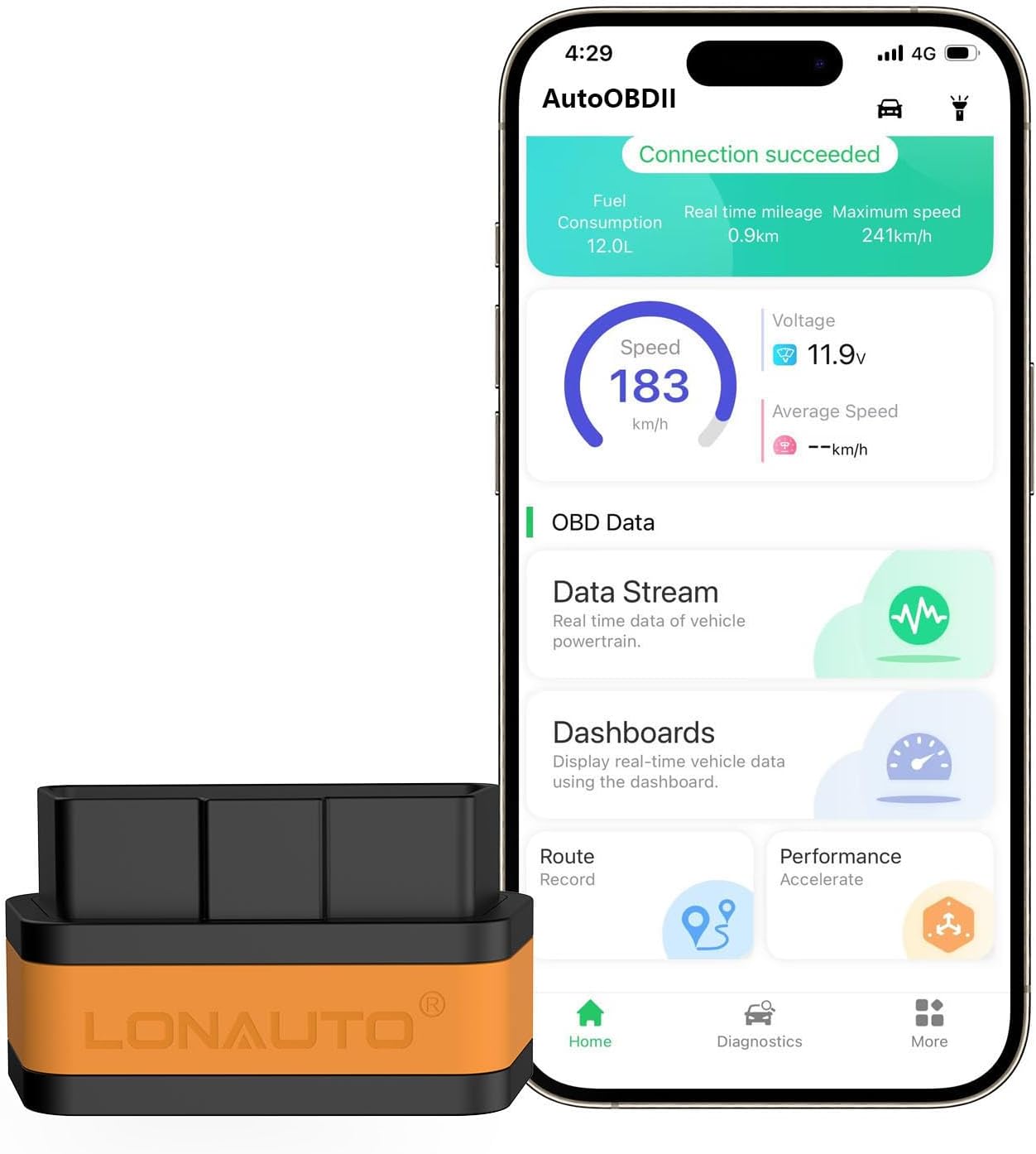
The LONAUTO LB02 Mini Bluetooth OBD2 Scanner is a compact wireless diagnostic adapter that connects an OBD2-compliant vehicle to a smartphone or tablet. Its primary use is reading and clearing engine fault codes, checking emissions readiness, and viewing live vehicle data without carrying a dedicated handheld scan tool.
For drivers comparing affordable wireless diagnostic tools, this Mini Bluetooth OBD2 Scanner review finds the LB02 most suitable for everyday DIY engine diagnostics rather than advanced workshop-level programming. Its strongest points are broad phone support, a very small footprint, low-power operation, and a subscription-free companion app.
🏆 My Quick Verdict
💡 Best For: Drivers and DIY mechanics who want inexpensive wireless check-engine diagnostics, emissions information, and live sensor data from a phone.
⚡ Key Specs:
Bluetooth wireless connection, iOS/Android/Windows compatibility, OBD2/EOBD support, 33-foot claimed wireless range, 1.85 × 1.02 × 0.9-inch body, and 18.5 g weight.
✅ Bottom Line: The LB02 offers a useful combination of basic OBD2 diagnostics and convenient wireless operation in a pocket-sized adapter. It is a sensible entry-level choice, but buyers needing ABS, SRS, coding, bidirectional tests, or heavy-duty truck diagnostics should consider a more advanced scanner.
At a Glance
- Connects wirelessly to supported iOS, Android, and Windows devices.
- Reads diagnostic trouble codes and can clear eligible check-engine faults.
- Displays live vehicle data, freeze-frame information, and battery voltage.
- Supports OBD2 and EOBD-compliant passenger vehicles within stated compatibility limits.
- Automatic sleep reduces current draw when the adapter remains connected.
- It is not intended for 24V heavy-duty diesel trucks.
Premium Specifications
| Specification | Verified Detail |
|---|---|
| Brand | LONAUTO |
| Model | LB02 |
| Connection | Bluetooth Low Energy wireless connection |
| Operating Systems | iOS, Android, Windows |
| Dimensions | 1.85 × 1.02 × 0.9 inches |
| Weight | 18.5 g |
| Wireless Range | Up to 33 feet claimed |
| Operating Current | 28–32 mA |
| Sleep Current | Approximately 3 mA after automatic sleep |
| Power Source | Vehicle OBD2 port |
| Included Component | OBD2 scanner |
Design & Build Quality
The LB02 is exceptionally compact, which is one of its clearest practical advantages. At roughly 1.85 inches long and only 18.5 grams, it occupies little space around a vehicle’s diagnostic connector.
The short body should also reduce the chance of the adapter protruding far into the driver’s footwell. That matters because larger diagnostic dongles can be awkward in vehicles where the OBD2 port sits close to the knees or pedals.
The scanner draws power directly from the diagnostic port, eliminating batteries and charging cables. An automatic sleep mode is also specified to reduce current consumption when a Bluetooth connection is inactive.
Setup, Installation & Ease of Use
- Remove the scanner from its packaging and inspect the connector for damage.
- Locate the vehicle’s 16-pin OBD2 diagnostic port, normally beneath the dashboard.
- Push the LB02 firmly into the port without forcing the connector.
- Turn the ignition on as required by the vehicle and diagnostic procedure.
- Enable Bluetooth and open the compatible diagnostic application on your device.
- Select the adapter inside the app and allow it to establish vehicle communication.
- Read codes or live data before clearing faults so diagnostic information is preserved.
- Keep the adapter in a glove box when not needed if you prefer not to leave accessories connected.
Core Performance & Feature Breakdown
The LB02’s core strength is generic OBD2 engine and emissions diagnosis rather than manufacturer-level service work. It can retrieve fault information, clear supported trouble codes, display real-time data, show freeze-frame information, and report emissions-related information.
Live data is particularly useful when a stored code alone does not explain a drivability problem. Sensor values can help a knowledgeable user investigate fuel trims, temperature readings, engine speed, and other parameters exposed by the vehicle.
Its emissions functions also make the scanner useful before an inspection. Checking readiness monitors can show whether required self-tests have completed after a battery disconnect or code clearing.
For more guidance on this category, see our Bluetooth OBD2 scanner guide for beginners and our explanation of live-data scanners versus basic code readers.
Expert Insight
A code reader identifies what the vehicle computer detected; it does not prove which component needs replacement. Record codes, freeze-frame information, and relevant live data before erasing anything, then diagnose the underlying cause.
Key Features Explained
Bluetooth Low Energy Connectivity
The wireless design lets the phone act as the display while the adapter remains connected under the dashboard. The manufacturer claims a connection range of up to 33 feet, although normal diagnostic use generally keeps the phone much closer to the vehicle.
Live Vehicle Data
The scanner can display real-time parameters supported by the connected vehicle and software. This makes it more useful than a simple code-only reader when investigating intermittent engine behavior.
Freeze-Frame and Readiness Information
Freeze-frame data captures operating conditions associated with certain stored faults, while readiness status helps evaluate emissions-monitor completion. Both functions add diagnostic context without requiring advanced bidirectional controls.
Automatic Low-Power Mode
The adapter is specified to enter sleep after approximately 30 minutes without a Bluetooth connection, lowering current draw to about 3 mA. That is useful for short-term installed use, though disconnecting accessories remains sensible when storing a vehicle for extended periods.
Real-World Usability & Maintenance
Daily usability should be straightforward because the scanner has no display, internal battery, or physical control menu to maintain. Most interaction happens through the connected application.
Keep the connector clean and dry, and avoid kicking or placing pressure on the dongle when installed. If communication fails, confirm that the vehicle is OBD2 compliant, the ignition state is correct, and the correct adapter is selected inside the app.
Users comparing connection types may also find our Bluetooth vs wired OBD2 scanner guide helpful.
Pros & Cons
Pros
- Compact dimensions make it easy to carry or leave installed temporarily.
- Supports iOS, Android, and Windows devices.
- Provides live data, freeze-frame information, and readiness monitoring.
- Automatic sleep mode helps reduce power consumption.
Cons
- It is not suitable for 24V heavy-duty diesel vehicles.
- Generic OBD2 functions do not replace professional full-system diagnostics.
- Actual functions available can depend on vehicle and app compatibility.
Common Issues & Fixes
The scanner will not connect
Bluetooth or app configuration can prevent communication even when the adapter has power. Enable Bluetooth, verify the correct connection mode inside the diagnostic app, and cycle the vehicle ignition before trying again.
No vehicle data appears
An unsupported vehicle or incorrect ignition state can stop ECU communication. Confirm that the vehicle meets OBD2/EOBD compatibility requirements and that the ignition is in the position required by the app.
A cleared code returns
Clearing a diagnostic code does not repair the fault that triggered it. Diagnose and correct the underlying mechanical or electrical problem before expecting the warning light to remain off.
What to Know Before You Buy
The most important check is vehicle compatibility. The LB02 is intended for OBD2/EOBD-compliant passenger vehicles, including applicable 12V gasoline vehicles and qualifying small diesel vehicles, but it is not designed for 24V heavy-duty trucks.
Buyers should also understand the difference between generic OBD2 diagnostics and advanced module access. Reading engine and emissions data does not automatically mean the scanner can perform ABS bleeding, airbag diagnostics, ECU coding, key programming, or manufacturer-specific service resets.
The listing specifies a manufacturer warranty period of 90 days. Warranty terms can vary by seller, so confirm the current policy displayed at checkout before purchasing.
Who Should Buy It / Who Should Skip It
✅ Who Should Buy It
- Drivers who want to investigate a check-engine light before visiting a repair shop.
- DIY mechanics who need affordable live engine and emissions data.
- Users who prefer smartphone-based diagnostics over a separate handheld screen.
- People who want a very compact scanner for a glove box or travel kit.
✗ Who Should Skip It
- Professional technicians needing deep manufacturer-level module access.
- Owners who specifically require coding, programming, or bidirectional controls.
- Heavy-duty truck operators working with 24V commercial diagnostic systems.
Alternatives to Consider
Veepeak OBDCheck BLE
Best For: Buyers who want broad third-party app compatibility.
Main Advantage: Supports Bluetooth LE and Classic Bluetooth with numerous established diagnostic apps.
Trade-off: Many advanced vehicle-specific functions depend on separately purchased applications.
Key Spec: Supports iOS and Android and measures 1.97 × 1.61 × 0.87 inches.
BlueDriver Bluetooth Pro
Best For: Buyers who want a more polished diagnostic ecosystem and enhanced-code coverage on supported vehicles.
Main Advantage: Includes repair reports, live data, Mode 6 information, and enhanced diagnostics for supported makes.
Trade-off: The adapter works with the BlueDriver app rather than offering the same open third-party app flexibility.
Key Spec: Compatible with iOS and Android devices and OBD2 vehicles from 1996 onward.
Is It Worth It?
The LB02 is worth considering when your goal is affordable, portable engine diagnostics without buying a dedicated handheld scanner. Its live-data capability, emissions information, broad mobile-platform support, and compact form make it more useful than a basic code-only reader.
Its value decreases if your diagnostic needs extend beyond generic OBD2 functions. In that situation, paying more for a scanner with verified ABS, SRS, transmission, active-test, or manufacturer-specific service coverage makes more sense.
Final Verdict
The LONAUTO LB02 Mini Bluetooth OBD2 Scanner is a practical entry-level diagnostic adapter for DIY drivers who mainly need check-engine codes, live data, freeze-frame information, and emissions readiness from a smartphone. Choose it for compactness and basic wireless diagnostics, not as a substitute for a professional full-system scan tool.
Frequently Asked Questions
Does the LONAUTO LB02 work with iPhone and Android?
Yes, the verified product information lists support for both iOS and Android devices. Windows is also listed as a supported operating system.
What vehicles are compatible with the LB02?
It is intended for OBD2/EOBD-compliant passenger vehicles within the manufacturer’s stated compatibility range. Buyers should confirm their specific model year, fuel type, and diagnostic protocol before ordering.
Does it work on heavy-duty diesel trucks?
No, it is not intended for 24V heavy-duty diesel vehicles such as many semi-trucks and tractors. Those vehicles require diagnostic hardware designed for commercial truck protocols and electrical systems.
Can the LB02 read live data?
Yes, live vehicle data is one of its listed diagnostic functions. Available parameters depend on what the vehicle ECU and connected software expose.
Does the scanner require regular maintenance?
No significant routine maintenance is required beyond keeping the connector clean and protecting the adapter from physical damage and moisture. Store it safely when not installed and keep the companion software updated when updates are available.
What warranty does the LB02 include?
The verified listing metadata specifies a 90-day manufacturer warranty. Because seller policies can change, confirm the warranty and return terms shown on the retailer’s current product page before purchase.
Affiliate disclosure: replacekeyfob.com earns a small commission when you purchase through links on this page — at no extra cost to you. Our editorial process is independent: affiliate relationships never influence which products we recommend or how we rank them.
