
KINGBOLEN Ediag Elite Review: Is This Bluetooth OBD2 Scanner Worth It?

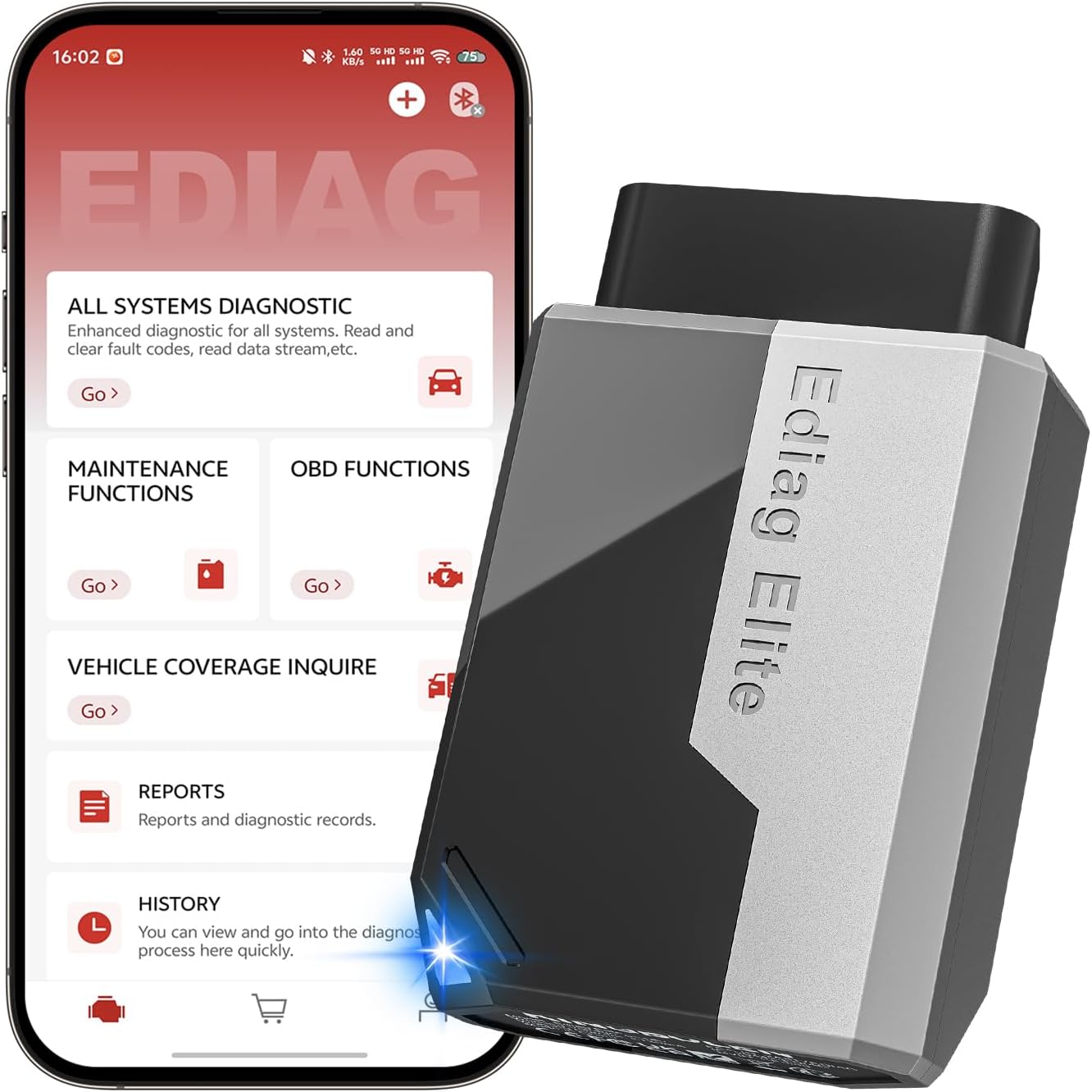
The KINGBOLEN Ediag Elite is a Bluetooth OBD2 scanner that turns a compatible iPhone or Android device into a full-system diagnostic tool. Its primary use is deeper DIY vehicle diagnosis, active component testing, service resets, and live-data analysis without buying a dedicated scan tablet.
This KINGBOLEN Ediag Elite review focuses on verified functions rather than marketplace hype. It sits well above basic code readers by adding bidirectional control, AutoVIN, CAN FD support, multiple maintenance services, and lifetime software updates.
🏆 My Quick Verdict
💡 Best For: Advanced DIY owners and small repair shops wanting app-based full-system diagnostics and active tests without recurring update fees.
⚡ Key Specs:
Bluetooth 5.2, iOS and Android support, full-system diagnostics, bidirectional control, AutoVIN, CAN FD, 15+ service functions, 22 languages, and lifetime free online updates.
✅ Bottom Line: The Ediag Elite offers unusually deep diagnostics for a compact phone-based scanner, especially if active tests and service resets matter. Vehicle-specific function coverage still needs to be checked before purchase.
At a Glance
- Connects to compatible iOS and Android phones through Bluetooth 5.2.
- Reads diagnostic information across multiple vehicle systems rather than engine codes alone.
- Supports bidirectional active tests on compatible vehicles and modules.
- Includes AutoVIN, live-data graphing, reporting, and 15+ maintenance functions.
- Supports CAN FD plus a broad list of vehicle brands and 22 interface languages.
- Lifetime online software updates are included without an annual update subscription.
Premium Specifications
| Specification | Verified Detail |
|---|---|
| Brand / Model | KINGBOLEN Ediag Elite |
| Connection | Bluetooth 5.2 |
| Mobile OS | Android 5.0+ and iOS 9.0+ |
| Diagnostics | Full-system fault-code access, live data, reports, AutoVIN |
| Advanced Functions | Bidirectional tests, adaptation/matching, 15+ maintenance functions |
| Protocol Support | Standard OBD2 functions plus CAN FD support |
| Languages | 22 listed languages |
| Updates | Lifetime free online software updates |
| Package | OBD2 connector, storage bag, manual |
Design & Build Quality
The Ediag Elite uses a compact dongle-style design that plugs directly into the vehicle’s OBD2 port. Its small format keeps the hardware simple because your phone supplies the screen, controls, storage, and internet connection.
The supplied storage bag is useful for protecting the connector between jobs. Verified product information does not establish a ruggedness or water-resistance rating, so it should be treated like ordinary electronic diagnostic equipment.
Setup, Installation & Ease of Use
- Unbox the scanner, storage bag, and manual, then inspect the OBD2 connector before use.
- Install the Ediag app on a supported Android or iOS device.
- Plug the adapter firmly into the vehicle’s OBD2 port and follow the app pairing process.
- Use AutoVIN when supported, or manually select the vehicle if automatic identification fails.
- Confirm the exact vehicle and module coverage before attempting advanced tests or service functions.
- Store the adapter in its bag with clean connector pins when diagnosis is finished.
Core Performance & Feature Breakdown
The Ediag Elite’s main advantage is diagnostic depth beyond generic check-engine scanning. It can access many vehicle modules, read and clear supported faults, display live data, and generate vehicle health reports on compatible vehicles.
Bidirectional control is the standout capability because it lets the app command supported actuators for testing. That can help separate an electrical control problem from a failed component without replacing parts blindly.
Expert Insight
Treat feature lists as capability ceilings, not guarantees for every car. Active tests, resets, adaptation, and module access vary by make, model, year, and control unit, so checking coverage is essential.
CAN FD support improves relevance for newer vehicle platforms that use that protocol. Standard OBD2 modes remain available for tasks such as trouble codes, readiness checks, freeze-frame information, and live engine data.
Key Features Explained
Full-System Diagnostics
Full-system access lets the scanner communicate with supported modules such as engine, transmission, ABS, SRS, body, battery, and tire-pressure systems. This matters when a problem sits outside the generic powertrain data available to simple code readers.
Bidirectional Active Tests
Active testing sends commands to supported components so you can observe whether an actuator responds. Availability is vehicle-specific, which makes the coverage check more important than the headline feature alone.
Service and Maintenance Functions
The listed maintenance menu includes functions such as oil reset, steering-angle reset, brake reset, battery matching, ABS bleeding, throttle relearn, DPF reset, TPMS reset, gearbox relearn, and EGR adaptation. These shortcuts can save menu time when the connected vehicle supports them.
Lifetime Updates
Lifetime online software updates are a meaningful ownership benefit because many advanced scanners use paid renewal models. Updates can add fixes and coverage, although they do not guarantee a specific future function for every vehicle.
Real-World Usability & Maintenance
The phone-based interface gives you a larger, familiar display without carrying a dedicated tablet. Bluetooth also makes it easier to view data from outside the driver’s seat during certain diagnostic checks.
Keep the adapter dry, avoid harsh cleaners, and protect the connector pins during storage. Update the app and device software over a stable internet connection before relying on newly added functions.
For a broader format comparison, see our Bluetooth OBD2 scanner vs wired OBD2 scanner guide.
Premium Pros & Cons
Pros
- Full-system access provides much broader diagnostic scope than basic engine-code readers.
- Bidirectional tests add genuine troubleshooting value on supported vehicles.
- Lifetime free updates reduce long-term software ownership cost.
- Bluetooth operation keeps the hardware compact and easy to store.
Cons
- Advanced functions vary significantly by vehicle, module, and model year.
- A compatible smartphone is required because the adapter has no standalone display.
- Reliable use depends on the app ecosystem and software pairing process.
Common Issues & Fixes
The Scanner Will Not Connect
A loose OBD2 connection, incorrect app setup, or phone Bluetooth issue can prevent pairing. Reseat the adapter, restart Bluetooth, and follow the Ediag app connection procedure.
AutoVIN Does Not Identify the Vehicle
Automatic identification may not work on every supported vehicle. Select the make, model, and year manually when AutoVIN cannot complete identification.
A Listed Function Is Unavailable
Vehicle-specific software coverage can differ even when the scanner supports the feature generally. Verify that exact function for the exact vehicle and control module before assuming a fault with the adapter.
What to Know Before You Buy
Compatibility is the most important pre-purchase check. Do not assume that “full system,” “bidirectional,” or a named reset function means every supported brand receives identical capability.
The Ediag Elite is also a phone-dependent tool, so buyers wanting a self-contained screen should consider a wired handheld or tablet scanner instead. Its value is strongest for users comfortable diagnosing through an app.
Who Should Buy It / Who Should Skip It
✅ Who Should Buy It
- Advanced DIY owners who need more than engine and emissions code reading.
- Users who want active tests and common service resets from a phone.
- Small workshops seeking a compact secondary diagnostic tool.
- Owners who value lifetime software updates over annual renewals.
✗ Who Should Skip It
- Drivers who only need basic check-engine code reading.
- Buyers who do not want to use a smartphone during diagnosis.
- Technicians requiring guaranteed OEM-level coding on every supported vehicle.
Alternatives to Consider
THINKCAR ThinkDiag
Best For: Buyers wanting full-system diagnostics plus ECU coding capability on supported vehicles.
Main Advantage: Adds ECU coding alongside bidirectional tests and 15+ maintenance functions.
Trade-off: Software access and function availability depend on the ThinkDiag ecosystem and vehicle coverage.
Key Spec: Bluetooth full-system diagnostics with bidirectional control and 15+ maintenance functions.
TOPDON TopScan Pro
Best For: Users who want a polished phone-based scanner with repair resources and active tests.
Main Advantage: Combines full-system diagnosis, bidirectional control, AutoVIN, and repair information.
Trade-off: Advanced functions use a paid renewal model after the included update period.
Key Spec: TopScan Pro lists 13 maintenance services plus bidirectional control.
For a closer look at the first alternative, read our ThinkDiag OBD2 scanner review.
Is It Worth It?
The Ediag Elite is worth considering when you genuinely need full-system scanning, service functions, and active tests but prefer a compact Bluetooth tool. Lifetime update access also improves its long-term value proposition compared with scanners built around annual renewals.
It is less compelling for simple check-engine work, where a cheaper generic OBD2 reader can handle the basics. The buying decision should therefore start with your vehicle coverage and required functions, not the longest feature list.
Final Verdict
The KINGBOLEN Ediag Elite is a capable Bluetooth diagnostic tool for advanced DIY owners who want broad module access and bidirectional testing without a dedicated tablet. Its strongest selling points are feature depth, portability, CAN FD support, and lifetime updates, while vehicle-specific coverage remains the key limitation to verify.
Frequently Asked Questions
Is the KINGBOLEN Ediag Elite compatible with every OBD2 vehicle?
No, advanced coverage is not identical across every OBD2 vehicle. Basic OBD2 compatibility is broad, but full-system diagnostics, active tests, and maintenance functions depend on make, model, year, and module.
Does the Ediag Elite work with iPhone and Android?
Yes, it supports both iOS and Android devices. Verified specifications list iOS 9.0 or later and Android 5.0 or later.
Does it require a paid annual subscription?
No annual update subscription is listed for the Ediag Elite. KINGBOLEN states that lifetime online software updates are included.
Can it perform bidirectional tests?
Yes, bidirectional active testing is a listed core feature. The exact actuators available for testing vary by vehicle and control module.
What maintenance functions does it support?
It lists 15+ maintenance functions on compatible vehicles. Examples include oil reset, brake reset, battery matching, ABS bleeding, throttle relearn, DPF reset, TPMS reset, gearbox relearn, and EGR adaptation.
How should the scanner be maintained?
Keep the adapter dry, clean, updated, and protected in its storage bag. Avoid harsh chemicals and keep the connector pins free of dirt or damage.
Affiliate disclosure: replacekeyfob.com earns a small commission when you purchase through links on this page — at no extra cost to you. Our editorial process is independent: affiliate relationships never influence which products we recommend or how we rank them.
